Four translator earbuds, one question: when the meeting ends, what's left?
AirPods Live Translation runs 10 languages entirely on your iPhone. Timekettle's $449 W4 Pro covers 52. Pixel Buds do 40 but need a connection. Compare what four translator earbuds preserve after a conversation, and what a work-ready meeting record still needs.
An interpreter sits in a lit booth at the back of a dark conference hall. The speaker she is rendering is on the screen beside her, mid-gesture. For ninety minutes she turns every sentence into a second language and the room follows along in headsets, and it works — the meeting happens, decisions get made, nobody in the audience thinks about the booth at all.
Then the session ends and the booth goes dark. Unless somebody in that room was writing, those ninety minutes now exist only in the memory of the people who heard them.
Translator earbuds have miniaturised that booth and put it in your ear for somewhere between $99 and $449. They are genuinely, unhyperbolically good now — good enough that "I can't take that meeting, we don't share a language" has stopped being a real sentence in a lot of companies. What they have not done, and mostly do not claim to do, is turn the lights on afterwards.
TL;DR:
- Apple's Live Translation runs on 10 language entries, fully on your iPhone; Google's Pixel Buds cover 40 languages but require an internet connection; Timekettle's $449 W4 Pro claims 52 languages and 106 accents. All figures from vendor pages read 18 August 2026.
- After the conversation, the options differ: Apple documents a live transcript; Google Translate lets you save, find, copy and share a transcript; Samsung documents recording playback; Timekettle advertises saved audio and text plus an exportable AI memo.
- Listening and recording are two different jobs. The earbud pipeline is finished the moment the audio reaches your ear; a record needs original wording, speaker attribution, timestamps and a summary — none of which is a byproduct of hearing.
The hardware got genuinely good, and the price spread is enormous
Start with what you can actually buy. Apple sells Live Translation as a feature of hardware you may already own: it works on AirPods 4 with Active Noise Cancellation, AirPods Pro 2, AirPods Pro 3 and AirPods Max 2, paired with an iPhone 15 Pro or later running iOS 26 with Apple Intelligence enabled. AirPods Pro 3 list at $249.00 on apple.com as of 18 August 2026. That is not a translation device; it is an earbud that translates.
Timekettle sits at the other end. The W4 Pro is a purpose-built interpreter with an open-ear design, listed at $449.00 USD on timekettle.co on 18 August 2026, rated for 6 hours of continuous translation on the buds and 20 hours with the charging case. Its spec page claims 52 languages and 106 accents, "covering 95% of the world's population" — a vendor claim, not an independent measurement, and worth reading as marketing arithmetic rather than a benchmark.
Google's approach is the oldest of the four and the most modular: the Pixel Buds do the audio, the Google Translate app does the work. Its help page lists 40 languages for Live Translate mode, and a much narrower Transcribe Mode that runs from English into French, German, Italian or Spanish only.
Samsung ships Interpreter as a Galaxy AI feature that pairs the Galaxy Buds3, Buds3 Pro or Buds3 FE with a compatible Galaxy phone. Samsung's own product footnote notes that English and Spanish come pre-installed and other languages require a free download — a small detail that matters enormously if you are landing in a country tomorrow morning.
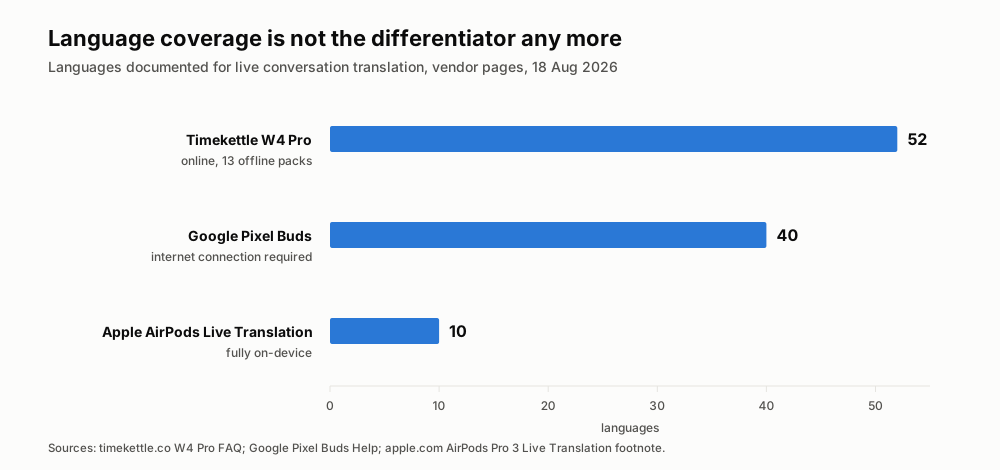
Language counts as documented by each vendor, read 18 August 2026. The spread is real, but so is the asterisk on every number — see the next section.
The language count on the box is the least interesting number
A count of 52 and a count of 10 are not measuring the same thing, and comparing them straight is how you end up disappointed.
Apple's 10 entries — Chinese (Mandarin, Simplified and Traditional), English (UK and US), French (France), German (Germany), Italian, Japanese, Korean, Portuguese (Brazil) and Spanish (Spain) — buy something the bigger numbers do not. Apple's support page states it plainly: "Once the language models are downloaded, all processing takes place on your iPhone where all of your conversation data remains private." Ten languages, no network, no server. For a legal call or a salary negotiation, that trade looks very different than it does on a spec sheet.
Google is equally plain in the other direction. The Pixel Buds help page's own footnote reads: "Requires a Google Assistant-enabled Android 6.0+ device, Google Account, and an internet connection. Data rates may apply. Translation isn't instantaneous." That last sentence is the most honest thing any of the four vendors writes about latency, and it is the reason none of these products feels like a conversation with a bilingual friend.
Timekettle splits the difference commercially. The W4 Pro FAQ says it offers 13 offline translation packs with no download limit, but two pairs come free via coupons and further packs are $10 per pair or bundled into a paid subscription. The buds themselves need no subscription for their core modes — but the iOS versions of audio-video translation and two-device call translation are listed as "included in $14.99/mo plan" with a 10-minute free trial.
Here is the honest summary: nobody in this category is selling you fluent bilingualism. Apple says so out loud in the fine print on its own support page — "Live Translation uses generative models, and outputs may be inaccurate, unexpected, or offensive. Check important information for accuracy." Read that sentence twice, because it is the whole argument of this post compressed into one vendor disclaimer. Check important information for accuracy implies there is something to check it against.
Read the support pages, not the box: who actually keeps anything
The practical question is what remains available after the conversation, not just whether text appears while you are speaking.
The answers are more varied than the marketing suggests, and two vendors come out better than the cynical version of this story would predict.
The original comparison graphic is omitted here because its categories and empty-circle key no longer match the documented transcript-saving options.
Apple documents a transcript, but strictly as a live artefact. Its instructions tell you to "use the Live tab in the Translate app on your iPhone to show a transcript to the person you're speaking with," and the November 2025 EU announcement describes the same thing: "For conversations with someone not using AirPods, users can simply display a live transcription in the other person's language on their iPhone." Display. Nothing on that page describes saving, exporting or attributing that transcript once the conversation ends.
Google offers a useful next step beyond the live display. In Transcribe mode, a transcript appears on your phone; Google Translate's help page also explains how to save a transcript, find it later, copy its text or share it with another app. That gives you a text record, though the cited instructions do not describe speaker labels or a meeting-ready summary.
Samsung goes further than either, and deserves credit for it. Its support page states that "Interpreter will provide a text transcript to accompany the translation," and then adds a genuinely record-shaped sentence: "Tap the microphone icon again to stop the recording. You can also pause, resume, and play back the recording using the buds' touch controls." That is a recording you can replay. What Samsung's page does not describe is exporting it, sharing it, searching it or keeping it past the session.
Timekettle is the only one of the four that treats the record as a product feature. Its W4 Pro page carries the line "Audio and Text Saved, Export AI Memo," advertises that the earbuds "summarize post-meeting notes," and says of call translation that the device "captures, translates, and transcribes every word of your international calls in real time, ensuring smooth conversations and clear post-call records."
That is the shape of the market as of August 2026: all four help you listen; some also leave text or a recording behind, but none of those features alone guarantees a meeting-ready record with aligned original speech, speaker attribution, and decisions.
The record is not a feature of translation. It is a different product.
Let us give the gap a name, because it keeps showing up and it deserves one: ear-only translation. It is translation whose entire output is a sound wave aimed at one person's eardrum, with no durable artefact on either side.
Ear-only translation is not a defect. For the situations these products were designed around — asking for a phone charger in Barcelona, following a lecture, getting through a taxi ride, making a new acquaintance at a conference dinner — it is exactly right, and a transcript would be a privacy liability rather than a feature. Nobody wants a searchable archive of every time they ordered coffee abroad.
It becomes a defect the moment the conversation has consequences. A supplier renegotiation, a candidate interview, a clinical intake, a design review with an offshore team, a customer escalation: in every one of those, the value of the conversation is mostly realised after it, by someone re-reading it.
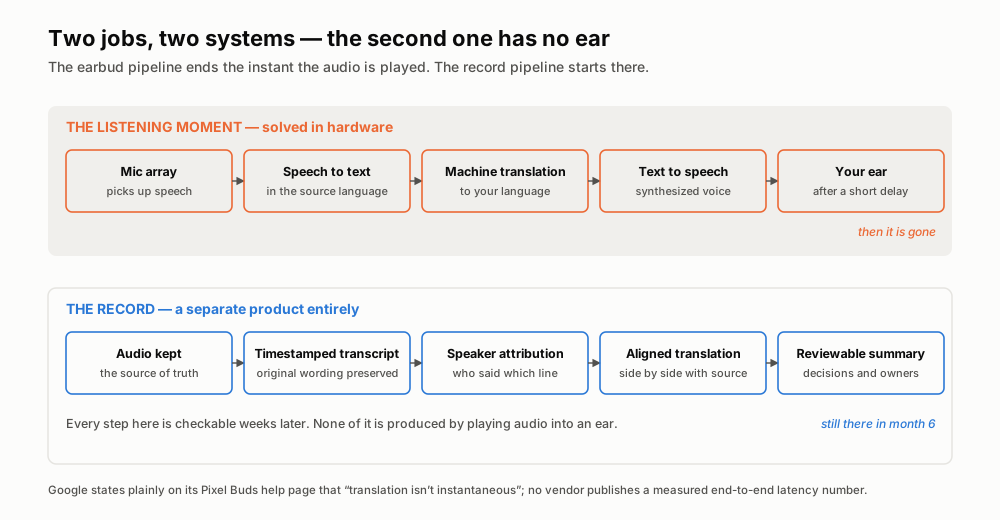
Both lanes start from the same microphone. Only one of them produces something you can open in six months.
Look at the two lanes and you can see why hardware alone will not close this. The earbud pipeline's success condition is "the user understood the sentence," and it is met the instant the synthesised audio finishes playing. Everything after that — keeping the source audio, preserving the original wording next to the translation, marking who said which line, timestamping it so you can jump back to minute 34 — is dead weight against that success condition. It costs battery, storage and latency to produce something the listening job never needed.
Here's the point: you are not going to get a record as a side effect of a better earbud, no matter how good the earbud gets. The two systems optimise for different things, and one of them ends where the other begins.
Earbuds, phone apps, record-first tools: what each one actually solves
Three categories, three genuinely different jobs. Most of the confusion in this market comes from people comparing them on a single axis — usually language count — when they barely overlap.
| Criterion | Translator earbuds | Phone translation app | Record-first tools |
|---|---|---|---|
| What it optimises | Understanding the sentence you are hearing right now | Getting one message across, either direction | Reconstructing the conversation later |
| Hands and eyes free | Yes — the core value | No, you look at a phone | Yes, it runs in the background |
| Both sides hear it | Yes, if both wear buds; otherwise on-screen text | Usually one shared screen or speaker | Not its job — it does not interject |
| Cost to start | $99–$449 hardware | Free on a phone you own | Usually a subscription, no hardware |
| Original wording kept | Not documented by Apple or Google | No | Yes — the source-language transcript is the point |
| Who said which line | Not documented by any of the four | No | Yes, via speaker attribution |
| Findable in six months | No | No | Yes, by search across sessions |
| Where it fails | Nothing survives the session | Kills conversational flow | Does not help you understand in the moment |
Read that bottom row across, and the answer to "which one should I buy" resolves itself. The failure modes are complementary, not competing. Earbuds fail after; record tools fail during; phone apps fail at tempo. A business meeting in two languages fails at all three points, which is why the serious answer is a stack, not a product.
A translated transcript still isn't a record
Even when you do get text out, there is a second trap worth naming, because it catches teams who think they have already solved this.
A machine translation of what was said is not the same as what was said. Translation is lossy in exactly the places that matter most in business: hedges, conditionals, degrees of commitment. "We will look into it" and "we will do it" are two different obligations that collapse into the same target-language sentence more often than anyone is comfortable admitting. If the only artefact you keep is the translation, you have thrown away your ability to check.
This is why the useful unit is the pair: the original-language line and its translation, aligned, timestamped, and attributed to a named person. That is what lets someone six weeks later say "he said it in Korean, show me the Korean," and settle it in thirty seconds instead of an email thread. It is also, not coincidentally, what a human interpreter's employer has always insisted on for high-stakes work — the interpreter interprets, and a separate record is kept.
We made this argument at length when Google shipped live speech translation and the reviewable note still mattered more than the fluent output. The earbud wave does not weaken that argument. It strengthens it, because it removes the last excuse — the moment is now genuinely handled, so the only thing left to get wrong is the record.
How to run a multilingual meeting so both the moment and the record survive
This is the part you can act on tomorrow. Seven steps, in order, assuming a scheduled business meeting where two languages are in the room.
- Pick the record language before the meeting, and say so out loud in the invite. One language is the canonical text; everything else is a translation of it. Teams that skip this step end up with two records that disagree and no rule for which one wins.
- Download the language packs the night before, not in the lobby. On AirPods: Settings → your AirPods' name → Translation → Languages, then select and download both directions. Apple's on-device processing only works once those models are on the phone. Samsung's Interpreter ships English and Spanish and requires a free download for everything else. Timekettle offline packs are per-pair and only two are free.
- Give the earbuds exactly one job: the live moment. Both parties in buds is the good configuration. If only one side has them, use the on-screen transcript mode rather than passing a phone back and forth — Apple, Google and Samsung all document this fallback.
- Start a separate recording of the room, capturing the original audio — not the translated audio. This is the single step people get wrong. If you record the earbud output, you have preserved a machine translation and destroyed the source. Record what was actually said, in the language it was said in.
- Burn the first sixty seconds on names. Have each person say their name and role before business starts. Speaker attribution downstream is dramatically more accurate when there is a clean labelled sample of each voice, and it costs you one minute.
- Within 24 hours, spot-check the translation on the lines that carry a decision, a number or a date. Not the whole transcript — the three to five lines that someone might later dispute. Open the original next to the translation and confirm the modality survived: will versus may, approved versus noted.
- Store the four artefacts as one object, not four files. Source audio, original-language transcript, aligned translation, and the summary belong together with one link. The moment they live in four places, the record has already begun to rot — someone will circulate the summary, and the thing that could have settled the argument will be in a folder nobody opens.
Steps 4 and 7 are the ones that separate teams who have a record from teams who think they do.
The bottom line: the earbud finished a job that was never the hard one
For twenty years the hard part of a multilingual meeting was understanding it in real time. That problem is now solved well enough by $249 consumer hardware that we can stop treating it as the interesting question.
What is left is the part that was always harder and never had a gadget attached to it: producing something that outlives the room. The interpreter in the booth was never the record. She was the reason the meeting could happen at all — and someone else, always, was taking minutes.
So the question worth asking of any translation product you buy this year is not how many languages it speaks. It is a simpler one: when it stops speaking, what is still there?
Where Telli.sh fits: we work on the second lane. Telli.sh records the meeting in the language it actually happens in, produces a timestamped transcript with speaker attribution, puts the translation next to the original rather than instead of it, and turns the whole thing into a summary you can search months later. It does not go in your ear — if you want live translated audio in the room, buy the earbuds; they are good at that now. Use Telli.sh for the part that is still there on Thursday.
Sources
- Use Live Translation with your AirPods — Apple Support (published 31 March 2026)
- Live Translation on AirPods expands to the EU — Apple Newsroom (4 November 2025)
- Buy AirPods Pro 3 — apple.com, price and Live Translation language footnote (read 18 August 2026)
- Translate with Google Pixel Buds — Google Pixel Buds Help (read 18 August 2026)
- Save and find transcripts in Google Translate — Google Translate Help
- Using Galaxy AI features with your Galaxy Buds3, Buds3 Pro, or Buds3 FE — Samsung US Support (read 18 August 2026)
- Galaxy Buds3 Pro product page and Galaxy AI footnotes — samsung.com (read 18 August 2026)
- Timekettle W4 Pro AI Interpreter Earbuds — price, language list, offline packs and FAQ (read 18 August 2026)
- Wikimedia Commons image page: Interpreting Vint Cerf, by liftconferencephotos, CC BY 2.0
.jpg)