A consecutive interpreter doubles your meeting. A live translator forgets it. What Thai teams are actually choosing between in 2026.
Bangkok agencies publish consecutive interpreting from 3,000 THB an hour and simultaneous from 5,000, and consecutive roughly doubles how long the meeting runs. Google Translate's Live translate covers 74 languages including Thai, Google Meet's translated captions cover 69 including Thai — and Meet's Transcripts and Gemini note-taker cover 8 each, neither of which is Thai. Deepgram's Nova-3 transcribes Thai as th and th-TH but excludes it from the 10-language code-switching mode, which is exactly the Thai–English sentence your meeting is made of. A full accounting of meeting translation options for Thai teams.
Book a consecutive interpreter through a Bangkok agency and the published starting rate is 3,000 THB an hour; simultaneous starts at 5,000. Those are Sawadee Translations' own listed figures, retrieved September 1, 2026. The hourly number is not the expensive part.
The expensive part is the clock. In consecutive interpreting the speaker talks for a passage — Acolad's April 24, 2026 explainer puts the typical passage at one to five minutes — then stops, and the interpreter delivers it again in the other language. As Acolad writes: "A consecutive session roughly doubles in duration because each statement is delivered twice." Your ninety-minute quarterly review is a three-hour quarterly review, and you are paying an interpreter for all three hours.
Meanwhile Google will do a version of the same job on a Thai team member's phone, for free, right now.
TL;DR
- Thai passes every listening test and fails every writing test. Google Translate's Live translate lists 74 languages including Thai; Google Meet's translated captions list 69 including Thai. Google Meet's Transcripts and its "Take notes for me" note-taker list 8 languages each — the same 8 — and Thai is in neither.
- The Thai–English sentence is the specific failure. Deepgram's Nova-3 transcribes Thai as
thandth-TH, but itsmulticode-switching mode covers exactly 10 languages and Thai is not one of them. Meet's note-taker states outright that it "supports one language at a time." - Human interpreters remain essential for high-stakes conversations. The guide explains when to hire one, how to run a Thai–English meeting that leaves a record, and how published interpreting rates compare with Thai speech-recognition error rates.
This is the Thailand entry in a series. We ran the same accounting for Vietnam yesterday and found a near-identical shape — Google will translate your Vietnamese meeting in real time and will not write a word of it down — and the general-purpose version of the argument lives in what happens when the translation is excellent and gone by dinner. Thailand differs in one important way, and it is the code-switching section below.
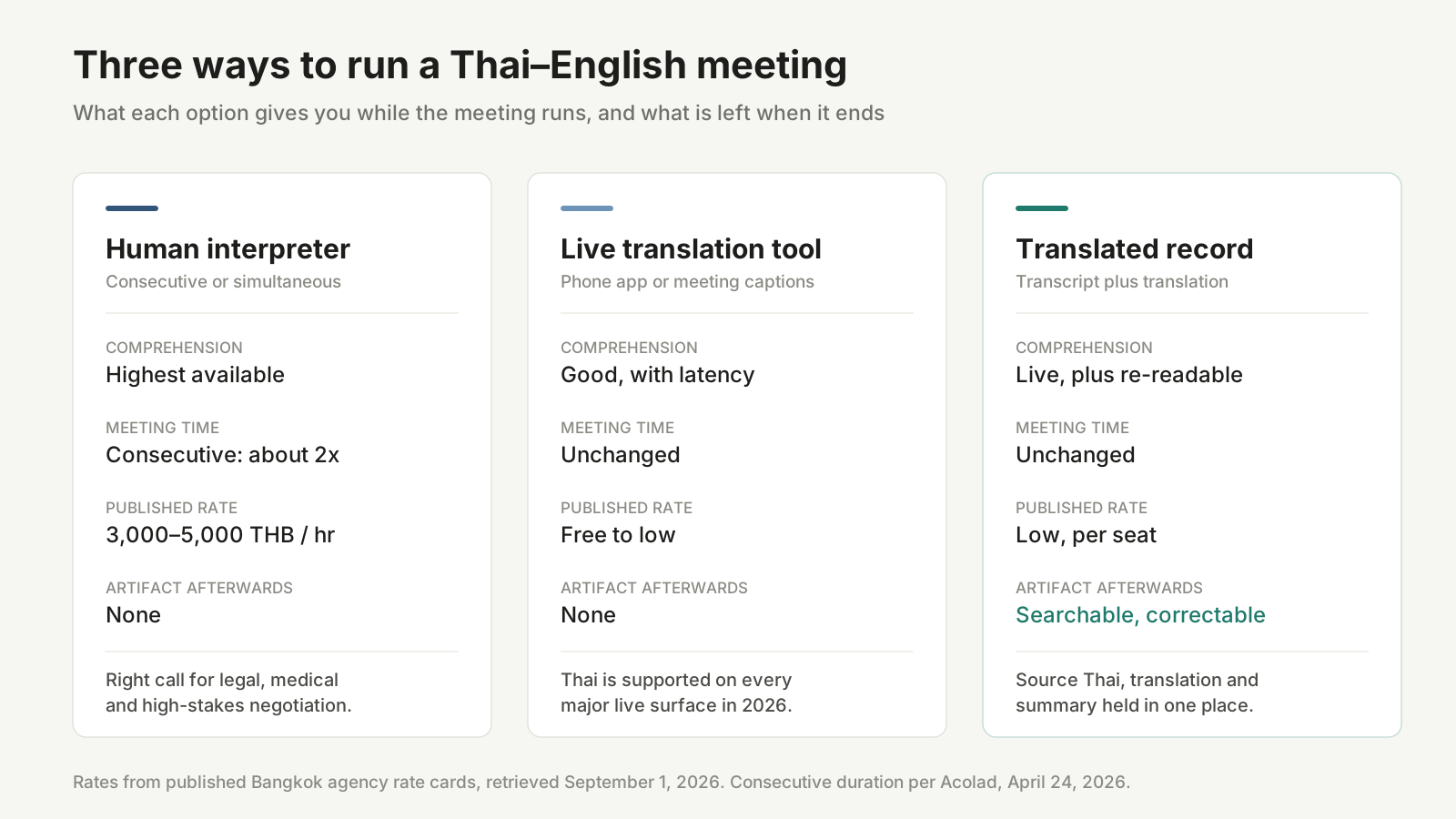
The three options, side by side. Rates are from published Bangkok agency rate cards retrieved September 1, 2026.
แปลต่อเนื่อง and แปลพร้อม are two different products, and Thai searchers ask for the first one
Start with vocabulary, because the Thai search data is unusually precise about it. People in Thailand are not typing "translation" into Google when they need a meeting handled. They are typing การประชุมแปลต่อเนื่อง — literally, consecutive-interpretation meeting — which is a request for a specific professional mode, not a generic wish.
Consecutive interpretation (แปลต่อเนื่อง) means the interpreter waits. The speaker delivers a passage, pauses, and the interpreter renders it. Per Acolad, it needs no booth, no receivers, no transmitter — a notepad is the entire technical requirement. That makes it the default for bilateral meetings, legal depositions, medical consultations, site visits, and factory walk-throughs. Sawadee Translations notes that most legal proceedings and embassy appointments use consecutive interpreting "since accuracy matters more than speed and the format allows for pauses."
Simultaneous interpretation (แปลพร้อม) means the interpreter does not wait. Translation is delivered while the speaker is still speaking, with a lag of a few seconds. It costs more for a structural reason: Elite Asia's breakdown lists soundproof interpreter booths, pocket receivers, headphones, a central control unit, multi-channel transmitters, and interpreter desks with microphones as the standard rig, and simultaneous interpreters conventionally work in pairs, rotating every 20 to 30 minutes because the cognitive load does not survive a solo shift.
Here's the point most comparison articles bury: the price difference between the two modes is not the real cost difference. Consecutive is cheaper per hour and more expensive per meeting, because it consumes the one resource nobody prices — the calendar. Call it the interpreted hour: sixty minutes of agenda that occupies a hundred and twenty minutes of everyone's day.
What a Thai interpreter actually costs, from published rate cards
Rate cards for Thai interpreting are genuinely public, which is rarer than it should be. Two Bangkok providers publish figures we can quote directly.
| Provider | Mode | Published starting rate | Unit |
|---|---|---|---|
| Sawadee Translations | Consecutive | From 3,000 THB | per hour |
| Sawadee Translations | Simultaneous | From 5,000 THB | per hour |
| Y LINK (Personnel Consultant) | Consecutive, online | From 2,000 THB | per 60 minutes |
| Y LINK (Personnel Consultant) | Simultaneous, online | From 3,000 THB | per 60 minutes |
| Y LINK (Personnel Consultant) | Conference / business discussion, on-site Class A | From 6,000 THB | half day (4 hrs) |
| Y LINK (Personnel Consultant) | Conference / business discussion, on-site Class A | From 9,600 THB | full day (8 hrs) |
| Y LINK (Personnel Consultant) | Simultaneous or whispering, on-site Class A | From 14,400 THB | half day (4 hrs) |
| Y LINK (Personnel Consultant) | Simultaneous or whispering, on-site Class A | From 21,600 THB | full day (8 hrs) |
Both rate cards retrieved September 1, 2026. Y LINK's Japanese–Thai–English dispatch page also states that interpretation between Japanese, Thai and English "starts at 14,400 Baht per day."
Read the fine print, because it is where the interpreted hour shows up as money. Y LINK defines a half day as four hours "not crossing 12:00" and a full day as eight hours excluding a one-hour lunch break for the interpreter. Overtime is calculated under Thai labour law — the daily contract amount divided by 8, multiplied by 1.5, billed in fifteen-minute increments. And the cancellation ladder is steep: 100% of the fee inside two business days, 80% at three to seven days, 50% at eight to fourteen days, 20% at fifteen to thirty days.
So a meeting that overruns by ninety minutes because consecutive interpretation doubled it does not cost you ninety minutes. It costs you 1.5× the pro-rated hourly rate on top of a day you already bought, plus the downstream cost of every person in that room losing an afternoon.
None of this makes interpreters bad value. It makes them a considered purchase — which is exactly how the rest of this post treats them.
Every free tool now speaks Thai, and they are better than their reputation
The other half of the market is worth a fair hearing, because Thai coverage in live translation went from patchy to comprehensive faster than most teams noticed.
Google Translate's Live translate lists 74 languages, and Thai is one of them. It runs with or without headphones on Android and iOS, offers Listening, Conversation, Text-only and Custom modes, and a Face-to-face mode that splits the screen so each speaker reads their own side while the microphone detects automatically which language is being spoken. Google's documentation states that translation "continues seamlessly when you switch apps, minimize the application, or when the screen locks." Thai can also be downloaded for offline use, which matters for a site visit in Rayong or a supplier audit where connectivity is not a promise.
Google Meet's translated captions cover 69 languages, Thai included. This is a paid-tier feature — Business Standard, Business Plus, Enterprise Standard, Enterprise Plus, Enterprise Starter (available until June 30, 2025), and Google AI Pro for Education.
Samsung's Live translate and Interpreter support Thai on Galaxy devices — one of the 20 base languages listed on Samsung's support page, alongside Vietnamese, Indonesian and Hindi. That same page carries a caveat worth reading twice: "Only one person should use Live Translate at a time, otherwise translation errors will occur. If the selected language doesn't match what's being spoken, the conversation may be mistranslated."
Deepgram's Nova-3, the engine layer under a lot of meeting tooling, lists Thai as th and th-TH. Counting distinct base language codes in Deepgram's Models & Languages Overview on September 1, 2026 gives 58, and Thai is among them in both the Nova-3 and the older Nova-2 tables.
These tools can help two people understand one another in a low-stakes exchange, including a supplier conversation on a factory floor. Use them when participants can clarify mistakes as they happen; choose a professional interpreter when an error would carry lasting consequences.
Thai passes every listening list and fails every writing list
The gap is not live comprehension; it is a searchable, editable record after the call.
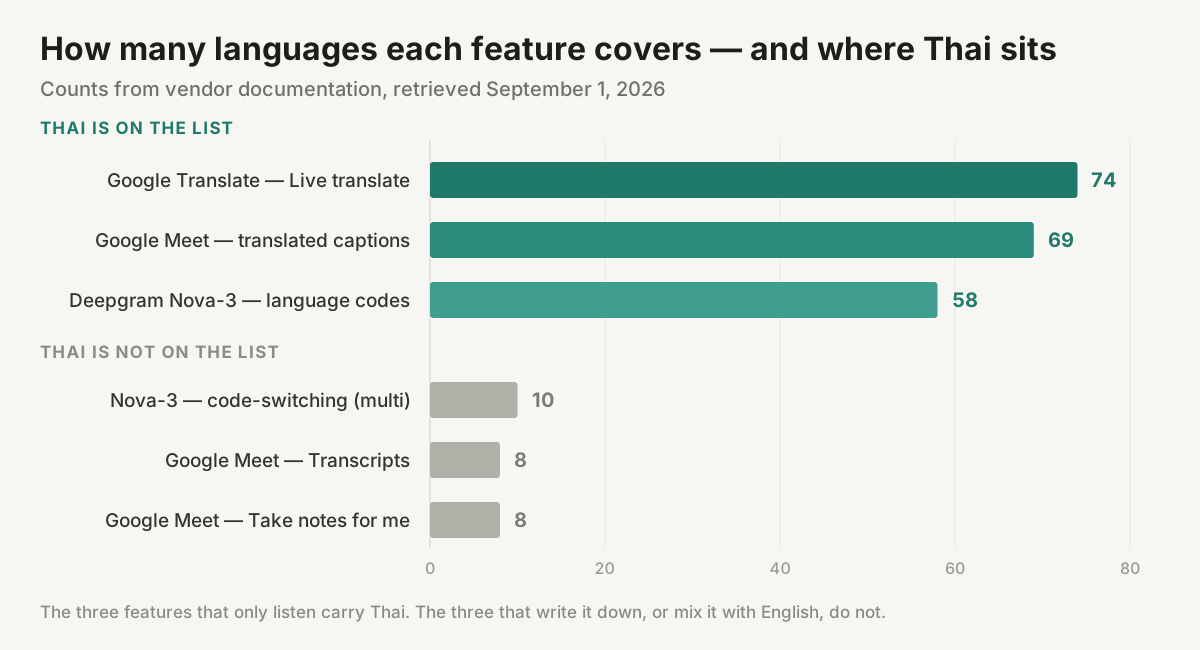
Counts from vendor documentation retrieved September 1, 2026. The features that only listen carry Thai; the features that write, or that mix Thai with English, do not.
Google Meet's Transcripts feature — the one that produces a durable Google Doc — is available in exactly eight languages: English, French, German, Italian, Japanese, Korean, Portuguese, and Spanish. Google Meet's "Take notes for me", the Gemini note-taker that files notes into Google Docs and emails the organizer a recap, is available in exactly the same eight. Thai is in neither list, twice.
| Feature | Thai supported? | Languages | Leaves an artifact after the call? |
|---|---|---|---|
| Google Translate — Live translate | Yes | 74 | No |
| Google Meet — translated captions | Yes | 69 | On screen only; burned into the clip if you record captions |
| Deepgram Nova-3 — transcription | Yes (th, th-TH) | 58 base codes | Yes, if the product built on it keeps one |
Deepgram Nova-3 — multi code-switching | No | 10 | n/a |
| Google Meet — Transcripts | No | 8 | Yes, a Google Doc |
| Google Meet — "Take notes for me" | No | 8, one at a time | Yes, Docs notes plus an emailed recap |
All rows from vendor documentation retrieved September 1, 2026.
Meet's translated captions do have a persistence path, and it deserves acknowledgement: if you record the meeting and select Record captions, the captions are embedded into the video file. But burned-in captions are not a record in any useful sense. You cannot search a pixel, you cannot correct a misheard supplier name in it, and you cannot generate a summary from it. It is a picture of a transcript.
The Thai–English sentence is where the tooling specifically breaks
For Thai–English meetings, the key limitation is mixed-language recognition.
Deepgram's multi code-switching mode — the setting that lets a single audio stream contain two languages in the same sentence — covers exactly ten languages: English, Spanish, French, German, Hindi, Russian, Portuguese, Japanese, Italian, and Dutch. Thai is not among them, despite Thai being fully supported as a monolingual language. So Nova-3 will transcribe a Thai meeting, and it will transcribe an English meeting, and it is not built to transcribe the sentence where your ops lead says the Thai equivalent of "we pushed the shipment to the 15th because the QC report flagged a batch issue" with QC report, batch, and the date in English.
That sentence is not an edge case in Thailand. It is the median sentence in a Thai office with a foreign parent company.
Google's note-taker documents the same limitation in plainer language. Its help page states that the feature "supports one language at a time" and that "multiple languages spoken in the same meeting aren't currently supported." A Bangkok–Tokyo call that switches between Thai and English is therefore disqualified twice: once because Thai is not in the eight, and once because switching is not supported even between languages that are.
DeepL adds a third variant of the same problem. DeepL Voice splits its language support into spoken languages (what the recognizer accepts) and translation languages (what captions can display). DeepL's own models transcribe 18 spoken languages, and Thai is not one of them. Thai sits in a second tier of 20 languages transcribed by a third-party provider, Speechmatics, with three conditions attached, all documented on DeepL's help page retrieved September 1, 2026:
- A team admin must enable third-party data processing in the organization's admin account before any of these languages work at all.
- Auto-detect does not work. In DeepL's exact words: "Third-party languages do not work with Auto-detect language — they need to be manually selected as a Spoken language."
- To let participants choose their own spoken language, the host must enable an access code when connecting the meeting to DeepL Voice.
DeepL is straightforward about the arrangement — Speechmatics operates under a zero-retention agreement, so transcription data is deleted from their servers once processed — and none of the three conditions is unreasonable on its own. Stacked, they produce a specific outcome: a Thai speaker joining a DeepL-equipped meeting is one unticked admin setting away from not being transcribed at all, and cannot count on the system noticing them automatically.
Nobody publishes a Thai meeting accuracy number. One Thai lab published the raw ones.
The cited vendor materials do not provide a Thai meeting-speech word error rate. Amity's published study offers a relevant, though narrower, reference: it measures Thai business audio rather than scripted reading.
Amity's AI research team published a whitepaper on August 14, 2025 documenting Thai speech-to-text fine-tuning on two in-house datasets: a contact-centre set of 615 segments and an insurance set of 422 segments. They benchmarked four systems on both.
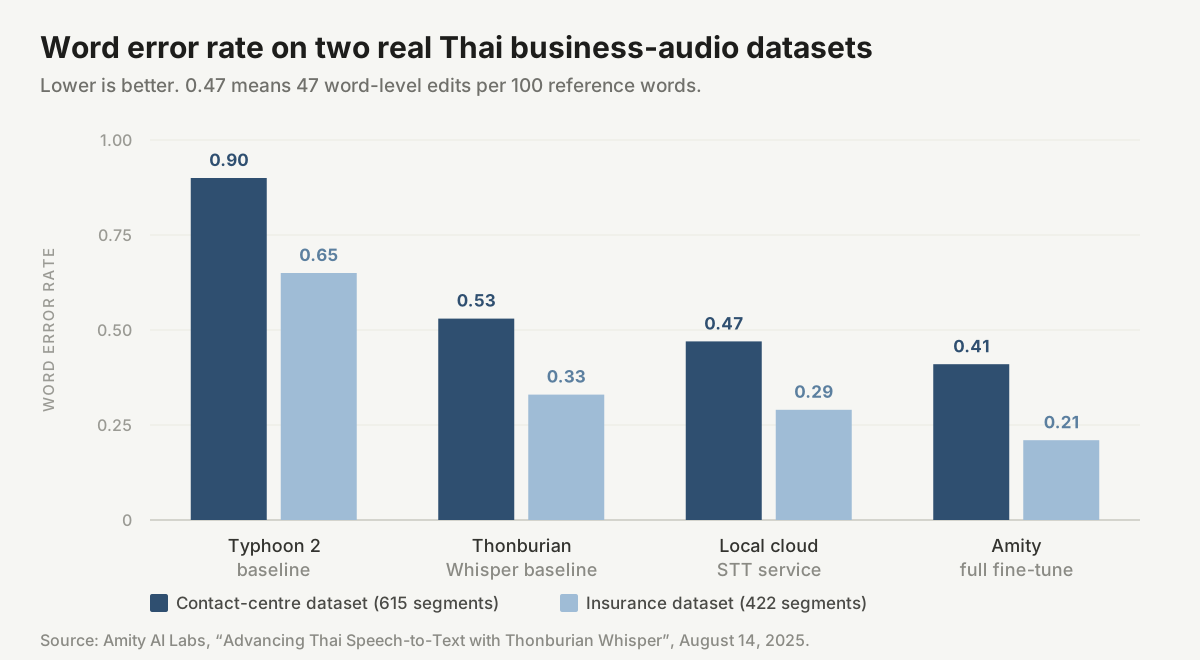
Word error rates from Amity's August 14, 2025 whitepaper. Off-the-shelf systems on real Thai business audio land between 0.29 and 0.90.
The numbers are the argument. Typhoon 2 scored 0.90 WER on the contact-centre set and 0.65 on the insurance set. Thonburian Whisper, itself a Thai-specific fine-tune of Whisper, scored 0.53 and 0.33. A commercial local cloud speech-to-text service scored 0.47 and 0.29. Amity's own full fine-tune reached 0.41 and 0.21.
A word error rate of 0.47 means roughly one word in two needs an edit. That is what a general-purpose system does to unrehearsed Thai business speech with background noise and telephone bandwidth. Read a marketing page claiming "99% accuracy in Thai" against that table and you learn something about the marketing page.
Diarization tells the same story. Amity reports that the standard pyannote.audio pipeline, applied to their insurance audio without Thai-specific adaptation, produced a Diarization Error Rate of 31.3%, with the principal errors "in distinguishing overlapping and code-switched speakers." Adapting the front end dropped DER to 8.13% on the same evaluation set. Code-switching shows up again, this time as a speaker-attribution problem — the machine loses track of who said something the moment the speaker switches language mid-turn.
Two structural properties of Thai make this harder than the equivalent problem in English. First, Thai script does not mark word boundaries with spaces. Word segmentation is therefore, in the words of Chormai, Prasertsom and Rutherford's November 16, 2019 AttaCut paper, "a fundamental pre-processing step for Thai Natural Language Processing" — a recognizer has to decide where one word ends before it can decide what that word was, and the ambiguity is real enough that Thai NLP carries a whole sub-literature of competing segmenters benchmarked against each other. Second, Thai is tonal. Meaning rides on pitch contour, so a system that mishears tone does not return a slightly-wrong word; it returns an unrelated one.
The operational consequence is not "don't use ASR." It is: assume the first-pass Thai transcript contains errors, and buy a workflow where a human can see and fix them. Which requires that a transcript exist in the first place, and be editable, and still be there tomorrow.
How to run a Thai–English meeting so the record survives
Seven steps, in the order they occur. Each one addresses a specific failure documented above.
- Decide the stakes before you decide the tool. If a wrong sentence creates legal, medical, or contractual exposure, hire a human interpreter — and then keep reading, because the record steps below apply to that meeting too. The interpreter handles the room; nothing about hiring one produces a document afterwards.
- Separate the comprehension job from the record job, and accept that they are different tools. Google Translate or Meet captions handle Thai comprehension today. Neither produces a durable Thai record. Choosing one tool to do both is how teams end up with neither.
- Budget the interpreted hour honestly. If you are booking consecutive interpretation, book double the agenda length and tell participants the real end time. A 4-hour half-day at 6,000 THB covers a two-hour agenda, not a four-hour one.
- Set Thai explicitly as the spoken language; never rely on auto-detect. On DeepL Voice this is mandatory — Thai is a third-party language and auto-detect does not apply to it. Everywhere else it is still the better choice, because auto-detection commits to a guess in the first few seconds, on the least contextual audio of the whole session.
- Check the language list of the specific feature that writes, not of the platform. This is the trap the whole post exists to describe. Google Meet supports Thai. Google Meet's transcript does not. 69 versus 8 is the distance between those two sentences.
- Declare the code-switching problem out loud before the call. If your team drops English product names, ticket IDs, and part numbers into Thai sentences — and every Thai team with a foreign parent does — confirm your record tool tolerates two languages in one session. Nova-3's
multimode does not include Thai; Meet's note-taker rejects mixed-language meetings outright. - Fix names and numbers in the first five minutes, live. Thai proper nouns and English product codenames are the two places transcription reliably fails, and they are also the two places a wrong line does the most damage to any summary built on top of it. Correcting during the meeting costs seconds. Correcting a summary next week costs an argument.
If you want the workflow version of step 7 rather than the market analysis, our June guide walks through turning a Thai meeting into reviewable action items end to end, and the real-time meeting translation solution page covers how the live and record layers connect.
When you should still hire a human, stated plainly
Free tools suit low-stakes conversations where participants can correct a misunderstanding on the spot. A human interpreter remains the better choice when accuracy, confidentiality, or cultural mediation carries material consequences.
Hire a professional interpreter when a mistranslated sentence has consequences a correction cannot undo: court and arbitration proceedings, immigration and embassy appointments, medical consultations, board-level M&A negotiation, regulatory audits, and any conversation where the other party will later quote what you said. Hire one when the room is large enough that a phone screen is not a delivery mechanism. Hire one when cultural mediation matters as much as lexical accuracy — Thai business register carries hierarchy and face in ways a literal rendering flattens, and a good interpreter is managing that in real time.
Use tools when the meeting is internal, recurring, operational, and would simply not have happened at all if it required a booking three weeks out and a five-figure baht invoice. That is the majority of meetings, and it is the segment where the record matters most, because nobody was ever going to take minutes.
The interpreter and the record are not competing purchases
Most articles that reach this point present the choice as either/or, and that framing is wrong. The sharper position is interpreter plus record assistant: in the high-stakes meetings where you absolutely should hire a professional, the machine still earns its seat — running quietly alongside, doing three jobs the interpreter is not there to do.
One: a reference record. The interpreter's rendering is spoken and gone. A transcription layer preserves the source-language audio as text next to a machine translation of it, so a disputed point three weeks later can be checked against what was actually said in Thai — not against anyone's memory of the English version of it. This matters most in exactly the settings that justify hiring an interpreter, because those are the settings where someone will later quote the meeting back at you.
Two: an assistant for the people in the room, interpreter included. Consecutive interpretation compresses under time pressure, and the first things to go are the details that carry no grammatical weight and all of the operational weight — part numbers, dates, percentages, company names, unfamiliar technical terms. That is not a criticism of interpreters; it is the documented shape of the task. A reviewable running transcript means the number stays on screen after the sentence containing it has moved on, and a participant who thinks they misheard "the 15th" can check rather than interrupt.
Three: the after-meeting layer. Interpreters do not write minutes. That is not their job and you should not ask them to. Summary, action items, and a searchable record of decisions are work that happens after the interpreter has left, and today it is either done by hand by whoever is least senior in the room, or not done at all.
Keep the hierarchy honest, though, because it does run one way. The machine rendering assists and archives; it does not override the professional in the room. When the transcript and the interpreter disagree in a legal or medical setting, the interpreter is the authority and the transcript is the thing you go check. Treat the record as evidence to consult, not as a second opinion with equal standing.
One more piece of context that explains why this category exists in Thailand at all. In EF's 2025 English Proficiency Index, Thailand scores 402 against a global average of 488, ranking #116; the speaking sub-score is 377. Whatever you think of the methodology, the direction is not in dispute: a large share of Thai professional meetings with foreign counterparts are conducted in a language at least one side is straining in. Everyone in that room needs to be able to re-read what was agreed, in their own language, after the adrenaline wears off.
The bottom line: Thailand solved comprehension and skipped memory
For a decade the complaint about Thai in international business was that the technology could not understand it. In 2026 that complaint has largely expired. Thai is in Live translate's 74, in Meet's 69, in Nova-3's 58, in Samsung's Interpreter, and in DeepL's caption languages. Comprehension is handled, and mostly for free.
What did not move is the record. The two Google features that produce a durable artifact support eight languages between them — the same eight — and Thai is in neither. The one mode built for mixing two languages in a sentence covers ten, and Thai is not there either. Published Thai word error rates on real business audio run from 0.21 to 0.90 depending entirely on whether anyone bothered to adapt the model to Thai. And a human interpreter, who solves comprehension better than any of them, leaves the room with the entire meeting inside their head.
So the question to put to a vendor is not "do you support Thai." Nearly all of them now say yes, and nearly all of them mean the listening half. The question is: which of your features support Thai after the call ends, which of them survive a Thai sentence with English in the middle of it — and can you show me the language list for those specific features?
Where Telli.sh fits: the record layer is the layer we build. Telli.sh transcribes the meeting in the language it was actually spoken in, translates into 44 target languages including Thai, and keeps all three artifacts in the same note — the Thai source text, the translation aligned to it, and the summary generated on top, all of them editable when a name comes out wrong. The interface itself ships in 15 languages, Thai included, so a team in Bangkok and a client in Osaka read the same meeting in their own language and still share one correctable record.
Start a live translated meeting note
Sources
- Sawadee Translations, Interpreting Services, retrieved September 1, 2026 — consecutive interpreting from 3,000 THB/hour, simultaneous from 5,000 THB/hour, and the note that most legal proceedings and embassy appointments use consecutive interpreting.
- Y LINK / Personnel Consultant, Interpretation (Japanese, English, Thai, Chinese), retrieved September 1, 2026 — on-site half-day and full-day rate table, online rates of 3,000 THB/60 min simultaneous and 2,000 THB/60 min consecutive, the half-day/full-day definitions, the Thai labour law overtime formula, and the cancellation ladder.
- Acolad, "Simultaneous vs Consecutive Interpreting: Which One Do You Need?", April 24, 2026 — the one-to-five-minute passage length and "A consecutive session roughly doubles in duration because each statement is delivered twice."
- Elite Asia, "Simultaneous vs. Consecutive Interpretation: How to Choose for Your Event", retrieved September 1, 2026 — the equipment breakdown for each mode.
- Google Translate Help, "Hear live speech to speech translations with Live translate", retrieved September 1, 2026 — the 74-language list including Thai, the four modes, face-to-face mode, and background continuation.
- Google Meet Help, "Use translated captions in Google Meet", retrieved September 1, 2026 — the 69-language list including Thai, the paid Workspace editions, and Record captions.
- Google Meet Help, "Use Transcripts with Google Meet", retrieved September 1, 2026 — the eight supported transcript languages.
- Google Meet Help, "'Take notes for me' in Google Meet", retrieved September 1, 2026 — the same eight languages, and "supports one language at a time."
- Samsung, Call assist: Live translate calls on your Galaxy phone, retrieved September 1, 2026 — Thai in the supported language list, and the one-speaker-at-a-time caveat.
- Deepgram, Models & Languages Overview, retrieved September 1, 2026 — Thai as
thandth-THin the Nova-3 and Nova-2 tables, 58 distinct base language codes, and the 10-languagemulticode-switching list. - DeepL Help Center, "DeepL Voice languages", retrieved September 1, 2026 — the 18 DeepL-transcribed spoken languages, the 20 third-party spoken languages including Thai, the admin toggle, the auto-detect restriction, the access-code requirement, and the Speechmatics zero-retention agreement.
- Amity AI Labs, "Advancing Thai Speech-to-Text with Thonburian Whisper", August 14, 2025 — the 615-segment contact-centre and 422-segment insurance datasets, the WER table, and the 31.3% → 8.13% diarization error rate result.
- Chormai, Prasertsom and Rutherford, "AttaCut: A Fast and Accurate Neural Thai Word Segmenter", submitted November 16, 2019 — word segmentation as a fundamental pre-processing step for Thai NLP.
- EF Education First, EF English Proficiency Index — Thailand, 2025 edition, retrieved September 1, 2026 — global ranking #116, score 402 against a global average of 488, speaking sub-score 377.