Jev Now Reads Photos: From Return Checks to Finding the Damage
Jev's experimental image support turns photos into typed judgments and bounding boxes. Follow a mug-return workflow, learn the presence gate, and prepare a safe first prototype.
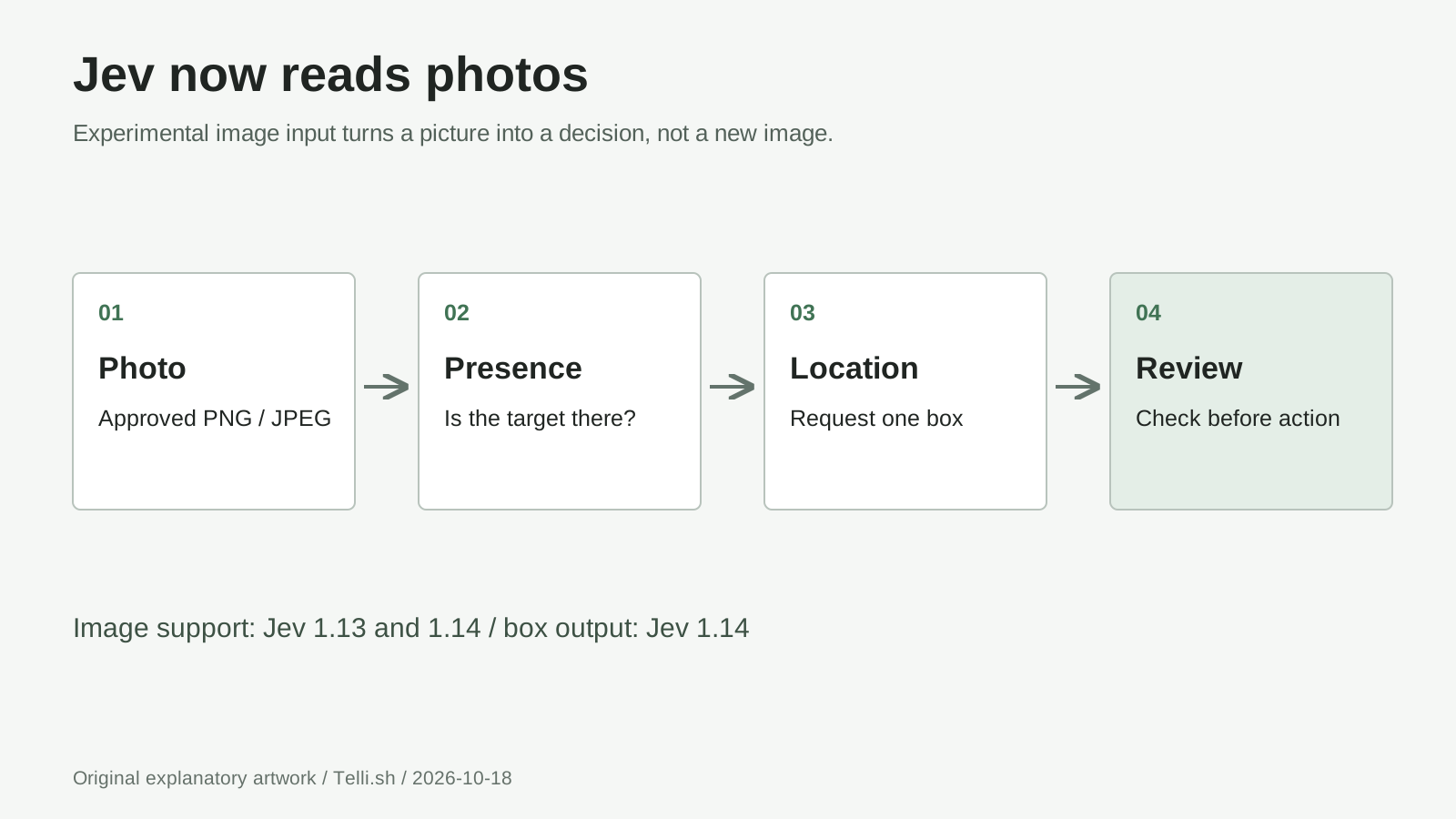
Original explanatory diagram: photo in, separate judgments and coordinates out, with a person reviewing the proposed damage. It illustrates a workflow, not a recorded model result.
A customer photographs a chipped mug. Your support tool needs to answer three different questions: is the mug visible, does the picture show damage, and where should a reviewer look? A fluent paragraph about ceramics is not the most useful intermediate result.
On October 14, 2026, TypeSafe AI announced experimental image support for Jev alongside Jev 1.14.0 and a new box output type. Images work with both Jev 1.13 and 1.14; Box requires 1.14. TypeSafe calls these features experimental and explicitly stops short of recommending them for production automation. Official announcement
The useful change is narrower than an all-purpose multimodal assistant: a photo can become a typed decision or a location inside a program. Here is how that changes a returns workflow, what the interface accepts, and how to build a cautious prototype without mistaking a rectangle for proof.
TL;DR:
- Jev now has an experimental path for still-image understanding, not image generation.
- Ask whether a target exists before trusting its proposed location.
- Keep the original photo and human review; let code validate coordinates, permissions, and consequences.
A photograph can become a decision instead of a description
Jev's original attraction was bounded answers: choose a supplied option, rate against described levels, or evaluate a yes-or-no proposition. Our earlier guide to Jev's decision model covers that foundation. The new development is giving those questions visual evidence, plus a way to return spatial coordinates.
For a returns interface, that changes the division of work. The model can suggest that damage is visible; application code can display that suggestion beside the submitted image. Neither operation establishes when the damage occurred, whether the photograph belongs to this order, or whether a refund is authorized. Those are separate questions with different evidence.
| Input or output | What the documented interface supports | What your application must supply |
|---|---|---|
| Photo input | Experimental PNG/JPEG still images | Permission to process the image and preparation before upload |
| Audio input | No native audio input | A transcript or structured fields produced elsewhere |
| Video input | No native video-file input | Selected still frames or extracted text, not an uploaded movie |
| Document input | Text/JSON; a scanned page can be treated as an image | PDF/DOCX parsing or page rendering outside Jev |
| Output | Defined labels, scores, probabilities, and Box coordinates | Rendering, cropping, document creation, and any business action |
These boundaries follow the model reference, API request contract, and image-enabled SDK. A folder of PDFs does not become a document-processing pipeline simply because some pages contain pictures. Equally, several extracted frames do not establish native video understanding or access to the clip's soundtrack.
Our take: the interesting unit is a small, inspectable judgment attached to evidence. It is not a new permission to automate everything downstream.
Three official examples turn the same photo into different work
TypeSafe's JavaScript documentation provides three concrete starting points. They are published code examples, not reports of live customer deployments or measured results. Treat them as patterns for a prototype, not promises about accuracy on your photographs.
The first combines a damaged-mug claim with a product photo, asking a Noul about damage and a Score about severity. In a support queue, an adaptation could place suspected damage near the top for inspection. A reviewer should still see the full photo, the customer's description, and an option to reject the suggestion.
The second compares a seller's uploaded photo with a catalog image. It asks whether they show the same product and classifies photo usability, including blur, cropping, and non-product content. For a marketplace, that suggests a useful separation: identity matching and photo quality need not share one approval decision. A clear image of the wrong product should not pass just because it looks professional.
The third asks Box to locate the damaged area. The result could guide an overlay or a suggested crop for the reviewer. Preserve the uncropped original alongside it: narrowing attention can help someone inspect a claim, but can also hide context that changes its meaning.
Follow the official examples for damage assessment, catalog comparison, and damage localization. Our proposed returns flow adds application safeguards around those patterns; it is not an account of a trial.
A box cannot tell you that there is nothing to find
The critical detail in TypeSafe's Box contract is that there is no absent-target output. A Box question returns four edges even when its requested target is missing. A rectangle around an intact mug therefore cannot, by itself, establish that damage exists.
Ask a separate Noul about the presence of the requested target. For this workflow, distinguish the mug being visible from damage being visible. A positive mug answer is not enough to authorize a damage overlay. Ignore the proposed damage box unless the relevant presence checks pass your validated rules.
This is a presence gate, not a cure for mistakes. The two judgments can be wrong together. A bright reflection might look like a chip, while an actual crack might disappear against a patterned glaze. Test photographs with no mug, intact mugs, ambiguous reflections, multiple objects, and clearly visible damage before choosing thresholds.
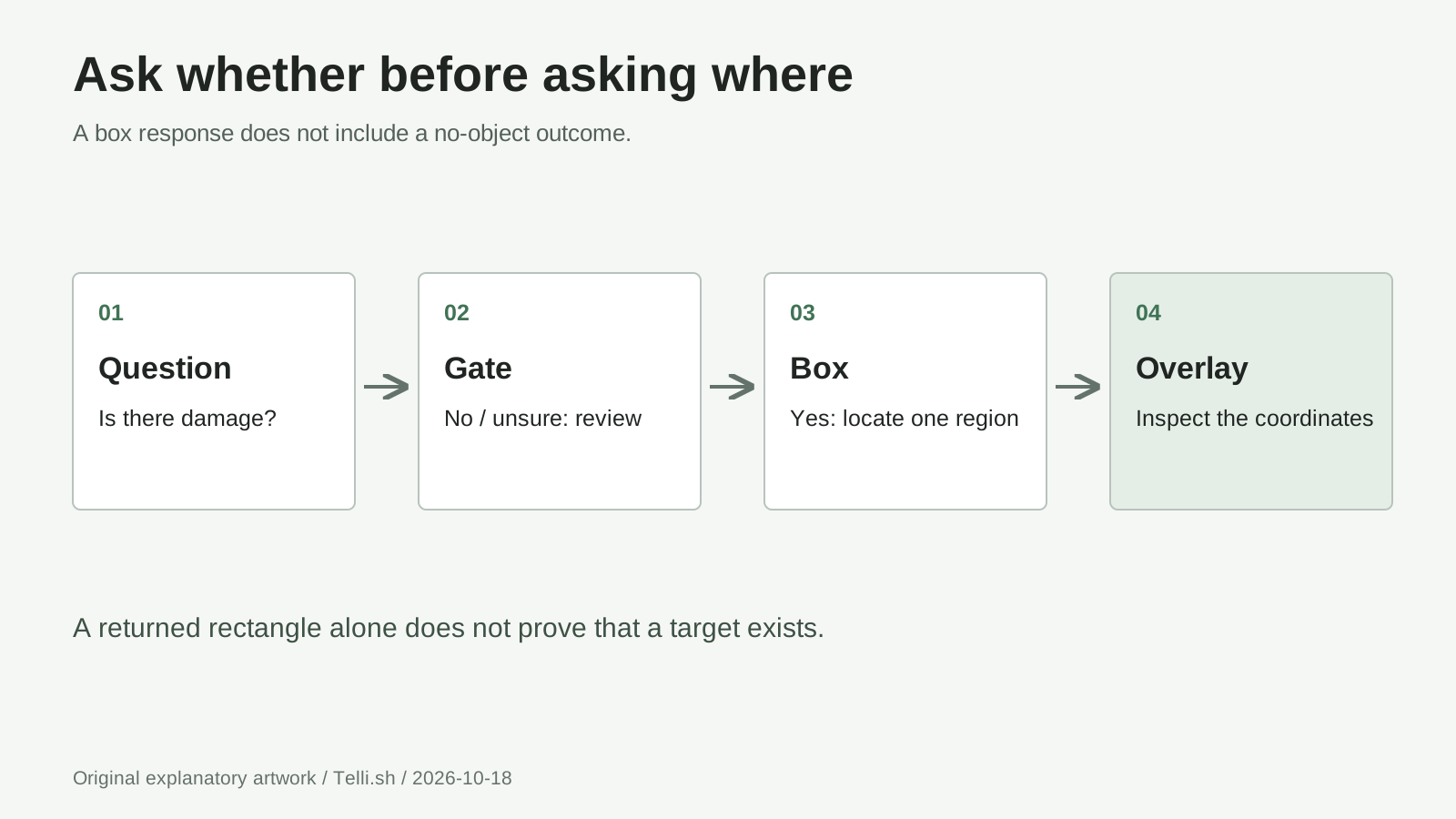
Original decision diagram: a valid rectangle is usable only after the target-presence gate passes. Failed or uncertain checks retain the original photo for human review; they do not become automatic rejections.
Think of the rectangle as a pointer, not a verdict.
Treat coordinates as geometry, then check their meaning
Box returns left, right, top, and bottom as fractions of the image dimensions, measured from the upper-left corner. Values lie between 0 and 1, with left < right and top < bottom. One question produces one box, not an object-detection list. Box response contract
For an illustrative 1200 x 900 prepared image, edges of left 0.20, top 0.30, right 0.60, and bottom 0.70 correspond to pixel edges 240, 270, 720, 630. These are arithmetic examples, not a Jev response. Crop APIs commonly expect left, top, right, bottom, so map named fields deliberately rather than relying on JSON property order.
Validate finite numbers, bounds, and ordering before drawing anything. Then inspect whether the region actually identifies the damage. If you resize, rotate, pad, or tile a photo, retain the transformation needed to map coordinates back; otherwise a plausible box can point at the wrong pixels.
Prepare the image before the request, not after an error
The official image limits are precise and inclusive. An out-of-range image is rejected rather than resized automatically; one rejected image fails the whole request.
| Constraint | Published limit |
|---|---|
| Format | Still PNG or JPEG; animated PNG rejected |
| Individual file | 16 MiB, measured after base64 decoding when applicable |
| Each dimension | 280 to 1568 pixels |
| Total pixels | 78,400 to 2,458,624 |
| Request body | 32 MiB, including JSON and upload framing |
| Processed images together | 32 MiB |
| Expanded request | 32 MiB after image references are replaced |
Repeated references count again in the expanded request. File size, dimensions, and context length are separate checks. Image limits
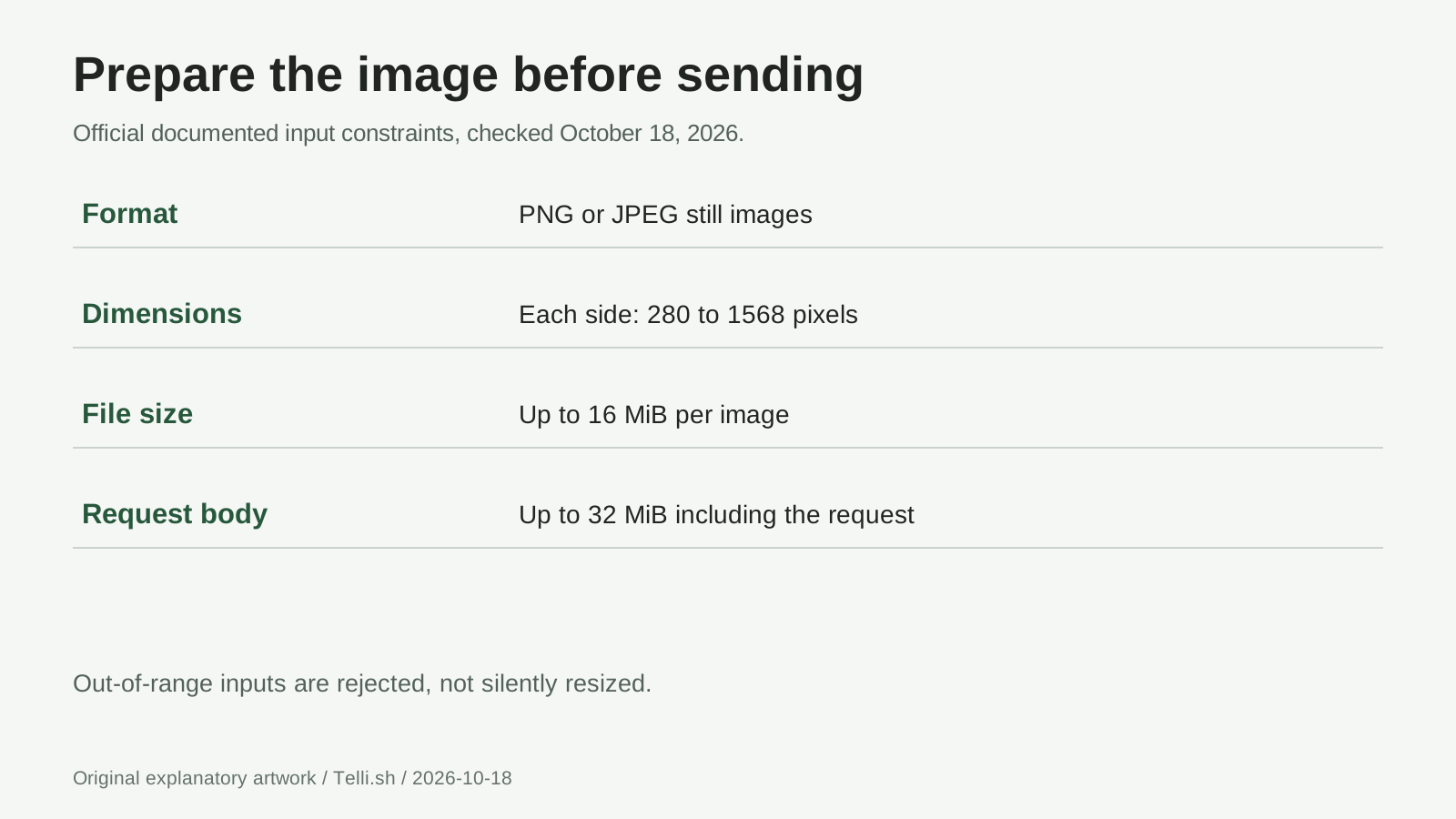
Original constraints diagram based on TypeSafe's image documentation, checked October 18, 2026. Per-file, processed-image, expanded-request, and request-body limits apply independently.
TypeSafe also says to rotate pixels upright before sending: the API removes metadata and does not apply EXIF orientation. Convert unsupported formats first. Preparation guidance
For a prototype, prepare a clearly named copy of an owned photo and keep the original untouched. Check dimensions locally and preview the exact copy that will be sent. A narrow crop may need padding to meet the minimum dimension; record that padding before interpreting its coordinates.
Pin 1.14 and make the experimental switch explicit
As of October 18, the published alias table maps jev-latest to jev-1.13.0 and jev-preview to jev-1.14.0. Pin jev-1.14.0 for a Box example rather than assuming that latest means the newest preview. Model aliases
The following procedure creates a local review-only example. Running the final command sends a billable inference request, which the SDK may retry; it never approves a return or changes an account. Use a staged photograph you own, without people, shipping labels, addresses, or private documents.
-
Get access and choose the right organization. TypeSafe says signup no longer requires waitlist approval. Create an API key in the console and check the organization's credits before testing. Account access, credit settings
-
Use Node.js 22 or newer. The image-capable JavaScript SDK release is
0.7.0, dated October 14. Pinning it makes this example's client dependency explicit. SDK changelog
node --version
mkdir jev-photo-check
cd jev-photo-check
npm init -y
npm install @typesafe-ai/[email protected]
- Set a session-only key. In Windows PowerShell use the first block; in macOS or Linux Bash/Zsh use the second. Replace the placeholder locally, and do not commit a real key.
$env:TYPESAFE_API_KEY = "your-api-key"
export TYPESAFE_API_KEY="your-api-key"
- Prepare
owned-mug.jpgand createinspect-return.mjs. This original adaptation uses the documented SDK helpers. The experimental header is configured before any image request. Both probability cutoffs below are illustrative application rules, not TypeSafe recommendations. Every result remains subject to human review. SDK usage
import { readFile } from "node:fs/promises";
import { box, image, noul, TypeSafeClient } from "@typesafe-ai/sdk";

if (!process.env.TYPESAFE_API_KEY) {
  throw new Error("Set TYPESAFE_API_KEY before choosing to run this example.");
}

const client = new TypeSafeClient({
  defaultHeaders: { "TypeSafe-Danger-Zone-Images": "true" },
});
const photo = image(await readFile("owned-mug.jpg"));
const response = await client.systemOne({
  model: "jev-1.14.0",
  state: { photo },
  questions: {
    mugVisible: noul("Is a mug clearly visible in `photo`?"),
    damageVisible: noul("Is physical damage clearly visible on the mug in `photo`?"),
    damageRegion: box("The physically damaged area of the mug in `photo`"),
  },
});

const { mugVisible, damageVisible, damageRegion } = response.answers;
const edges = damageRegion.box;
const coordinates = [edges.left, edges.top, edges.right, edges.bottom];
const validBox = coordinates.every(
  (value) => Number.isFinite(value) && value >= 0 && value <= 1,
) && edges.left < edges.right && edges.top < edges.bottom;

const presencePasses = [mugVisible.noul, damageVisible.noul].every(
  (value) => Number.isFinite(value) && value >= 0.95 && value <= 1,
);

console.log({
  model: response.model,
  usage: response.usage,
  humanReviewRequired: true,
  suggestedBox: presencePasses && validBox ? edges : null,
});
- Run only when ready to send the image and incur usage. On all three operating systems, the command is
node inspect-return.mjs. An exception orsuggestedBox: nullshould leave the original image available for review, not trigger repeated automatic submissions.
The questions share one request, but the box is ignored unless the application gate passes. That does not save the cost of computing an unused box. A later design can make localization a second request after presence checks, trading another round trip for avoiding unnecessary localization calls.
A small token price is not a price per photograph
The published rate for both versions is $0.042 per million input tokens, with output tokens free. That means 10 million billed input tokens cost $0.42 at the listed rate; it does not mean ten million images cost that amount. Published pricing
Images count as input tokens at the text rate, without a separate image charge. TypeSafe has not yet supplied an image-token estimation formula in its documentation. Use the response's usage.input_tokens when budgeting an authorized evaluation, rather than inventing a cost per photograph. Image billing
Your budget should include failed attempts, retries, preprocessing, storage, and reviewer time. Keep cost and quality measurements together: saving a fraction of a cent is not useful if an overly tight crop makes every reviewer reopen the original. Compare the complete review task against a simple manual baseline.
Design for uncertainty, privacy, and a busy service
A Noul returns a probability without a separate confidence field. Choice and Score include distributions and derived confidence values. Those values describe the model's uncertainty; they are not a blanket certificate of correctness. Confidence documentation
For the mug workflow, validate the gate on held-out photographs with agreed labels. Group similar outputs and compare them with observed correctness to check calibration on your task. Measure missed damage separately from false alarms, and distinguish a misplaced overlay from an incorrect refund decision. Reassess thresholds after changing the model, lighting, product category, or capture process.
Do not treat every non-passing image as evidence against a customer. A photograph can be inadequate because the camera is poor, the object is reflective, or the defect needs another angle. A useful review state offers another-photo and manual-inspection paths without making the model's uncertainty the customer's fault.
TypeSafe says customer requests and responses are not used to train Jev. Its help center also explains that processing can include service delivery, billing, abuse prevention, and telemetry; retention depends on data, agreements, and any zero-data-retention arrangement. No-training is not the same as no-retention. Data-handling policy
The public service-status page lists US geography and the regions us-east-1, us-east-2, and us-west-2. Teams with regional data-residency requirements should settle the processing-location question before uploading customer photographs; being able to reach a console is not a residency agreement.
Apply data minimization before upload. Crop away an address label in a prepared copy when it is irrelevant, restrict access to originals, and avoid putting images or secrets into routine logs. Decide retention for your own review records independently of the provider's policy.
Organization limits cover requests and tokens per second. The API documents 429 for rate limiting and 529 for overload; malformed or oversized input needs correction, not an unchanged retry. Rate limits, API errors
The JavaScript SDK's retry policy defaults to two retries and honors supported retry-delay headers. Avoid adding an unbounded outer retry loop. Set a time budget, preserve an actionable error state, and keep any future business action separate so a retried inference cannot issue duplicate refunds. Retry policy
Questions to answer before your first photo workflow
Will Jev edit or generate the return photograph?
No. The image is evidence for a judgment or a proposed region. Your application draws an overlay or makes a crop with ordinary image-processing code. Keep the untouched source separately; a useful rectangle does not replace the original evidence.
Why does the example pin 1.14 instead of using latest?
The published alias table currently maps jev-latest to 1.13, while Box requires 1.14. Pinning jev-1.14.0 makes that dependency explicit. Revisit the release notes and your test set before changing the version, rather than assuming an alias update preserves behavior.
Can a strong damage probability trigger a refund?
Not safely on that evidence alone. The probability concerns the question asked about the submitted image; it does not authenticate the order, establish responsibility or apply your refund policy. Start with review assistance, validate representative examples and retain a human decision for consequential actions.
Does free output mean an image request costs nothing?
No. Input tokens, including image tokens, are billed. The published rate is not a per-photo quote because the image-token estimation formula is not yet documented. Inspect reported usage during an authorized pilot and include retries and review time in the total.
Can I send a product video or PDF directly?
Not through the documented still-image interface. Your application must extract suitable frames, text or rendered pages first, with permission to process them. Preparing a frame loses temporal and audio information, so ask only questions the supplied evidence can answer.
The bottom line: point attention before delegating authority
Jev's image preview makes a practical proposition: turn visual evidence into small answers that software can inspect. A mug-return tool can test that proposition by separating presence, damage, location, and review. The most valuable first result is not an autonomous refund; it is a reviewer reaching a better-supported decision with less searching.
That is the standard worth measuring: does the proposed region help a person understand the original evidence, including when the model is wrong?
Sources and scope
Primary sources checked October 18, 2026: TypeSafe's October 14 announcement, models and pricing, image limits and billing, Box contract, JavaScript examples, and SDK release notes. Additional policy and reliability sources are linked beside their claims. The worked flow and diagrams are explanatory adaptations, not a hands-on benchmark; no paid model call was performed for this article. Diagrams are original rather than copied vendor media.
Keep the source beside the conclusion
For your own model research, keep original sources separate from the conclusions drawn from them. Create a Telli.sh account to organize research material and derived notes with their source context intact.