FLUX 3 Image Klein: A Practical Guide to Reference Images, Layout and Local Editing
Learn FLUX 3 Image Klein from a first image to controlled edits: browser and API paths, bounding boxes, Windows and Mac choices, GPU memory, licensing and troubleshooting.
You have a usable product photograph, but the layout is wrong for the next job. The subject needs to move left, the background should change, and the right side must stay empty for a headline. Asking an image generator to start again is easy. Getting a revision you can actually use is harder.
FLUX 3 Image Klein brings text-to-image generation, editing and multiple reference images into one model family. Black Forest Labs released it on October 15, 2026. The interesting change is not another beautiful sample: it is the ability to describe both what an image contains and where its elements should go. BFL release
This guide takes you from a small first experiment to a repeatable editing workflow. Start in a browser if you want to understand the tool; choose an API for an application; consider local execution when control over files or repeated use justifies the setup. You do not need to understand diffusion mathematics to make that choice.
Choose the shortest path to a useful first image
| Your goal | Starting point | What you still need to check |
|---|---|---|
| Try a prompt or reference image | Official Hugging Face Space or BFL Playground | Access, current quota, whether an upload is appropriate |
| Add generation to an application | BFL API | API credentials, billing, retries and result handling |
| Keep inference on your own machine | Compatible ComfyUI, Diffusers or reference implementation | Full runtime memory, supported GPU, model access and license |
| Adapt a visual style through training | Base checkpoint and a supported LoRA recipe | Dataset rights, training resources and distribution terms |
These are different products around related weights, not interchangeable buttons. A model is the learned set of weights. A runtime executes it. ComfyUI supplies a workflow interface; Diffusers supplies Python components; a hosted API supplies an operated service. The feature you saw in one interface may include processing that another interface does not perform.
For a first attempt, open the official Space or BFL Playground. Check any account and billing prompts before generating. A browser is the same starting route on Windows, macOS and Linux; no local GPU is required to use a remote service.
Use an image you own and can safely send to that service. A photograph of your own mug is a better learning input than a customer's unreleased product. The exercise below gives you a small, concrete task and a way to judge its result.
Make one controlled change before combining ten references
- Save an untouched source image and note its dimensions.
- Choose an editing workflow and attach that one image.
- Describe the complete desired scene, including what should remain recognizable.
- Request one change, such as a different background, rather than a new subject, style and composition together.
- Compare the result with the source at full resolution. Inspect shape, text, edges and lighting, not just the thumbnail.
- Keep the instruction and result together. Change one variable for the next attempt.
For example, begin with this scene description:
A catalog photograph of the same plain ceramic mug from the reference image,
with its handle and proportions preserved, on a matte pale-green surface.
Soft light comes from the left. The mug sits in the left third of a wide
composition, leaving clear space on the right for text added later.
The acceptance criteria are yours: the handle has not changed, the mug's silhouette remains useful, and the empty area really is empty. If a logo must be exact, compare it with the original rather than trusting a plausible-looking reconstruction. Add final typography with an ordinary design tool when spelling and brand geometry are non-negotiable.
The official model card describes up to 10 reference images. That is a capacity, not a recommendation to use ten for every task. Two references with conflicting camera angles can create more ambiguity than one clean reference. Give each input a specific role: subject, material, composition or style.
Layout boxes guide composition; they are not a pixel lock
FLUX 3 supports region descriptions with normalized coordinates. Instead of saying only "put the object on the left," you can give a box and describe the content associated with it. The coordinate range is 0 to 1000, so the layout description does not depend directly on whether the final image is 1024 or 2048 pixels wide. BFL bounding-box guide
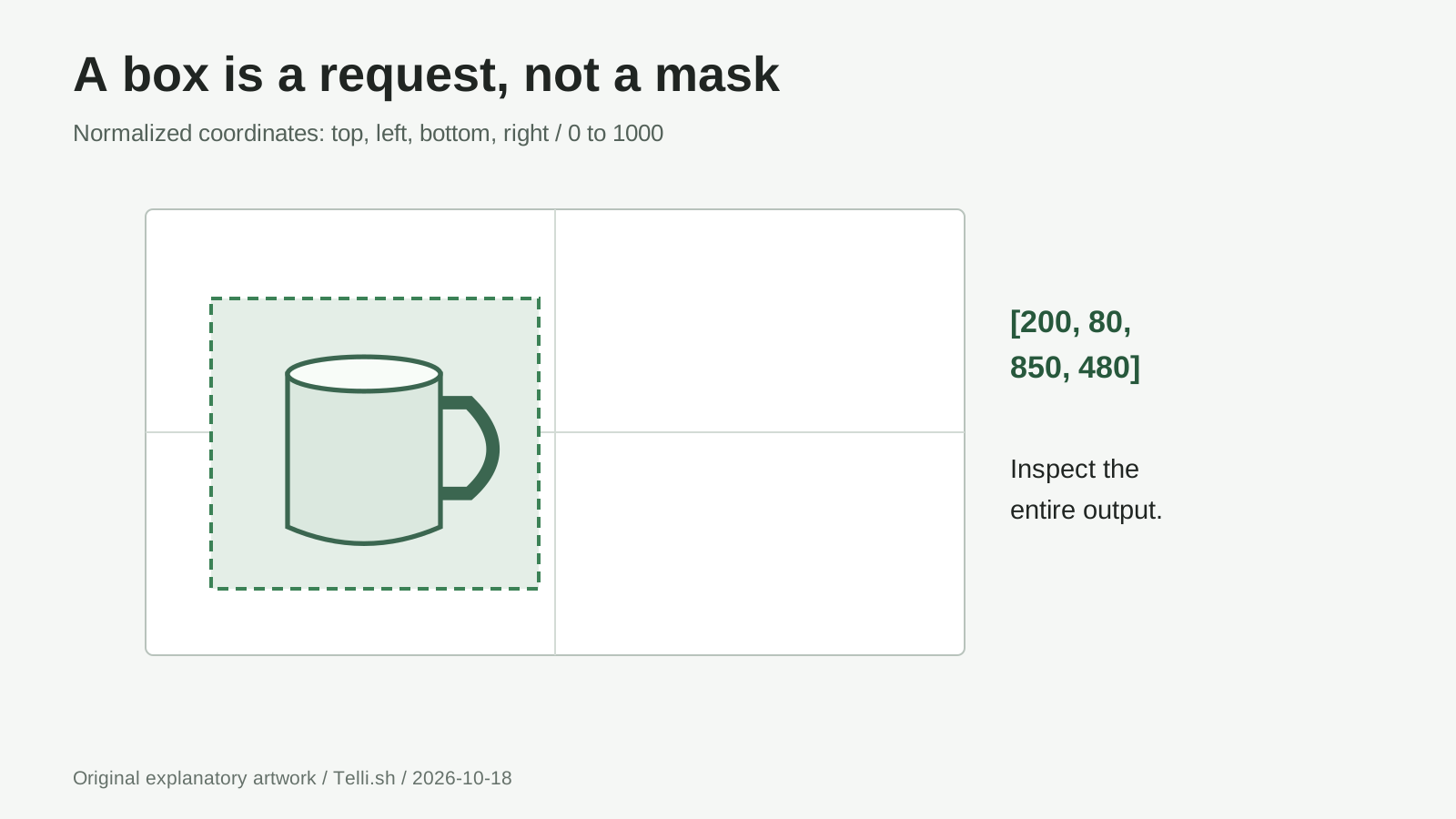
Original explanatory diagram. The box expresses a requested location, not an observed generation or a hard image mask.
Here is an illustrative generation caption fragment. It describes a new composition, not a reference-image edit. It belongs inside the prompt, not in a terminal:
A clean studio composition with a ceramic mug <mug_1> on the left.
[{"id":"mug_1","bbox":[200,80,850,480],"desc":"A plain ceramic mug with a visible handle"}]
The ordering is top, left, bottom, right. In this example the box begins 20% down and 8% across the canvas, and ends 85% down and 48% across. For an actual design, sketch the target arrangement first; then translate that arrangement into coordinates. Swapping the horizontal and vertical values is an easy way to create a confusing result.
An edit needs to identify the source as well as the destination. The following illustrative API body moves a mug from a central source box to a left-hand target box. Replace the example image URL with a reachable image you own; do not send the placeholder unchanged. The first reference is ref_image_0.
{
  "images": ["https://example.com/your-own-mug.png"],
  "output_format": "png",
  "prompt": "In <ref_image_0>, move the mug <mug_1> to the left. Preserve the mug's handle and the plain background. [{\"id\":\"mug_1\",\"from\":\"ref_image_0\",\"src_bbox\":[200,300,850,700],\"tgt_bbox\":[200,80,850,480],\"desc\":\"The same plain ceramic mug with its handle visible\"}]"
}
Here, from names the reference, src_bbox identifies its original region, and tgt_bbox describes the requested destination. Add rows for other elements when a more detailed preservation plan is needed. The local reference CLI's separate boxes.json uses 0 to 1 coordinates instead; do not paste the API's 0-to-1000 values into that file. Hosted edit syntax, local box format
Do not treat a box as a guarantee that everything outside it is unchanged. The raw checkpoint documentation warns that edits can affect other regions and that elements can extend beyond their boxes. BFL's hosted editing path also includes pixel-restoration behavior; that service feature must not be silently attributed to every local pipeline. Check the implementation you are using. Checkpoint limitations
For print or client work, overlay the old and new images in an editor. If the object is moved successfully but its packaging text changes, the composition task succeeded while the asset-preservation task failed. Those are separate judgments, and separating them makes iteration much less frustrating.
An API request is the start of a job, not the finished file
Developers can submit an image request to the documented endpoint. In a macOS or Linux terminal, set BFL_API_KEY privately in the environment, then use this small example. It may incur service charges; do not place the key in a public repository or browser bundle.
curl --fail-with-body --request POST \
  --url https://api.bfl.ai/v1/flux-3-image-klein \
  --header "x-key: $BFL_API_KEY" \
  --header "Content-Type: application/json" \
  --data '{"prompt":"A simple studio photograph of a plain ceramic mug on a pale green surface","aspect_ratio":"16:9","output_format":"png"}' \
  --output bfl-job.json
For Windows PowerShell, use the same endpoint with native JSON serialization:
$body = @{
    prompt = "A simple studio photograph of a plain ceramic mug on a pale green surface"
    aspect_ratio = "16:9"
    output_format = "png"
} | ConvertTo-Json
$job = Invoke-RestMethod -Method Post `
    -Uri "https://api.bfl.ai/v1/flux-3-image-klein" `
    -Headers @{ "x-key" = $env:BFL_API_KEY } `
    -ContentType "application/json" -Body $body
$job | ConvertTo-Json -Depth 10 | Set-Content -Encoding utf8 bfl-job.json
Choose one submission method above. Both save the accepted job to bfl-job.json; neither downloads the result. Save this standard-library Python script as poll_result.py in the same folder. Keep BFL_API_KEY available to its process, then run python poll_result.py on Windows or python3 poll_result.py on macOS/Linux. It polls the existing job and saves result.png without submitting another generation.
import json
import os
from pathlib import Path
import time
from urllib.parse import urlparse
from urllib.request import Request, urlopen

job = json.loads(Path("bfl-job.json").read_text(encoding="utf-8-sig"))
polling_url = job["polling_url"]
parsed = urlparse(polling_url)
if parsed.scheme != "https" or not (parsed.hostname or "").endswith(".bfl.ai"):
    raise ValueError("Unexpected polling host; inspect the saved job")
headers = {"x-key": os.environ["BFL_API_KEY"]}
deadline = time.monotonic() + 600

while time.monotonic() < deadline:
    with urlopen(Request(polling_url, headers=headers), timeout=60) as reply:
        result = json.load(reply)
    status = result["status"]
    print(job["id"], status)
    if status == "Ready":
        sample = result["result"]["sample"]
        if urlparse(sample).scheme != "https":
            raise ValueError("Unexpected result URL")
        with urlopen(sample, timeout=120) as image:
            Path("result.png").write_bytes(image.read())
        print("Saved result.png; inspect it before accepting the asset")
        break
    if status not in {"Pending", "Reasoning", "Generating"}:
        raise RuntimeError(f"Job stopped: {status}; keep bfl-job.json")
    time.sleep(1.5)
else:
    raise TimeoutError("Keep bfl-job.json and resume polling this job later")
The result API distinguishes running, ready, moderated and error states. If a network exception interrupts this script, retain the job file and rerun the poller, not the submission command. Inspect an uncertain submission response before trying again: losing the response does not prove that the service rejected the paid job. Request schema
A useful application has three records: the source asset, the generation job and the accepted output. The user should be able to revisit the original even after rejecting a revision. That design is more valuable than a button that hides every intermediate step and produces a mysterious new JPEG.
Local installation starts with the whole memory budget
Klein's 5.6B label refers to the image transformer, not every component required by the workflow. The text encoder, image autoencoder, prompt upsampler, activations and reference-image tokens also use resources. The reference CLI, demo and Python API enable the upsampler by default; BFL explicitly instructs users to keep it enabled unless supplying an already prepared upsampler-style caption. A weight-file size is therefore not a reliable estimate of total VRAM. This is the same distinction that matters when evaluating large local language models. Reference implementation
BFL advertises optimized consumer-GPU paths, including an INT8 configuration for an 8GB card. The reference-code model card reports substantially larger peaks for other configurations. Those statements describe different recipes; neither is a universal minimum for every interface, resolution and number of references. Record the runtime, precision, image size and offloading policy alongside any memory figure. Release hardware examples, reference-code hardware details
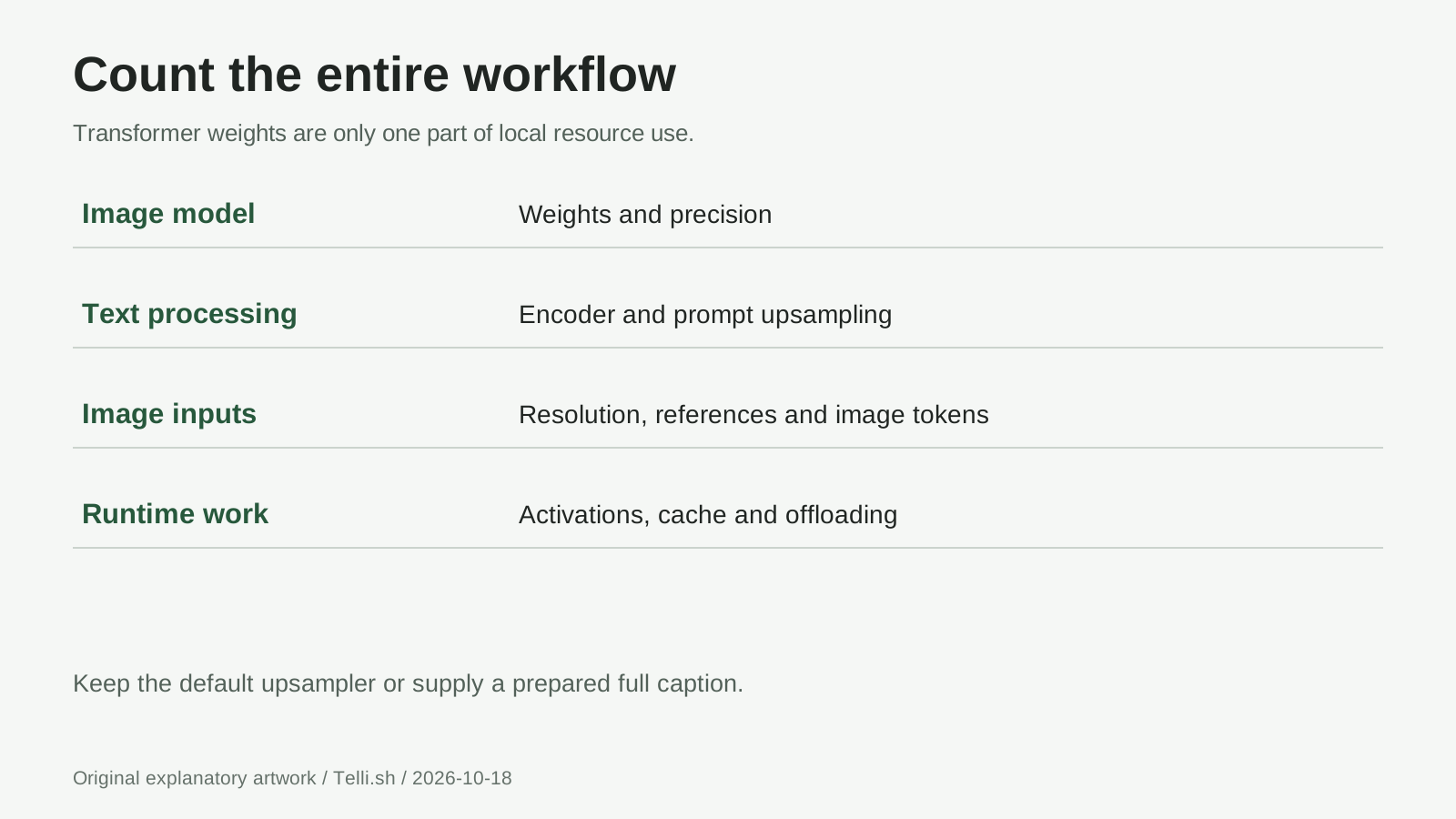
Original resource checklist, not a benchmark. Component sizes and runtime peaks vary by recipe.
On Windows with a supported NVIDIA GPU, begin with the current ComfyUI integration or the runtime recommended by BFL. Confirm the exact FLUX 3 workflow rather than loading a FLUX 2 template because its name looks similar. A successful model download does not prove that custom nodes, quantized kernels and text encoders are compatible.
On Linux, the reference repository and Diffusers integration guide provide developer-oriented routes. The reference installation below is for its documented CUDA 13 recipe, tested by the publisher on B200, not an 8GB-card recipe. Windows users need a compatible Linux/WSL environment for these Bash commands. Confirm driver compatibility and the full memory budget first.
- Install Git and Python 3.12, then prepare an isolated environment:
git clone https://github.com/black-forest-labs/flux-3-image-klein.git
cd flux-3-image-klein
python3.12 -m venv .venv
source .venv/bin/activate
python -m pip install -e . --extra-index-url https://download.pytorch.org/whl/cu130
- Accept the checkpoint terms in your own Hugging Face account, authenticate with
hf auth login, and download the documented distilled bundle. The reference README budgets about 52GB on disk for this model, upsampler and safety classifier; disk space is not VRAM.
hf download black-forest-labs/flux-3-image-klein --local-dir weights/flux-3-image-klein --exclude 'variants/*'
hf download black-forest-labs/flux-3-image-klein-pup --local-dir weights/pup
hf download Falconsai/nsfw_image_detection --local-dir weights/nsfw-classifier
- Run one generation with prompt upsampling left enabled, then inspect
out.pngand its accompanying settings JSON:
python scripts/cli.py "A plain ceramic mug on a pale green studio surface" --model distilled --out out.png --seed 7
- For a browser interface running on your machine, start
python scripts/app.py, openhttp://127.0.0.1:7860, choose Edit, attach your own source image and enter one requested change. Layout is the separate tab for drawing boxes. Keep the app loopback-only; do not add the public-share option for private material. Reference setup and demo
Add quantization or CPU offloading only after a baseline works. For an 8GB GPU, follow the separate ComfyUI files and instructions, not the full reference-code memory assumptions.
On a Mac, browser and API use remain straightforward options. Do not copy CUDA installation commands or NVIDIA speed figures into an Apple Silicon expectation. A local route requires a compatible Metal/MPS implementation and enough unified memory for all components; a generic library example using mps is not evidence that every quantized path works. Intel Macs are a separate hardware case, not another name for Apple Silicon.
A longer prompt is useful when it removes ambiguity
The reference implementation expands a short instruction into a full scene caption before image generation. This prompt upsampling is a separate language-model step, enabled by default in the reference CLI, demo and Python API. The current reference README also links a Diffusers pipeline that runs upsampling on each request. Preserve that behavior rather than treating a short bare prompt as equivalent. Prompt preparation
If the upsampler and image model cannot fit together, the reference recipe can run upsampling first and pass its prepared caption to generation. An external vision-language model can prepare the caption using the published system prompts as well. Only that already prepared caption belongs behind --no-pup; the flag is not a free memory optimization for an unexpanded one-line request. Upsampling and hosted pixel restoration are different features, so retaining one does not establish that another runtime includes the other.
Write the subject, background, lighting and intended change in ordinary language before adding specialist syntax. "Make it professional" leaves almost everything undecided. "Preserve the mug and handle, use a plain background, leave the right third clear" gives the system fewer conflicting objectives. More adjectives are not automatically better instructions.
For a second use case, create a family of article illustrations. Keep the palette and subject description constant while changing composition for a wide header and a square social image. Inspect whether the object is consistent between formats; do not assume one successful aspect ratio transfers perfectly to another.
For a third, compare packaging mockups internally. Use fictional labels or approved material and mark outputs as concepts. An attractive render does not establish manufacturability, accurate color reproduction or permission to use a photographed person's likeness. A production design review still has work to do after generation.
Price a finished asset, not only one successful request
The launch announcement lists API pricing starting at US$0.009 per 1K image, as of October 15. That starting unit is not a promise for every resolution or workflow. Check the current BFL pricing, account charges and request rules before estimating a campaign.
For budgeting, count attempts per accepted asset. If a task takes five revisions, the relevant unit is those five attempts plus review and finishing time. Local execution replaces some service charges with hardware, electricity, storage and maintenance; it does not remove the cost of inspecting results.
Open weights also do not mean unrestricted commercial rights. The FLUX Kommunity License distinguishes non-commercial use, qualifying commercial output generation and other commercial activities. Revenue thresholds, affiliates, model redistribution and training uses need their own check. Rights in an input photograph, trademark or person remain separate from the model license.
When an edit goes wrong, narrow the failure
| Symptom | First check | Useful next move |
|---|---|---|
| The composition ignores your request | Coordinate order and conflicting scene descriptions | Reduce to one reference and one region |
| Other parts of the image change | Raw model guidance versus hosted preservation features | Compare overlays and use a mask-based finishing tool where necessary |
| A local run exhausts memory | All loaded components, resolution and reference count | Return to the runtime's documented low-memory recipe |
| Text looks plausible but is wrong | Full-resolution lettering, not the thumbnail | Add exact text in a conventional editor |
| API response has no image file yet | Job state and result polling | Track the existing job instead of immediately resubmitting |
Questions worth answering before your second project
Is FLUX 3 Image Klein a Photoshop replacement?
It is a generation and editing model with several ways to run it, not a complete layer-based production application. It can help create or revise assets; selection tools, precise typography, color management, versioning and delivery may still belong in your editor.
Can I use Korean text and expect exact lettering?
Test your actual text at delivery size. The model card warns that rendered text can be inaccurate or distorted. A readable English demo is not proof of reliable Korean typesetting. Keep exact copy as editable text when possible.
Does local inference keep every part of the workflow offline?
Only if you have deliberately made it so. Initial downloads, remote prompt expansion, external nodes and telemetry can introduce network traffic. Inspect the complete workflow, not merely the location of the image transformer.
Which checkpoint should a beginner choose?
Use the documented distilled generation path first. The base checkpoint is aimed at adaptation and research. Once you have a known-good task, compare alternatives on the same inputs rather than changing the model, prompt and resolution together.
The useful breakthrough is a revision you can trust
Our view is that image AI becomes more useful when it gives people better control over revision, not just a larger gallery of surprises. FLUX 3 Image Klein is interesting because references, layouts and several deployment paths bring that control closer to ordinary work. The remaining job is to make the original, the requested change and the acceptance criteria visible.
Start with one image and one deliberate edit. A workflow that reliably produces an approved asset is a stronger result than a fast model that leaves you guessing what changed.
Sources and media
Checked October 18, 2026. Product capabilities and performance figures above come from the linked publishers; no local benchmark or paid generation is claimed. The three diagrams are original explanatory artwork. View BFL's official output gallery and the official interactive demo for product examples; those third-party images are not republished here.
- BFL announcement, October 15
- Checkpoint, limitations and local recipes
- Diffusers integration and workflow examples, October 15
- BFL API request schema
- FLUX Kommunity License
Keep your experiments reusable
Keep source links, prompts, settings and review notes together rather than saving only the final image. Telli.sh can help organize those research notes; it is not an image-generation integration. Create a Telli.sh account