Strata and Qwen3.8-Flash-Next: How a 180B-Class Model Runs on a Personal PC
A source-checked guide to Strata's architecture, Windows and Linux setup, the separate Apple Silicon Mac route, published benchmarks and local AI's limits.
A model with roughly 180 billion parameters running on a desktop with a 12 GB graphics card sounds like a contradiction. Strata makes that proposition plausible, but not by squeezing every parameter into the card. Its more interesting achievement is making different parts of a sparse model use different kinds of memory and compute without turning every generated token into a storage-transfer bottleneck.
The official model name is Qwen3.8-Flash-Next, not Qwen3.8-Next-Flash. Qwen lists a 125B-parameter core with 6B activated, an additional 51B n-gram embedding component, and 4B for multi-token prediction. The rounded 180B total describes stored components; it is not the amount of dense computation performed for every token. Qwen model card
The setup and performance details below refer to Strata revision fb58e0dbc8399662c0e47c76578c6e878b14f6cf. Benchmark figures are measurements published by the project; your hardware, prompt, context and model variant can produce different results.
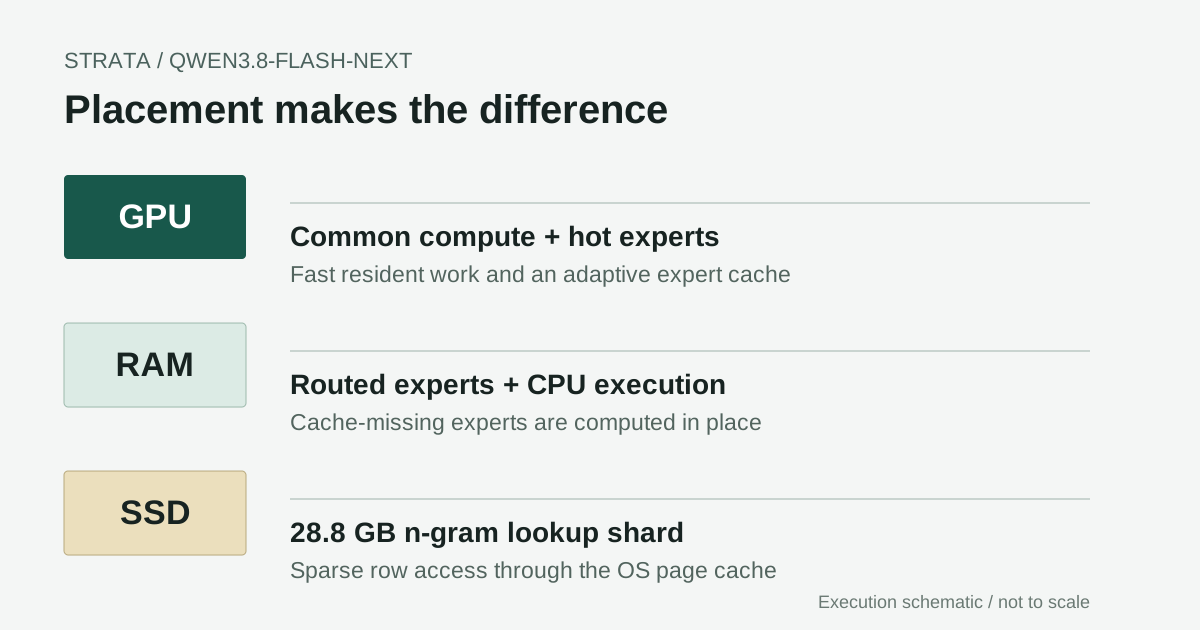
Original schematic based on the documented execution design. The tiers are not drawn to scale: download size, RAM usage and GPU residency are different quantities.
The breakthrough is placement, not a smaller model
There are three questions to ask about any unusually large local model: how much must be stored, how much is active for one token, and where the active work runs. A small active-parameter number answers only the second question. It does not remove the requirement to keep the other weights somewhere accessible.
Strata is a community-developed inference engine and local serving application in the Niko1221 repository. Its documented setup offers Windows and Linux installation, a local chat interface, compatible API surfaces and optional image input. It is a separate community project, not an official Qwen desktop product. Strata repository
The useful engineering shift is to stop treating a PC as a GPU with inadequate memory. A desktop also has system RAM, CPU vector units and an operating-system page cache. Those resources are slower than GPU memory for some operations, but not equally unsuitable for every operation. A large table lookup and a dense matrix multiplication do not need the same placement policy.
That distinction is what makes the headline interesting. The model remains large; the runtime changes how much of it needs the fastest memory at a particular moment. This opens a practical local-inference path without proving that every ordinary laptop can run it well.
Sparse architecture creates the opportunity
Qwen's architecture combines recurrent-style Gated DeltaNet blocks with Qwen Sparse Attention, routed experts and n-gram embeddings. The technical report explains why these components are designed for more efficient scaling. Strata did not invent those model components; it builds an execution strategy around their different access patterns. Qwen architecture report
The routing detail matters. Each of the 48 layers has 512 routed experts; 10 routed experts are activated per layer, alongside a shared expert. That means 24,576 routed experts are stored across the layers. It does not mean that just 10 of those 24,576 experts are used across the entire model for a token. Qwen architecture configuration
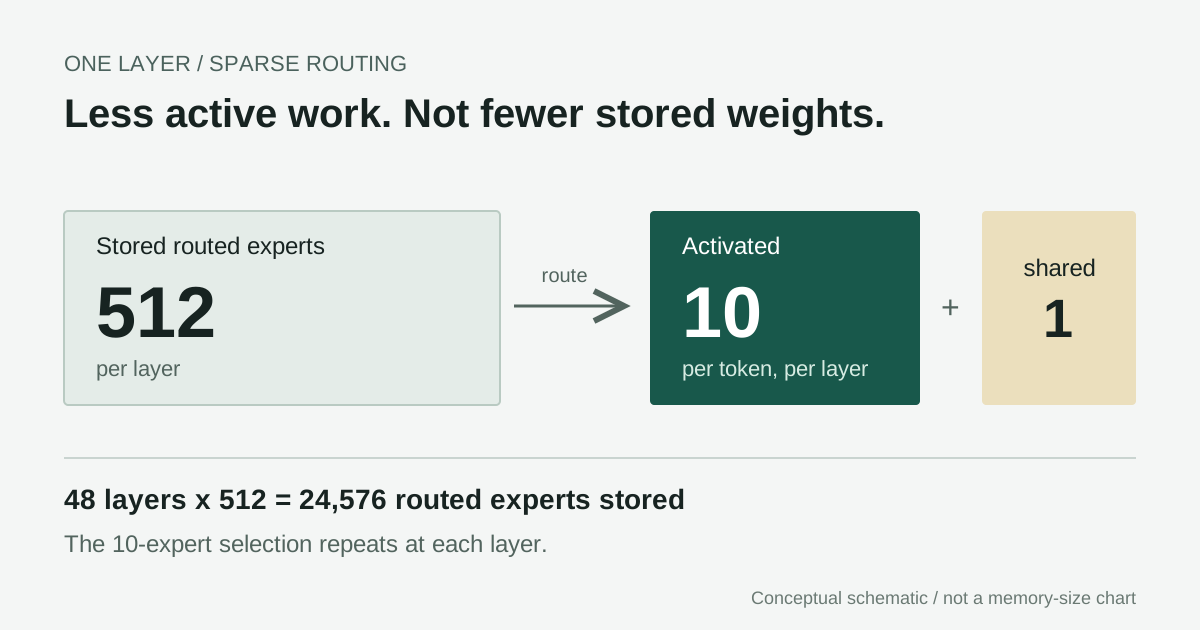
Selection reduces active work, not the stored inventory. This diagram represents one layer, not the entire 48-layer model.
Consider the consequence independently of any speed claim. If an expert is rarely selected, permanently occupying expensive accelerator memory with it may be a poor use of capacity. If another component is used on every step, repeatedly moving it is likely to be costly. A useful scheduler must distinguish these cases and then manage the misses it cannot avoid.
This is also why a sparse 180B-class model should not be compared to a dense 180B model solely by parameter count. Conversely, calling it a "6B model" hides storage, routing, context state and the cost of accessing distributed weights. Both shortcuts obscure the actual engineering problem.
GPU, RAM and SSD do different jobs
In the documented baseline, the GPU keeps common computation and a cache of frequently used routed experts. System RAM holds routed-expert weights, and the CPU computes experts missing from the GPU cache in place. A separate, memory-mapped n-gram table remains on SSD, with needed rows served through the operating-system cache. Strata execution overview
That CPU path is more significant than a generic "offload" label suggests. During decoding, a cache miss does not simply require copying every missing expert to the GPU before continuing. CPU and GPU work can overlap. The trade-off is that CPU capability and system-memory bandwidth now affect output speed directly.
The n-gram component has a different access pattern again. Looking up a few rows is not the same workload as scanning the whole table. Leaving a 28.8 GB quantized lookup shard on SSD can therefore be practical without implying that the entire model is read from disk for every generated token. A slow drive or heavy page-cache pressure can still hurt responsiveness.
Prefill also differs from decoding. Processing an initial prompt offers larger batches and opportunities to overlap expert transfers with other layer work. Generating the next token repeatedly is latency-sensitive. The project's detailed documentation describes distinct kernels, scheduling and cache behavior for these phases. A single throughput number cannot summarize both. Strata implementation details
My reading is that the innovation is a coordinated system, not a single compression trick. Quantization reduces the stored weight footprint; caching reduces repeated access to hot weights; CPU execution handles misses; sparse lookup avoids loading an enormous table wholesale. Remove any of these advantages and a modest-memory desktop becomes a much less convincing host.
Speculation saves work only when verification accepts it
Strata also uses the model's multi-token prediction component to propose short continuations and verify them with the target model. Instead of paying for a full target pass for each individual output token, a successful draft can let that pass accept multiple tokens. The repository describes drafts of up to three tokens in its MTP path. MTP design and implementation
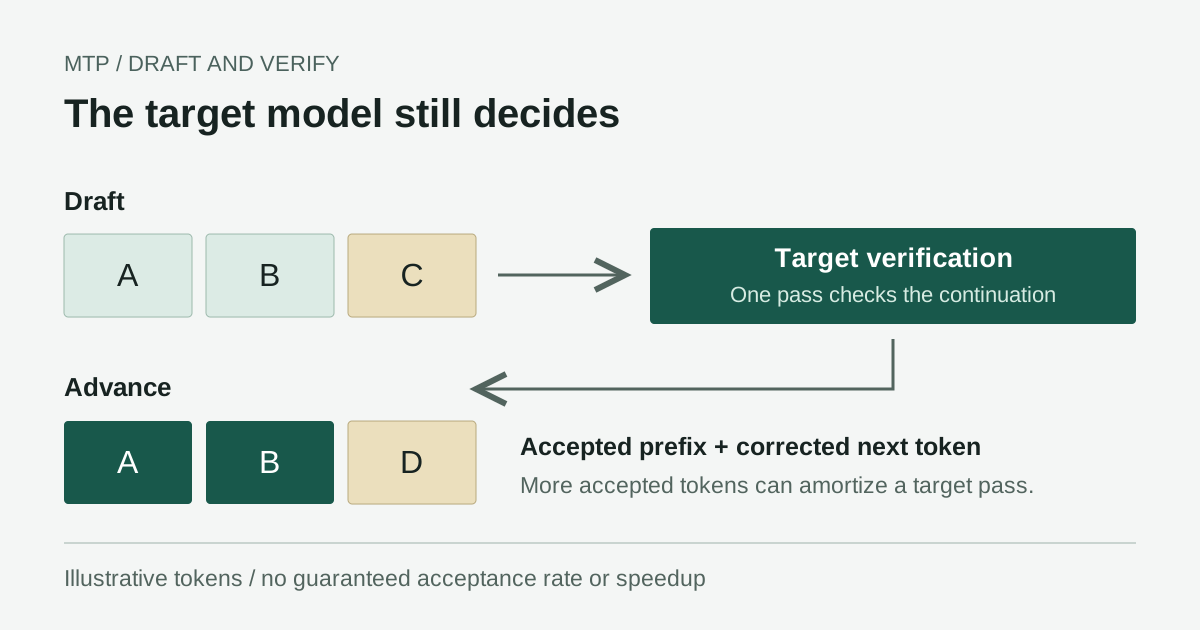
The example illustrates verification, not a guaranteed acceptance rate or a measured speedup.
This is conditional acceleration. Predictable code or repeated text can be easier to draft than an unfamiliar reasoning transition. Prompt wording, sampling, output length and model variant can change acceptance. A headline measured on one prompt should therefore not be assumed to describe a different language or task.
Verification targets the model actually being run. It does not undo information lost during quantization, and it does not establish equivalence to the original BF16 weights. Keeping those two issues separate is essential: speculative execution and reduced-precision model quality answer different questions.
A second distinction concerns cache reuse. An unchanged conversation prefix can save repeated work, but a warm follow-up and a fresh long prompt are not equivalent tests. Record whether the prefix was reused when comparing local results. The project documents message-boundary caching explicitly. Prefix-cache behavior
"12 GB GPU" does not mean a 12 GB installation
The published GGUF quantizations split the model into a main shard and a fixed 28.8 GB n-gram shard. File sizes below are decimal GB and are download sizes, not GPU-memory requirements. The optional vision projector adds about 0.91 GB; auxiliary downloads and temporary conversion files need additional space. ISTA-DASLab quantization files
| Variant | Average core bits/weight | Main shard | N-gram shard | Combined download |
|---|---|---|---|---|
| Q2_0 | 2.40 | 37.6 GB | 28.8 GB | 66.4 GB |
| IQ2_XS | 2.50 | 39.2 GB | 28.8 GB | 68.0 GB |
| IQ3_XXS | 3.00 | 47.0 GB | 28.8 GB | 75.8 GB |
| IQ3_S | 3.50 | 54.8 GB | 28.8 GB | 83.6 GB |
The format name alone is not a precise description of every tensor. The main shard uses mixed formats, while the n-gram shard uses IQ4_NL. "Two-bit model" is convenient shorthand but misleading if it suggests the whole download uses exactly two bits per parameter. Quantization methodology
For a first full-model trial, a 12 GB-or-larger supported GPU and 64 GB system RAM form a more credible planning baseline than the GPU headline alone. The repository also discusses reduced-RAM paths and a pruned Coder variant. Those are different configurations, not proof that a 32 GB machine provides the same full-model experience. Strata model selection
I would reserve 100-150 GB of free SSD space before experimenting. That is a conservative planning allowance, not a fixed vendor requirement: the selected quantization, MTP helper, optional vision files and build/conversion caches determine the real total. Some Q2 CPU optimization paths can require a substantial additional expert copy. Check the selected path rather than assuming one universal disk figure.
Before choosing hardware, establish the configuration you need: full or pruned model, short or long context, vision or text, and sustained throughput or occasional use. Those choices change where the bottleneck sits, and the benchmark below describes one specific system.
Install a pinned baseline before tuning
The documented standard path covers Windows 10/11 and Ubuntu 22.04/24.04, with supported NVIDIA and selected AMD GPUs. NVIDIA instructions specify driver 580 or newer. macOS and other source-build backends have separate requirements; the commands below are not a universal setup path. Official installation guide
On Windows, check before downloading
Install Git from its official distribution if it is missing. In PowerShell, clone the upstream repository and pin the revision reviewed here:
git clone https://github.com/Niko1221/Strata.git
cd Strata
git checkout fb58e0dbc8399662c0e47c76578c6e878b14f6cf
.\START-HERE.bat --check
The check avoids the large model download, but its launcher may bootstrap Python and a private environment. Setup check behavior
Read the hardware report, inspect the setup scripts and confirm free space before continuing. Then start the interactive setup:
.\START-HERE.bat
For an initial 64 GB trial, IQ2_XS is a reasonable starting point from the documented choices. Use 32,768 tokens of context, text only, and leave Experimental Speed Projection off. This smaller baseline makes failures easier to isolate than beginning with maximum context, vision and every optimization enabled.
Expect downloads and dependency installation, not a self-contained tiny executable. Depending on the GPU path, setup uses a prepared engine or build tooling. Review prompts involving drivers, compilers or administrator privileges; do not disable antivirus or browser protections to force an installation through. Obtain any required driver from the hardware vendor.
Subsequent launches use the same launcher. To revisit setup or avoid a port conflict:
.\START-HERE.bat --setup
.\START-HERE.bat --port 8081
On Ubuntu, use the documented setup script
git clone https://github.com/Niko1221/Strata.git
cd Strata
git checkout fb58e0dbc8399662c0e47c76578c6e878b14f6cf
./setup.sh
Choose the backend that matches the GPU. AMD's ROCm path and NVIDIA's CUDA path are not interchangeable. Treat package-manager or compiler installation prompts as changes to your own machine that require review. The pinned revision keeps this article reproducible; newer releases may improve support, so read their release notes before deliberately upgrading.
Confirm a response before connecting an agent
Once loading completes, open http://127.0.0.1:8080 in the local browser, or the chosen alternate port. Submit a short, non-sensitive question and confirm that an answer completes. Only then try a longer prompt, follow-up cache reuse and your intended language. Watch memory usage and server logs during the first load.
The documented compatible API includes GET /v1/models and POST /v1/chat/completions. Discover the served model identifier instead of copying a guessed alias into another client:
$base = "http://127.0.0.1:8080"
$models = Invoke-RestMethod "$base/v1/models"
$models.data | Select-Object id
Use the returned identifier when configuring a compatible client. A successful model-list request proves discovery, not generation quality; the completed chat response remains the meaningful first check. Keep file-writing or shell-executing agent tools disabled during this initial test.
If the card runs out of memory, first reduce context and turn off vision. If the process is killed or the machine swaps heavily, investigate system RAM rather than only VRAM. For missing runtime libraries, consult the backend-specific instructions rather than installing arbitrary DLLs. The project maintains symptom-based guidance. Strata troubleshooting
On Mac, separate model support from Strata support
Apple Silicon uses unified memory rather than the separate GPU-VRAM and system-RAM layout in the desktop benchmark. The pinned Strata installer does not document a supported macOS route; a Mac support request is not a completed port. Upstream Mac request
There are two different experiments a Mac user might mean. A community Strata-macOS fork preserves the interface and Python API with a Metal backend for smaller GGUF models; its documented checks use Qwen2.5, not the original Flash-Next configuration. It explicitly does not port Strata's CUDA expert streaming or MTP path. Do not treat that fork as a one-click installation of the model discussed here. Community fork and scope
For Qwen3.8-Flash-Next itself, a separate experimental path is a compatible llama.cpp Metal build with the publisher's split GGUF files. This is not Strata on Mac, and the Windows speed table below does not apply.
Build the separate Metal runtime
Use an Apple Silicon Mac, a native ARM64 terminal, Apple's command-line developer tools, Git and CMake. If CMake is absent, install it from its official distribution or your trusted package manager. The reviewed llama.cpp build documentation enables Metal by default on macOS. Pinning this engine also prevents a future moving branch from silently changing the example. llama.cpp Metal build instructions
git clone https://github.com/ggml-org/llama.cpp.git
cd llama.cpp
git checkout 71ad0590f4808b6202f9213d166913858c73b1bc
cmake -B build -DCMAKE_BUILD_TYPE=Release -DGGML_METAL=ON
cmake --build build --config Release -j 4
./build/bin/llama-cli --version
Download both IQ2_XS shards from the publisher's file list into one directory, keeping their original names. The second shard is needed even when its lookup rows remain on disk. Replace the example model path below with the actual first-shard path on your Mac:
./build/bin/llama-cli \
  -m "/path/to/IQ2_XS/Qwen3.8-Flash-Next-GSQ-RCO-IQ2_XS-00001-of-00002.gguf" \
  -lm mmap --lazy-mode on -ngl 99 \
  --ctx-size 4096 --n-predict 128 \
  -p "Explain sparse expert routing in three sentences."
The publisher documents the split-file loading and mmap/lazy flags; the reviewed engine exposes those switches. They keep the n-gram table available on demand rather than requiring full residency. They are llama.cpp options, not Strata launcher options. GGUF loading example
Capacity still matters: IQ2_XS has a 39.2 GB main shard before runtime state and macOS overhead. A 16 GB or 24 GB Mac is therefore not a credible full-residency baseline for this example; even 64 GB is a planning starting point, not a guaranteed pass. Check Activity Monitor's memory pressure and swap, start with 4K context, and stop if memory pressure remains high. Do not use kernel memory-limit changes to force a failed fit.
Confirm that logs select Metal and a coherent text-only answer completes before experimenting further. Then test longer prompts before adding speculative decoding or vision. This route does not cover Intel Macs, distributed multi-Mac execution or MLX conversions. No Mac throughput figure is available here; results depend on the exact chip, unified-memory size, engine, quantization and context.
Published speed is encouraging; first-token latency tells another story
For a reproducible comparison, the table uses the September 29, 2026, engine 0.1.26 benchmark rather than mixing later README headlines. Its machine was an RTX 5070 12 GB on PCIe 5.0 x16, a six-core Ryzen 5 7600, 64 GB DDR5-5200 and Windows 10. Tests used greedy generation, MTP on, images off and 256 generated tokens. Benchmark conditions
| Variant | Short-prompt decode, tokens/s | Long-prompt decode, tokens/s | Mid-prompt prefill, tokens/s | Long-prompt first token, seconds |
|---|---|---|---|---|
| Q2_0 | 92.97 | 73.73 | 2170.85 | 62.48 |
| IQ2_XS | 78.60 | 62.72 | 2092.02 | 74.85 |
| IQ3_XXS | 61.64 | 48.95 | 1745.16 | 81.71 |
| IQ3_S | 53.30 | 45.51 | 1624.07 | 90.72 |
Short, mid and long tiers contain 3,562, 31,566 and 128,478 prompt tokens, respectively. Each cell represents one run, not an average with a confidence interval. The IQ2_XS run uses the documented Swift 1.5 fine-tune, so it is not a controlled quantization-only comparison with the base model. Values are copied from the published result matrix. Machine-readable measurements
The Q2_0 long-prompt case takes 62.48 seconds before the first token, despite subsequent decoding at 73.73 tokens/s. For a user waiting on a new document, that first minute matters. For a continuing conversation with reusable context, the experience can be different. Neither should be hidden behind a maximum tokens-per-second claim.
These figures support a narrow, useful conclusion: on the author's specified desktop, selected quantized configurations achieved interactive generation speeds. They do not establish the same result on a lower-bandwidth machine, in Korean, with sampled reasoning, with vision enabled or under concurrent users. Tokens are not words, and language tokenization also complicates casual comparisons.
The model's native 262,144-token context and extended-context claims likewise do not guarantee that your chosen Strata configuration can serve that length comfortably. Runtime state, cache placement and available RAM still matter. Start small and increase context only when the workload justifies the extra latency and memory.
Quality and "speed" features need separate checks
The quantization publisher reports useful quality comparisons, but they are not end-to-end Strata benchmarks. For example, its LiveCodeBench v6 score is 87.43 for BF16 and 81.14 for Q2_0. That is a reason to test the tasks you care about, not a reason to declare every low-bit output unusable or every variant equivalent. Published quantization evaluation
Experimental Speed Projection deserves particular caution. The project describes an optional control-vector feature that changes model behavior; it is not simply an invisible arithmetic optimization. Leave it off for the baseline and disclose it if used in comparisons. A faster answer caused by changed content is not the same measurement as faster execution of equivalent work. Experimental feature details
For your own evaluation, record the repository commit, engine version, quantization and fine-tune, GPU and VRAM, CPU, RAM speed, SSD, driver, context setting and feature toggles. Then measure at least three fresh prompts and three cached follow-ups, reporting the median and range rather than selecting the best run. Keep prompt and output token counts alongside time to first token, decode rate and total elapsed time.
Pair speed checks with task-specific correctness checks: compile and test coding answers, compare document answers against the source, and verify language and terminology in multilingual output. Record failures, timeouts and memory exhaustion alongside successful runs.
Local execution changes control, not every security risk
Keep the default loopback address. Exposing a local model server to a LAN or the internet changes its threat model, and a compatible API is not automatically an authenticated service. Strata's security policy describes local binding and its security scope; it does not claim an independent external security audit. Strata security policy
Local generation can reduce dependence on a hosted inference provider, but privacy still depends on the complete workflow. Chat logs, client applications, web search, external tools and backups can send or retain data outside the model process. Review those paths before placing confidential documents in an agent. "Runs locally" is a useful architectural fact, not a complete privacy certification.
Licensing is similarly layered. Strata's code license does not replace the model's qwen-community-1.0 terms. Quantized weights do not erase obligations attached to the original model. Read the applicable licenses before redistribution or commercial deployment instead of assuming that an open repository means unrestricted use. Qwen model license
The implication is a different kind of personal AI computer
The strongest implication is not that cloud inference has become obsolete. A desktop still has limits in concurrent serving, first-token latency, energy use, maintenance and model quality. A hosted system can remain the better choice when availability or high request volume matters more than control over the execution environment.
What Strata suggests is that consumer inference may be limited as much by orchestration as by GPU capacity. Better use of CPU, RAM and sparse storage access can unlock a class of models that a simplistic all-on-GPU calculation would reject. System-memory bandwidth becomes part of the AI-computer specification, not an afterthought.
That is an inference from the architecture and published results, not a guarantee about every future model. It depends on models exposing sparse, cacheable or lookup-oriented components that a runtime can exploit. A dense model with different access patterns will not inherit the same advantage simply because it has a similar parameter count.
For an individual researcher or developer, the realistic next step is a bounded pilot: a pinned version, short context, a supported machine, a few representative tasks and an honest quality/latency record. The milestone is meaningful precisely when described that way. A very large model has become a plausible desktop workload through careful placement and verification, not through the disappearance of hardware constraints.
Keep the setup decisions with your research notes
When comparing local AI configurations, keep the source links, hardware details, observations and unresolved questions together. Telli.sh can help organize those notes and summaries without implying a built-in Strata integration. Create a Telli.sh account