Clip files a web page in your notes with the summary already written. Today it opens to every Telli.sh account.
Clip turns a web page into a Telli.sh note with an AI-written title and a one-line summary, not just a saved link. It shipped behind an admin flag, so two analytics counters never fired once. That gate is gone: free accounts get 30 saves and 10 AI summaries a day, and version 1.18 of the browser extension adds a right-click Save to Telli.sh that authenticates with a token which can do nothing but save clips.
There is a specific kind of bug that no test suite catches: the feature works, and nobody can reach it.
Clip has been complete for weeks. The modal saves through POST /v1/clip, fills the link card from the page's public meta tags, generates a one-line AI summary, invalidates the notes cache, and already knows the difference between "saved, but your summary quota ran out" and "this failed." All of it, working. And in PostHog, the two events it reports — clip_opened and clip_created — had never fired. Not once, not rarely. Zero.
The reason was three lines of frontend code. The sidebar button and the modal were both gated on user.is_master, and the button wore an amber Admin preview badge. The backend never gated on is_master at all — it enforces per-plan daily quotas, which is the right place for a limit. The feature was not unused. It was unreachable.
As of commit 64852ac on September 5, 2026, the gate is "is somebody signed in." This post is a product announcement, so it is product-centric by design: here is what Clip does, what it costs you, what the browser extension sends, and what it deliberately never reads.
TL;DR
- Clip is open to every signed-in account. The sidebar button lost its admin badge on September 5, 2026.
- Limits are daily quotas, not a gate. Free gets 30 saves and 10 AI summaries per UTC day; plus, pro and pro+ rise from there. The exact numbers are in the table below.
- Running out of summary quota does not lose your clip. The link and its metadata still save; only the summary is skipped, and the app says so.
- The browser extension can save the page you are on. "Save to Telli.sh" sits in the right-click menu on any http(s) page, and carries whatever you had selected. Version 1.18 is in Chrome Web Store review as this goes out — it is not installable yet.
- The extension authenticates with a token that can only save clips. It cannot read your notes, change your account, reach billing, or mint another token. You see the secret exactly once, and you can revoke it.
- The extension reads what the page already shows you. Title, canonical link, public
og:/twitter:meta, and your selection. Not the article body. Nothing leaves the browser without your click, and with no token saved the menu item does nothing at all.
What Clip actually does with a URL
Open Clip from the sidebar, paste a URL, and the modal calls POST /v1/clip/metadata. That endpoint fetches the page's HTML and reads only its public meta tags — og:title, og:description, og:image, og:site_name, article:author, article:published_time, and the <link rel="canonical">. Title, description, site and image come back filled in. If the fetch fails, the modal says so and lets you save the link anyway, with the hostname standing in for the site name.
Then you save, and Clip becomes a note. Not an attachment, not a bookmark in a separate list — a note with note_type="clip", sitting in All Notes with everything else, searchable, foldable, shareable and exportable by the same machinery. The source URL and the whole link card are preserved in the note's context, so the origin never gets lost behind the summary.
If there is anything to summarize — a description, your selected text, a note you pasted — a general summary runs and writes a one-line summary onto the note. That is the line you see under the title in the list.
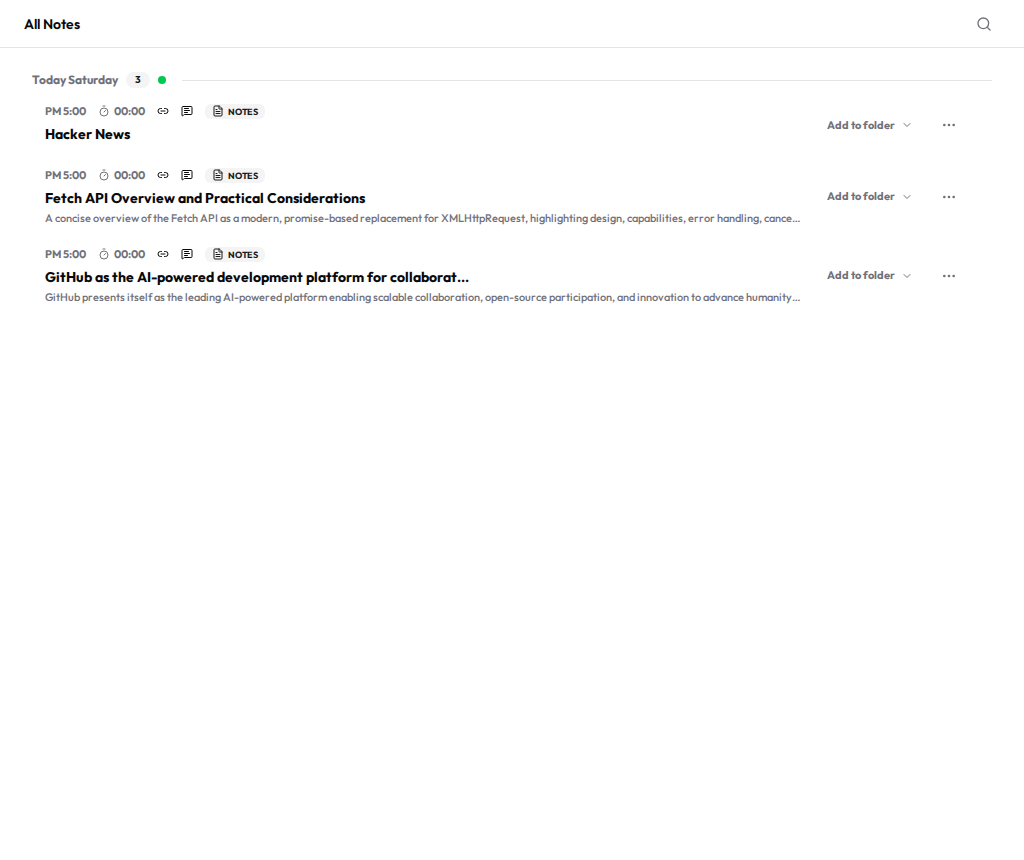
Three clips saved to a production account on September 5, 2026, sitting in All Notes next to ordinary notes. The two article clips carry an AI-written title and a one-line summary. The Hacker News front page publishes no description meta and had no selected text, so there was nothing to summarize — it kept its own title and no summary line. When Clip has nothing to work with, it says nothing rather than inventing something.
That last detail is the design rule underneath the whole feature, and it is worth stating on its own: AI output never replaces the original. The source URL, the site's own metadata and any text you supplied are kept; the summary is derived data layered on top. If the summary is wrong or useless, the thing you actually saved is still there.
The limits are a daily quota, and they are the only limit
There is no plan gate on Clip. There is an amount.
| Plan | Saves per day | AI summaries per day |
|---|---|---|
| Free | 30 | 10 |
| Plus | 150 | 50 |
| Pro | 500 | 150 |
| Pro+ | 2,000 | 500 |
Defaults from backend/config.py (CLIP_SCRAPE_DAILY_QUOTA_*, CLIP_SUMMARY_DAILY_QUOTA_*), read September 5, 2026.
Two quotas, not one, and they fail differently on purpose. Run out of saves and the save is refused — the server answers 403 with a structured clip_scrape_quota_exceeded code and a reset date. Run out of summaries and the clip still saves; only the summary step is skipped, and the app tells you exactly that: "Clip saved. Today's AI summary quota has been used."
That asymmetry is deliberate. Saving a link is cheap and it is the thing you actually wanted; summarizing is the expensive part. Losing a page you meant to keep because a language model was rate-limited would be an absurd trade, so we do not make it.
The counter is a plain UTC calendar date. At 00:00 UTC your day resets — the same instant for everyone, not a rolling 24-hour window you have to reason about.
"Save to Telli.sh" is one right-click away — once 1.18 is approved
The web modal assumes you have the URL on your clipboard. Usually you have the page open instead.
Telli.sh: Every Translator 1.18 adds a context-menu item, Save to Telli.sh, registered for both page and selection contexts on http://*/* and https://*/* — any web page, not just the 30-odd sites the extension translates on. Right-click anywhere on an article and it saves. Select three paragraphs first and those go with it, up to 2,000 characters.
Feedback rides the toolbar badge the extension already owns: … while saving, ✓ on success, ! on failure, each with an explanation in the toolbar tooltip. The failure messages are specific because the server's errors are. A 401 means the token was rejected and you need a new one. A 403 means one of two different things, and the extension tells them apart by looking for a *_quota_exceeded code in the response body — quota used up ("come back tomorrow") versus a token without clip permission ("this token cannot do that"). Same status code, opposite advice.
Version 1.18 was submitted to the Chrome Web Store and is in review as of September 5, 2026. You cannot install it yet. When it is approved it arrives as an automatic update, and the context menu appears with it.
A write-only key: the token can save clips and do nothing else
Scoped tokens limit the extension to the account action it needs: saving clips.
The lazy version of "connect the extension to your account" is to have you paste your session token into the extension. That token opens everything: it deletes notes, exports your data, touches billing. You would be handing over full account credentials in exchange for a bookmark button, and it would sit in extension storage forever.
So Clip does not use that token. Telli.sh issues scoped API tokens, modelled on Cloudflare's: a token carries a list of policies rather than standing in for you, and each policy is an effect (allow or deny, with deny winning), a set of resources, and a set of permission groups. Today there is exactly one group, clip_write, expanding to the permissions clip:write and clip:metadata, and exactly one resource shape, {"user": "self"} — your own data, nothing else.
We call it a write-only key, because that is the shape of it: it can put things into your account and take nothing out.
The security invariant that makes this real is one sentence in the design doc: an API token never passes through the session-authentication path. Session cookies and access JWTs resolve through get_current_user_optional, which reaches every endpoint in the product. API tokens resolve only through the require_permission(...) dependency, and if the permission that dependency asks for is not in the token, the answer is 403. Break that separation and a scoped token quietly becomes a full-account token again, which is why it is stated as the design's most important rule. There is a helpful second-order effect: an API token is an opaque string, so JWT decoding always fails on it. If one ever leaked into a session code path by mistake, it would authenticate as nobody.
The token API itself is closed to tokens. Creating, listing and revoking tokens requires a real signed-in session — a token cannot mint another token.
Creating one takes about fifteen seconds
Go to Settings → API tokens. Before you have one, the page is honest about what the thing you are about to create can do.
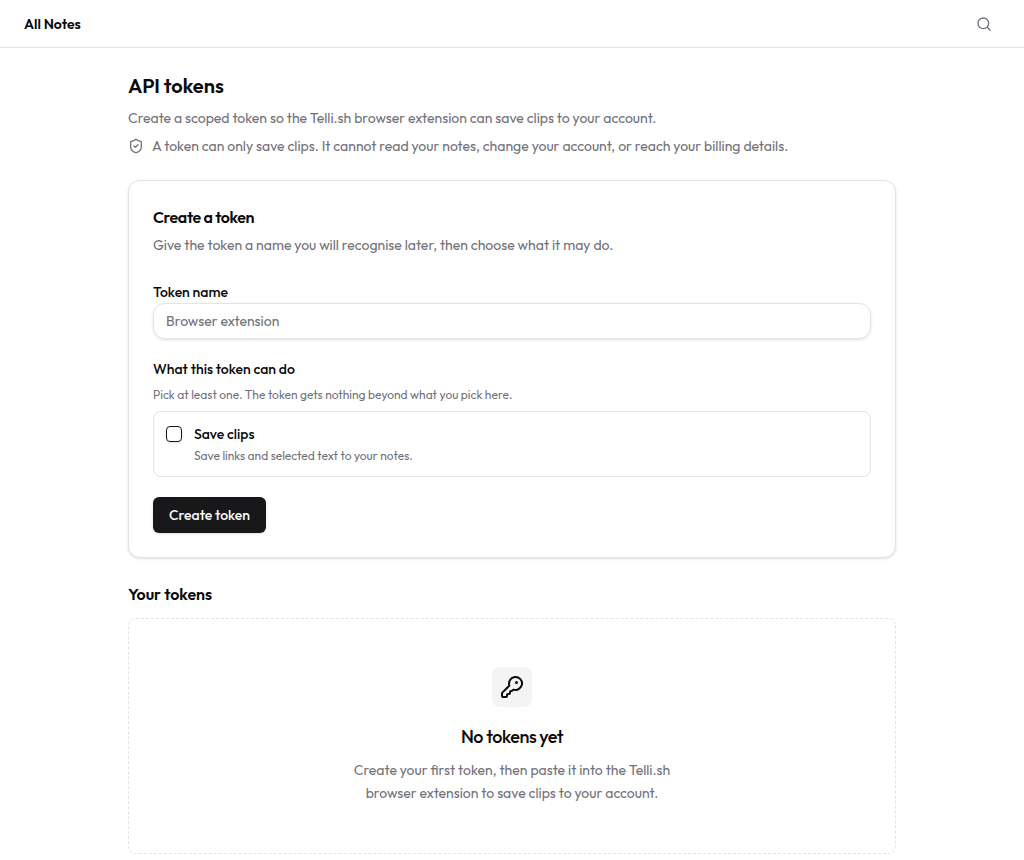
The API tokens page at /settings/tokens before any token exists, captured September 5, 2026. The scope line sits above the form, not buried in a help article: "A token can only save clips. It cannot read your notes, change your account, or reach your billing details." One permission is on offer, because one permission is all that exists.
Name it, tick Save clips, create. The full secret appears once, in a panel that says so in red.
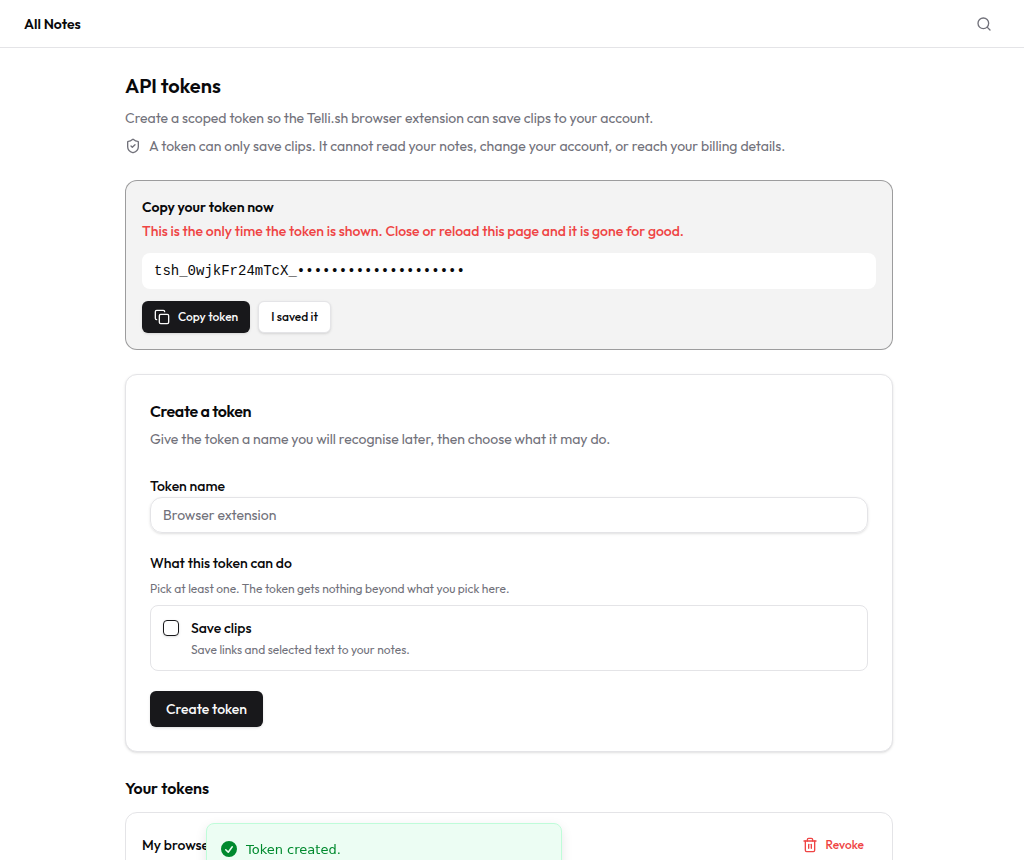
The one-time secret panel. The token in this screenshot is masked, and the account it belonged to has been deleted. A token is tsh_<12-character prefix>_<43-character secret> — 256 bits of base64url randomness. Only the prefix is stored in plaintext, as the lookup key; the secret is stored as a bcrypt hash and is not recoverable by us or by you. Close this panel and it is gone for good.
Afterwards the list shows the prefix and nothing more. That is enough to tell two tokens apart and useless to anyone who steals the screenshot.
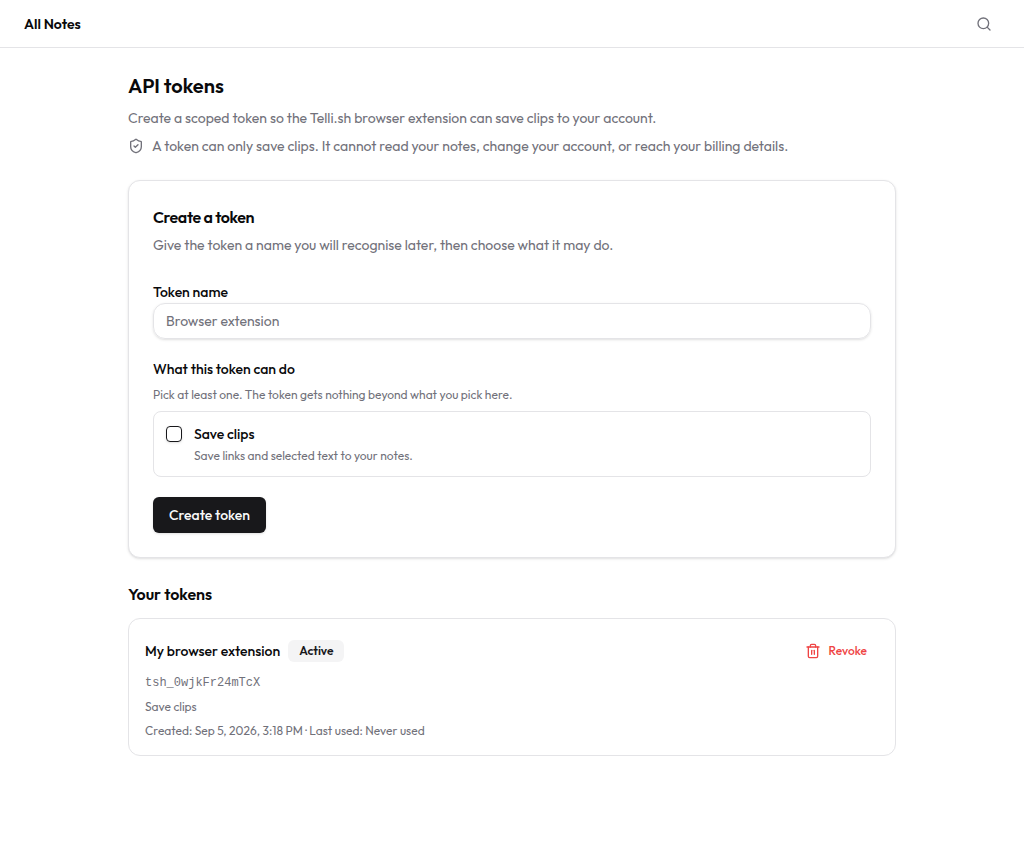
The same token after the secret panel is dismissed: prefix, scope, creation time, last-used time, and Revoke. last_used_at is written at most once an hour rather than on every request, so it tells you roughly when a token was last active without turning every clip into an extra database write. Revoking sets revoked_at — immediate, permanent, and not a hard delete, so the record of what existed survives.
Connecting the extension: five steps
- Sign in at telli.sh and open Settings → API tokens (
/settings/tokens). - Enter a name you will recognise later — "Browser extension" is the placeholder for a reason — tick Save clips, and press Create token.
- Press Copy token while the one-time panel is open. There is no second chance; if you lose it, revoke that token and make another.
- Open the extension's settings page, find the Telli.sh Clip section, paste the token into Telli.sh Clip token, and press Connect.
- Right-click any web page and choose Save to Telli.sh. The toolbar badge flashes
✓and the clip is in All Notes.
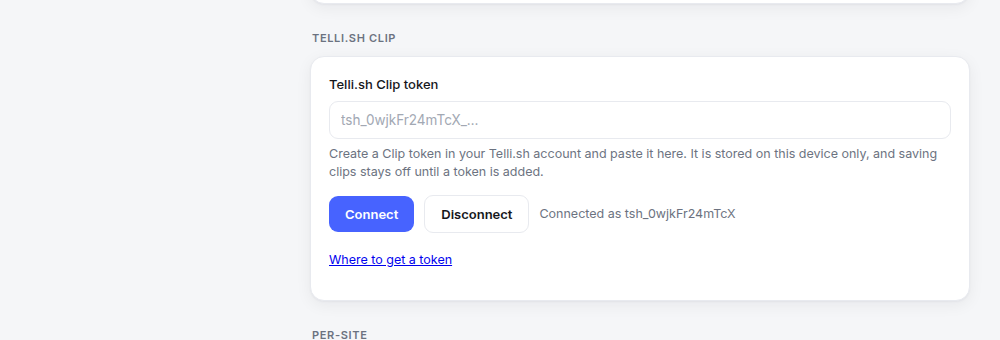
The extension after step 4, captured September 5, 2026. The status line shows only the prefix — the extension displays what the token list displays. The helper text states the storage model plainly: "It is stored on this device only, and saving clips stays off until a token is added." No token, no clipping; the menu item exists but does nothing.
What the extension reads, exactly
When you choose Save to Telli.sh, the extension reads these page details:
When you click Save to Telli.sh, the extension injects one function into the page and reads eight fields: og:title or twitter:title falling back to document.title; og:description, twitter:description or description; the canonical link; og:image or twitter:image; og:site_name or application-name; article:author or author; article:published_time; and window.getSelection().
Read that list again for what is missing. There is no document.body. There is no article-text extraction, no readability pass, no DOM walk. Seven of the eight fields are metadata the page publishes for Google and for social-media previews — data written to be read by strangers. The eighth is the text you highlighted yourself.
Four more properties hold in code:
Nothing is sent without a click. The metadata function runs inside the context-menu handler. There is no background alarm, no page-load hook, no "collect as you browse" mode.
With no token, nothing happens at all. The handler checks for a saved Telli.sh token first and stops there if there is none, showing a badge that tells you to connect one. The menu item is inert on a fresh install.
Your session cookie cannot be borrowed. The extension holds a host permission for telli.sh, which normally means its fetch calls carry your logged-in cookies automatically — and the cookie would authenticate ahead of the token, granting full account access instead of the clip-only scope we designed. So the request is sent with credentials: 'omit'. The token is the only credential in play, and the scope you picked is the scope that applies. That single option is what makes the write-only key actually write-only.
Where the extension has no page access, it sends less, not more. Script injection needs host access, which the extension holds only for the sites declared in its manifest. Everywhere else the injection simply fails and the clip falls back to the URL alone; the server then fills the card from the page's public meta tags. The failure mode is "less data," never "ask for broader permissions."
And when the server fetches a URL, it fetches like a visitor, not like a crawler. It refuses localhost, any .local host, and any hostname that resolves to a private, loopback, link-local, multicast, reserved or unspecified IP address — resolved and checked, not merely pattern-matched, so a public DNS name pointing at 10.0.0.1 is rejected too. It follows at most 3 redirects and reads at most 256 KB of HTML. It does not log in, does not carry your cookies, and does not attempt anything a signed-out visitor could not fetch. Paywalled and private pages stay paywalled and private — save your own selected text from them instead.
Extension clips are recorded by the server rather than the web app. The clip_created event includes the source app and type, whether a selection or summary was included, and the plan; it excludes the URL, title, and selected text.
The bottom line: a notes app that only holds what you said is half a memory
Telli.sh started as a place for spoken work — record a meeting, transcribe it in the language it was actually spoken in, translate it, summarize it, keep all four layers in one note. That covers what you said.
It does not cover what you read, which is most of what you know. The tab you kept open for three days. The documentation page you will need again in a month. The comment thread with the actual answer in it. Those live in a browser history you will never search and a bookmark bar you stopped opening in 2019.
Clip is the other half arriving: the same note, the same search, the same folders, the same export — reached by a right-click instead of a microphone. The direction is a single personal database where your words and your sources sit next to each other, and this is the first collection surface pointed at the web.
The gate is gone. The counters have somewhere to go now.
Try it: sign in, open Clip in the sidebar, and paste the URL of something you have been meaning to keep. Free accounts get 30 saves and 10 AI summaries a day. When extension 1.18 clears Chrome Web Store review, the same thing becomes a right-click on any page you are already reading.
Open Telli.sh and save your first clip
Sources
- Telli.sh repository, commit
64852ac, September 5, 2026 — "feat(clip): open Clip to every signed-in user", which removed theis_mastergate and the Admin preview badge, and recorded thatclip_createdandclip_openedhad never fired in PostHog. - Telli.sh repository,
backend/config.py—CLIP_SCRAPE_DAILY_QUOTA_*andCLIP_SUMMARY_DAILY_QUOTA_*defaults, read September 5, 2026. - Telli.sh repository,
docs/SUPERAPP_BASELINE.md— the Clip baseline and safety rules: no login or paywall bypass, no bulk scraping, summarization limited to user-supplied text and public metadata, and the rule that AI output never replaces the original. - Telli.sh repository,
docs/design/API_TOKEN_RBAC_DESIGN.md— the scoped-token design: policy structure, thetsh_<prefix>_<secret>format, bcrypt storage, and the invariant that API tokens never resolve through the session authentication path. - Telli.sh repository,
extension/extension/background.js—readClipMetadataFromPage,collectClipMetadataandsaveClip, September 5, 2026: the eight metadata fields, the click-only trigger, the no-token early return, andcredentials: 'omit'. - Telli.sh: Every Translator on the Chrome Web Store — the listing that version 1.18 was submitted to; in review as of September 5, 2026.
- Telli.sh: Every Translator product page — the supported sites, display modes, providers and privacy commitments in one place.
- The extension popup was answering the wrong question. In 1.16 it draws the page you are on instead., September 4, 2026 — the previous extension release, for the settings page the Clip token field lives on.