Zoom wants the meeting's context to survive the meeting
Zoom's Unified Context Layer connects conversations with documents and business systems. The opportunity is less reconstruction after a call; the difficult part is knowing which context can justify the next action.

Zoom wordmark via Wikimedia Commons, classified there as PD-textlogo. Used for company identification; this is not a screenshot of the Unified Context Layer. Proportionally resized with neutral padding; no endorsement implied.

The meeting ends with a familiar promise: somebody will send the summary, update the customer record and follow up on the open question. Then the participants return to different applications. A qualification mentioned on the call disappears from the task description. A revised deadline survives in chat but not in the document. By the next meeting, someone is assembling the same history again.
Zoom's October 20 Zoomtopia announcement addresses that gap with a Unified Context Layer, linking conversations to relevant documents, data and connected applications. The company also announced agents, APIs and a staggered set of meeting features. The interesting change is the attempt to carry a conversation into subsequent work, rather than merely produce a better summary of the conversation. Zoomtopia announcement.
Our take: a shared context layer could make workplace AI useful at the point where handoffs currently lose detail. Its credibility will depend on whether it preserves sources, permissions and changes over time. A larger collection of information becomes valuable when a person can tell why a proposed next step follows from it.
A communications company is moving toward the work around the call
Zoom is familiar as a place to meet, but the announcement spans Workplace collaboration, customer experience and developer tools. That wider position is relevant to this release. A customer conversation can move from a video meeting to a phone call, a chat message and a business record. Each surface carries a different piece of the relationship, while the person handling the next interaction needs a coherent view.
The company's more detailed explanation distinguishes dynamic conversation information from documented knowledge and systems of record. A conversation can contain the latest development; a document can contain the policy that constrains what happens next. Bringing those together is a different ambition from keeping a collection of transcripts. It makes context an input to work in other applications. Zoom's context-layer explanation.
Think of a project lead preparing a revised customer proposal. The formal specification still describes the original scope. Yesterday's call contains an approved reduction in scope, while a later message asks a question about pricing. A useful assistant should help the lead see those relationships. Simply combining all three sources into confident prose could conceal that the price remains unresolved.
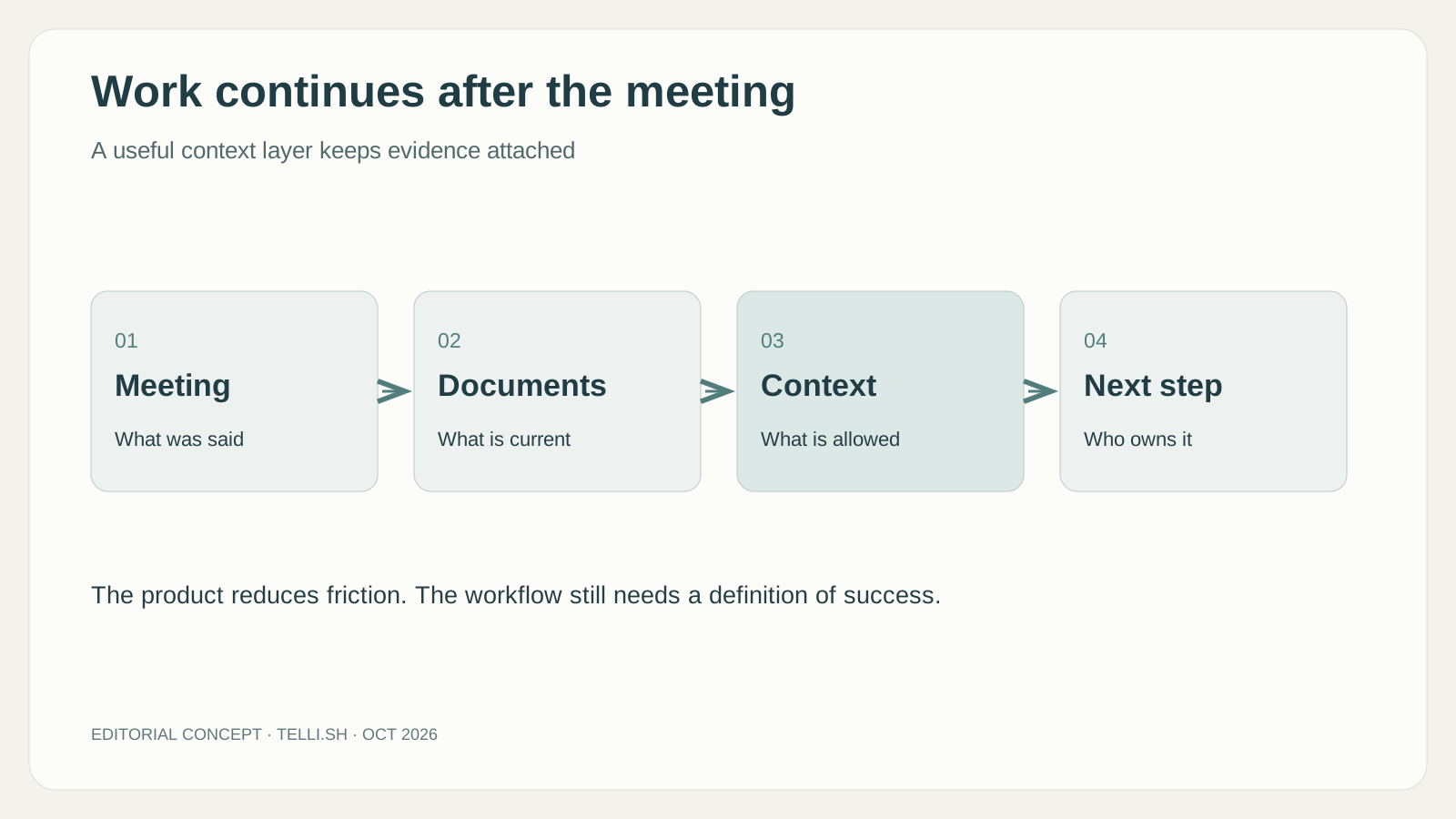
Original editorial infographic. The sequence explains a workflow, not a technical specification of Zoom's system.
The release calendar is part of the story
Zoom's announcement combines available products with future plans. It lists ZoomMate Agent Teams, portfolio MCP servers and Search & Ask APIs as available now. My Notes Workflows is expected in October, enriched notes in November, and “Follow the meeting” and a refreshed Zoom Chat in December. A Live Meeting AI Agent is expected in the first quarter of 2027. These dates are the company's stated plans as of October 20, not confirmation that every feature is usable in every account today. Release windows.
That distinction changes how readers should interpret a demonstration. The combined vision may look like one finished experience even while its parts arrive on different schedules. A team evaluating the product this week should identify the currently available step that solves its problem, then treat later components as possible extensions. Building an operating process around an expected feature creates a dependency on a promise rather than a working capability.
It also gives the announcement a more useful shape than a list of launches. The available APIs suggest that conversation context can become infrastructure for other tools. Enriched notes could make specific moments easier to inspect when they arrive. Workflows could shorten the path from a summary to an update in another system. These pieces are related, but each has its own point of usefulness and its own conditions of access.
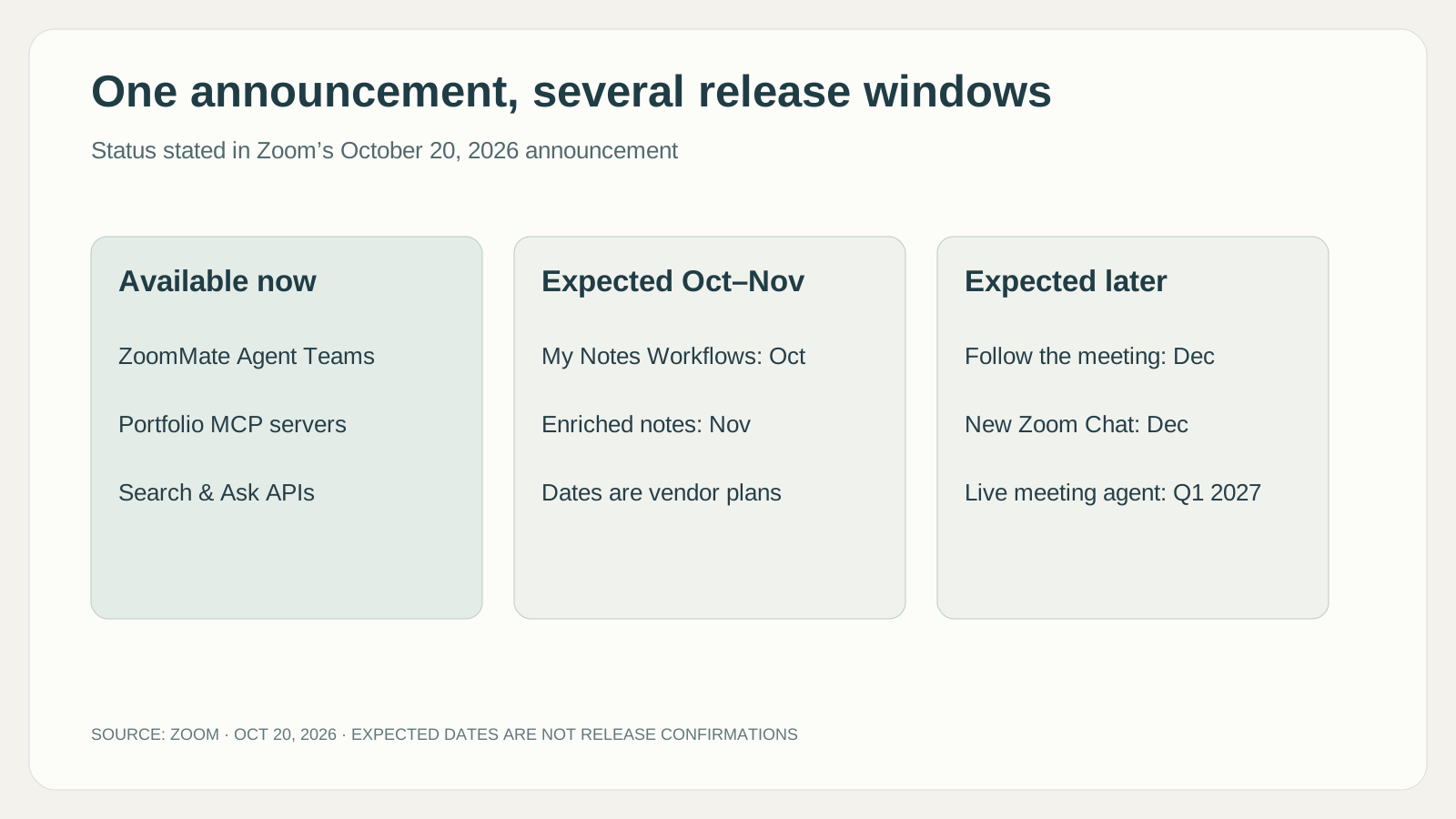
Original infographic based on Zoom's October 20 announcement. Expected dates remain subject to change; account eligibility and rollout should be checked separately.
Teams and Meet make the existing workplace part of the comparison
Zoom is entering a contest in which the destination of the meeting record matters as much as the record itself. Microsoft's Facilitator documentation describes collaborative notes covering decisions and open questions, responses in meeting chat and document creation from the discussion and shared material. Google's Take notes for me guide places the resulting notes in Google Docs and connects them with the Calendar event. These are different product paths toward making a conversation useful afterward, rather than proof that any one assistant understands meetings best.
For a company already coordinating projects through Microsoft documents and Teams chat, a note that stays close to those shared surfaces may require less organizational adjustment. A team that plans its work in Google Calendar and Docs may value the same continuity in that environment. Zoom's announcement invites a different question: can its context layer connect the conversation to enough of the surrounding work to justify the integration? Familiarity, permissions and where colleagues actually return to work can outweigh an impressive summary in a separate demonstration.
| Product direction | Documented point of continuity | A useful evaluation question |
|---|---|---|
| Teams Facilitator | Collaborative meeting notes, chat and generated documents | Can participants correct the shared record where they already work? |
| Google Meet notes | A Google document linked to the Calendar event | Does the document reach the people responsible for the follow-up? |
| Zoom's announced context layer | Conversations, documents and connected work | Which sources and downstream tools are supported for this account? |
The comparison also exposes limits that broad “AI meeting notes” labels can conceal. Google's guide says its note-taking supports one language at a time rather than simultaneous multilingual meetings. For a team that switches between languages during discussion, this affects whether the feature fits the meeting at all. An international team should bring its actual language pattern to the evaluation instead of treating the presence of a language menu as evidence of equivalent behavior.
Shared memory needs an editing life after the call
Cross-product context raises a less visible issue: the record will keep changing after people leave. A participant can correct an assigned task, a customer can revise a requirement and a linked document can supersede an earlier decision. A useful context service should make those changes understandable to the next reader. Otherwise, generating more summaries simply creates more places in which the old interpretation can survive.
Consider a project whose delivery date changes during a follow-up conversation. A colleague reading the first meeting note should be able to discover that the commitment changed, while still understanding what was agreed at the time. Erasing the original loses the history; repeatedly presenting it as current loses the update. This is an editorial expectation for connected context, not a confirmed description of a particular Zoom versioning feature. It helps turn a vague promise of organizational memory into something a demonstration can show.
Data handling is another part of that product choice. Zoom's AI Companion data guidance says communications content is not used to train Zoom's or third-party AI models. That addresses training use; it does not by itself answer how long an organization's records remain available, who can see a generated note or what happens after a connected source changes permissions. Those are separate questions about the service and the customer's configuration.
The practical attraction is a shared record that remains useful without someone constantly reconstructing it. The concern is that a convenient assistant can spread an outdated interpretation farther than a meeting transcript ever traveled. The strongest implementation would help people see the source, correct the interpretation and carry the correction into subsequent work. That is how richer context can improve coordination rather than merely increase the volume of available text.
The useful unit is the handoff that no longer needs reconstruction
A meeting summary is readable output. A successful handoff is a change in what the next person has to do. If an account manager can prepare for a call without reopening six threads, the system has removed real work. If the same manager must verify every sentence across six threads, a fluent summary may have improved presentation without reducing the underlying burden.
Consider an illustrative customer onboarding workflow. During a call, the customer asks for a revised training date and explains that one department cannot attend. An assistant could prepare a follow-up that carries both details into the scheduling task. The important gain is preserving the reason for the change, so the scheduler does not solve the date problem while reintroducing the attendance problem.
A product team has a different version. Someone shares a chart showing that a proposed feature is used mainly by one customer segment. Later, a task appears saying “simplify onboarding.” Without the chart and discussion, a developer may interpret that task too broadly. Linking the relevant moment to the task could make the decision easier to understand and challenge. The benefit would come from retained reasoning, not simply from faster task creation.
A service handoff offers a third case. A customer has already described a failed workaround on the phone. The next agent should see that history and avoid asking them to repeat it. But the agent also needs to know whether the workaround was attempted, merely suggested or subsequently ruled out. A shared memory is only helpful when those distinctions remain visible.
More context can also carry more contradictions
Workplace information rarely agrees perfectly. A document may be authoritative but old. A recent conversation may be current but tentative. A customer might use an informal phrase that conflicts with the product name in the CRM. An assistant that retrieves more material can find the missing detail, but it can also find additional ways to construct a plausible misunderstanding.
Freshness alone is an incomplete rule. The newest message might be a question, while an older document contains a still-valid approval. Authority alone is incomplete too: a policy can be authoritative while an exception has been explicitly granted for this case. Context systems therefore need to help people inspect relationships between evidence, rather than hide those relationships behind a single confident answer.
This matters most when the next step changes something. Drafting a meeting recap leaves room for review. Sending a customer commitment or changing a business record can make an interpretation operational. The permission to read a conversation does not automatically define permission to act on every statement inside it. That is a workflow design question, whatever product supplies the context.
The strongest version of this product direction would make uncertainty usable. It might help a person see that a deadline was proposed but not accepted, or that two sources conflict. Those are editorial expectations for a good experience, not claims that Zoom already resolves every such case. The distinction matters because detecting an unresolved issue can be more valuable than filling a blank with a smooth answer.
Enriched notes could make the evidence easier to revisit
Corrections need a place in this memory as well. If someone notices that a recap assigned the wrong owner, editing one displayed paragraph may not be enough if later workflows continue using the earlier interpretation. A team evaluating a context service should ask how a corrected decision reaches subsequent answers and proposed work. It should also preserve the difference between correcting a transcription error and changing a decision after the meeting. The first repairs the record; the second adds a new event to the history. Treating both as an invisible overwrite would make the shared context harder to trust.
Among the planned features, enriched notes deserves attention because it links shared screens, slides, charts and meeting chat with relevant transcript moments. That is a more specific promise than “better notes.” A visual reference can explain what a speaker meant by “this number,” which a transcript alone may leave ambiguous. Zoom lists the feature as expected in November. Enriched-notes announcement.
Imagine a forecast review in which participants compare two scenarios on screen. A summary that says “the team preferred the conservative option” leaves an obvious follow-up question: which option was that? If the relevant visual moment remains available, a reviewer has a path back to the evidence. That could reduce the work of interpreting references that made sense only to people watching the screen.
The opportunity should not be confused with automatic proof. A slide may contain an outdated assumption. A transcript may attribute the wrong speaker. A screenshot may show an option that was rejected a minute later. Linking these materials improves inspectability; it does not settle the business meaning by itself. The useful product experience lets a reviewer move between the concise interpretation and the underlying moment without losing their place.
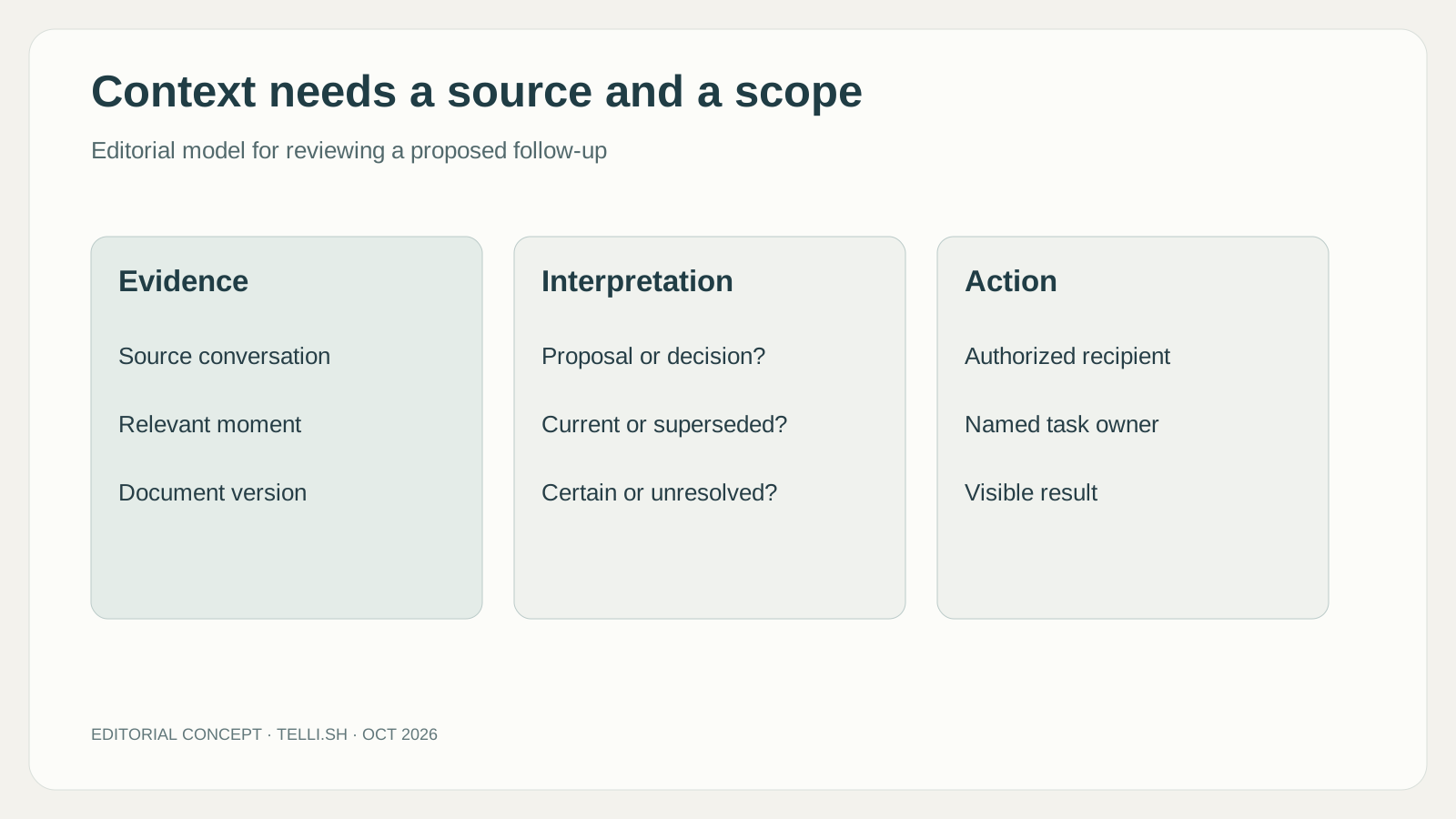
Original editorial model. These are questions to ask of a context-based workflow, not a claim about specific Zoom controls.
Context outside the Zoom client changes the integration decision
The announced Search & Ask APIs and MCP servers also point toward a less visible change: a team may use Zoom-derived context from an AI environment it already works in. The attraction is continuity. A developer or account manager need not necessarily open another interface just to recover what was discussed. The same context could support preparation, drafting and follow-up in different tools. Developer capabilities in the announcement.
That makes integration quality a product issue. A useful answer in one interface should retain enough source information to be checked in another. A permission change should not become irrelevant simply because the information crossed a tool boundary. The receiving application needs to understand whether it is showing a source excerpt, an AI interpretation or a proposed action. Otherwise, portability can spread ambiguity as efficiently as it spreads context.
There is an organizational choice here as well. Connecting more systems can make a central context service more useful, while also making it harder to replace. A team should understand what it can export, which records remain in their original systems and how it will continue working if one integration is unavailable. Those questions help assess the operating relationship, without assuming that an integrated product is either inherently liberating or inherently restrictive.
Completion needs a definition the organization can inspect
The right pilot could begin with one recurring handoff: meeting to follow-up email, customer call to account update, or review discussion to an assigned task. Define the intended result and compare the work needed to reach it. Count corrections, missing qualifications and the time spent finding the source. These are proposed measures for an evaluation, not performance figures from a test of Zoom's new layer.
Keep the task owner in the comparison. A draft may look complete to the meeting organizer while leaving the recipient with unresolved questions. Ask whether the recipient understands the request, can inspect the relevant evidence and knows which decision remains theirs. A small improvement at that boundary can be more valuable than generating a large number of additional notes.
The longer-term promise is a workplace that remembers why work was assigned, not just what text appeared in a summary. That could make AI useful between meetings, where information now gets copied, shortened and quietly changed. It could also create an overly confident institutional memory if corrections, ownership and sources disappear. The difference will be visible in ordinary follow-ups before it appears in a grand productivity claim.
Zoom has identified a real place for a communications platform to expand: the unfinished work that surrounds a conversation. The announcement offers both working entry points and future components. Readers should evaluate those stages separately while keeping the larger question in view. Does the next person receive a better understanding of the work, or merely another polished message about it?
Sources
-
Zoomtopia product announcement and release windows, October 20, 2026.
-
Unified Context Layer, My Notes and ZoomMate explanation, October 20, 2026.
-
Microsoft Teams Facilitator, checked October 21, 2026.
-
Google Meet note-taking and language limits, checked October 21, 2026.
-
Zoom AI Companion data handling, checked October 21, 2026.
Keep your own review alongside the source
For readers who want a separate workspace for authorized recordings and reviewed notes, Telli.sh is one option. Start with an audio note.