Windows wants to become the operating system for AI agents
Microsoft's hybrid AI plan separates local context, model routing and agent containment. What is available, what is still preview, and how to evaluate a safer Windows setup.
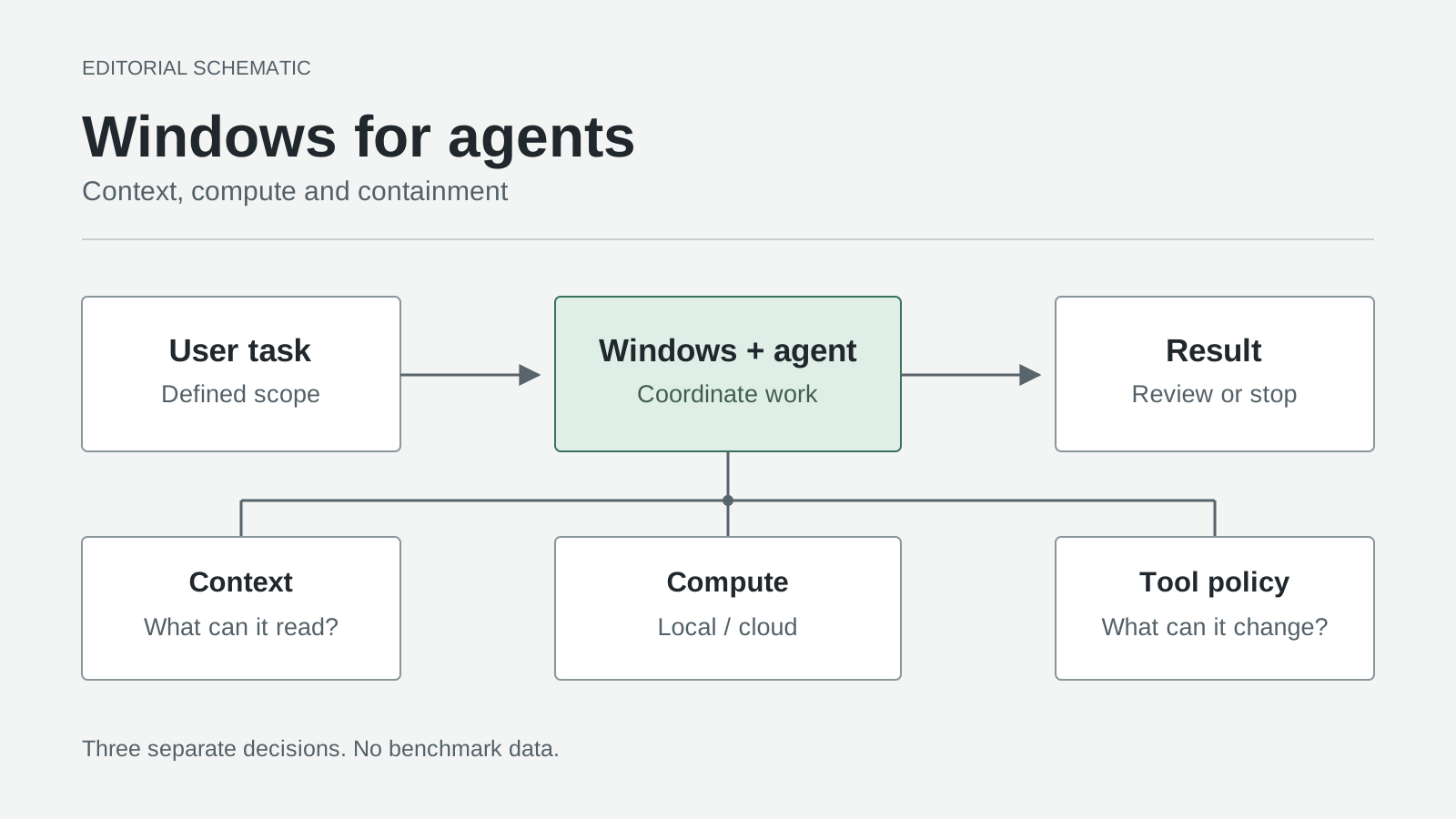
Original editorial schematic, not an official screenshot or measured result. Context access, inference placement and execution permissions are separate decisions.
An AI assistant that answers a question needs a conversation. An agent that reorganizes a project needs something more consequential: access to your computer.
Microsoft's October 7, 2026 Windows announcement makes that distinction a platform strategy. Windows wants to coordinate agents, local models and cloud services, not merely provide another place to open a chatbot.
Our take: the important change is the operating system's job description. A useful agent platform must decide where work runs, expose the right context and enforce what the resulting code may touch. Understanding those decisions gives you a better buying and setup checklist than any promise that a PC is simply "AI-ready."
The roadmap has several clocks, not one launch date
As of October 16, these announcements have different availability states:
| Component | Announced status | What that means for a reader |
|---|---|---|
| Microsoft Execution Containers, or MXC | Generally available on Windows 11 | A containment foundation exists; the agent and host must support the relevant configuration. |
| Windows-local GitHub HydraFusion routing | Experimental preview planned for later October | A roadmap date, not a feature to assume is already enabled. |
| Broader hybrid Copilot capabilities on Copilot+ PCs | Expected to begin rolling out in the coming months | Hardware ownership does not make the whole experience available today. |
| New Windows ML llama.cpp integration | Experimental developer functionality | A development path, not a production-readiness declaration. |
The timing comes from the October 7 Windows roadmap; the separate MXC developer announcement and Windows ML engineering post explain the technical layers.
That distinction matters before a purchase or deployment. An agent can gain a safer execution environment without gaining local inference. A model can run locally without the promised automatic routing. Neither proves that a particular consumer feature has reached a particular device, market or update channel.
"Local" describes three different relationships with your PC
Microsoft organizes its future Copilot experience around context from the device, actions on the device and models on the device, with permission central to the first two. Those capabilities are related, but they are not interchangeable. Windows roadmap, October 7, 2026
Context is what the agent can read. Imagine a proposal scattered across a draft, a spreadsheet and a folder of reference PDFs. Relevant context means selecting the material needed for the proposal, not treating the entire home directory as a reasonable default. Recent activity can help identify a document; it should not turn every recently opened document into authorized input.
Actions are what the agent can change. Drafting a suggested folder structure is different from moving the originals. Preparing an email is different from sending it. A good interface should make those transitions visible even when the same model can perform both tasks.
Models determine where inference happens. A locally running model can interpret a request, generate text or propose a tool call without making that particular inference request to a cloud model. But a proposal still needs a tool, and that tool still needs permission.
Think of these as three switches, not one privacy switch. A setup can read local files, ask a cloud model to reason about selected excerpts and execute a constrained action locally. Its behavior is understandable only when all three choices are visible.
HydraFusion chooses compute; it does not choose your privacy policy
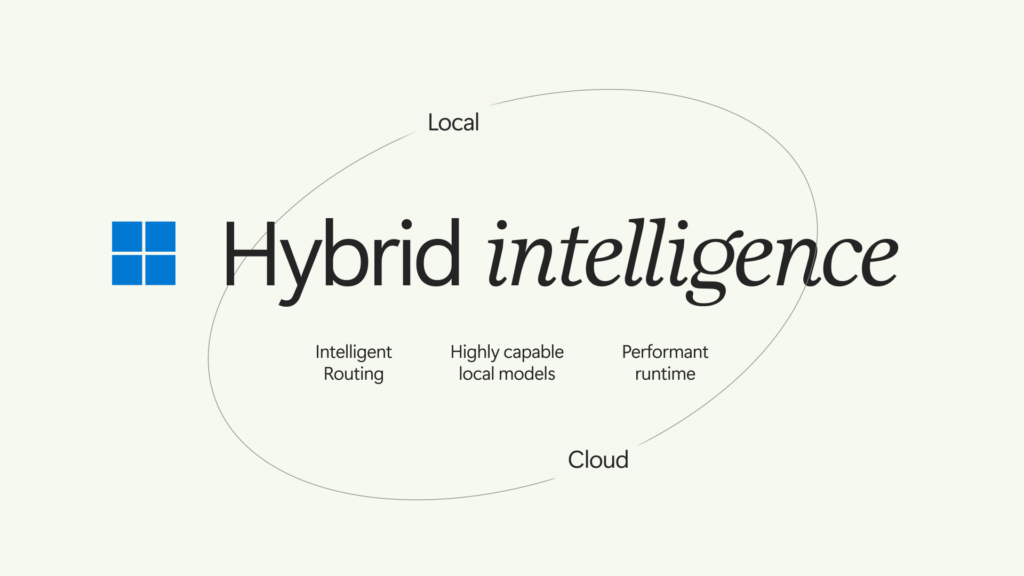
Microsoft's Windows hybrid-intelligence concept connects local and cloud processing through routing, local models, and the runtime. Source: Microsoft News Center, October 8, 2026. Copyright Microsoft. Used with permission from Microsoft. Concept graphic, not a product screenshot or a measured result.
Microsoft's October 7 Command Line technical explanation describes two planned approaches: Auto orchestration across local and cloud models, or explicit selection of a local model or compatible endpoint. It also explicitly separates model selection, inference and tool execution.
The practical comparison is about control, not a contest in which one mode always wins. The questions below are our evaluation criteria:
| Approach | Useful when | Question to settle first |
|---|---|---|
| GitHub Copilot Auto with hybrid routing | You want the orchestrator to balance a changing task across compute options | What content may reach a cloud provider during this session? |
| Explicit local-model selection | You need a known model and inference endpoint | What other services can the application and its tools still contact? |
| Explicit cloud-model selection | You deliberately choose remote inference for a task | Which inputs are approved for that provider and account? |
Consider a hypothetical code-maintenance task. A short formatting change and an unfamiliar architectural problem need not deserve the same compute budget. Routing can make that distinction convenient. It cannot decide that an internal design document is approved for external processing merely because a remote model would solve the problem faster.
This is the privacy trap in the hybrid pitch: better placement is not automatically better authorization. Package downloads, remote tools, application telemetry and cloud-backed integrations need their own review. Even an agent using only local inference could send information through an allowed network tool.
Conversely, a carefully approved cloud request can coexist with a tightly restricted local working folder. Privacy depends on the actual data path and policy, not the location of the model alone.
The official Windows video "GitHub Copilot on Windows", embedded in the October 7 announcement, supplies the product demonstration context. Treat it as a vendor demonstration of the intended experience, not a guarantee about your installation.
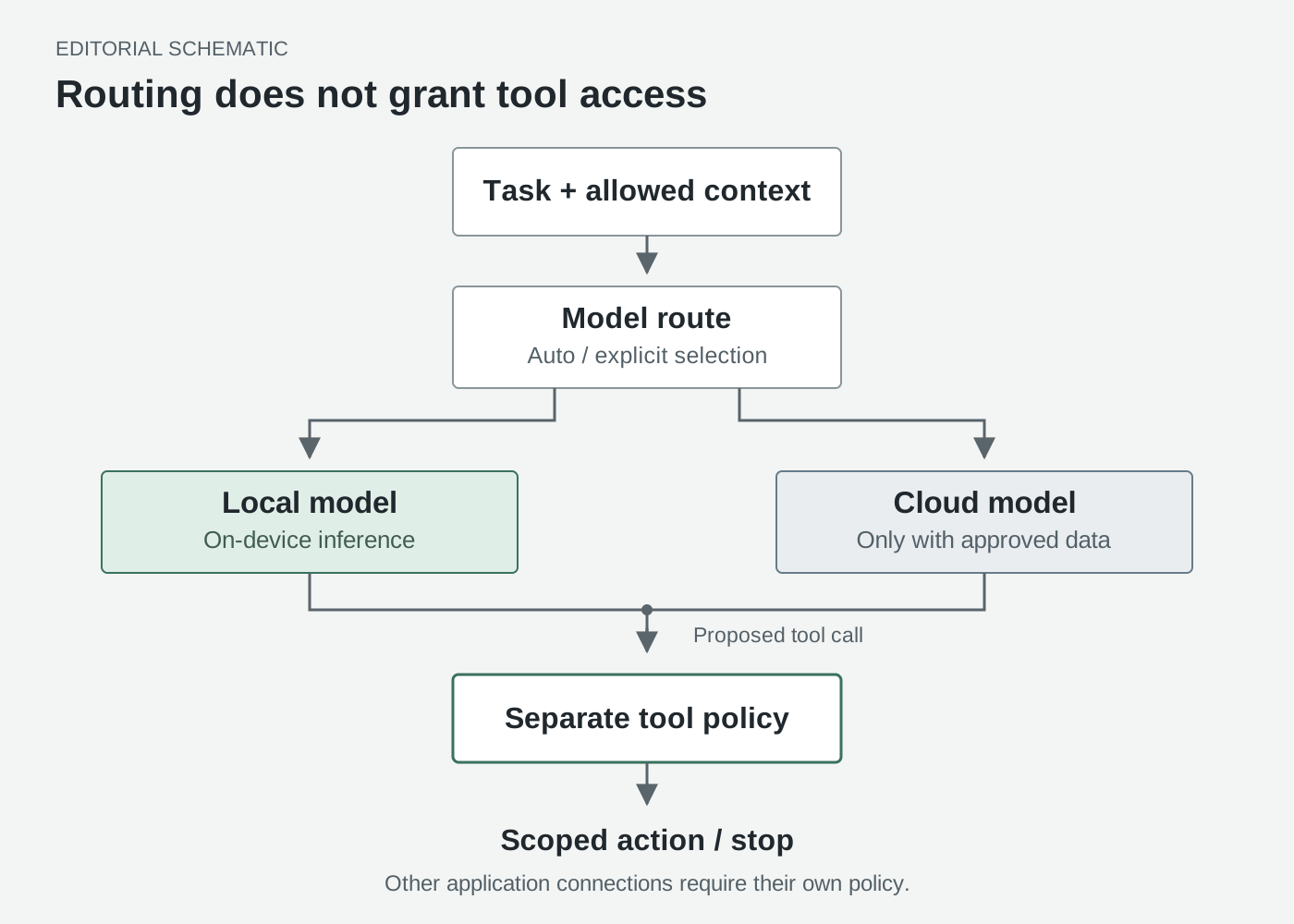
Original editorial schematic. The inference route and the tool-access decision are independent. This illustrates the separation described in Microsoft's October 7 technical explanation, not an implementation trace.
Windows ML makes model choice easier, not hardware limits disappear
The runtime matters because an agent application should not have to implement every model loader itself. Microsoft's October 7 Windows ML post introduces experimental GGUF support through llama.cpp alongside ONNX workflows, plus text-generation and speech-recognition APIs. It also describes an OpenAI-compatible local endpoint for prototyping.
Those are developer building blocks, not an agent's complete permission system.
The Windows ML Runtime documentation, updated October 7, 2026, adds an important compatibility limit: CPU and CUDA are the validated llama.cpp backends for this release. The broader runtime's CPU, GPU and NPU vocabulary does not mean every GGUF model runs on every NPU. The new Runtime API is experimental, unsupported for production and available in C++ and Python rather than C#.
Model packaging is another separate responsibility. The Text Generation API documentation, updated October 9, 2026, says the application supplies its model; Windows does not bundle one for this API. GGUF embeds the tokenizer, while the documented ONNX path requires an appropriate model contract and tokenizer source.
For a developer, that means checking architecture, model format, runtime version and execution backend together. A file extension is not a complete compatibility promise.
Memory is equally concrete. Microsoft reports a 53 GB quantized MAI Code 1.1 Flash model and 75.5 GB peak memory use at 256K context on Surface Laptop Ultra; these are vendor-reported measurements, not our testing. The October 7 technical article explains the additional runtime and context-cache demands.
The useful buying question is therefore not just "Will the model load?" Ask whether a full task leaves enough room for your editor, browser, tool outputs and other applications. A compact prompt demonstration and a long debugging session are different workloads. Faster token generation is valuable only if the resulting changes are correct and the machine remains usable.
MXC constrains consequences without reading the model's mind
Microsoft's MXC developer explanation, October 7, 2026, places the policy outside the workload's control. The developer or organization defines the resources; the containment environment enforces the resulting boundary.
That is a different job from persuading a model to behave. An instruction can ask the agent not to edit a configuration file. An enforced read-only permission can prevent the edit even when the agent proposes it. Neither makes the model's reasoning infallible, but the second limits the consequence of a bad decision.
The MXC repository and SDK documentation, checked October 16, 2026, describe an SDK embedded in an application, with versioned requests and multiple containment backends. MXC is not a universal protection switch that automatically wraps every agent installed on Windows.
The distinction becomes clearer in a file-review scenario. Give an agent read-only access to copied source material, write access to a disposable output directory and no access to unrelated private folders. A successful summary should appear in the output directory. An attempted overwrite of the source should fail. That second outcome is part of success, not an inconvenience to remove.
Network access deserves its own test. The ProcessContainer networking guide, checked October 16, 2026, distinguishes direct egress rules, proxy configurations and backend-dependent enforcement. Host-loopback access is also a separate consideration. "No internet" must not be shorthand for "every local service is harmless."
Boundaries also depend on where the tool runs. GitHub's filesystem-policy documentation, checked October 16, 2026, distinguishes OS-sandboxed shell processes from built-in file tools checked by the agent harness; remote MCP servers are outside the local process sandbox. Ask which operations receive OS enforcement and which rely on application checks.
The official "Windows secure platform for agents" video, from the Windows channel and embedded in the October 7 announcement, is the relevant containment demonstration. The operational question remains whether your chosen tool path is actually inside the intended boundary.
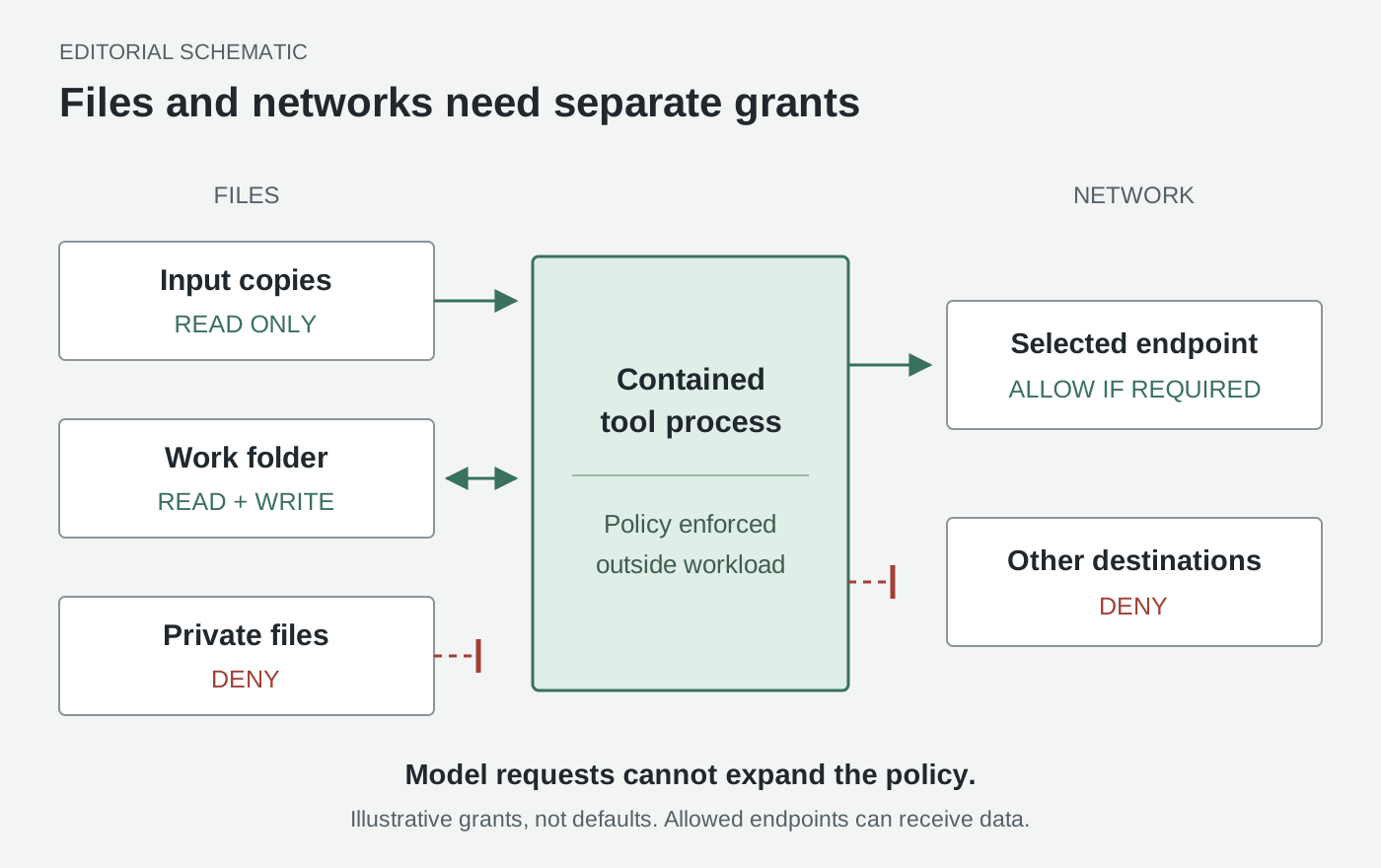
Original editorial schematic of a proposed least-privilege policy, not a Windows settings screen. Allowed resources are illustrative, not defaults. An allowed endpoint is a potential data destination; see the MXC networking reference.
Start with a bounded job, not an unattended personal assistant
Here are two illustrative workflows, not results from hands-on trials.
A document reviewer produces a comparison without modifying evidence. Copy three public sample documents into an input folder. Ask for a table of conflicting dates, missing definitions and unanswered questions, with filenames and passages supporting each observation. Give it a separate output folder and keep the inputs read-only. Begin without sending email, connecting a shared drive or enabling a messaging channel.
The value is not autonomous document management. It is a reviewable artifact whose relationship to the sources is clear. You can check whether a claimed conflict exists before allowing any broader integration. A model that writes persuasive prose but cannot point to the relevant passage has not completed the job.
A coding assistant prepares a patch in a disposable working copy. Choose a small test project without credentials. Ask for one behavior change and a test that distinguishes the old behavior from the requested one. Keep deployment configuration and personal directories outside the granted scope. Permit package access only if that specific task needs it.
Judge the result by the diff, test evidence and boundary behavior together. A green test does not justify a changed production setting. An access denial does not justify disabling containment. If a required dependency is blocked, the useful next step is a narrow permission decision by the operator, followed by another bounded run.
These jobs teach more than a vague instruction to "help with everything." Each has a visible input, an inspectable output and a clear stopping point. Neither needs a permanent invitation into your digital life.
Check compatibility before following any setup recipe
Use this as a staged compatibility procedure. The hybrid roadmap spans several products and preview states, so there is no single installation command that establishes the whole experience.
-
Match the Windows release and build to the containment backend. Open Settings, System, About and record the OS build. The MXC OS support table, checked October 16, 2026, lists Windows 11 24H2 process isolation at 26100.9278 and session isolation at 26100.9550. Other releases have their own entries. Do not apply a build number from a different release branch.
-
Check application requirements, not just SDK compatibility. GitHub's local-sandbox guide, checked October 16, 2026, requires Windows 11 25H2 with KB5124010 or later, or 26H1 with KB5124006 or later, plus BaseContainer support. That is narrower than the MXC SDK matrix. Check the installed agent's version and release channel separately; the hybrid announcement does not supply a universal minimum client version for future local routing.
-
Choose a supported model path before downloading a large model. Check Windows architecture, available memory and the documented backend. Use the Windows ML Runtime guide and Text Generation guide, checked October 16, 2026, for the experimental API's supported scenarios. Keep a production application on a supported path rather than treating preview availability as approval to ship.
-
Let the supported installer own host preparation. For SDK integrations, consult the MXC host-preparation reference, checked October 16, 2026. Some compatibility tiers require a separate privileged preparation tool; that is not a reason to run the agent itself as administrator. Have the installer or an administrator resolve a specific documented prerequisite instead of changing system permissions speculatively.
-
Define a small policy and test both permission and refusal. Start with copied public inputs, a disposable writable folder and the minimum necessary connectivity. In a supported Copilot CLI installation, GitHub's settings reference, checked October 16, 2026, documents
/sandbox configfor reviewing the configuration. Verify that the intended output can be created and an out-of-scope file cannot be changed. Check the tool process's network policy separately from the agent application's model connection. -
Diagnose a denial without converting it into permission. The MXC learning-mode reference, checked October 16, 2026, distinguishes deny-and-record diagnostics from permissive auditing. The latter relaxes containment; it is not a safer runtime for untrusted work. Keep enforcement in place, inspect the denied resource and grant only what the task actually requires.
Your acceptance test is simple to describe even if implementation details differ: the agent completes the allowed job, cannot modify a protected input and cannot contact a destination excluded by the effective policy. A complete validation also checks the application connections outside that tool boundary. Save the version and policy alongside the result so a later update can be evaluated against the same job.
A native OpenClaw gateway changes installation, not authority
Microsoft also announced a native Windows gateway and MXC integration for OpenClaw in its October 7 mini-PC discussion. The official "New Get Started experience for agents on Windows" video shows the announcement's onboarding context.
For an actual installation, use OpenClaw's Windows documentation, checked October 16, 2026, rather than interpreting "native" as a promise about every component. It distinguishes the Windows Hub, its app-owned WSL gateway setup, other desktop options and the native Windows CLI/gateway route. Choose one documented route and verify that route's prerequisites.
An always-on machine raises another question: who can instruct it? OpenClaw's security guide, checked October 16, 2026, defines one trusted boundary per gateway, not a hostile multi-tenant boundary between unrelated users. A convenient installer does not settle channel authorization, credential scope or network exposure. Keep those decisions separate from whether the gateway starts successfully.
The bottom line: the operating system must make delegation inspectable
The interesting contest is no longer just which assistant gives the best answer. It is which environment makes delegated work understandable: what the agent read, where inference ran, what a tool could change and why a blocked action stayed blocked.
Windows is assembling the layers for that contest. Judge them separately. Local compute is a placement option. Hybrid routing is an orchestration option. Containment is an enforceable limit only across the operations it actually covers. A credible agent platform needs all three without disguising one as another.
Sources
- Windows: Building Windows for hybrid intelligence, October 7, 2026 - roadmap and linked official demonstrations.
- Windows Developer Blog: MXC policy-driven containment, October 7, 2026 - platform ownership and containment boundaries.
- Command Line: Local models and sandboxed tools, October 7, 2026 - routing options, reported memory figures and tool-boundary distinctions.
- Windows ML engineering update, October 7, 2026 - experimental llama.cpp integration; technical setup references are linked beside the relevant steps above.
Keep a source-linked record of the discussion
If you want to collect AI research material and your own review notes, Telli.sh is an optional workspace. Create a research note.