Five stages, four artifacts: what Telli.sh actually does with a meeting recording
A product walkthrough of the full Telli.sh pipeline — live recording or audio upload, AI meeting transcription with speaker identification, real-time meeting translation across 44 target languages, AI summaries in 10 formats, and a shareable note. With the honest limits, the exact prices, and what meeting transcription accuracy really requires.
Eight people are standing in a room. One of them is explaining why the migration slipped. Two are half-listening. Someone at the back says the sentence that will matter in three weeks, and nobody writes it down.
That is the raw material. This post is about what our system does with it, stage by stage, from the moment audio starts moving to the moment you paste a link into a channel.
This is a product walkthrough from the team that builds Telli.sh. It follows the audio from recording or upload through transcript, translation, refinement, and shareable note, with the models, limits, and pricing identified along the way.
TL;DR:
- A recording moves through five processing stages and leaves four separately stored artifacts behind: the raw transcript, the speaker map, the refined script, and one summary per format applied.
- Speaker identification runs on
pyannote/speaker-diarization-community-1chunk by chunk, carrying voice embeddings forward so the same person keeps the same label from minute five to minute fifty.- Translation targets 44 language codes; the interface itself ships in 15 languages; summaries come in 10 built-in formats plus any custom format you define by name, instructions, and section list.
- See the current pricing page for monthly and yearly billing, minute allowances and plan-specific features. Prices and features can change; checkout shows the applicable currency, tax and payment conditions. This article is not a billing quote.
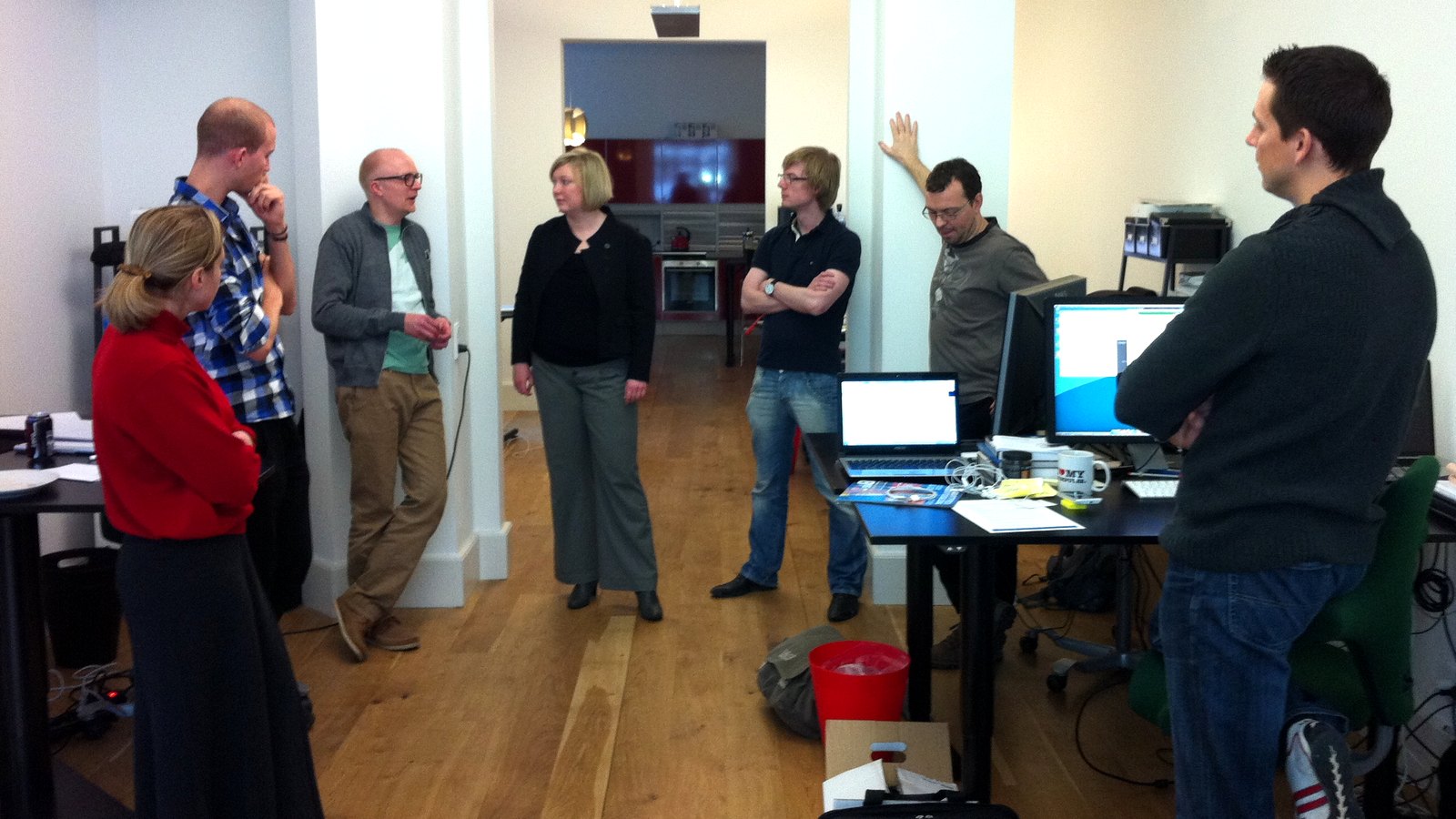
Image: Klean Denmark, "Daily sprint meeting," Wikimedia Commons, CC BY-SA 2.0. The kind of meeting this whole pipeline exists to survive.
Two ways audio gets in, and they are not the same path
There are exactly two entry points, and the difference between them shapes everything downstream.
The first is live recording. Your browser opens an AudioContext pinned to a 16,000 Hz sample rate, loads an AudioWorklet, and buffers microphone input in 4,096-sample frames — which at 16 kHz is one packet every 256 milliseconds. Each frame is converted from 32-bit float to 16-bit integer PCM and pushed over a WebSocket to /ws/audio/{sessionId}. A second socket, /ws/session/{id}, carries the control channel: language changes, context updates, a SUMMARIZE command, and the FINISH command that closes the session and writes the note.
The second is file upload. You drop a recording into the upload modal, and it streams to POST /upload, which answers with newline-delimited JSON — a stream, not a spinner — so the interface can show you actual progress through named steps rather than a fake percentage. The hard limits are honest and worth stating: 500 MB per file, and the file picker accepts audio/* only. If you have a meeting sitting inside an MP4 screen recording, you need to pull the audio track out first. We do not do that for you today.
Both paths converge on the same processing spine. From stage one onward, a live recording and an uploaded file are treated identically.
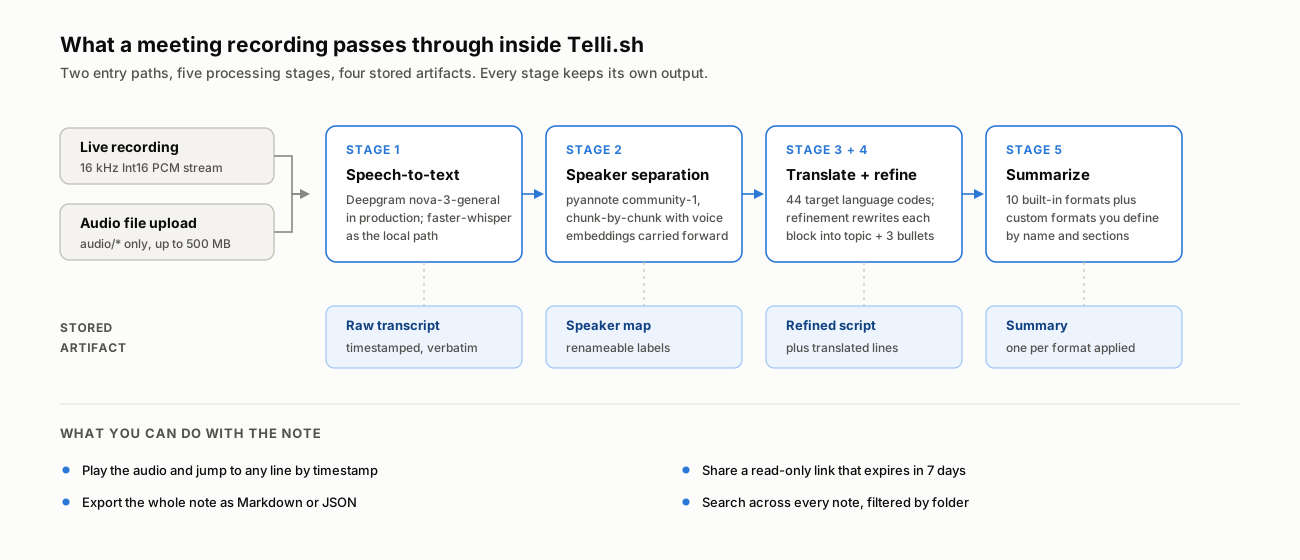
Every stage keeps its own output. Nothing is overwritten by the stage after it.
Stage 1 and 2: hearing the words, then working out whose they were
Speech-to-text runs first. In production, both the batch path and the streaming path use Deepgram's nova-3-general model; the codebase also ships a fully local path built on faster-whisper for self-hosted deployments, selected by a single provider setting. That switch matters less than people expect, for a reason we have written about at length: the top speech models on independent benchmarks are now clustered within about 1.5 percentage points of word error rate of each other, so the engine choice is no longer where the quality difference lives.
Speaker identification is where it lives.
Diarization runs on pyannote/speaker-diarization-community-1. The implementation detail that actually matters is how it handles long recordings. Rather than diarizing the whole file in one pass, the pipeline processes audio in chunks and assigns speakers immediately after each chunk — but it keeps a running dictionary of voice embeddings per speaker and re-identifies against that accumulated set on every subsequent chunk. That is the mechanism that stops the classic failure mode where a two-hour recording quietly renames the same person SPEAKER_00, then SPEAKER_03, then SPEAKER_07 as the meeting drags on.
When a segment overlaps two speaker turns, the label goes to whichever turn overlaps more of it, with an embedding-similarity check as the tiebreaker for low-overlap cases.
You get generic labels — SPEAKER_00, SPEAKER_01 — because a model cannot know that SPEAKER_01 is your VP of Engineering. You rename them once in the note, and the mapping is stored with the note and applied everywhere afterward, including in exports and share links. That is the honest division of labour: the machine separates the voices, you supply the names.
What each stage actually leaves behind
The design rule we hold to is that no stage destroys the output of the stage before it. You can always get back to the words that were actually said.
The four stored artifact groups are transcript, speaker map, refined script and summary. Translated lines are attached to the transcript, so they appear as a fifth row below rather than a fifth independent artifact.
| Artifact | Produced by | What it contains | What it is for |
|---|---|---|---|
| Raw transcript | Stage 1 + 2 | Timestamped verbatim lines with a speaker label on each | Checking what was literally said; clicking a line to seek the audio |
| Speaker map | Stage 2 (+ your edits) | The label-to-name mapping for the note | Making every other view readable — applied in the note, exports, and shares |
| Refined script | Stage 4 | Each block rewritten into a bold topic line plus up to 3 points | Skimming a long meeting without reading it |
| Translated lines | Stage 3 | A translation attached to each line, alongside the original | Reading a meeting held in a language you do not work in |
| Summary | Stage 5 | One structured document per format you apply | The thing you actually send to people |
In the note interface these show up as three tabs — History (the raw transcript), Script (the refined version), and one tab per summary format you have generated. If the recording's audio was stored, a player sits above them, and clicking any transcript line seeks the audio to that timestamp.
Stage 3: the number that matters for translation is 44
Real-time meeting translation is the feature that pulled most of our early users in, and it is worth being precise about its scope, because "supports 100+ languages" is the single least verifiable claim in this category.
Two different numbers apply, and they are not the same number:
- 44 target language codes are accepted for translation. That set is enumerated explicitly in the backend configuration and includes
zh-TWas distinct fromzh, which matters more than it sounds if you work across Taiwan and the mainland. - 15 languages are supported for the interface itself and for the language the AI writes your summary in: English, Korean, Japanese, Chinese, German, French, Spanish, Italian, Portuguese, Russian, Polish, Vietnamese, Thai, Indonesian, and Malay.
Translation is incremental during a live session, not batched at the end. As punctuation boundaries arrive in the transcript, the translation for that segment streams in beside the original, and a per-session cache prevents re-translating text that has not changed. During file upload, lines are batched instead — throughput matters more than latency when nobody is watching a screen.
There is also a translation workflow mode, distinct from note mode, for the case where the translation is the deliverable — a bilingual conversation you need to follow live rather than a meeting you need minutes from.
Stage 4: refinement is the stage nobody asks for and everybody needs
Here is the pivot from description to opinion, and we will not hedge it: refinement is the most underrated stage in this pipeline.
A verbatim transcript of human speech is close to unreadable. People restart sentences, trail off, say "yeah, yeah, right" four times, and bury one decision inside ninety seconds of throat-clearing. Word-perfect transcription of that is still ninety seconds of throat-clearing.
So the refinement stage takes each block of conversation and rewrites it under tight constraints, defined in a prompt template rather than in code so we can tune it without a deploy. Each block becomes a bold topic line derived from the content — not from a role name, not in brackets — followed by at most three bullet points, targeting roughly 300 characters per block. Speaker names and timestamps are explicitly stripped, because they already exist in the raw transcript and repeating them just makes the skimmable view less skimmable.
One constraint in that template is there for a reason worth naming: the model is instructed to match the register of what it heard, and specifically not to force a business-meeting tone onto a casual conversation. A hallway chat summarized as if it were a board meeting is a worse artifact than no summary at all.
We call the result the script — the version of the meeting you can read at a glance, sitting one tab away from the version you can quote in a dispute.
Stage 5: ten summary formats, because "summary" is not one thing
The last stage produces the document you actually send. Asking an LLM for "a summary" gets you a summary of nothing in particular, so the format is a first-class choice rather than a hidden default.
Ten formats ship built in: AI Summary (general), Meeting Notes, Summary Report (executive framing), Lecture Notes, Sermon / Talk, Counseling Record, Call Summary, Interview, Idea Notes, and Presentation Deck. Each one carries its own section structure — Meeting Notes produces overview, discussion points, decisions, and next steps; Presentation Deck produces an outline, slide flow, key messages, speaker notes, and next actions. The section headings are themselves localized per language rather than translated at generation time, which is why a Japanese summary reads like a Japanese document instead of a translated English one.
When none of the ten fits, you define a custom format: a name, a set of instructions, and the section list you want, saved and reusable. "Weekly board update with risks and open decisions" is a format you write once.
Any format can be applied to a note after the fact, and each generates its own tab. Summarizing the same recording three different ways for three different audiences is a normal thing to do here, not a workaround.
Meeting transcription accuracy is a stack, not a number
Word error rate is only one part of evaluating a meeting transcript. In STT accuracy is not enough, we explain why a single dropped "not" can invert a decision while barely affecting the overall score.
The practical version: transcription accuracy that survives contact with a real meeting is built from five layers, and the acoustic model is only the bottom one.
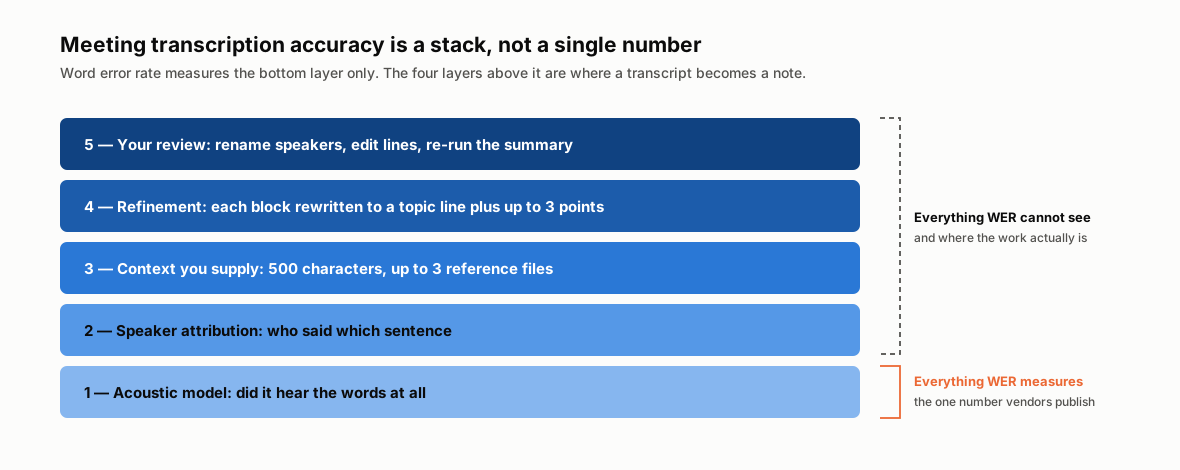
Word error rate measures layer 1. Layers 2 through 5 decide whether the transcript is usable.
Layer 3 is the one users have direct control over and most people skip. Before recording or uploading, you can supply a context block of up to 500 characters — topic, participant names, product codes, acronyms — and attach up to 3 reference files (PDF, image, or text) whose text is extracted in the browser and folded into that same context budget. That context is passed to the AI stages.
Proper nouns are both highly informative and uncommon in general training data: internal project names, unusual surnames, and product SKUs. Adding context such as "Kestrel" is a product and "Ravi" is a person helps the system recognize them. Before recording, fill in the context box with names and terms the system may not know.
From nothing to a shared note, in eleven steps
Concretely, first run to shareable artifact:
- Sign up. See the current pricing page for monthly and yearly billing, minute allowances and plan-specific features. Prices and features can change; checkout shows the applicable currency, tax and payment conditions. This article is not a billing quote.
- Choose your path: start a live recording, or open the upload modal and drop in an audio file (
audio/*, under 500 MB). - Set the language pair. Source can stay on auto-detect; the target language decides what the translation and the summary come out in.
- Fill the context box — topic, names, acronyms, up to 500 characters. Attach up to 3 reference files if you have a deck or agenda.
- Pick a folder if you want the note filed somewhere specific. You can move it later.
- Record, or wait through the upload stream. During a live session, the transcript appears as people speak, with the translation streaming in beside it if you have a target language set. During an upload you will see named steps: voice recognition, analysis, refinement, summary, finalizing.
- End the session. That triggers the
FINISHcontrol message, which flushes the last segment, waits for in-flight refinement, saves the audio, generates the summary, and writes the note. - Rename the speakers. SPEAKER_00 becomes a person's name once, and the mapping propagates through every view and every export.
- Read the Script tab to see what the meeting was about; drop into History and click a line to hear the audio at that exact moment when something looks wrong.
- Generate additional summary formats if one audience needs Meeting Notes and another needs a Summary Report.
- Share or export. A share link is read-only, expires in 7 days, and can carry an optional password. Export gives you Markdown or JSON, with the summary, the refined blocks, and the full transcript all in one file.
Upload a recording you already have
Simple, transparent pricing
See the current pricing page for monthly and yearly billing, minute allowances and plan-specific features. Prices and features can change; checkout shows the applicable currency, tax and payment conditions. This article is not a billing quote.
Review the terms before use: the current license says personal, non-commercial use. Security and privacy documents describe processing and deletion; ask [email protected] about retention or AI training before uploading sensitive material.
What Telli.sh does not do
A product post that only lists capabilities is an advertisement. Here is the other column.
It does not take video files. The uploader accepts audio/*. Extract the audio track first.
It does not join your calls. There is no bot that dials into Zoom, Meet, or Teams and sits in the participant list. You record the room, or your own machine's audio, or you upload the file afterward.
It does not fix bad audio. One omnidirectional laptop microphone at the head of a twelve-person table, in a room with hard walls, will produce degraded diarization no matter whose model is running — overlapping speech and distant speakers are where speaker attribution breaks first. A phone placed in the middle of the table beats a laptop at the end of it, every time, and costs nothing.
It does not know your vocabulary unless you tell it. See layer 3 above. Unusual proper nouns are the most common error source, and the context box is the fix.
Speaker labels start generic. No system can guess that SPEAKER_01 is Priya. You rename once per note.
Share links are time-boxed. Seven days, then the link dies. That is a deliberate default for meeting content, not a feature we forgot — but it means a share link is not an archive. Export the Markdown if you need permanence.
The bottom line
Telli.sh is more than a transcription product. Transcription is stage one of five, followed by speaker attribution, refinement, translation, and summaries.
What we actually build is the distance between a recording and a decision: knowing who spoke, cutting the ninety seconds of throat-clearing down to the one sentence inside it, rendering that sentence in the language the reader works in, and putting it somewhere a colleague can open. The recording is evidence. The note is the thing that changes what happens next week.
If you have a meeting recording, try the workflow with your own audio and review the resulting note against the transcript.
Start a live translated session
Sources
- STT accuracy is not enough — Telli.sh blog, August 4, 2026 — the word error rate argument in full, including the leaderboard spread
- pyannote/speaker-diarization-community-1 — Hugging Face — the diarization model used in this pipeline
- Deepgram Nova-3 model documentation — the speech-to-text model used in production
- Telli.sh pricing — current plan quotas and prices
- Wikimedia Commons image page — hero photograph, Klean Denmark, CC BY-SA 2.0
