VS Code 1.144 moves the coding session beyond the laptop lid
Persistent agent hosts and cloud sessions change how coding work survives a client disconnect. What is stable, what remains preview, and how to test the handoff without losing changes.
You start a coding task at a desk, check it from another device and return later to review the diff. The useful experience is one continuing job, with the same instructions and visible decisions. Reconstructing a conversation after every device change is another form of development work.
VS Code 1.144 became a stable release on October 28, 2026. Its release notes bring agent-session continuity and remote management together with features carrying their own Preview or Experimental labels. Cloud sessions run on GitHub infrastructure, so their execution can continue while the development laptop is offline. Official release notes.
This guide explains the difference between a client and the place where work runs, what the Agent Host Protocol contributes, and how to evaluate a continuing session through a real code-review handoff.
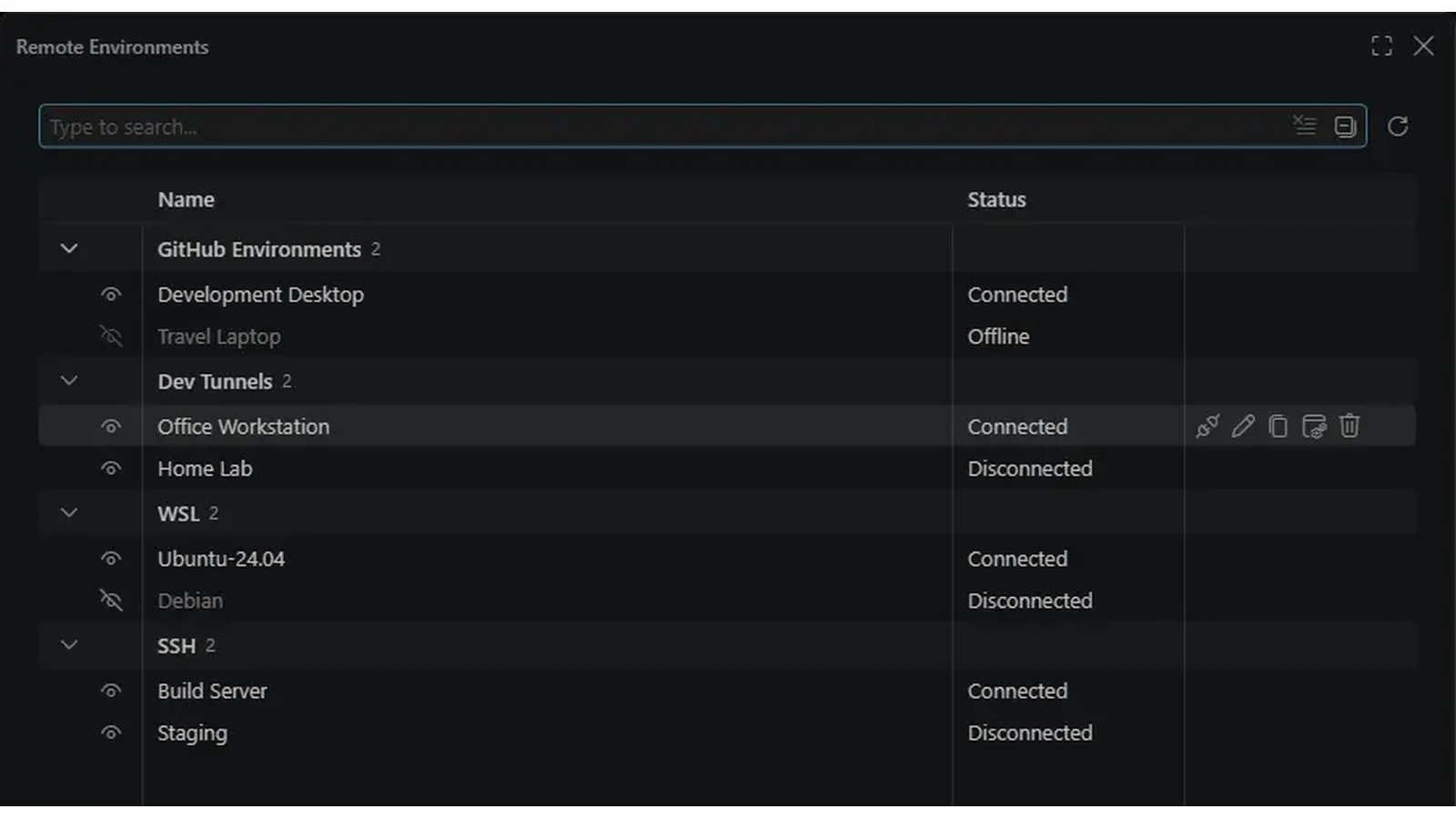 Visual Studio Code 1.144’s official Remote Environments screenshot. Used with permission from Microsoft. Image source · License and image notes.
Closing a window and stopping a worker are different events
A coding interface shows messages, files and approval requests. The process carrying out the task may live elsewhere. Once those roles are separated, closing the interface does not have to mean abandoning the task, provided the host and its environment remain available.
Microsoft's October 28 Universe overview describes the Agent Host as an independent process managing sessions, harnesses, models, files and terminals. It says Agent Host Protocol has reached 1.0 and connects clients to continuing session state. That is a useful architectural distinction for evaluating what “keep working” actually means.
A local host still depends on the local machine. A remote host depends on its remote machine and connection arrangements. A cloud session has a separately hosted environment. Choose the execution location according to what needs to remain available when the client goes away.
Think of the client as a control room window. Another window can show the same work, but it does not move the machinery underneath it. A phone that displays a session does not turn a sleeping local computer into an always-on server.
Our take: persistence becomes useful when the task's identity survives alongside its execution. The continuing session should make it clear which repository it uses, which changes it has produced and what decision it is waiting for. Merely keeping a process alive is a smaller achievement.
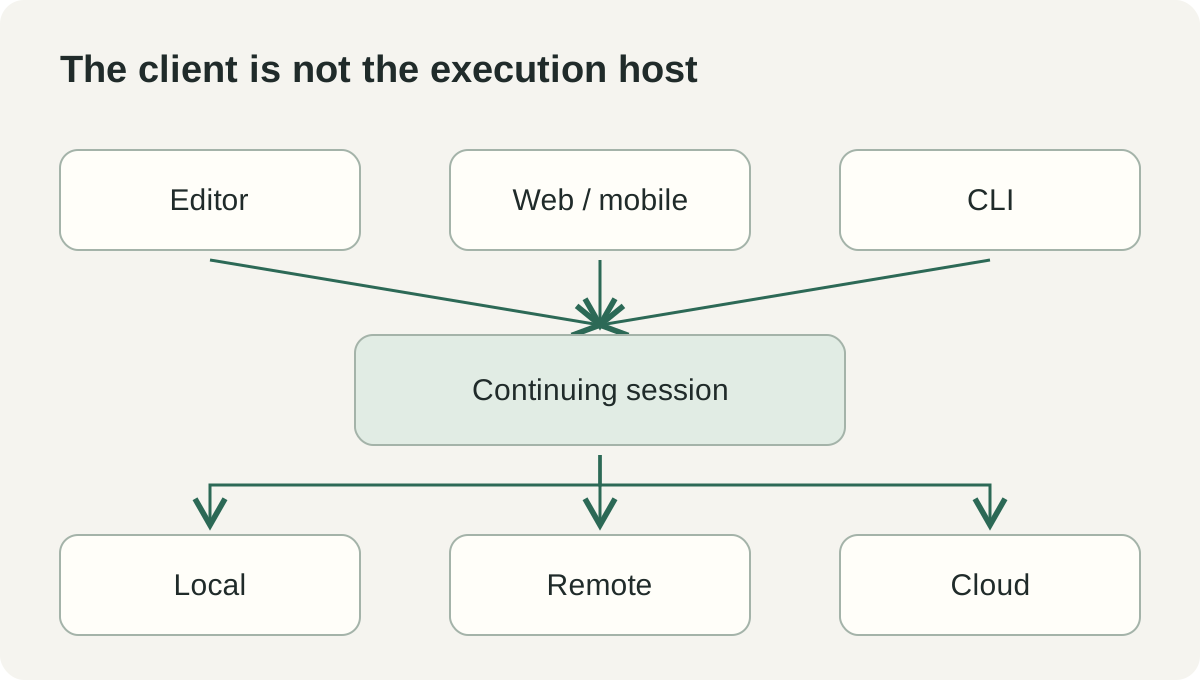 Original explanation of client-versus-host ownership, informed by the VS Code Universe overview. It is a simplified planning model, rather than a network topology.
AHP synchronizes the session the interfaces are looking at
The official Agent Host Protocol site, checked November 2, describes AHP as a bidirectional, state-based display protocol. Clients operate on shared session state; the host broadcasts actions and arbitrates conflicts. Reconnection can deliver missed actions or a current snapshot so an interface can catch up.
That matters because an agent session contains more than a transcript. It may include an action waiting for approval, a running terminal or a changed file. If two interfaces show inconsistent versions of those facts, the person operating the session can make the wrong decision even when the code generation itself is good.
The protocol's reconnect examples show pending client actions being reconciled with host state. For a reader, the practical implication is simple: reconnecting should recover the job's current situation, including the fate of an earlier request. It should not require guessing whether an approval arrived before the network failed.
A shared protocol also creates a boundary for client interoperability. A client needs to understand the session state and actions it displays. The existence of a protocol does not mean every tool can already connect to every provider or expose every feature identically.
For a team comparing interfaces, inspect the decisions that matter in its workflow. Can the alternate client show a pending permission request? Can it identify the changed files and the task's current status? Does returning to the editor preserve the same job rather than starting a second conversation?
Stable release and preview capability are separate labels
VS Code's 1.144 page identifies the release as Stable, while Cloud Automations, image generation and Copilot connectors retain Preview labels; computer use and working set features are marked Experimental. The cloud-session experience requires a paid Copilot plan and is subject to organizational policy. Release and feature status, October 28, checked November 2.
That combination is common in an extensible editor: a stable application can contain individual features at different maturity levels. The right adoption decision belongs to the feature and workflow, rather than the version number alone.
| Execution choice | What must remain available | Question before starting |
|---|---|---|
| Local agent host | Local execution environment | What happens when this machine sleeps or stops? |
| Remote agent host | Remote host and required services | Who owns availability, access and workspace state? |
| Cloud session | Provider-managed execution environment | Does this repository, plan and organization allow the task? |
This table is an operational comparison, not a promise of identical behavior across environments. The requirements of a particular extension, model and harness still matter. Test the combination your team intends to use.
For an experimental capability, choose a separate, reversible exercise. For a core continuity evaluation, start with the smallest workflow that demonstrates the handoff. Combining several new features makes it harder to identify which part produced an unexpected result.
Three illustrative tasks show where continuity helps
A developer can hand off a bounded fix and review it later
Imagine a developer asking a cloud session to fix a failing parser test in a repository. The instruction names the failure, the relevant behavior and the expected verification. The developer then checks progress from another supported client before returning to the editor for review.
The acceptance criterion should be the same as for any change: the fix addresses the behavior, the relevant checks pass and the diff is appropriate. The ability to continue while the laptop is closed is useful because it changes when the work can happen. It does not establish that the result is ready to merge.
For the handoff, ask the session to retain the exact command and outcome of the test. A message saying “tests passed” is harder to assess than a named check tied to a particular revision. The reviewer needs enough evidence to understand the result without reconstructing the whole conversation.
If the task becomes blocked by an approval or missing service, the session should expose that state. A job that remains active but cannot progress is different from a job doing useful work. Visibility helps the developer decide whether to intervene, change scope or leave the task waiting.
A maintainer can investigate separate issues without mixing their files
An illustrative maintainer might ask one session to reproduce a bug while another examines documentation. This can make good use of waiting time if the tasks have clear boundaries. It also creates a need to keep each result attached to its own workspace and review context.
Define ownership before starting. Name the files or subsystem, the branch or workspace, and what each session should produce. If two tasks must touch the same contract, decide how their findings will be reconciled before applying both changes.
Review one result against a known repository state. Otherwise, a successful test may depend on another session's unreviewed edits. A workspace boundary is valuable because it makes the source of a passing result easier to establish.
The payoff is a clearer review queue, not simply more simultaneous agents. Two well-scoped investigations can reduce uncertainty; several overlapping edits can increase it. The Agents interface is useful when it helps the maintainer see which situation is developing.
A team can test a recurring cloud task before trusting the schedule
For an illustrative automation pilot, consider a periodic review that identifies documentation links needing attention. Begin with a read-only report and a specific output. Let a person inspect the result before expanding the task to create changes.
Cloud Automations' Preview status matters here because recurring work adds another operational responsibility. A task that behaves acceptably once may still need rate controls, ownership and a clear response to failure before it runs on a schedule. Test those requirements separately from the quality of its language output.
The team should know where each run records its repository revision, findings and external requests. If the run cannot complete, the record should say what remained unresolved. A recurring task becomes useful when its owner can distinguish an unchanged situation from a failed check.
Start with one repository and a modest scope. Expand only after the team has observed ordinary runs, an intentionally blocked run and a review of the resulting artifact. Those are proposed pilot steps, rather than claims of hands-on testing of the release.
Your uncommitted work needs an explicit handoff
The 1.144 release notes state that cloud sessions use a separate workspace and do not automatically copy local uncommitted changes. From the Chat or Agents window, a user can select Cloud, choose a GitHub repository, follow up, respond to approvals and review changes; existing sessions can be reopened from the session list. Cloud-session instructions.
That separate workspace is an important fact for anyone working in a busy checkout. A local file can be essential to the task even though it does not exist in the repository state the cloud session sees. Before handing off, identify the intended source revision and the authorized way to supply any additional material.
Do not confuse an interface transition with a file transfer. Continuing the same conversation does not prove that every local file or running service has moved. A session can retain its intent while still needing explicit access to the material required to execute it.
For an illustrative bug report, include the failing input in an approved, reproducible form. State whether the agent should use committed fixtures or newly provided material. That gives the session a concrete starting point and avoids a long investigation of a repository state that never contained the problem.
The final review should check the same boundary in reverse. Determine where the proposed changes live and how they will enter the working branch. Preserve active local edits while reviewing and applying the result. The benefit of a remote workspace should not come at the expense of uncertain local work.
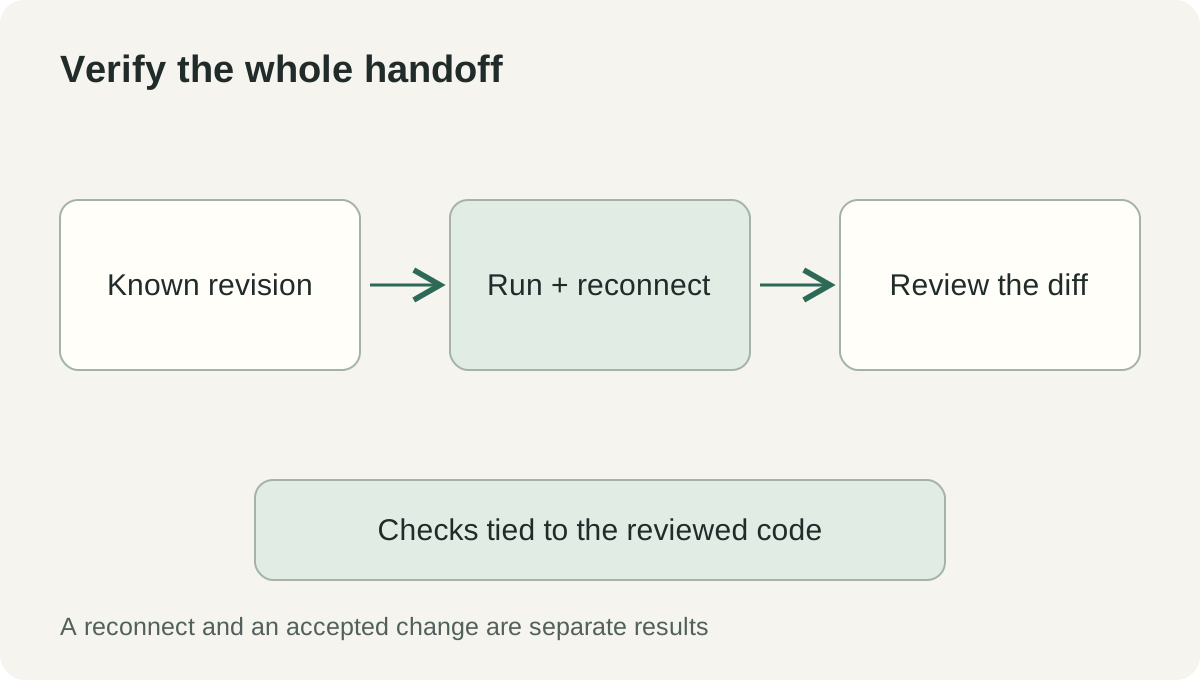 Original acceptance flow for a continuing coding task. It combines the documented cloud workspace boundary with ordinary engineering review; it reports no independent test result.
A ten-minute tour proves less than one complete task
It is easy to evaluate the visible parts of continuity: a session appears in a list, a client reconnects, a message arrives. Those are useful checks, but the developer's goal is a completed piece of work whose state survives the handoff.
Choose a small task that can finish with an inspectable artifact. A test fixture, documentation correction or isolated behavior fix can work if the repository has an obvious check. The task should be meaningful enough to expose workspace state and permissions without making the first trial unnecessarily broad.
- Update and verify the installed release. Use VS Code's Check for Updates flow and confirm the version. Review the feature-specific labels in the official notes.
- Choose an authorized execution environment. Confirm repository access, plan eligibility and organization policy. Decide whether the task belongs on a local, remote or cloud host.
- Record the starting state. Note the repository and revision. Preserve local changes and identify any input the chosen workspace will need.
- Give a bounded instruction. Name the desired behavior, scope and verification command. Define the artifact you expect to review.
- Exercise the handoff. Leave the client and reconnect through an available supported interface. Check the same session's status, pending approvals and new work.
- Return to the code. Inspect the diff and the verification evidence. Confirm that the checks apply to the revision being reviewed.
- Record the outcome and remaining limits. Separate a successful reconnect, a completed task and an accepted change. They are related milestones with different evidence.
If the test fails, diagnose the boundary that failed. A missing repository fixture calls for a workspace repair; a blocked tool call calls for a permission decision; an unavailable host calls for an execution-environment decision. Repeating the same prompt rarely resolves a problem outside the prompt.
Keep this first result specific. “This task continued in this environment and produced this reviewed diff” is a useful operational conclusion. It tells a colleague what can be repeated and where the conditions matter.
A persistent session should make responsibility easier to follow
VS Code 1.144 puts more of the agent workflow into a continuing workspace: the place where instructions become actions and actions become reviewable changes. AHP provides a shared-state direction for clients, while execution location determines what can keep running after a device disconnects.
The meaningful upgrade is a job you can leave, return to and still understand. When the session preserves its source state, decisions and verification, the laptop lid becomes a scheduling detail instead of the boundary of the work.
Sources
- Visual Studio Code 1.144 release notes, Stable release October 28, 2026; checked November 2, 2026.
- VS Code Wrapped: GitHub Universe 2026, October 28, 2026.
- Microsoft Agent Host Protocol, specification v1.0.0 and shared-state overview, checked November 2, 2026.
Preserve the material behind a decision
Telli.sh is one option for keeping authorized source material alongside the notes you have reviewed. Create a note workspace.