Your local AI can keep an appointment: what Unsloth's scheduled prompts actually do
Unsloth v0.1.911-beta adds scheduled prompts for local and API models. A practical guide to useful recurring work, model switching, notifications and the limits of unattended execution.
Original editorial diagram by Ken Jo, based on the sources listed below.
A useful prompt can become a small chore. Every morning, you open the same application, select the same model, paste the same instructions and save another answer. The work is simple enough to repeat, which is exactly why remembering to start it feels unnecessary.
Unsloth's v0.1.911-beta, released on October 26, 2026 at 14:23 UTC, adds scheduled prompts to its local AI workspace. A task can run once or repeat daily, on weekdays, weekly or monthly, with each answer saved as a new chat. The release supports local models and connected API providers. Official release.
The useful question is which recurring work belongs there. This guide explains the execution limits, offers three concrete starting scenarios and shows how to evaluate a schedule before relying on it. The central distinction is simple: Unsloth can start a prompt on a clock, but this release's scheduled tasks run only while the application is open and have no tools or web search.
A schedule removes the start button from a familiar task
Unsloth is an open-source workspace for running and training models on your own hardware. Its broader application includes capabilities beyond chat, but a feature available elsewhere in the interface does not automatically become part of a scheduled run. The October 26 release describes a deliberately bounded execution path: prompt, selected model, new chat and optional notification.
Think of that path as an appointment book for prompts. It remembers when to start an activity; it does not independently discover what your business needs today. A well-designed appointment therefore contains enough information for the model to produce something useful without fetching new material.
That changes the best starting point. Instead of asking for a daily market briefing, begin with a recurring exercise or a draft whose source material is already inside the instructions. The schedule supplies consistency. The prompt supplies scope, context and a definition of a useful result.
Our take: this is a meaningful addition precisely because it makes a modest action repeatable. You do not need an autonomous assistant with broad access to get value from a dependable draft waiting at a predictable time. You do need to distinguish the convenience of starting work from the quality of the work it produces.
The application must be awake when the appointment arrives
The release's runtime condition matters more than the recurrence menu. Unsloth must be running for a scheduled task to execute, and scheduled prompts do not use tools or web search in v0.1.911-beta. Those conditions are stated in the October 26 release notes.
For a laptop user, that makes a daytime schedule easier to reason about than an overnight one. Choose a time when you normally have the application open, then verify the actual result. A sleeping computer, a closed application or an interrupted session should never be treated as a completed task simply because the calendar says it was due.
Do not build a critical process around assumed recovery behavior. Before depending on a missed run being replayed, establish what the installed version does when it starts again. Until that behavior is known, a missed appointment should remain visible in your own record rather than being quietly counted as success.
The same principle applies to changing circumstances. A weekly prompt cannot inspect a folder for newly arrived documents through this scheduled path. A morning checklist can ask you to review today's appointments, but it cannot truthfully claim that it has read your calendar unless the relevant information was supplied through a supported mechanism.
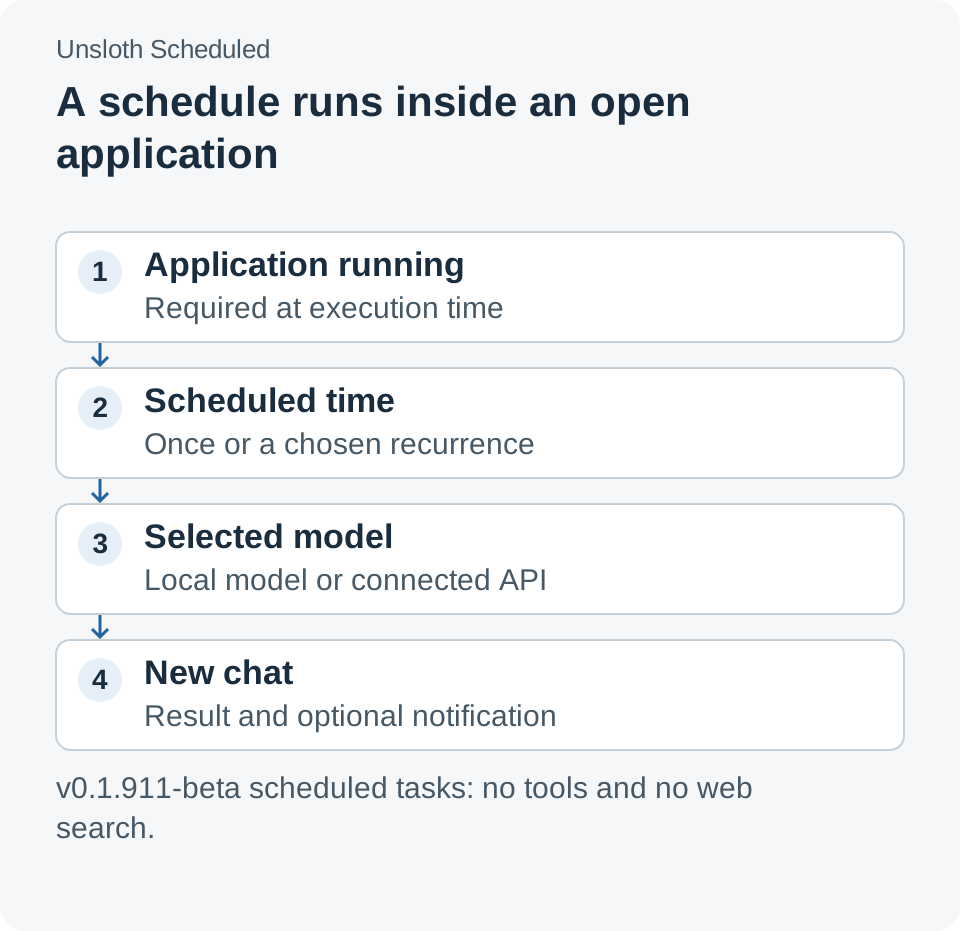
The scheduled execution path described in Unsloth's October 26 release. An open application is a prerequisite; external tools and web search are outside this path.
Three useful starting jobs already contain their own context
Consider a language learner who wants a short exercise before lunch. A scheduled prompt can request a dialogue at a chosen difficulty, five comprehension questions and an answer key placed after a clear separator. Include the target language, desired register and themes directly in the instructions so each run has a complete assignment.
This is an illustrative workflow, not a report of measured learning gains. Its value is easy to examine: does the exercise match the requested level, do the answers follow from the dialogue, and does the learner actually use it? A small recurring exercise that receives attention is more useful than a long worksheet that accumulates unread.
A second scenario is a weekly communication rehearsal. A team lead can supply a stable project description and ask for three ways to explain a difficult trade-off to different audiences. The output becomes rehearsal material rather than a claim about the latest project state. When the project changes, the source description needs an explicit update.
A third scenario is a recurring review checklist. A freelancer could ask for a Friday checklist covering invoices to inspect, commitments to confirm and unfinished drafts to revisit. The model can organize those review questions, while the person supplies the current facts during the review itself. This avoids giving a polished checklist the appearance of a completed audit.
All three examples fit the same boundary: they generate from a supplied context. They do not require today's news, live account balances or automatic access to local folders. That makes them useful places to learn whether scheduled generation helps your routine before expanding its role.
| Proposed job | What to put in the prompt | What still requires your attention |
|---|---|---|
| Language practice | Level, language, topic, exercise format and answer-key rules | Check correctness and complete the exercise |
| Communication rehearsal | Stable project facts, audience and the decision to explain | Update changed facts and choose suitable wording |
| Weekly review checklist | Areas to review, desired sequence and completion criteria | Inspect current records and carry out the review |
Local execution depends on the model you select
The schedule can use the currently loaded model, another model on the device or a connected API model. Those choices make the feature flexible, but they also mean that “scheduled in a local AI app” does not describe where every request is processed. The model selection remains part of the task's operating conditions.
For a local model, the practical constraints include available memory, loading time and competition with other work on the machine. Start with a model that already runs reliably in an ordinary chat. A schedule is an additional way to invoke it, not a remedy for a model that exceeds the device's capacity.
For an API model, review what information will leave the device and what the provider charges. Repetition changes the scale of an otherwise small request. An illustrative weekday schedule running once on each of 22 working days produces 22 scheduled requests before any retries or manual experiments; the actual bill still depends on provider pricing and token use.
That simple count is useful when choosing prompt length. Repeating several pages of unchanged context can be more expensive than a concise assignment, depending on the provider's billing and caching behavior. For local execution, the same excess context can consume time and memory even when no per-request invoice exists.
Avoid turning the choice into a blanket contest between local and hosted models. The relevant comparison is whether the selected model handles this bounded task well, within your resource and data requirements. Run the same assignment manually before asking the scheduler to repeat it unattended.
Model switching deserves a separate decision
When the task's chosen model is not loaded, Unsloth asks before loading it unless the setting “Switch automatically when I'm away” is enabled. This behavior, documented in the October 26 release, is a meaningful operating choice rather than a detail to click past.
Imagine a machine being used for a long interactive session when a scheduled exercise becomes due. Automatically loading another model may compete with the work already underway. On a dedicated machine, the same automatic switch may be exactly what makes an unattended routine useful.
Decide which situation you are designing for. A personal laptop often benefits from a schedule that respects the current activity, while a machine set aside for recurring drafts can tolerate more predictable switching. Neither choice removes the need to observe memory use and the experience of returning to the application.
Use one task while learning this behavior. If several schedules and models are introduced together, a delayed result becomes harder to explain: the prompt, the selected model, a loading decision or another task could all be involved. Keeping the first experiment narrow makes the next change easier to justify.
Set up the first task as a visible experiment
Unsloth's official documentation, checked on October 27, provides native desktop downloads for macOS, Windows and Linux. Choose the supported installation path for your operating system, then confirm that your installed release includes Scheduled. The steps below are a proposed evaluation procedure, not an account of an installation performed for this article.
- Confirm a normal chat works. Select a model and run the intended prompt manually. Check the output before introducing timing or unattended loading.
- Open More → Scheduled. Start with a one-time task shortly ahead while you are present. Keep the application running so the first test addresses the schedule itself.
- Choose the model deliberately. Record whether it is already loaded, stored locally or supplied through an API. Decide how an unloaded-model confirmation should be handled.
- Specify a complete assignment. Include the necessary context, output length and format. State what the model should do when the supplied information is insufficient.
- Enable a useful notification. During evaluation, notice every run. After a stable routine emerges, decide whether failure-only notices provide enough visibility.
- Inspect the saved chat. Check both the time and the content. A generated answer is evidence that the prompt ran; its usefulness is a separate question.
- Move to recurrence gradually. Keep a short record of expected runs, actual results and changes. Introduce a second task only after the first behaves understandably.
Notifications can be set for every run, failures only or never. A failure notice is helpful, but a technically completed run can still produce an irrelevant or incorrect answer. The operating record therefore needs a content check as well as an execution check.
A repeatable prompt states what a good answer contains
A scheduled task receives less immediate supervision than an interactive chat. In conversation, you can notice a misunderstanding and clarify it. A recurring prompt should carry more of those clarifications in advance, especially when the result is intended to be useful without a follow-up exchange.
Here is an illustrative exercise prompt with a visible completion boundary:
Create one English practice dialogue for an intermediate learner.
Topic: explaining a delayed software delivery to a customer.
Use two speakers and keep the dialogue under 250 words.
Add five comprehension questions.
Place the answer key after a heading called Answers.
Do not invent current news or describe a real customer's situation.
The exact length and question count are design choices, not limits imposed by Unsloth. Their purpose is to make results comparable. If the exercise repeatedly feels too easy, change the difficulty requirement while leaving the rest stable, then see whether that specific adjustment helps.
A review checklist needs different boundaries. Ask for questions to answer, not assertions that records have been checked. A rehearsal prompt should identify which supplied facts must remain unchanged. These small distinctions help a scheduled draft remain honest about the work it has actually done.
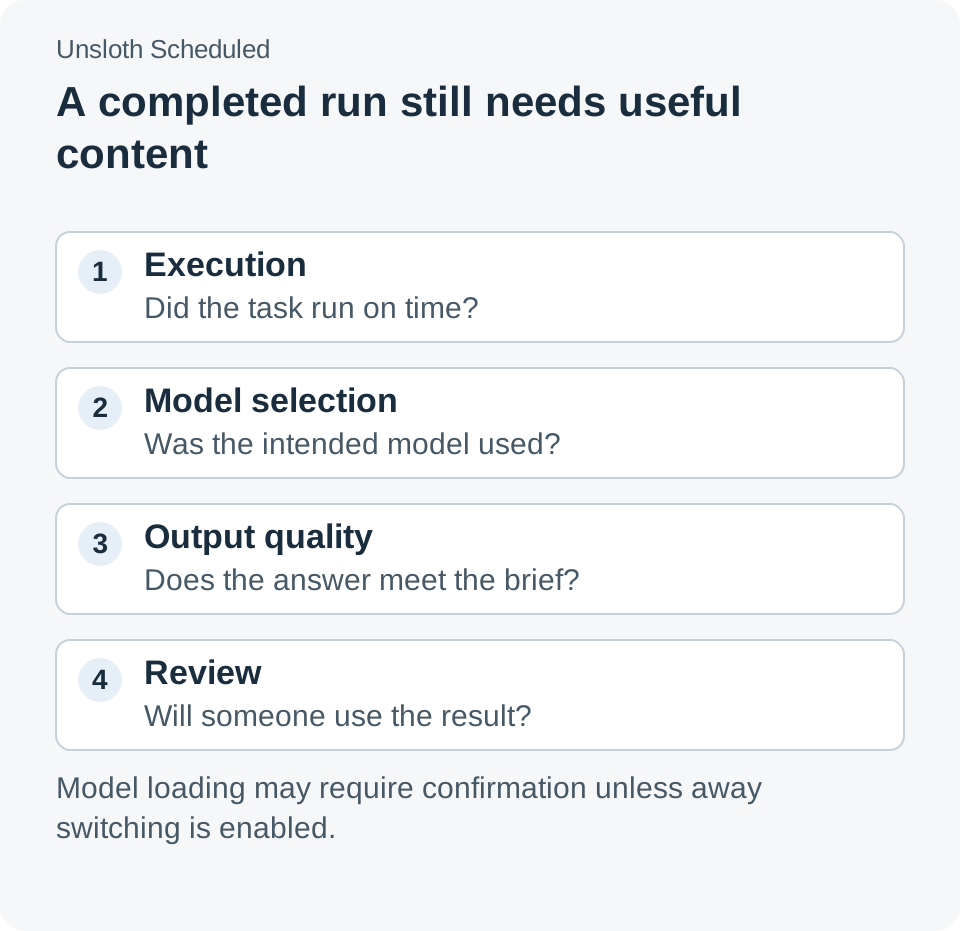
Evaluate whether the task ran, whether the intended model was used and whether the result was useful as separate questions. These are proposed checks, not reported benchmark results.
Reliability includes deciding when a routine should stop
The release is a beta, so start with work whose failure is easy to notice and inexpensive to recover from. A missed practice exercise is a manageable experiment. A process that silently depends on a generated checklist being correct every morning requires a stronger operating design than a schedule alone provides.
Make the first evaluation finite. For example, review the next five expected runs and decide whether to continue, revise or remove the task. Five is a practical trial size for observing your own routine, not a statistical guarantee of reliability. The point is to create a decision instead of letting an experiment become permanent by accident.
Watch for a second kind of failure: technically successful output that nobody reads. A folder of generated chats can look productive while adding another review burden. Shorten the answer, change the timing or retire the task if it is not improving the activity it was meant to support.
The most useful scheduled prompt has an owner, a bounded assignment and a recognizable moment when its output is used. Those qualities make it possible to improve the routine as the software and your needs change.
A local AI routine earns its place by being useful on time
Unsloth's scheduled prompts give existing model work a predictable starting point. The opportunity is to turn a small, well-understood assignment into a routine you actually use. Choose work whose context is already available, keep the application requirement visible and treat the resulting chat as something to evaluate.
The strongest first task is rarely the most ambitious. It is the one whose result you will recognize, inspect and act on when the appointment arrives.
Sources
- Unsloth v0.1.911-beta release notes, published October 26, 2026, 14:23 UTC: scheduled execution, model selection, notifications and runtime limits.
- Unsloth official documentation, checked October 27, 2026: installation paths and product background.
- Unsloth source repository, checked October 27, 2026: open-source project and release access.
The scenarios and evaluation procedure are illustrative. Product behavior is described from the dated release; no installation, unattended reliability trial or model benchmark is represented here.
Telli.sh recommendation: Keep the prompts you tried, the answers worth revisiting and the reasons you changed a routine in one searchable place. Create a Telli.sh account to organize your reference notes.