[Local AI Field Notes 01] Strata's Next Test: Making a Large Model Useful on Your PC
Strata's 0.2 beta became a desktop app. Three published consumer-hardware examples show what works, what costs memory, and where local AI goes next.
The most interesting local AI demo is the one you can still use next week. A large model producing a clever answer on a gaming PC is a milestone; opening the same conversation tomorrow, finding the model files, and safely letting it edit a project are the beginnings of a useful tool.
Strata crossed toward that second category with 0.2.0-beta on October 19, 2026: a desktop app, a Terminal interface, and separately packaged engines. By October 23, 0.2.3 had arrived. The beta's actual name matters when choosing downloads: this is the 0.2 release line, rather than an announced future 2.0. Beta release, October 23 release
This first Local AI Field Notes installment examines what that change buys a person with an existing computer. We will connect the new interface to three published hardware examples, separate model choices from different architectures, and examine the developments that could make local inference a dependable everyday service.
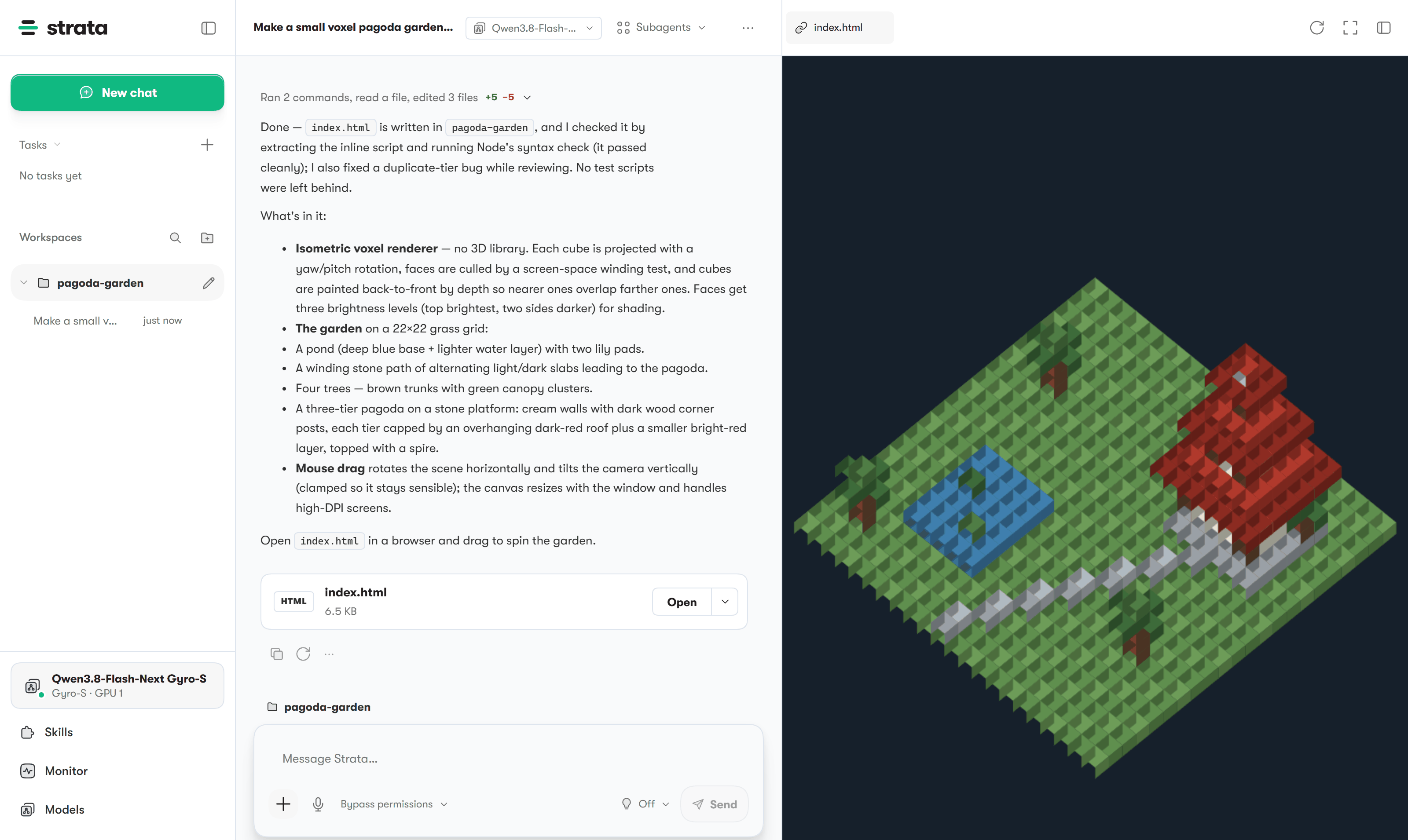
Official Strata screenshot from the 0.2.3 repository, showing a coding conversation and HTML preview. It illustrates the interface, rather than a test performed for this article. © 2026 Niko1221 and the Strata contributors; source, MIT license.

The beta made the engine something you can return to
The desktop app brings model selection, storage management, chat, hardware monitoring, and a coding workspace together. Its Manual permission mode asks before changes; the more permissive Bypass mode gives the agent greater freedom. The Terminal offers a guided strata launch flow and connections to coding clients. Both share the underlying engine. 0.2.0-beta feature notes
For a developer, that creates a straightforward illustrative use case: ask for a small parser in a disposable project, inspect the proposed files, run its tests, then continue the conversation with a failing example. For a document-heavy worker, the comparable first job is a bounded question about a supplied passage, followed by a request for the exact supporting quotation. Neither scenario requires turning the model into an autonomous employee.
The practical improvement is continuity. A graphical model picker reduces the chance of starting an incompatible configuration; a hardware monitor helps explain why another application changes performance; a saved preset turns a successful experiment into something repeatable. These features do not increase the model's reasoning ability. They reduce the work between having that ability available and using it responsibly.
Here is our take: local AI's next competition is about that distance. The winning experience will make a good configuration easy to retain, a failure easy to understand, and a risky action easy to review.
The computer's whole memory system becomes part of the model
Strata's main target is Qwen3.8-Flash-Next, whose core has 125 billion parameters. Its execution strategy uses GPU memory for common computation and frequently needed experts, system RAM and CPU execution for other experts, and SSD access for the n-gram lookup table. A larger graphics card helps, but the machine's RAM and storage remain part of the inference path. Project overview, execution design
Think of the PC as a workshop with several work surfaces. The fastest surface is limited, so the runtime must decide which work deserves to stay there. Improving that decision can make existing hardware more useful; it cannot make every surface equally fast.
Three quantities deserve separate attention. The download occupies storage. The loaded weights and runtime buffers consume memory. The context window adds working state as the conversation grows. A file's size alone therefore tells you neither how much VRAM you need nor how quickly the first answer appears.
The project's current starting guidance is at least 32 GB of RAM and VRAM combined, with roughly 80 GB of free disk for its usual setup. Those are entry guidelines, not a promise that every model, context length, or operating system fits that allowance. A basic 16 GB laptop should not be treated as equivalent to the desktops below. Hardware requirements
More model names do not always mean more model architectures
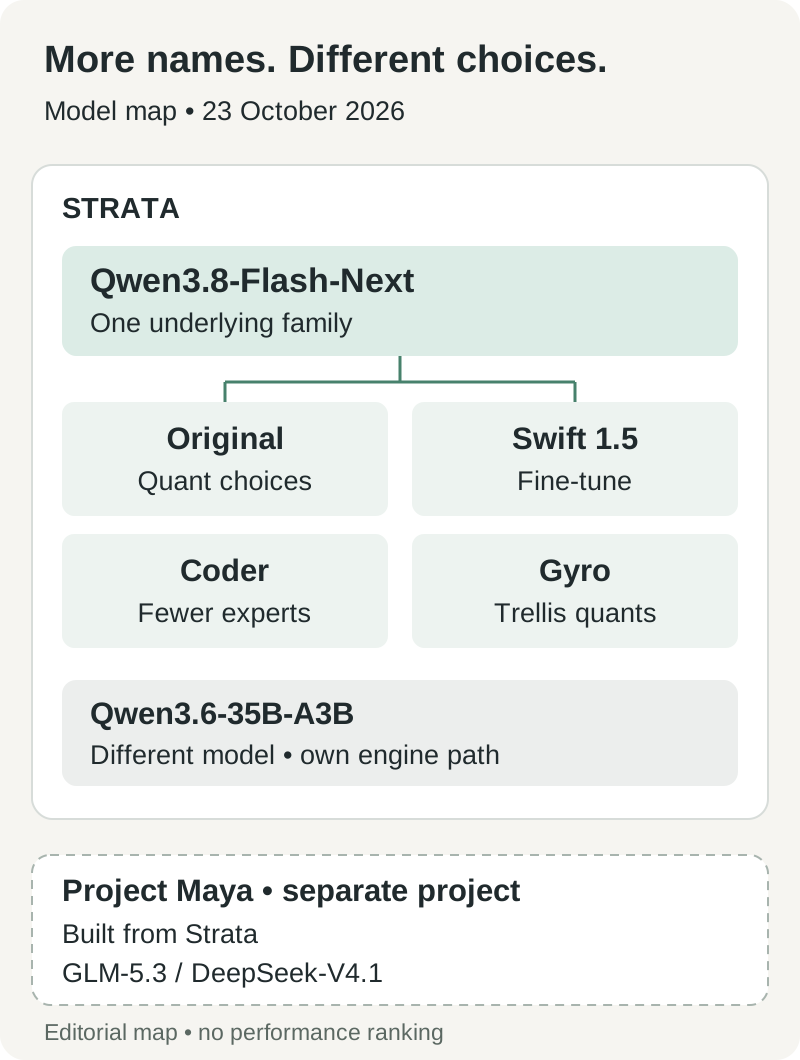
Original editorial map of documented model relationships, checked October 23. Branches show lineage and runtime support, not equal quality or interchangeable files.
The original Flash-Next, Swift 1.5, Coder, and Gyro choices answer different questions about the same underlying family. Swift changes behavior through fine-tuning. Coder removes experts selected as less useful for its coding focus. Gyro changes how weights are represented. Treating those names as four unrelated foundation models makes the catalog look broader than it is. Model guide
These differences are consequential. Coder keeps 256 of each layer's 512 experts, and the project warns about weaker general and non-English performance. A model selected because it fits a coding desktop should not automatically become the default for multilingual document questions. Swift's shorter reasoning can improve elapsed time without making the hardware generate each individual token faster. Version trade-offs
Gyro-S needs a 58.5 GB download, although its documented weight-memory requirement across RAM and VRAM is 27.6 GB. Its n-gram table remains on SSD. The project's evaluation places its quality below the larger low-bit choices; fitting into less memory has a price. Gyro documentation
There is also an actual second model: Qwen3.6-35B-A3B, a 35B mixture-of-experts model with 3B active parameters, handled by a separate engine path. Its documented options include images and concurrent requests on supported NVIDIA and AMD configurations; the Mac engine does not run it. That distinction makes it a useful alternative to evaluate when the largest headline parameter count is not your real requirement. Qwen3.6 support
Three published machines show three different kinds of usefulness
The following examples were published by community contributors or the project itself. They are measurements of particular configurations, rather than hands-on tests for this article. Their purpose is to show plausible work and its cost, not to rank three computers using incompatible prompts.
| Published example | Model and context conditions | Reported result | What it helps you decide |
|---|---|---|---|
| Community, October 9: RTX 3060 12 GB, Core i7-12700, 64 GB DDR4-3200, NVMe, Windows 11 | Strata 0.1.41; original Q2_0; 131,072-token window; 4,096-token fresh prompt, 256 output tokens; reasoning and vision off; three runs | Median 42.9 output tokens/s; 4.7 seconds to first token; 10.6 seconds total | An older 12 GB card can support interactive short work when paired with substantial system RAM |
| Community, October 9–10: RX 9060 XT 16 GB, Ryzen 7 9800X3D, 64 GB DDR5-6000, Windows 11 | Engine 0.1.40.3; IQ2_XS; 122,880-token window; prefill 8,192; 8,019-token fresh input, low reasoning; three runs | Median 879.4 prompt tokens/s, 56.3 output tokens/s, 11.212 seconds total | Prompt configuration can matter as much as a faster card for document-sized inputs |
| Project measurement, documented by October 23: M4 Mac mini, 32 GB unified memory | Gyro-S; SSD expert streaming; 11–12 GB expert arena; no draft layer; 120-token story; total window not specified | Median 9.14 output tokens/s over five interleaved pairs; a separate 4,065-token prompt read at 109 tokens/s | A compact machine can run a large model, with a waiting-time trade-off |
Sources: RTX 3060 report, RX 9060 XT report, Mac measurements. These reports predate or differ from today's app release.
The RTX 3060 example is useful because it includes the waiting period before output. An interface displaying roughly 43 tokens per second can still pause while reading the question. Its report also records thermal slowdown and uncontrolled background activity; the value is a realistic boundary around one machine, rather than an idealized GPU specification.
For the Radeon user, there is evidence of a concrete workflow beyond a speed loop. The contributor ran three synthetic TypeScript tasks three times per model through a coding client, with both IQ2_XS and IQ3_XXS passing all nine task runs. The IQ2 configuration finished those bounded tasks faster, while consuming less host memory. This supports trying testable coding jobs; it does not establish equal quality on an unfamiliar repository. Coding comparison and fixtures
The Mac example answers a different question: can a relatively compact 32 GB system participate at all? Yes, under the published streaming configuration. But a separate roughly 30K-token IQ3_XXS prompt in the Mac documentation took 5.6 minutes to first output. A patient batch task and an interruption-sensitive assistant have different latency budgets. Mac streaming measurements
That is the choice a reader should carry away. Use a short question to discover interactive behavior, a long document to discover prompt cost, and a verified task to discover whether the answers are useful. No single number stands in for all three.
October's fixes show why version numbers belong in the setup notes
The October 23 release reports a 6–19% answer-speed improvement on its Windows Strix Halo test machine with IQ3_S, measured in three paired runs against 0.2.2. It also ships an Intel Arc Linux SYCL engine package, with the A750 as the tested card. DFlash2 drafting is Terminal-only and opt-in; Auto continues to select MTP because the alternative has not won across all workloads. 0.2.3 measurements and limits
Those improvements sit beside ordinary software maintenance. The October 20 v0.2.1.2 tag addressed Strix Halo Windows startup. The hardware guide explains the earlier problem: registering the expert arena exhausted available GPU memory, leaving no slots for the cache. A supported chip and an installer were insufficient until memory ownership was corrected. v0.2.1.2, Strix Halo startup explanation
There are current rough edges too. Issue #3810, opened October 23, reports a Windows CUDA setup crash involving the packaged vision metadata. That is a user report awaiting resolution at this article's research cutoff, rather than proof that every Windows installation fails. If your path matches it, check the issue and the subsequent release notes before spending hours retuning a model. Windows setup report
Upgrades deserve attention as well: the 0.2.3 notes instruct users of 0.2.0-beta through 0.2.1.2 to rerun the Terminal installer because those versions cannot switch Control components themselves. The installer retains models and settings. For a Mac, check that the desired signed artifact has actually appeared: the same release's known-limits section says its Mac builds were still being signed at publication. Upgrade instructions
Start with one useful job and a short context
You do not need to reproduce an enormous context demonstration to discover whether this is worthwhile. A small successful loop gives you a baseline, including the failures and corrections, before you commit more storage or let an agent act broadly.
- Choose the documented path for your hardware. Open the official release page and select the matching operating system and GPU package. Record the app and engine versions separately. Preserve an already working installation while evaluating an upgrade.
- Select a model using free memory, language, and task. Close heavyweight applications for the first trial. Start with the recommended size, around 8K context, and one concurrent request. Keep the model files on local SSD storage.
- Use the guided setup. The desktop model picker or
strata launchexposes model, storage, context, image, and access settings. Retain local-only access and Manual permissions for the first coding exercise. Terminal guide - Ask something you can verify. Try a small function with tests, three questions about a supplied document, or a screenshot containing known labels. Save the prompt and check the answer against the actual source or test output.
- Measure the complete wait. Record startup, time to first output, total task time, peak memory, and correctness. Then repeat once with a cached follow-up and once with a new prompt. Keep drafting and reasoning settings unchanged during that comparison.
- Add complexity one variable at a time. Increase context only when the job requires it. Evaluate images, another model, or a coding-client connection separately, so a regression has somewhere concrete to point.
For shareable performance reports, Strata provides strata bench run. Its standardized protocol remained a draft pending pilot validation on October 23, and explicitly separates model loading from timed inference. The important habit is already useful: attach hardware, quantization, effective settings, and task outcomes to the result. Benchmark protocol
Keeping inference local still leaves decisions at the edges
Strata's privacy documentation says it has no usage telemetry and can run downloaded models offline. Web search, opened pages, remote model services, tunnels, and configured tools create external connections when used. A private model conversation therefore needs a private surrounding workflow too. Network and download behavior
This is especially relevant to the document and coding examples. An assistant that can read files and run commands has capabilities beyond text generation. Review its working folder, the exact proposed command, and any external tool endpoint before supplying confidential material. Keep originals and version history so an incorrect edit remains recoverable.
The default inference listener uses 127.0.0.1; opening a network listener changes who can reach it. Strata documents API keys and its separate sharing listener, but the person enabling access still owns that decision. A compatible API makes connecting a client convenient, rather than making every possible client configuration private. Security policy
Project Maya shows how far the idea travels—and what it costs
The broader development is that the runtime strategy is being adapted to other model families. Project Maya explicitly credits Strata as the starting point for its engine, server, and dashboard, with substantial work for its own models. Its documented targets include GLM-5.3-Flash, 321B, and DeepSeek-V4.1-Flash-1017, 748B. It is a separate project, rather than a Strata model-menu option. Maya models and credits
Its GLM Maya-S download is 96.5 GB; the DeepSeek Maya-S option occupies 340 GB including Engram tables. A community example pairs one RTX 5090 with a Ryzen 9 7950X and 96 GB RAM, reporting over 30 tokens per second for GLM Maya-M. Those conditions explain why “one GPU” is an incomplete description of a consumer setup. Maya files and hardware reports
The opportunity is real: a machine can combine several storage and compute tiers to serve a model whose full weights exceed its accelerator memory. The cost grows too. Hundreds of gigabytes of downloads, model-specific kernels, spare system memory, and experimental platform support are meaningful commitments. A successful large-model port does not establish a universal loader for every architecture.
For most readers, Maya is a development to watch before it is a replacement recommendation. The useful question is whether a different model solves a task your current one fails, with enough benefit to justify the added hardware and maintenance. Parameter count alone cannot answer that question.
The next milestone is dependable work, and the public proposals point there
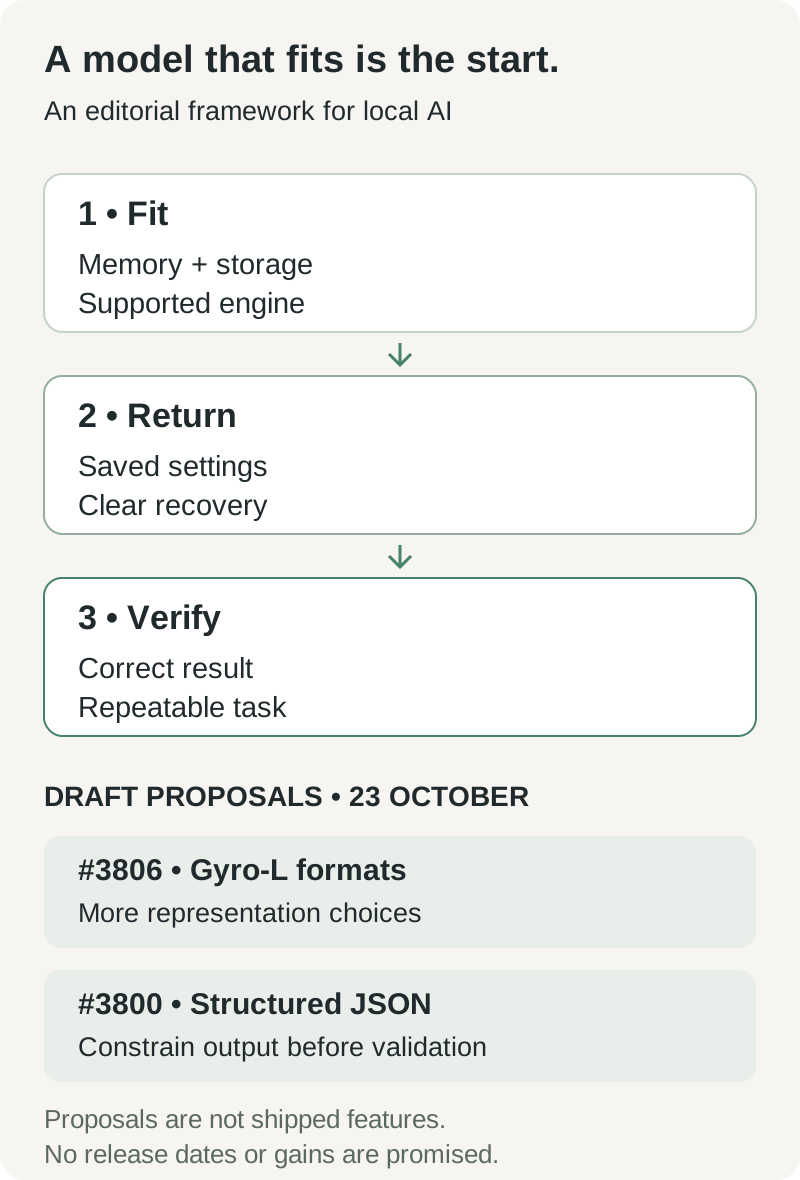
Original editorial framework. The upper sequence describes adoption criteria; the lower row identifies public proposals checked October 23. It is not a promised release schedule or a performance forecast.
Two open draft pull requests offer more concrete signals than an imagined 2.0 roadmap. #3806 proposes support for Gyro-L's currently unsupported trellis formats. #3800 proposes token masking for structured JSON outputs so invalid generations need fewer full-request retries. Both were drafts on October 23; neither belongs in a list of shipped capabilities. Gyro-L proposal, structured-output proposal
If work like this reaches a reliable release, two kinds of local workloads benefit. Better format support gives users more ways to trade memory for quality. More dependable structured output helps document extraction, labeling, and tool calls produce data another program can safely validate. The second improvement is less spectacular in a video, but potentially more valuable in a repeated workflow.
Our expectation is conditional: personal inference becomes more useful as runtimes preserve working configurations, bound their memory use, and recover from failures. More backend ports and cleverer drafting help only when a reader can connect them to an actual task. A desktop model earns its place by producing work you can check and repeat.
The question for the next local AI computer is therefore simple: can you hand it the same useful job tomorrow and trust the process enough to keep using it?
Sources and reading notes
Research cutoff: October 23, 2026. Release status, issue status, and available artifacts can change after that date. Measurements above retain their original publication dates and configurations; no new inference benchmark was performed for this article.
- Strata 0.2.0-beta, v0.2.1.2, and 0.2.3 release notes.
- Strata model guide, Qwen3.6 support, and Gyro documentation.
- Community benchmark collection, Mac documentation, and draft benchmark protocol.
- Project Maya, official Strata screenshot, and its repository license.
Keep your local AI decisions with their evidence
When you compare configurations, keep the source links, hardware settings, task results, and corrections together. Telli.sh can help organize those research notes and summaries as your setup evolves. Create a Telli.sh account