A 220B Model on a 64 GiB PC? Check the SSD Before You Download
Strata 0.2.18 adds a Hy4-Flash engine. See what the 129.61 GB download, GPU memory, context and two sets of speed figures mean for a real local workload.
Suppose your PC has 64 GiB of RAM and a graphics card with 8 GiB of its own memory. Strata's November 21 update gives that machine a reason to try a 220-billion-parameter model. Start by checking the SSD. The smallest Hy4-Flash package the project recommends for that setup takes 129.61 GB on disk before the optional image component. Whether it is worth that space depends on how quickly it opens, how it handles the context you need and whether it gives you a better answer than the model already installed.
Strata is a PC app and command-line tool for running models locally. Release 0.2.18 adds a dedicated Hy4-Flash engine, version 0.1.64, with packages for supported Windows and Linux systems and Apple Silicon Macs. The project also lists a Linux ARM build for NVIDIA DGX Spark. The desktop app and Terminal remain at version 0.2.18. Hy4-Flash reads text and optional images and returns text, so a possible first job is comparing two screenshots of a spreadsheet. A text-only check can start with the same table exported as plain text. Strata 0.2.18 release and platform packages · Tencent's Hy4-Flash model card
The model fits three different budgets
Tencent's Hy4-Flash has 220B total parameters. Strata describes 12B active per token and 64B in the model's Engram lookup. The active count describes the model's per-token computation. The PC also needs somewhere to keep the model files, memory for the parts used by the engine and space for the active request. A prompt that fits after a fresh boot may be less practical while a browser, editor and other workloads are open. Strata model card and pack table
| Pack | Project's target system RAM | Listed graphics-card memory | Text files on disk | With optional image file |
|---|---|---|---|---|
| SQ-64 | 64 GiB | 8, 12 or 16 GiB | 129.61 GB | About 130.54 GB |
| SQ-96 | 96 GiB | 8 or 12 GiB | 157.16 GB | About 158.09 GB |
| SQ-128 | 128 GiB | 8 or 12 GiB | 181.23 GB | About 182.16 GB |
The disk totals include the shared 67.58 GB Engram-Q8 file each pack needs for text. The last column adds the separate 0.93 GB vision file to each text total. Reserve additional space for the installer, engine, ordinary work and downloads still in progress. If you keep two packs, the shared lookup is distinct from their individual weight files. Use the actual folder inventory when estimating how much you can reclaim or need for an update. Strata's file inventory and checksums
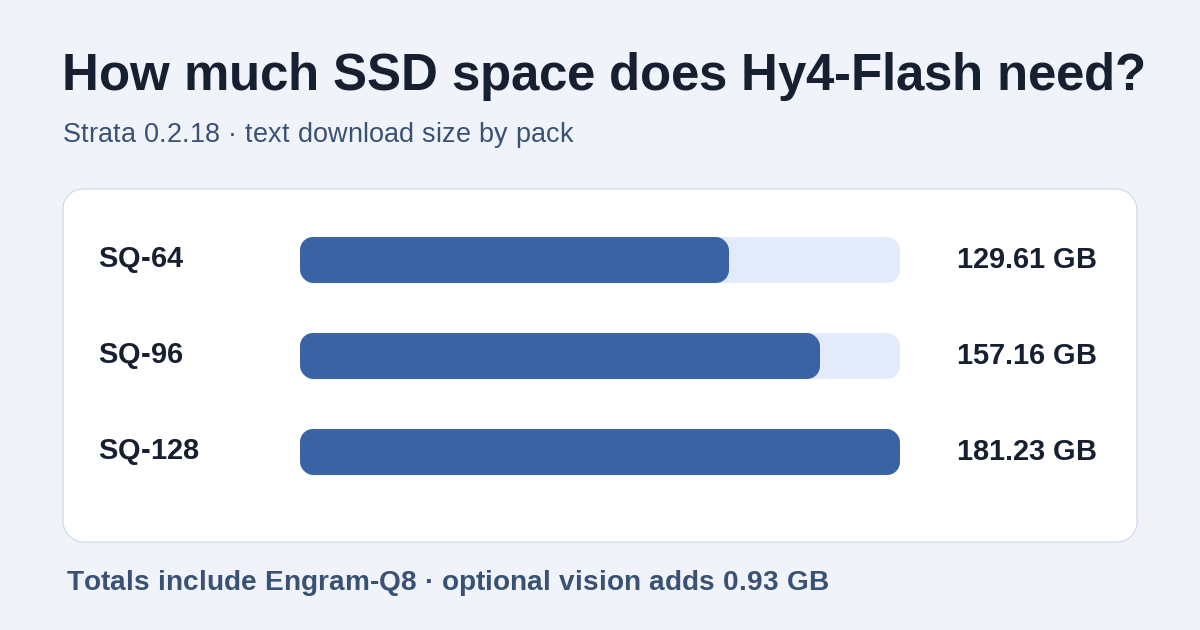
Original comparison of the disk totals published by Strata. The figures include Engram, with the optional vision file listed separately.
GB is the decimal unit used for the downloads. GiB is the binary unit used in Strata's PC memory table. If your system shows disk space in GiB, the SQ-64 text total is about 121 GiB by conversion, before the optional component or working space. Check free capacity on the actual model volume. A computer may have two drives with ample space in total while the volume chosen for models is still too small.
The graphics memory figures above describe the project's configurations with a separate GPU memory budget. On an Apple Silicon Mac, the CPU and GPU use one memory pool. Use the project's unified-memory guidance and check how much is available with other apps open. The model card gives SQ-96 as an option that leaves room for other work on a 128 GiB unified-memory system. Its discrete-GPU SQ-64 row alone does not establish a minimum for a 64 GiB Mac. Strata's unified-memory guidance
Decide why the large pack earns its space
In the project comparison with the original BF16 model, the mean KL divergence of next-token predictions for reasoning prompts is 0.23206 for SQ-64, 0.13591 for SQ-96 and 0.08789 for SQ-128. A lower value indicates closer agreement with the reference distribution on that test. The project also reports a separate tool-related prompt set. Each set uses eight held-out prompts of 512 tokens. These figures say something about how quantization changes the model's predictions. A completed tool call, a correct figure in a screenshot and a faithful document answer each require their own check. Strata's quantization comparison and method
For a screenshot task, start with two tables for which you know the answer. Ask for three changed values and the row labels that support them. Include a row with a missing value so you can see how the model handles uncertainty. Then give the same data as a plain text table. If the text is reliable but a small number in a screenshot is wrong, test the source image or crop before changing packs. If both fail on the same reasoning step, a larger pack is a comparison you can run on a suitable computer.
A second task is answering questions from a bundle of technical notes. Begin with a known fact in a short extract and work up to the bundle you would really send. If the answer is good on the extract but worse on the bundle, try a version of the job that passes the relevant passages explicitly. Hy4-Flash advertises up to 1,048,576 tokens of context. Use your local fit and response measurements to choose a practical setting, even when the model itself can accept much longer input. Tencent's model details · Strata model card
Two output rates describe two different setups
Strata's notes show a decode rate of 62 tokens per second on an AMD Radeon AI PRO R9700 or RX 9070 XT for a 4K SQ-64 context in its model-card test. The project used Strata 0.2.18 and Hy4 engine 0.1.64 with built-in DFly2 speculative decoding enabled. In a separate GitHub report, an Ubuntu user with an R9700 with 32 GB of VRAM, Threadripper PRO 3975WX and 124 GiB of system RAM reported 29.3 and 30.5 tokens per second in two SQ-64 runs at 4K context with temperature 0.9 and top-p 1.0. The user also reported 31.0 and 31.7 at temperature zero. Their measure divided response tokens by elapsed request time across short prompts. Project benchmark and method · User benchmark and corrected SQ-64 test
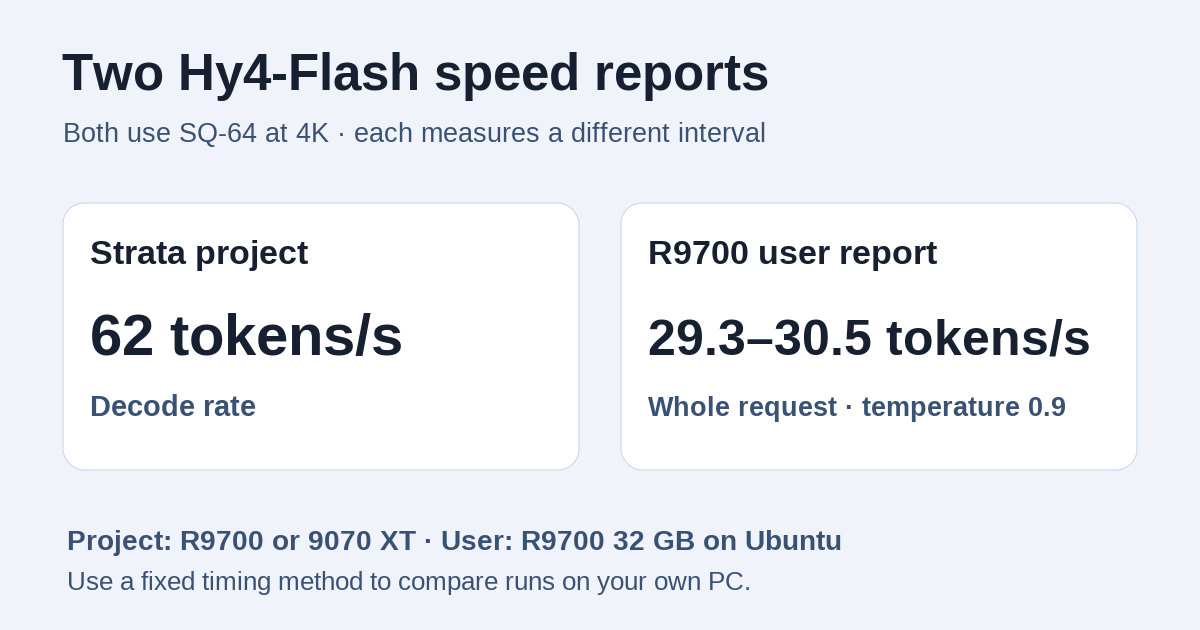
Original comparison of two reported results. Both use SQ-64 at 4K context, with different systems or measurement details.
Use both reports to plan a test. Match the build and backend, CPU, system and GPU memory, storage location, input length, sampler and speculative decoding settings before treating two numbers as a reproduction. Be consistent about whether the timer captures the request from start to finish or only decoding after the first token. The user had also measured a slower SQ-96 example at 128K, a separate case from the corrected SQ-64 test. Keep the pack and context in your own benchmark record.
For a person reading the reply, sustained output rate is one part of the wait. The engine must open the pack and process the prompt. A longer prompt or an image may do more work before the first visible token. A tool that displays a healthy decoding rate while you wait longer for the answer can still feel slow on short, interactive tasks. For batch work, the same model may make sense if the answer comes back with fewer corrections. Track the time to an accepted result, including any need to shorten an input, rerun it or repair an answer.
Run a trial before shopping for more memory
- Confirm the backend and model location. Open Strata's pinned release page. If Strata is installed, follow the project's terminal or app update path and check the displayed version. Find the model volume and its free space before choosing a pack. Use the published compatibility notes for the exact GPU and operating system.
- Choose the smallest suitable pack. Guided Setup and the Models view provide hardware-fit badges. Pick a text pack first if you can test your job without images. Enable image support when the workflow calls for it. Strata documents that it can add the missing vision file to an existing text pack. Start with a short context and one active request.
- Measure cold start and warm work. Time a run after a normal restart, then record several requests with the model already loaded. Record the time to first visible text and total completion time. Keep the same prompt, output limit and mode when testing a second pack or host. Check whether the machine remains usable under your ordinary workload.
- Increase the input to the size you actually use. For documents, try a known question on a short extract and a longer source. For images, include a clean screenshot and a hard example with small text. Track missing values, false claims and how much checking you need. An answer-quality failure may point toward a smaller document chunk or a different input format before it points toward hardware.
- Compare the least expensive next step that changes the outcome. An SSD with more free capacity addresses an installation obstacle. Greater available memory can address a fit problem. A workload with long prompts and an adequate small model may benefit from a different prompt workflow. The same evidence helps you decide whether a purchase would remove the constraint.
Look at the SSD during the wait
A slow first launch and a slow answer on an already warm model point to different parts of the job. Start by watching storage activity during the first launch, without updating the operating system or copying another large file at the same time. Then check whether a repeat query keeps the drive active or instead spends most of its time processing the input and generating a response. The release describes a Windows AMD path for streaming cold data from the SSD. It does not define one drive speed requirement for all platforms and packs. Release notes on storage streaming and backend differences
If you already have a smaller local model, run it on the same example before committing another large pack to disk. Keep the output format and what counts as a correct answer constant. A good comparison for screenshot review includes whether the model quotes the right values, whether it admits a cell is unreadable and how quickly you can verify the answer. If the cheaper setup clears those checks, the larger pack can be reserved for cases where the smaller model misses an important difference.
A PC that can start SQ-64 has a new option. A PC that can run it next to a normal workload and answer the hard example correctly has a reason to keep it. Make that your buying and setup test, and keep numbers for storage, responsiveness and accepted answers on the same record.
Sources and official media
- Strata 0.2.18 official version page and downloads, November 21, 2026
- Strata release notes, engine packages and app setup
- Strata model card, package specifications and model-card illustrations
- Tencent Hy4-Flash model card and license reference
- Community report with hardware, method and corrected measurements
Save the pack, context and timing next to an example answer so a later update is easy to compare. Start your first note with Telli.sh.