Your AI can build a Snapchat game. Your phone still gets the final vote.
Snap's free Easy Lens CLI connects familiar coding assistants to Lens creation, previews and publishing. The real opportunity is a shorter path to phone testing, with native features and platform review still to check.
A browser game can feel finished on a laptop and awkward the moment somebody opens it on a phone. The button is too small, the first scene takes too long, and saving a score depends on an account feature the desktop preview never actually exercised. Faster code generation does not remove that last stretch of product work.
Snap's November 18 announcement of Easy Lens CLI offers a shorter route through it. Developers can connect coding assistants such as Claude Code, Codex and Cursor, describe a Snapchat Lens, render preview videos and send versions to their phones. The CLI runs on Mac, Windows and Linux and is free to use with a Snapchat account; the connected coding assistant's own fees remain a separate consideration.
The appealing change is that an existing development tool can help carry an idea into Snapchat's actual environment. For a small game studio, creator or agency, that makes an early experiment easier to justify. The important next step is knowing what a desktop preview proves, what requires a phone and what still has to pass Lens review.
A familiar assistant gets a new place to publish
Snapchat Lenses are the platform's creative experiences, including camera effects and Web Lens games. Easy Lens already supports creation from prompts on web and mobile. The CLI brings that process into tools developers already use, allowing an assistant to work on assets, construction, testing and revisions within the same development session.
Snap says the tool can draw on more than 100 AR building blocks and more than 50 AI asset generators. It describes games with leaderboards, camera Lenses and beauty effects among the possible outputs. Those figures describe the available building resources; they do not mean every combination will fit a particular project or pass review without changes.
The useful shift is a reduction in handoffs. A creator can explain an interaction, inspect a preview, identify a problem and ask for a correction without manually moving every artifact between separate workflows. That still leaves a creative brief to write, assets to select and an audience to understand. The assistant can implement an instruction, but the team has to recognize whether the result is worth playing.
Think of the CLI as a faster route to the rehearsal, rather than a substitute for the performance. A generated preview can expose an obvious visual mistake. A phone trial can expose a control that only works with a mouse. Platform review answers another question entirely: whether the submitted experience meets Snapchat's publication requirements.
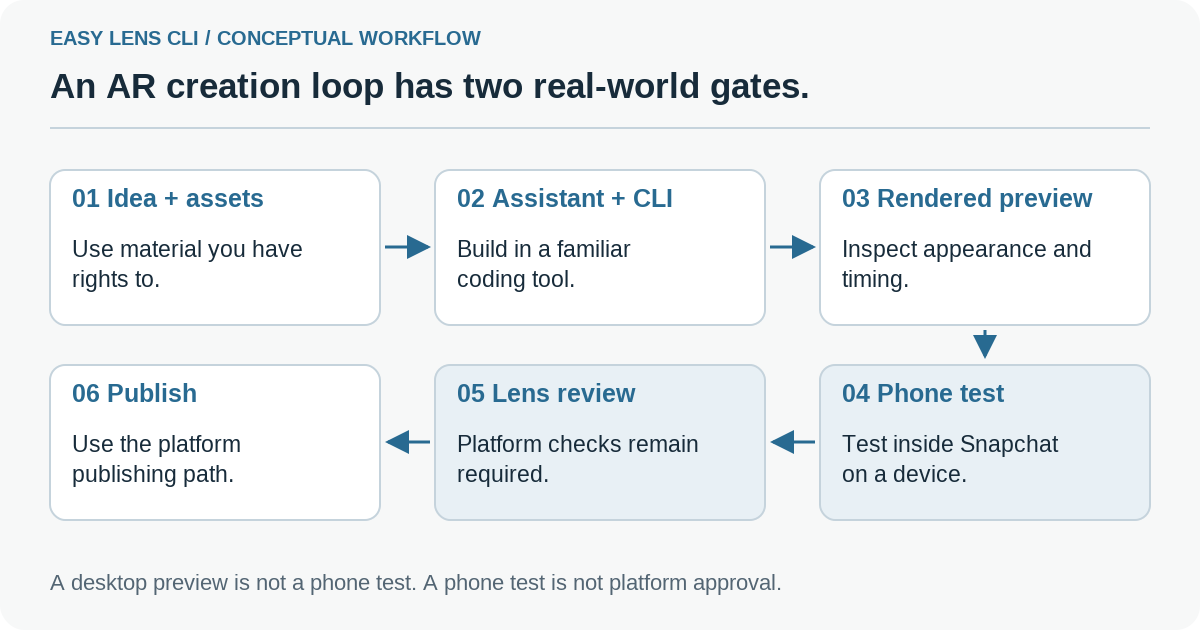
Original explanatory diagram based on Snap's creation and publishing workflow. Preview, device testing and platform approval are separate stages.
The best first project is a small game you already understand
Snap specifically identifies bringing existing browser games to Snapchat as a use case. That is a sensible starting point because the creator already knows the intended rules and can compare behavior. A short score-attack game, for example, has a clear start, a repeatable interaction and an end state that can be checked without building a large world first.
For an illustrative prototype, keep the first version to one input method and one complete round. Ask the assistant to preserve the original scoring rule and explain any changes required by the host. Test the entire loop before adding social features or elaborate artwork. Otherwise, attractive generated assets can conceal the fact that the actual game is difficult to start or restart.
Snap's public Web Lens API repository gives this workflow a concrete technical foundation. It exposes native capabilities including leaderboards, Bitmoji and account-bound storage through a JavaScript bridge on iOS and Android. The repository also includes examples, making it possible to inspect how a feature is meant to behave before asking an assistant to integrate it.
These native features can make a game feel connected to Snapchat, but each adds a responsibility. A leaderboard needs a clear scoring direction. An avatar needs a fallback when a user has none. Saved progress needs to survive ordinary opening and closing behavior. Add them because they improve the play experience, then test the edge cases they introduce.
A desktop stub is useful precisely because it is a simulation
The Web Lens API includes a desktop stub so development can happen in a normal browser, local server or PlayCanvas launch page. The official README says these environments return canned native data. That is useful for building layouts and checking basic code paths, but a successful desktop run is not evidence that the native integration works for a real Snapchat account.
The difference is especially important for Bitmoji. The README describes a placeholder response in the desktop stub and explains that real users may have no avatar, a fetch may fail or an asset may need to be loaded again. A game should remain understandable when personalization is unavailable. The first phone test should therefore include both the personalized path and the fallback.
Storage is another place where a local demo can mislead. The repository describes account-bound, per-Lens storage and warns that the first read can take seconds on a cold start. Writing before that read returns can overwrite the save still being loaded. A loading state is part of correctness here, not merely a visual polish task.
The distinction between environments can be made explicit in a test plan:
| Environment | What it helps you inspect | What still needs another check |
|---|---|---|
| Desktop browser with the API stub | Layout, basic game rules and handling of simulated native responses | Real account capabilities, phone input and native integration |
| Rendered preview video | Visual composition, timing and obvious animation problems | Interactive behavior and responses to interruptions |
| Snapchat on a phone | Touch controls, actual host behavior and account-dependent paths | Wider device coverage and publication review |
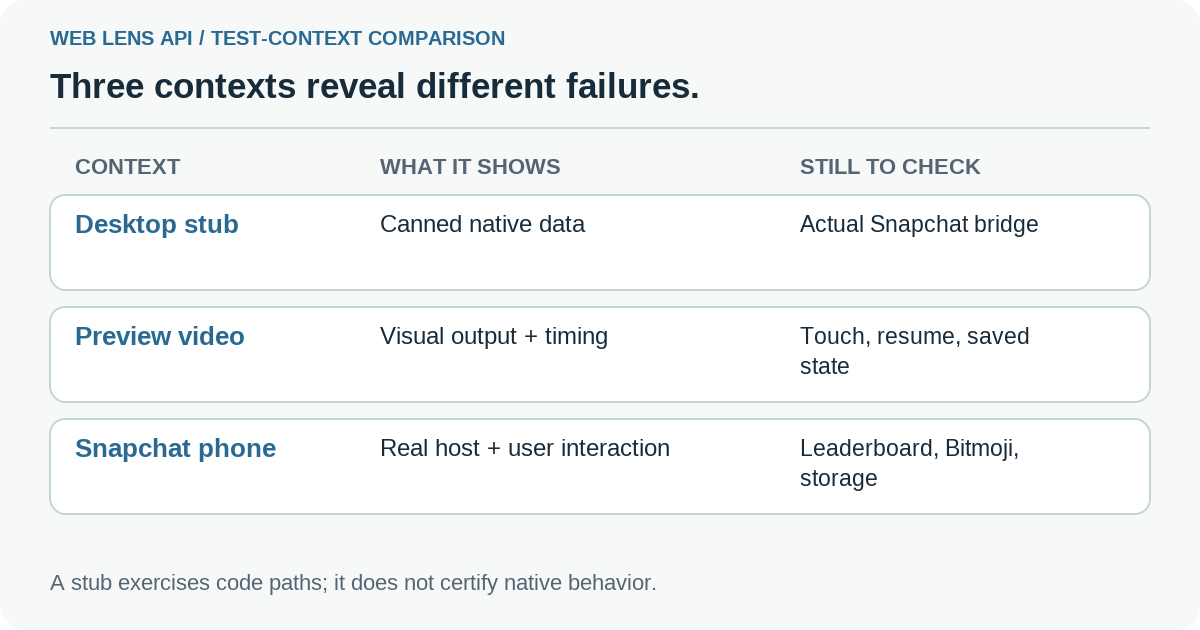
Original comparison based on the Web Lens API's documented desktop stub and Snap's preview features. No device performance measurements are implied.
Package the experience, not just the page that happened to work
The official Web Lens README says the uploaded zip should contain index.html at its root and include the API script locally. It explains that the Lens content security policy blocks fetching that script at runtime. An assistant can produce a page that works on a permissive local development server while depending on a remote file that the published host will refuse.
For an ESM project, the documented package installation is:
npm install @snap/web-lens-api
The API then requires initialization before capability checks. The repository's pattern is to await snapchat.init() and use snapchat.isSupported(...) before invoking a capability. A check made too early can report that a feature is unavailable simply because discovery has not finished. Errors can still occur after the capability is discovered, so a usable fallback remains necessary.
PlayCanvas users have an additional packaging detail: the README recommends adding the API as a local Script asset loaded before the engine, rather than as an external script URL. This is the kind of specific constraint an assistant should be given with a source link. “Make it work on Snapchat” is a useful goal, but a concrete packaging contract makes the result easier to inspect.
Save behavior deserves a similarly explicit instruction. The README recommends saving when state changes and when the page becomes hidden, rather than every frame. It also notes that a Lens can close with a swipe. A game should not depend on a final screen being reached or a traditional teardown callback to preserve every important change.
Two creative uses go beyond porting a game
An agency could use the workflow to explore a campaign Lens built around approved brand assets. The initial question might be whether a short interaction communicates a product idea more clearly than a static image. In that scenario, a playable phone prototype is useful for discussion before the team invests in a larger production.
The assistant can help assemble variations, but the agency still needs permission for logos, video, music and generated assets used in the final experience. A client's permission to use an image in a presentation does not automatically settle every interactive publication context. Keep a simple asset record while the prototype is small so later revisions do not lose the origin of a prominent element.
A creator could instead explore a camera effect or a visual style developed with existing creative tools. The advantage is iteration: change an element, inspect the result and try it on the intended device. The evaluation should match the job. A beauty effect needs careful visual inspection across the conditions and users it is intended to serve; a game needs clear controls and consistent rules.
These are illustrative project choices, not reports of hands-on trials. Their shared lesson is that the output should be judged where people will experience it. A generated video can help sell the concept internally, but it cannot replace interaction with the actual Lens when the value depends on touch, movement or account-linked features.
Free access does not make every experiment costless
Snap says Easy Lens CLI is free with a Snapchat account. That lowers one barrier, but the connected coding tool may have its own subscription, usage limits or paid generation. Asset creation, repeated agent attempts and team review also consume resources. A sensible pilot includes those costs rather than treating the CLI's price as the full budget.
Snap's announcement describes a game going from idea to publication in a day. That is a statement about the potential creation flow, not a dependable production estimate for every game. Existing assets, scope, review changes and the team's ability to identify defects can all affect the time required. Use the shortest working experience as the first milestone instead of promising a launch date from a demonstration.
Monetization needs an equally careful reading. The announcement mentions Lens+ Payouts and earnings for enrolled creators. Publishing a Lens does not by itself establish eligibility or guarantee revenue. For a first project, evidence that people understand and enjoy the interaction is a more useful success criterion than an earnings assumption.
Limit iteration by setting a clear question for each round. One pass can test the core mechanic; another can test first-use clarity; a later pass can inspect native features and packaging. When the assistant receives a specific defect and an expected outcome, the revision is easier to verify than a broad request to make the whole experience “more engaging.”
A five-step route from the CLI to a useful phone trial
-
Start from Snap's official installation page. Visit Easy Lens CLI, follow the current installation instructions for your operating system, sign in with Snapchat and connect the coding assistant you intend to use. Check that assistant's own usage terms and costs before a long session.
-
Give the assistant a bounded brief. Specify the interaction, audience, approved assets and a complete first round or scene. For a browser-game port, identify rules that must remain unchanged and include the official Web Lens API documentation for any native capability you need.
-
Inspect a preview before increasing scope. Use the rendered video to catch composition and timing problems, and test the basic game in the development environment. Ask which native responses are simulated and which paths remain untested. Keep the phone test list visible rather than treating the preview as completion.
-
Send the Lens to a real phone and exercise failure paths. Check touch targets, first loading, missing avatar behavior, restart and reopening after a swipe. Confirm that packaged assets load in the host and that progress is not overwritten while an initial read is still pending. Repeat on relevant iOS and Android devices where your intended audience requires both.
-
Submit only after the experience and assets are ready for review. Snap says CLI-created Lenses use the same content checks, Lens review and publishing path as those made in Easy Lens apps. Retain the tested version and its asset record so a requested change can be made without losing track of what was approved internally.
Faster creation makes the last mile more important
Easy Lens CLI expands who can get a Snapchat prototype onto a phone and how quickly a small team can reach that point. The strongest benefit is a shorter feedback loop between an idea and a real interaction. As generation becomes easier, the work that distinguishes a useful Lens is increasingly the ability to observe it, correct it and understand the platform it lives inside.
The question worth asking after the first successful preview is simple: can someone who never saw the prompt open this on their phone and enjoy it? That answer is more valuable than the amount of code the assistant wrote.
Sources and dates
- Snap, Introducing Easy Lens CLI, November 18, 2026. Official release, supported desktop systems, creation flow and publication review.
- Snap, Easy Lens CLI installation and access.
- Snapchat, Web Lens API repository and examples, consulted November 20, 2026. Native capabilities, desktop stub, packaging and storage guidance.
Official product images and demo videos are available on the announcement page. Reuse rights for those assets require separate review; the diagrams above explain the workflow. The project examples and test plan here are proposed applications, not measured production results.
Keep your creative brief, phone-test observations and asset sources together as the prototype changes. Start your first note with Telli.sh.