One person knows the prompt: Runway App Studio turns that workflow into a team tool
Runway App Studio lets paid users build creative apps from natural-language instructions. What shared interfaces change for product images, storyboards and design previews—and how to evaluate credits, sharing and review.
Original editorial diagram by Ken Jo, based on the sources listed below.
A team has a reliable way to turn a product photograph into campaign imagery. Unfortunately, the reliable part is a person: they know the prompt, the references, the model settings, and which result needs another pass. Everyone else waits for them or tries to reconstruct the process from a chat history.
Runway introduced App Studio on October 26, 2026 to make that expertise shareable as a tool. A user describes a creative application, and the system builds an interface around the task. The announcement says app creation is available on all paid plans, while free users can run built-in apps and apps shared with them. Official announcement.
Runway develops tools for generating and working with media. App Studio adds a useful question to that familiar category: what happens when a team can build the interface for its own recurring creative job? Three examples—product images, storyboards, and architectural previews—show the appeal, while a small pilot can reveal whether the resulting tool is understandable, affordable, and ready to share.
A shared interface can carry more than a saved prompt
A prompt is only one part of a working creative process. The person running it may also know which reference is current, which output dimensions are required, and when a result is unsuitable. Passing around the text of the prompt leaves much of that knowledge implicit.
An app can make some of those choices visible. Instead of asking a colleague to reproduce a long conversation, the interface can request the product image, the intended format, and the campaign direction. The underlying workflow supplies the repeated steps, while the person using the tool supplies the information that changes from one job to another.
The October 26 announcement describes apps that use Runway's image, video, and audio models together with Brand Kits, Workflows, Assets, and References. It also describes converting an existing successful workflow into an app. Those capabilities make App Studio interesting as a way to package a process already understood by the team. Announced capabilities.
Think of the result as a recipe with a usable counter in front of it. The recipe preserves the intended sequence; the counter shows the next person where to put the ingredients. A helpful interface reduces the decisions that have to be rediscovered on every run.
Our take is that this is the strongest reason to try the product. The important outcome is whether a second person can perform a real task without the original expert standing beside them. A polished interface is useful only when the workflow behind it remains understandable and the results remain reviewable.
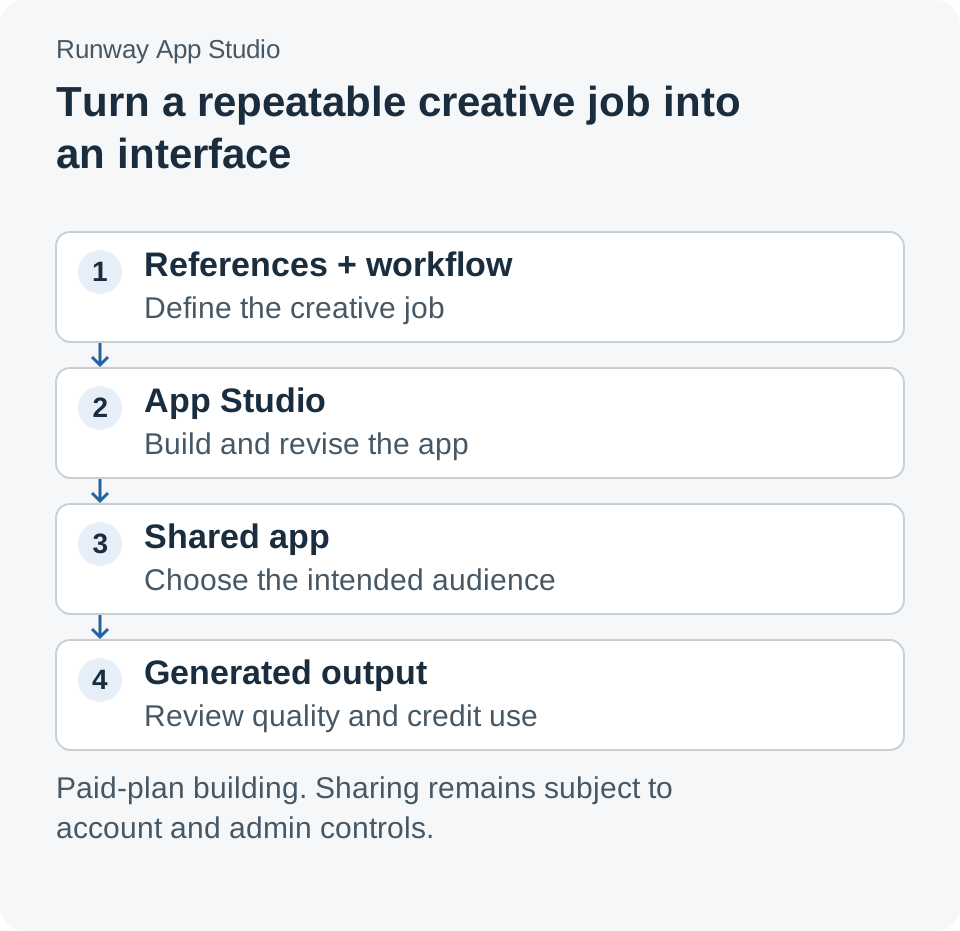
The reusable part is the process and its reference material. Each new output still needs a review appropriate to its intended use.
Product images are a useful first experiment
Imagine a small brand preparing images for several variations of the same product. The team already has approved photographs, a visual direction, and a list of required formats. Its recurring problem is turning those inputs into a consistent set of candidates for review.
An illustrative app could ask for the product photograph and a selected scene, then generate variations according to an approved workflow. The person requesting the images would have fewer hidden settings to reconstruct. The person reviewing them would receive a more predictable set of outputs to compare.
This is an attractive place to begin because the acceptance criteria can be concrete. Is the label legible? Is the product shape preserved? Does the scene match the brief? Are the requested crops usable? Write those criteria before generating a batch so that a visually appealing result does not distract from an incorrect product detail.
A shared tool can also make a repeated mistake easier to spread. If its references are outdated or its instructions allow unwanted changes to packaging, every user may produce the same problem. Keep ownership of the references explicit and treat a workflow revision as a change that deserves another small evaluation.
Runway's Brand Kits documentation describes applying stored assets and rules as context rather than re-uploading them for every Agent session. That is useful background for why shared reference material matters. It remains guidance for generation, so the team should continue checking outputs against the actual brief. Brand Kits guide, checked October 27, 2026.
A storyboard app should make creative decisions easier to discuss
The second example is a team turning short advertising scripts into storyboard candidates. A repeatable interface might collect the script, a reference style, and the intended aspect ratio. It could then present a sequence that the team discusses before committing to production.
The value is partly consistency. If every request arrives with the same essential inputs, reviewers spend less time reconstructing what the requester wanted. They can focus on whether the proposed sequence communicates the message and where it needs a different shot or transition.
Keep the storyboard's status visible. A generated sequence is a proposal for discussion, and a reviewer should be able to identify which parts were accepted and which require revision. The app should make it easy to return to the brief rather than turn its first output into an accidental final decision.
This scenario also exposes a useful design choice: how much freedom should the interface provide? Too many controls recreate the complexity the app was meant to reduce. Too few force users into a narrow result that does not fit their work. Start with the inputs that genuinely change the creative decision and add another control only when repeated use shows why it is needed.
Architectural previews make the handoff visible
Runway's launch announcement describes architecture firm KPF using App Studio to animate design renderings. In the company's account, designers specify movement in a still image and draw a camera path to produce a directed video. This is a vendor-published customer example, separate from the illustrative workflows above. KPF example in the launch announcement.
The example is interesting because the input expresses intent. A designer can indicate what should move and how the view should travel, rather than ask a colleague to infer the desired shot from a general instruction. A specialized interface can make that exchange more precise.
For a team evaluating a similar workflow, distinguish visual communication from design verification. A compelling preview can help people discuss a proposal without proving that every generated spatial detail corresponds to the underlying design. Use the appropriate source drawings and models when an exact property matters.
That distinction is ordinary creative practice: different artifacts answer different questions. A sketch helps discuss direction; a technical document establishes a specification. A generated preview should have an equally clear role in the review process so its strengths do not invite unsupported conclusions.
| Illustrative job | Inputs worth making explicit | Review that remains necessary |
|---|---|---|
| Product-image variations | Approved photograph, scene, required format | Packaging accuracy, legibility, and fit with the brief |
| Storyboard candidates | Script, visual references, aspect ratio | Message clarity, sequence, and production intent |
| Architectural preview | Source rendering, intended motion, camera path | Whether the visual communicates the proposal without being mistaken for verified geometry |
Start with a private app and one clear acceptance test
Runway's build guide describes a conversation panel alongside a live preview. A user can request changes, inspect the Code view, and publish when the app is ready. The documentation says a balance of approximately 700 credits is needed to start a build session, with build charges applied in blocks of about 50 credits. Those are balance and charging rules, not a fixed price for one completed app. Build guide, checked October 27, 2026.
Begin with a task that already has a recognizable good result. An experimental app cannot make an undefined brief precise by itself. Give it a narrow purpose and evaluate whether another person can use it correctly with minimal explanation.
- Choose one repeated task and approved example inputs. For product imagery, use a small set of material the team is entitled to process and an existing brief with explicit acceptance criteria.
- Open App Studio from the Runway sidebar. Describe the inputs, the desired outputs, and the decisions the interface should expose. Name the review step as part of the task.
- Inspect the first preview before expanding it. Check whether field labels and required inputs make sense to a colleague unfamiliar with the original prompt. Ask for a specific change when they do not.
- Run the same representative inputs through the workflow. Record rejected outputs as well as accepted ones. Check whether the app gives reviewers enough context to understand the result.
- Keep the first publication restricted. In the Publish panel, choose the appropriate limited audience and verify access with the intended collaborator. Expand sharing after the handoff works.
- Record the version and credit use. Note what changed, which examples were checked, and who owns the app's references. Repeat the check after a meaningful revision.
These steps are an evaluation plan. They do not require assuming that an app with a working preview is ready for every teammate or every input. The first successful handoff should teach the team what to simplify before it invites broader use.
Credits change the question from building to operating
The launch announcement says building, running, and hosting apps draw from the existing Runway credit balance. Visitors using a publicly shared app pay for their own generations, while its creator remains responsible for building it, their own generations, and hosting. Credit responsibilities announced October 26.
For an internal evaluation, track those categories separately. A team may spend credits while adjusting the interface before it generates an acceptable asset. It may then run several candidates for each approved result. Counting only the final successful generation hides the cost of learning and iteration.
A practical record can be simple: initial build, subsequent revisions, generation attempts, accepted outputs, and the period the app remains available. Use the workspace's actual usage information rather than inventing a per-image cost from the starting balance. The useful measure depends on the task the app is meant to improve.
Also record the human effort around the tool. A cheaper generation path that demands more manual repair may not help the team. A workflow that costs more credits but makes requests and review clearer may still be worthwhile. The comparison should include the complete repeated job, with the same quality criteria on both sides.
Sharing and maintenance need an owner
Runway's sharing documentation describes a private preview and audience choices such as the creator, the workspace, or specific people. The launch announcement also describes wider public-link sharing, subject to account and Enterprise controls; visitors still need a Runway account. Start with the audience options enabled in the actual workspace, and verify who can open the app before distributing a link. Sharing guide, checked October 27.
The distinction between an app and its outputs matters here. Someone may be allowed to run a tool while generated material belongs in a particular project or remains private. Runway's asset guide describes uploaded and generated assets as private by default, with some collaboration features sharing material within a project or workspace. Check both the app audience and the destination of its results. Asset management guide.
Maintenance also needs a practical exit path. The current build guide says App Studio does not yet offer deletion or unpublishing; setting the audience to Only you restricts other people from opening the app. Plan around that documented behavior when a pilot ends or a tool is replaced. Current app-management limits.
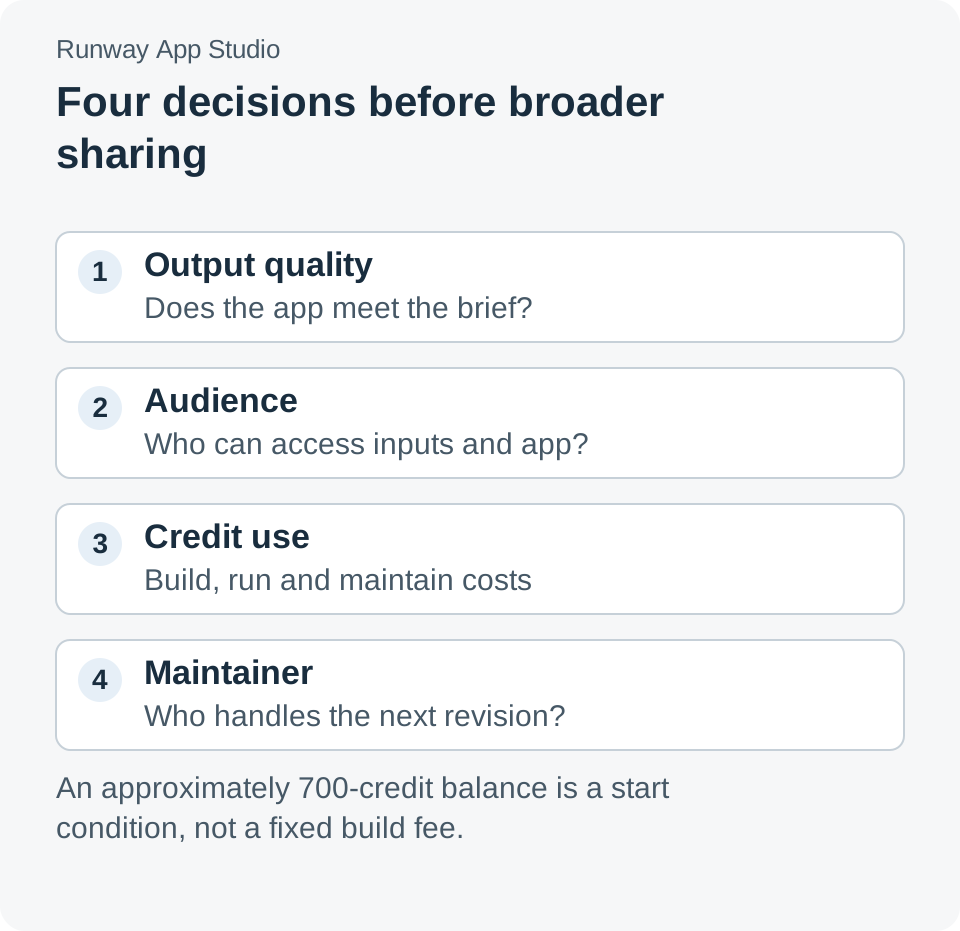
Broader sharing works best after the team understands the result, the audience, the operating cost, and who keeps the workflow current.
Assigning an owner can be lightweight. Someone should know when a brand reference changes, which version people are using, and what to do when the tool produces an unsuitable result. The point is to make a shared app easier to maintain than an undocumented prompt collection.
The important user is the second person
App Studio's most interesting promise is the transfer of practical expertise. A team can take a useful creative process and give another person an interface they understand. That creates a more meaningful evaluation than asking whether an app can be generated from a sentence.
Watch the second person use it. Notice which inputs they misunderstand, which outputs they trust too quickly, and where they still need the original expert. Those moments show whether the app has made the workflow genuinely reusable—and what the next revision should change.
Sources
- Introducing Runway App Studio, October 26, 2026.
- Building apps with App Studio, checked October 27, 2026.
- Sharing apps from App Studio, checked October 27, 2026. Audience availability follows the account and administrator controls in the workspace.
- Using Brand Kits with Agent and managing assets, checked October 27, 2026.
The proposed workflows and pilot are illustrative. The KPF example is attributed to Runway's announcement; no app-build benchmark or credit-cost measurement was performed for this article.
A recommendation from Telli.sh
Keep the creative brief, review notes, and decisions behind each workflow revision together. Create a Telli.sh account to organize your reference material and project notes.