[AI Ideas Notebook 04] From Jev-style decisions to images: meet QEV, a small Qwen-based model
Why visual decision models are appearing around Qwen, what Jev's experimental image support changes, and where the local 2B-class QEV project fits.
AI Ideas Notebook explores the ideas and practical possibilities behind newly emerging AI models and tools.
A photograph arrives in a sorting workflow. The application needs to choose between plastic, glass and metal, check whether the item belongs in a supplied category, and return a value that software can use. A fluent paragraph describing the bottle may be interesting, but it leaves another step between the model and the decision.
Jev brought attention to a different interface: give the model a situation, a question and the allowed answers, then receive a structured decision with probabilities. The next question is natural: can that interface work with what a model sees, as well as what it reads?
It now can in several forms. TypeSafe introduced experimental image support for Jev on October 14, 2026. Independent projects are also adapting Qwen vision-language backbones to Jev-style decisions. Among them is QEV, a local model built on Qwen3.5-2B that exposes choices, ordered scores, Boolean decisions and abstention. Jev announcement, QEV repository
Author disclosure: QEV is the independently maintained project of this post's author. This introduction separates its published release from source-only features and uses public documentation and recorded examples; it does not present a new independent model evaluation.
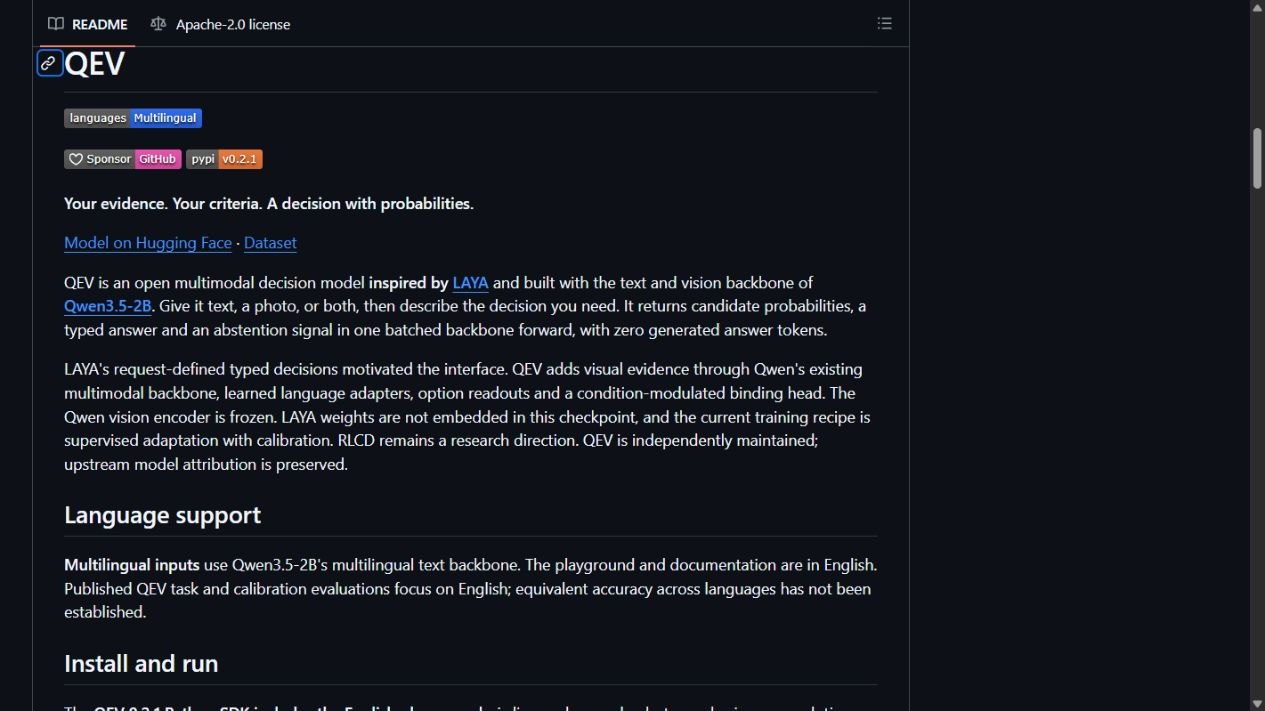 QEV's public repository, captured October 20, 2026. This is a documentation screen, not a local inference demonstration.
Why a decision model feels different from a chatbot
A chatbot usually writes an answer token by token. A decision model is useful when the application already knows the shape of the answer: select a destination, rank a condition on an ordered scale, or decide whether a statement holds.
The answer options can change with each request. A support system might offer billing and technical support today, then introduce account recovery tomorrow. A visual sorting workflow might supply six material descriptions for one question and a different set of handling rules for another. The model must relate the current evidence to those descriptions rather than select from one permanently trained label list.
Jev's familiar primitives are choice, score and noul. In QEV, a choice returns a distribution over supplied candidates. A score uses supplied ordered levels and returns their probabilities plus an expected level. A noul question uses true and false criteria. These are different output contracts, even when they share the same underlying model. QEV API reference
Probabilities make the boundary visible: a narrow lead between two candidates can trigger review instead of an automatic action. They do not make the decision correct. The application still needs a policy for uncertainty, unsuitable inputs and the cost of a mistake.
Jev already has an experimental image path
The historical motivation needs an update. It would be misleading to introduce QEV by saying that Jev currently cannot accept images. TypeSafe's October announcement enables experimental image input for Jev 1.13 and 1.14, behind the TypeSafe-Danger-Zone-Images header. Jev 1.14 also adds the spatial Box primitive. The announcement describes these image features as experimental. Jev 1.14 announcement
That changes the comparison. The useful question is which deployment, input contract and decision behavior fit a particular workflow. A hosted Jev experiment, a research model and a local Qwen adaptation can share the idea of bounded decisions while differing substantially in packaging and supported operations.
QEV has no documented equivalent of Jev's Box primitive. It is an independent implementation, not TypeSafe's weights or an official Jev release. Sharing primitive names or a SystemOne-style endpoint is a starting point for integration, not proof that every request can move unchanged between products.
Why Qwen appears in these projects
A vision-language backbone already brings text and image information into a shared model. That gives a decision project a practical starting point: retain visual understanding, then adapt how the model relates evidence to the answers supplied by an application.
Two public examples show that this is a broader direction than one repository:
| Project | Publicly described approach | How to read its status |
|---|---|---|
| PixelJev | Studies Jev-style visual choice with small Qwen3.5 backbones, including 2B and 4B variants | A research paper about visual choice; not evidence of a complete hosted Jev replacement |
| AutoTrust JEV-27B-VL | Uses Qwen3.8-27B with a decision head and adapters | An independent, larger model; its card distinguishes text-trained decision behavior from zero-shot image use |
| QEV | Adapts Qwen3.5-2B for choice, score and noul decisions | A local 2B-class project with a released SDK and separately documented source extensions |
PixelJev's paper is useful for understanding the architectural idea: connect images and runtime candidates to a decision readout. AutoTrust's model card illustrates another scale of implementation, while noting that systematic visual calibration is not established. These are examples of an emerging design pattern, not a benchmark ranking or a list of equally compatible products. PixelJev paper, AutoTrust model card
QEV's place in that picture is compact local deployment. “Small” describes its backbone class relative to much larger vision-language models; it does not mean the entire installation is a few megabytes or that it will run instantly on any device.
How QEV turns an image into a decision
QEV uses one Qwen3.5-2B text-and-vision backbone. Its published architecture adds language-side adaptation and a readout that binds the situation and question to the supplied candidate descriptions. The model scores those candidates directly instead of generating an answer sentence and asking another parser to extract a label. Public model card
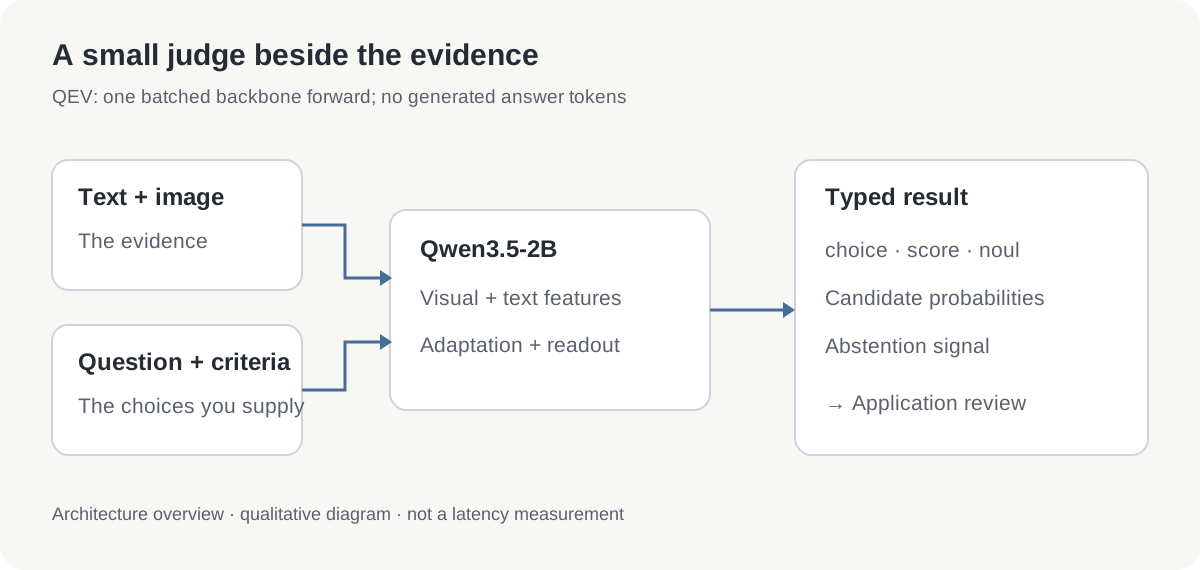 Original explanatory diagram. The arrows describe the documented decision path, not a measured speed comparison.
In the released SDK, one request can contain text, one image, or both. It supports one to four questions, with two to sixteen candidates for choice and two to sixteen ordered levels for score. This makes a small bundle of related decisions possible without turning every question into a separate chat conversation. API reference
Consider a photograph with a short instruction: “Choose the material according to these descriptions.” A second question can ask which policy band applies, and a third whether the item matches a supplied Boolean condition. The photograph is shared evidence; the criteria define what each decision means.
The documented inference path generates zero answer tokens. That removes a source of formatting variation, but it does not remove the vision encoder, backbone computation, image preprocessing or application overhead. “No generated answer” and “no computational cost” are very different claims.
Read the bottle example as an example
QEV's repository includes a licensed photograph and a recorded output for a plastic bottle. It is a useful way to see the response structure before installing anything.
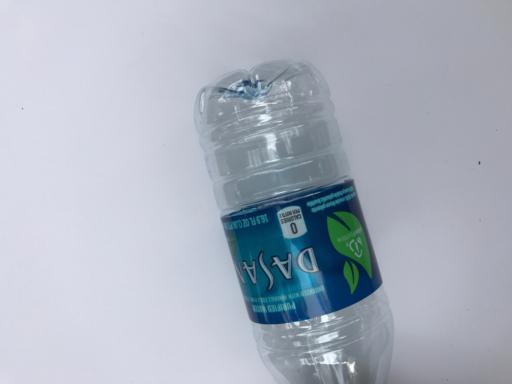 Published example input from QEV's photograph fixture, originally from TrashNet. Copyright 2017 Gary Thung, MIT license; the license notice is retained.
| Question in the published fixture | Recorded result | What it means |
|---|---|---|
| Choose among six materials | Plastic, probability about 0.9361 | Plastic receives the largest share among the supplied candidates |
| Choose an ordered policy band | Expected level about 0.4254 on a 0–2 scale | A weighted average of the three supplied band indices |
| Does it belong to glass, paper or plastic? | True, probability about 0.7903 | The Boolean criterion is favored over its false alternative |
The score needs particular care. In this fixture, band 0 groups glass and plastic, band 1 groups metal and trash, and band 2 groups cardboard and paper. The ordering is an example policy. The number 0.4254 is not a safety rating, a recycling standard or the confidence of the material choice.
Likewise, the plastic probability describes this request and its candidates. It is not evidence that 93.61% of all bottle photographs will be classified correctly. This is a previously inspected release fixture, not a fresh held-out test, and the output above was recorded by the project rather than reproduced for this article.
What “Jev-compatible” should mean here
Compatibility is easiest to understand in layers. There is the shared idea of request-defined decisions, the exact JSON schema, the supported inputs, and the behavior of each output type. Matching one layer does not automatically match the others.
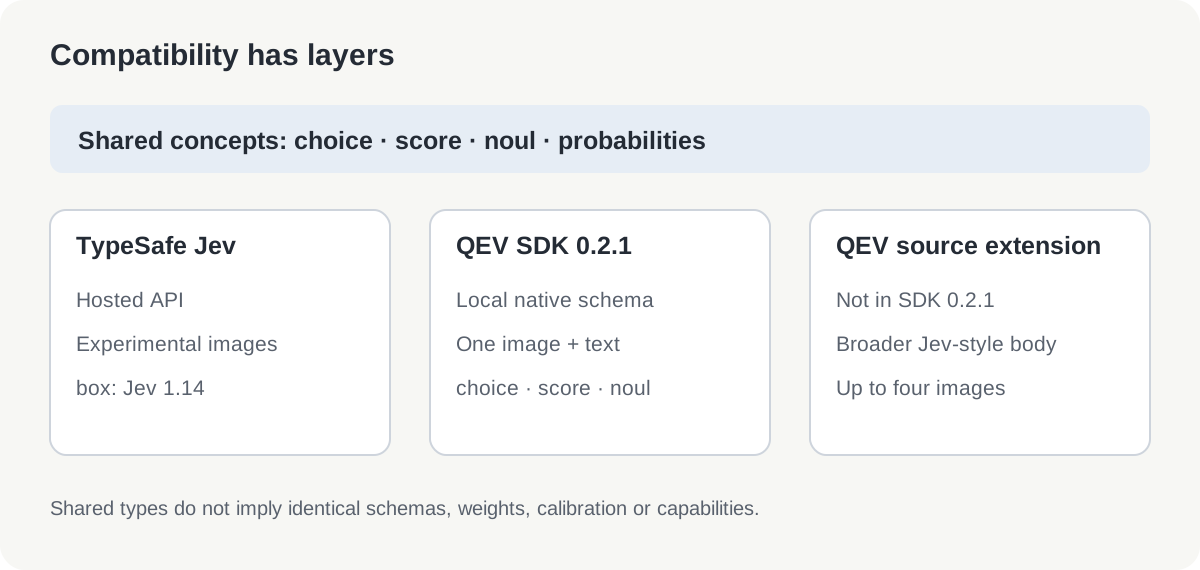 Original compatibility map, checked October 20, 2026. Source extensions are separate from the packaged SDK contract.
The packaged QEV 0.2.1 SDK uses QEV's native request schema and a single optional image. The public source checkout also documents broader Jev/SystemOne-style request handling and up to four ordered images. Those source extensions should not be assumed to exist in the published 0.2.1 package. API and release notes, 0.2.1 release
For an integration, start with one known request and compare validation, answer fields, candidate ordering and uncertainty behavior. A familiar /v1/systemone route alone does not establish a universal drop-in replacement for TypeSafe's service or SDK.
A practical first look
For a first exploration, the local playground is easier to inspect than an application integration.
- Prepare a Python 3.12 environment and activate it.
- Install the pinned release and start the playground with the commands below.
- Open
http://127.0.0.1:7860, choose an example and inspect the candidate probabilities and abstention.
python -m pip install qev==0.2.1
qev playground
The documented playground runs locally at http://127.0.0.1:7860. It includes example photographs and displays probabilities, abstention and structured output. Its interface and documentation are in English. These are installation instructions from the release, not a claim that the model was installed or timed for this post. Playground guide
A small text request shows the shape of the native SDK:
from qev import DecisionRequest, load

model = load()
request = DecisionRequest.model_validate({
    "state": {
        "text": "I was charged twice. Please refund the duplicate payment."
    },
    "questions": {
        "department": {
            "type": "choice",
            "instructions": "Which team should handle this request?",
            "criteria": {
                "billing": "Payments and refunds",
                "technical": "Software faults"
            }
        }
    }
})
print(model.predict(request)["answers"])
Begin with two or three clearly different candidates. Then try an ambiguous case and a case that belongs to none of them. Inspect whether abstention and your application policy produce a useful outcome. For image tests, use photographs you are entitled to process and write criteria around visible evidence rather than facts the image cannot establish.
Budget for the backbone, not just the adapter
For the older SDK 0.2.1 route above, QEV's adaptation checkpoint is approximately 32.01 MB, with a separate Qwen backbone download of about 4.55 GB. The published breakdown lists roughly 2.213 billion backbone parameters and 7.992 million adaptation/readout parameters. The October QEV-0.8B and QEV-2B checkpoints below use a separate release-loading route. SDK model size breakdown
The initial setup therefore involves gigabytes. Later use can rely on cached model files, but runtime memory also includes activations, image processing and buffers. The documented GPU and CPU paths use different numeric precision. A checkpoint's byte count is useful for storage planning, not a promise about memory, throughput or battery use on a particular machine.
If 2B strains your computer, try QEV-0.8B
The October release includes QEV-0.8B, built on Qwen3.5-0.8B and distilled from the same teacher as the newer QEV-2B. It is a practical starting point when GPU memory or response time makes 2B uncomfortable. The smaller model retains request-defined decisions while trading some visual decision quality for lower resource use. 0.8B model card, 2B model card
| Published measure | QEV-0.8B | October QEV-2B | Difference |
|---|---|---|---|
| Public vision Decision Index, accurate mode | 53.02 | 61.99 | 2B leads by 8.97 index points |
| Peak GPU allocation, accurate mode | 1.86 GiB | 4.44 GiB | 0.8B uses about 58% less |
| Median of request-profile p50 latencies | 66.0 ms | 135.3 ms | About 51% lower for 0.8B |
| Highest request-profile p95 latency | 377.3 ms | 738.6 ms | About 49% lower for 0.8B |
| Peak GPU allocation, fast mode | 1.60 GiB | 4.13 GiB | 0.8B saves 2.53 GiB |
| RealWorldQA score | 39.2 | 56.2 | 2B leads by 17.0 points |
| Winoground score | 47.5 | 65.5 | 2B leads by 18.0 points |
| InfographicVQA score | 75.4 | 83.1 | 2B leads by 7.7 points |
These are developer measurements checked October 20, 2026. The index is self-scored on the public vision kit, edition 0.3.2, pending an official run; it is not an overall accuracy percentage. The paired bootstrap interval for the 8.97-point gap is 7.39–10.48 points. The individual benchmarks show how the gap varies with the task.
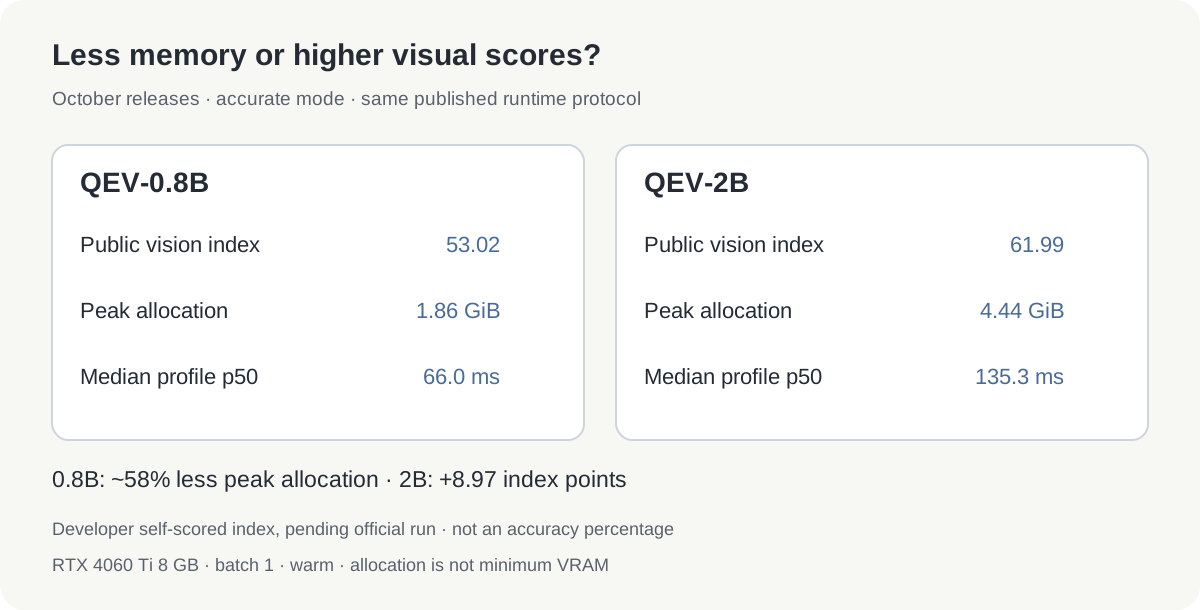 Original comparison infographic based on the two pinned model cards. Index values are self-scored; memory and timing refer to accurate mode on the measured GPU.
Runtime measurements use an RTX 4060 Ti 8 GB, batch 1, a warmed model and 47 request profiles, with three warm-ups and 30 timed runs per profile. Accurate mode allows up to 1.6 MP per image. Memory is PyTorch's peak allocation, not minimum graphics-card capacity: drivers, other applications and different inputs still need room. Timings exclude model download and loading, and do not predict CPU performance.
Fast mode caps images at 0.26 MP and exits at layer 16 of 24. For 0.8B, the median p50 falls to 44.6 ms and the worst-profile p95 to 123.2 ms. Internal DEV accuracy falls from 86.0% in accurate mode to 82.0%, particularly affecting document, chart and screen inputs. No public Decision Index is reported for fast mode; the 53.02 score belongs to accurate mode.
Use a separate Python 3.12 environment for these checkpoints. The old qev==0.2.1 package does not load the 0.8B release:
python -m pip install "qev @ git+https://github.com/ken-jo/qev@986a2d6d7b7e1583458b4006c9b88d6269dfa84a" huggingface_hub
from huggingface_hub import snapshot_download
import qev

path = snapshot_download(
    "ken-jo/QEV-0.8B",
    revision="def58ea5c773bb2e5bf53c428c6a1c76c6e55ceb",
)
model = qev.QEV.load(path, device="cuda")
# To reduce image resolution and depth further:
# model = qev.QEV.load(path, device="cuda", mode="fast")
Submit a DecisionRequest through model.predict(request), as in the earlier example. Start with 0.8B accurate mode, then try fast mode if resources remain tight. Move to 2B when errors on representative inputs justify the extra memory and time, keeping the same inputs and candidate descriptions for comparison.
Where to try it, and where the evidence stops
Good first experiments have visible evidence and a bounded consequence: route a document image to a review queue, categorize an item photo, or select which of several supplied handling descriptions best fits an input. Keep a human review path while measuring whether the model helps.
Choose a small representative set before adjusting prompts. Record accepted accuracy, abstention rate and the errors that still pass through. Repeat across lighting, image quality and language. QEV inherits multilingual input capabilities from its backbone, but its published accuracy and calibration evidence is English-focused; Korean or other-language parity should be tested rather than assumed. Public model card
The older SDK model's evaluations also put limits around the promise. In a 2,000-question typed-decision comparison, QEV scored 77.00% and the text specialist LAYA 76.95%—a one-question difference, with a paired confidence interval crossing zero. That is not evidence of a general accuracy advantage, and it is not a direct comparison with hosted Jev. These older results are separate from the October checkpoint comparison above. Text-only specialization can also be faster in its own setting. Comparison methodology and results
Visual reasoning remains uneven. The project's exploratory 2048 evaluation reports no successful games in 72 attempts. A compact model that can identify materials in a photograph is not automatically a reliable spatial planner. Evaluation notes
QEV is worth exploring when local operation, a small backbone class and explicit decision outputs matter together. Jev's experimental image path and the other Qwen-based projects make the wider direction clear: more applications can ask a model for a bounded judgment about an image, then decide what to do with that judgment in ordinary software.
Sources
Sources were checked October 20, 2026. The architecture, examples and release boundaries above refer to QEV's pinned public source and SDK 0.2.1. The wider context comes from TypeSafe's Jev announcement, the PixelJev paper and AutoTrust's model card. The hero is an editorial capture of the public QEV README; media sources and rights are recorded separately.
Keep the original evidence alongside the decision so it remains possible to revisit a mistaken classification or a changed policy. Create a Telli.sh account to collect source material, notes and follow-up research in one searchable workspace.