The morning test report can run before you open Open WebUI
Open WebUI 0.13.3 gives scheduled coding agents a terminal and project folder. Here is how to build a useful morning check with a narrow set of permissions.
At 8:30 on Monday morning, a developer opens the results of the overnight tests. Three jobs are red. The first lost its test database connection, the second hit a flaky timeout, and the third failed an assertion in code that changed on Friday. Sorting those results takes longer than reading the red badges. A recurring coding-agent run could leave a short report waiting in chat, with the failed assertion and its log excerpt at the top.
Open WebUI, a self-hostable chat interface for AI models and tools, added support for coding agents in scheduled automations in v0.13.3. GitHub timestamps the release on November 8, 2026 at 23:48 UTC. An automation can save a terminal, a working directory, and a coding agent available in that terminal, then deliver its results to a chat. The schedule can now start a task with a specific working environment, which is what makes the morning report practical. Open WebUI v0.13.3 release notes
The first job worth scheduling is a report a person can verify in a few minutes. Use the automation to collect evidence and leave the next decision with the person responsible for the project. Once a repeatable report is useful, you have a baseline for deciding whether to grant the next permission.
The automation remembers where the agent works
Open WebUI automations already support recurring prompts. A run starts a chat through the normal completion pipeline, which means model settings, tools, filters, and applicable memory settings can affect it. Version 0.13.3 adds a selection path for a coding agent discovered in a terminal. With a terminal selected, the model picker shows the available agent and model combinations in an agent/model format. Changing the terminal or folder can change the available combinations. Open WebUI checks for the saved terminal and agent before starting a run. If either has disappeared, the run fails and its owner can inspect the execution log. Open WebUI automation documentation
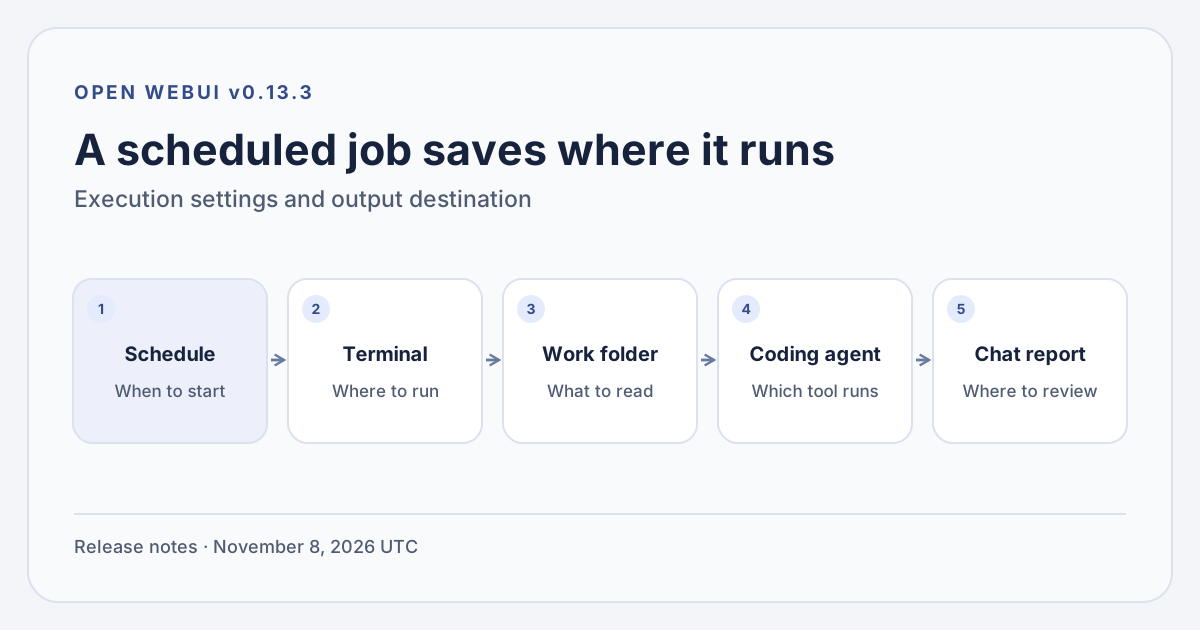
The scheduler starts a chat using the saved execution settings. Original illustration by Telli.sh based on the Open WebUI v0.13.3 release notes.
The working directory answers a mundane question with expensive consequences. Which checkout should the agent read when two projects have similar file names, or when the same project has a feature branch and a release branch on disk? An explicit path lets the job start where you intended and gives the reviewer a reference to check. It is still a starting directory. Read and write permissions, accessible files, environment variables, network access and the behavior of the coding agent determine what else a run can reach.
The results also have a defined destination. Coding-agent automations send output to chat. The release notes distinguish them from ordinary model automations, which can use channel destinations. A run history and a chat are enough for an individual to review the morning report. A team that wants a shared alert still needs a separate decision about which information to share, where to share it and who can see the underlying log. A failed scheduled job should also have an owner who knows where to look. Open WebUI v0.13.3 release notes
Give the first job a small, inspectable input
Take the Monday test report. Start with copies of the last overnight test run's summary, a machine-generated commit ID, and a small number of failure logs. An existing CI artifact exporter or a manual copy into a disposable directory gives the agent a stable input. Each file should contain enough context to attribute a failure to a job and a commit. Trim obvious secrets and unrelated logs before they enter the folder. The report works better if the input has a conventional name and a timestamp that can be checked without asking the agent to infer which file is latest.
Ask for three separate outputs in one chat reply. The first is a short list of failures that warrant attention. The second is a list of environmental or unresolved failures. The third is a link or path to the source evidence for each item. Give the report a compact shape so the reviewer can check it against the original CI view. A job that files six copies of the same issue because a test appeared in six matrix runs has taken a small reading problem and created a larger review problem.
A useful prompt describes what the output must preserve. Here is an example for a fixture with a commit record and an exported job summary. The directory and files are illustrative.
Read the exported test summary and related failure excerpts in the assigned project folder. Begin with the run ID, commit and timestamp from the input. Group repeated failures across the matrix. For each distinct failure, give the test name, the shortest useful excerpt and the source path. Distinguish explicit failures from possible causes. If the summary is absent, stale or incomplete, say which input is missing and stop. Leave the files as you found them.
Instructions like these reduce ambiguity. The terminal still needs permissions that match the request. If the job only reads files, give it a read-only view or a disposable copy without repository credentials. A failed test can print arbitrary text from a source file, third-party dependency or fixture. That text belongs in the evidence column. It never needs to become a new instruction for the agent. This matters more when a run begins before its owner is awake.
The same arrangement can help with a second recurring job. An engineering lead can give an agent a dated dependency inventory and a separately obtained advisory feed, then ask it to flag candidate version matches and quote the relevant records. The useful output is a review list with the exact package, version and source. A trusted scanner can still do deterministic matching, and the person reviewing can judge whether the dependency is in a reachable path. Holding the files stable also makes the report easier to reproduce if the explanation changes between runs.
A short setup reveals most of the real work
Open WebUI documents a global Automations switch and a separate permission for non-admin users. Confirm that your instance is running v0.13.3 or a later compatible release, that the feature is enabled, and that the account has access. Your terminal needs to be connected and allowed in the automation context. A terminal can be present in the model editor while excluded from automated jobs by its context configuration. That distinction can explain a job that works in a normal chat and fails from its schedule. Open WebUI Automations · Open Terminal connection documentation
- Prepare a fixture. Put a successful run, a representative failure and a manifest with the commit and timestamp in a temporary workspace. Keep test inputs small and leave production keys, cloud configuration and personal files outside the workspace.
- Open Automations and create a job. Use the title, prompt, model and schedule fields to create it. In the editor, pick a terminal, supply the explicit working directory, and choose the intended coding agent from the model picker. Give the environment a moment to report the agents available in that folder.
- Run the job once from the editor. Open the resulting chat and execution log. Confirm the commit, source files, deduplication and file permissions. Compare the result with the original artifact and check whether the source tree remains clean.
- Run a negative case. Remove the manifest from a separate fixture or point a fixture at a deliberately stale input. The report should make the missing evidence visible. Check that a terminal unavailable to automations shows up as a failed run in the execution history.
- Set the recurring slot and review the first few results. Compare the schedule with the time the CI export finishes. A report that starts early and reads yesterday's run is a schedule problem even if its prose sounds current. Pause the job if the input contract changes or the reports begin to drift.
Treat the fixture and report prompt as a pair. If you rename the folder, change the branch convention or move a test to another suite, update the fixture alongside the run. That keeps the job from quietly losing the evidence it uses to group results. When a person updates the prompt, save the previous example and compare the two outputs on the same input. The least costly correction is often a better input manifest, especially when two scheduled jobs have to agree on what the latest run means.
A terminal selection comes with a permission boundary
A self-hosted chat interface can connect to a model or agent supplied by another provider. Review the provider attached to the selected agent, the data it receives and any service credentials it can use. A checkout inside a container or disposable workspace gives the operator a place to limit what a task can do. The start directory alone does little if the same user can access the rest of the host or the agent has a credential with write access to the repository. The Open WebUI terminal docs describe separate options for where terminals can be used, including the automation context, which gives administrators a way to scope exposure before a job starts. Open WebUI terminal connection documentation
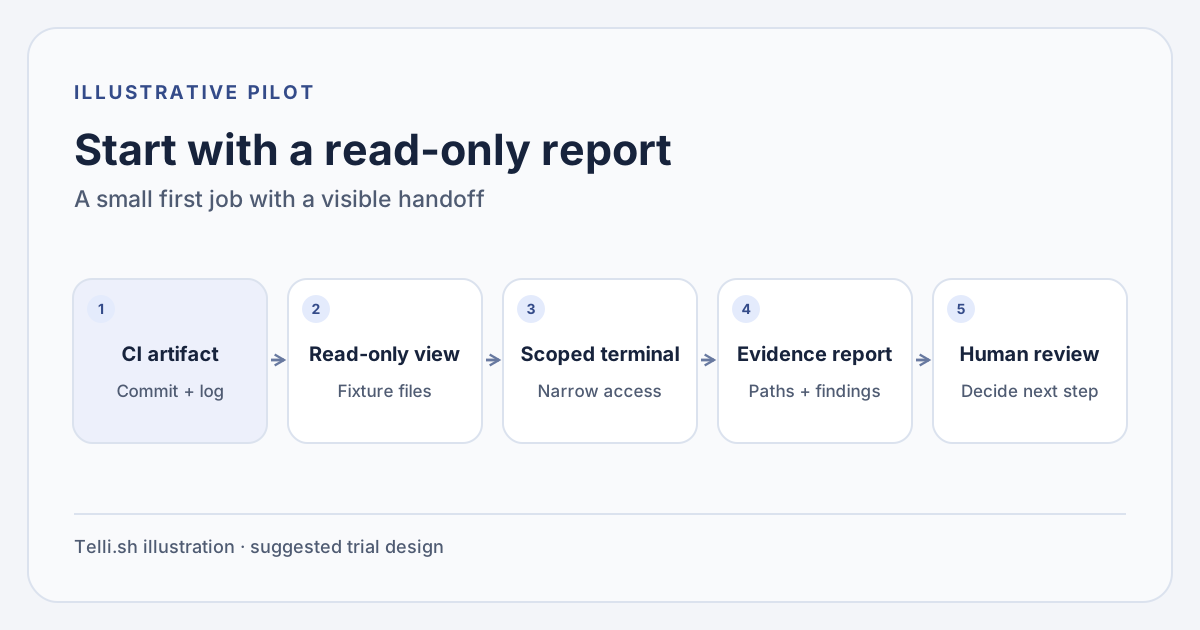
A read-only reporting setup keeps its evidence, execution permissions and review decision separate. Original illustration by Telli.sh.
| Job | Minimum useful input | Output to review | Capability to leave disabled at first |
|---|---|---|---|
| Overnight test summary | Exported test report, commit, selected log excerpts | Prioritized failures with evidence | Repository writes and deployments |
| Dependency review | Version inventory and trusted advisory snapshot | Candidate matches with package and version | Package upgrades and pull requests |
| Release handoff | Release manifest, test summary, approved issue list | Evidence gaps and unresolved items | Release tagging and customer notifications |
The work saved is the time between opening the results and knowing where to look. A dependable command can do much of the work for these jobs. Have it produce the run ID and status, then let the agent explain failures across several different kinds of output. That division helps when a job misbehaves. You can compare the reported ID with the manifest and see whether the input is wrong before trying a different agent.
Cost belongs in the same check. Scheduled runs can consume provider usage if the selected agent calls a billed model. Long logs can inflate input volume and repeated test failures can turn into repeated analysis. Measure how much useful review you get from a bounded log excerpt and a short schedule first. If every run processes the same large files, have a cheap deterministic step record whether anything changed. A schedule that fires daily is easy to budget once each run has a known upper limit on the input it reads.
For a small team, ownership matters as much as the terminal. Open WebUI's documentation says an automation belongs to the user who created it and is private to that user. A personal report can live there. A release sign-off used by several people needs a separate, visible process for sharing evidence and transferring responsibility when the owner is away. An automation history can help one person investigate a failure. A shared CI check keeps the build decision visible to the team that ships it. Open WebUI automation access controls
The morning report earns its place at review time
After the first week, look at the reports a person actually opened. Check the link or excerpt for each item marked urgent and count cases where the summary missed a failure, repeated a known one or cited the wrong commit. Ask the reviewer whether the report helped them find the next test to inspect. Those observations tell you more about the value of the schedule than the number of automatic replies it generated.
If the output stays useful, you can add a new kind of evidence one file at a time. Give the terminal a stable destination, keep the job's credentials small, and let changes to code or infrastructure move through the team's usual review process. The best sign of progress is a morning report you can trust enough to act on and verify quickly when something looks wrong.
Sources
- Open WebUI v0.13.3 release notes
- Open WebUI automation setup, permissions and execution history
- Open WebUI terminal connections and contexts
For a searchable record of the conversations and decisions behind your work, Create a Telli.sh account.