A 24GB model is not a 24GB computer: Nemotron Bolt's memory budget
Understand Nemotron Bolt's 74B total and 9B active parameters, native 2-bit weights, and the context, vision, draft-model and runtime memory its local recipes require.
You have a GPU with 24GB of memory. A new model has "24GB" in its name. Surely those two numbers settle the buying decision?
Not for a complete local AI workload. NVIDIA's October 15 announcement introduced Nemotron 3.5 Bolt 74B-A9B 24GB as a locally deployable vision-language model using native 2-bit quantization. Its name describes an optimization target, not a promise that every context length, image request and agent configuration fits a 24GB graphics card. NVIDIA announcement, October 15, 2026.
The useful question is what remains after the model loads. This guide separates stored parameters from active computation, explains the other memory consumers, and walks through a loopback-only setup based on the actual model-card recipe. Start with the workload you need, then decide whether the machine can sustain it.
Hero: original editorial explanation of a whole-workload budget, not an official screenshot or measured allocation. Component sizes are not represented.
The smaller active count does not make this a 9B download
Bolt has 74 billion total parameters and roughly 9 billion active per token. Its mixture-of-experts router selects part of the stored network. It is a compressed descendant of 120B-A12B Super VL, not a dense 9B model. NVIDIA Bolt research overview, October 15, 2026.
Here is the distinction to keep: active parameters help explain the work performed for a token; total parameters help explain what must be stored. Neither number alone determines application speed. Placement, memory bandwidth, kernels, input length and the surrounding application all affect the result.
An agent that reviews code still needs access to experts that were not selected for its preceding token. Moving data between storage, system memory and GPU memory is not equivalent to having everything available on the accelerator. A smaller active count is therefore not permission to calculate the hardware requirement as though the remaining parameters never existed.
The family names also deserve a precise comparison:
| Model | What the name refers to | Status on October 16 |
|---|---|---|
| Nemotron 3.5 Super VL | The separate 120B model | Released |
| Nemotron 3.5 Bolt 74B-A9B 24GB | The compressed local-model option discussed here | Released |
| Nemotron 3.5 Bolt E4B 4GB | A separate smaller edge/conversational offering | Announced for October 23 |
The release states come from the October 15 announcement. E4B is future availability at this article's date, not an available substitute demonstrated by these commands. Nor should Super VL's enterprise deployment results be read as a desktop Bolt result.
Native 2-bit weights solve one part of the budget
"Native 2-bit" is meaningful because aggressive compression is part of this model's development, not merely a user choosing a smaller export afterward. NVIDIA uses quantization-aware distillation to recover capability after reducing precision. Its expert weights use IQ2_XXS at 2.0625 bits per element, while other components retain different formats. The network is mixed precision, not uniformly two bits everywhere. NVIDIA compression and quantization explanation, October 15, 2026.
As a deliberately unrealistic arithmetic check, 74 billion values stored at exactly two bits would occupy 18.5 billion bytes. That is an illustration, not Bolt's file size or launch requirement: it ignores the actual precision mixture, metadata and execution state. Multiplying a headline parameter count by a headline bit depth cannot replace inspecting a particular checkpoint.
GGUF answers a different question. It is the model-file format used by the llama.cpp ecosystem, carrying tensors and associated information. It is not a second compression promise layered on top of "2-bit," and downloading a GGUF does not itself establish that a particular runtime understands the model. llama.cpp GGUF tooling documentation, accessed October 16, 2026.
NVIDIA's own estimated memory breakdown makes the distinction concrete: Table 2 lists 22.01GB for weights, 23.83GB total excluding vision, and another 1.68GB for the vision encoder and projector. These are vendor estimates for the report's configuration, not memory measurements from this article. The same report describes a sub-24GB design target at batch size one and 128K context. Bolt technical report, Table 2 and Section 2.3, linked October 15, 2026.
The takeaway is not that the branding is secretly a weights-only number. It is that a deployment target has assumptions. Change those assumptions and the memory requirement changes too.
Budget for the whole working set, not only the weights
Think of the deployment as a context tax on top of its stored model: the work you ask the system to retain and process needs space too. For planning, separate weights, sequence state, vision processing, speculative decoding and runtime workspace. Leave additional headroom for the desktop and the applications you actually intend to keep open.
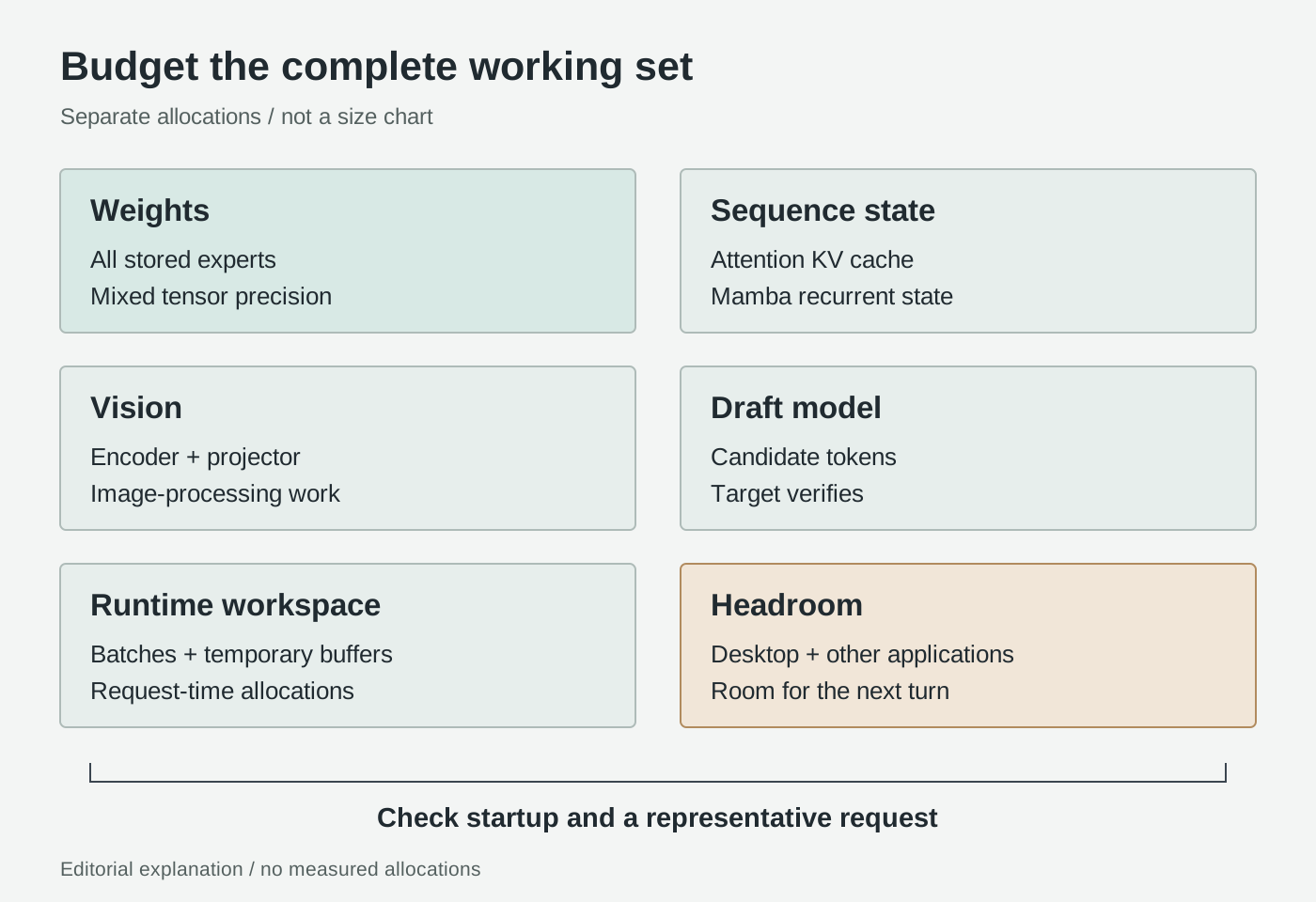
Original editorial explanation, not measured proportions. Mechanisms: Hugging Face caching documentation, llama.cpp multimodal guide and NVIDIA Bolt report, accessed October 16, 2026.
Sequence state is not another copy of the weights. An autoregressive attention model caches keys and values from earlier tokens so it can reuse them during generation. Longer retained sequences require more attention-cache storage, with details depending on the architecture and cache representation. Hugging Face, "How caching works," accessed October 16, 2026.
Bolt is a hybrid with Mamba and attention layers, so a generic all-Transformer cache estimate is not a complete calculator for it. Recurrent state and attention caches are distinct allocations; inspect what the runtime actually creates. The architectural distinction is documented in Table 1 of the Bolt report, accessed October 16, 2026.
For an agent, retained context means more than the question you typed. System instructions, tool schemas, conversation history, retrieved passages and tool responses all compete with space for the answer. A transcript containing repeated repository listings can exhaust a useful budget without adding useful evidence. Keeping a concise task state is a workflow decision, not just a hardware workaround.
Vision introduces a separate processing path. llama.cpp pairs the language model with a multimodal projector file through --mmproj; its documentation says this component is GPU-offloaded by default. llama.cpp multimodal guide, accessed October 16, 2026. Loading only the language-model file is therefore not the same configuration as a complete image-capable setup.
For a document task, distinguish reading extracted text from interpreting a rendered page. A plain-text paragraph does not contain the visual relationship between a column heading and its cells. Conversely, sending images of pages whose layout does not matter adds work without necessarily improving the answer. Decide which representation preserves the evidence needed for your question.
A speculative drafter is an additional model. Bolt's LiLiCorr drafter proposes candidate tokens for the target to verify. It is intended to accelerate decoding, but the extra checkpoint and its execution state still need memory. NVIDIA's LiLiCorr explanation, October 15, 2026. The presence of a drafter is not a guarantee of faster completion for your tasks.
Runtime workspace is separate again. Prompt-processing batches and temporary computation buffers belong in the budget alongside persistent state. The server exposes both logical batch size and physical microbatch size; these are not interchangeable with the number of concurrent conversations. llama.cpp server option reference, accessed October 16, 2026. A configuration that starts successfully still needs testing during a representative request.
The official hardware table is more useful than the product suffix
NVIDIA's published configurations:
| Recipe | Hardware | Context | Sequences |
|---|---|---|---|
| 28GB | RTX Spark 64GB or discrete RTX 32GB+ | 65,536 | 1 |
| 32GB | RTX Spark 128GB or discrete RTX 48GB+ | 262,144 | 1 |
Source: NVIDIA Quick Start, accessed October 16, 2026.
These rows do not cover a discrete 24GB GPU or establish Mac support. Host RAM is not extra discrete VRAM.
Our take: choose a repeatable configuration, not a successful loading screenshot. If a purchase depends on this model, require a demonstration with your intended inputs and ordinary background applications. The burden is especially important for document images and long-running agents, whose first request can be much smaller than their later ones.
Choose the context by the job, not by the maximum
Consider three illustrative starting jobs, not reported trials.
A developer asks for an explanation of a failing test, supplying the error, the relevant function and one nearby dependency. The useful output is a diagnosis tied to specific lines, followed by a proposed change. Before adding an entire repository, check whether the missing information is a particular interface or another stack frame. This keeps the question inspectable and makes wrong assumptions easier to catch.
A researcher compares a table across two document pages. Here, the test is whether the model correctly associates headers, units, footnotes and values. Use the actual page images when those relationships matter, ask for page-specific evidence, and verify a sample of cells against the original. A fluent summary that swaps two columns is a failed result even if it arrives quickly.
A local assistant searches an approved folder and prepares a draft report. Its memory pressure can grow through retrieved material and repeated tool responses. Give it a read-only first task, bound the search, and require it to name the files supporting each conclusion. Do not grant write or shell permissions merely to see whether the model can produce a useful plan.
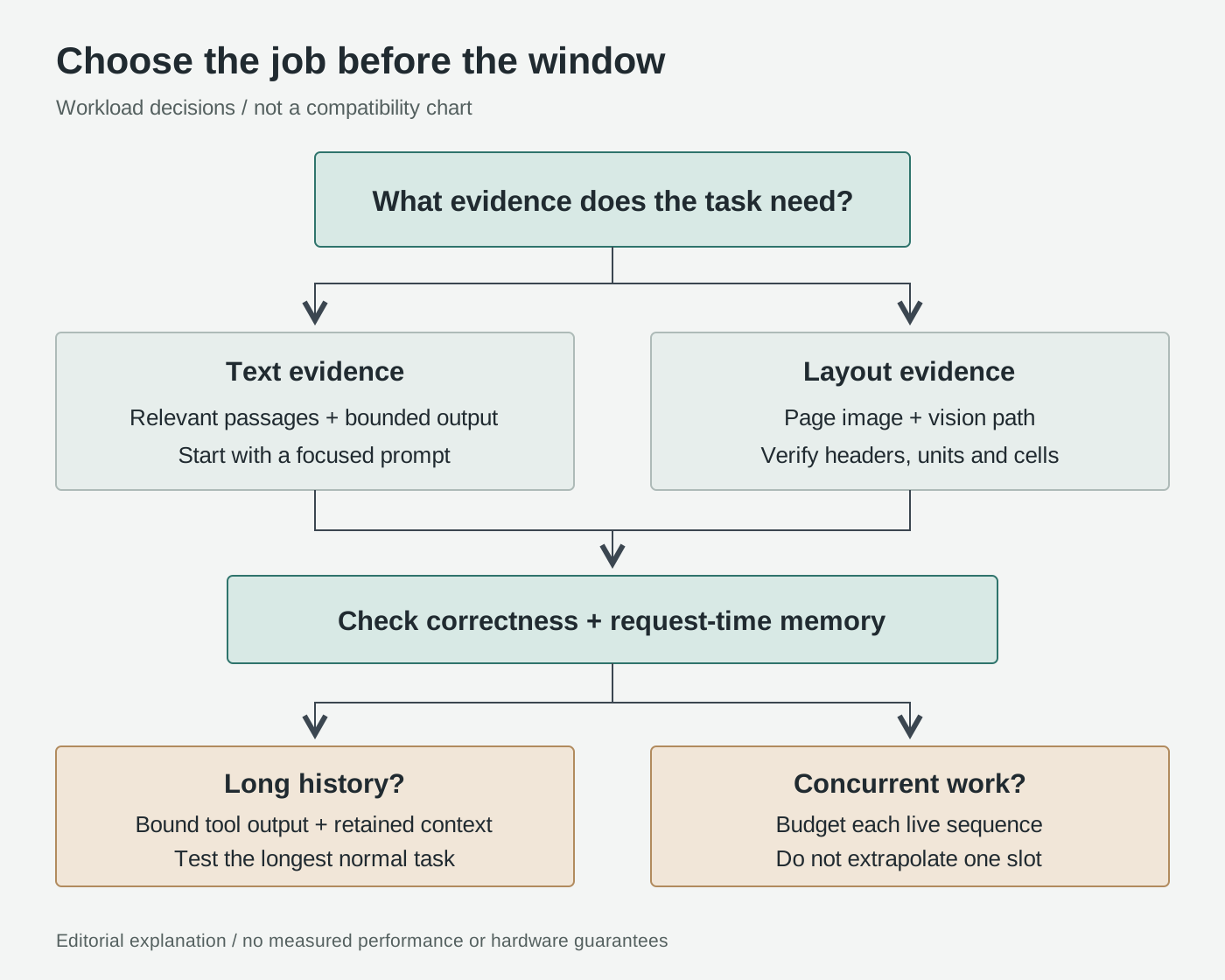
Original editorial explanation of workload selection, not a benchmark or compatibility chart. See Hugging Face cache strategies and llama.cpp multimodal handling, accessed October 16, 2026.
Quantized caches can reduce storage relative to higher-precision caches, while offloading moves pressure to another memory tier and can trade throughput for capacity. These are general tradeoffs, not evidence that every cache strategy in Transformers is available for this GGUF deployment. Hugging Face cache strategies, accessed October 16, 2026.
The practical priority is evidence density: retain the material needed to answer the question, preserve the originals separately, and remove repeated scaffolding. Reserve room for the response too. A larger configured window does not make irrelevant history useful.
Start locally, then test the workload you actually need
The following Linux Bash example targets a supported NVIDIA discrete-GPU configuration. It assumes Git, Python, CMake, a C++ toolchain, a compatible NVIDIA driver and CUDA toolkit are already installed. It is a procedure to run on your machine, not a report of a completed installation.
- Build the relevant runtime and check its options. Use the source-build path, not a generic model-page one-liner. Follow the llama.cpp CUDA build guide, accessed October 16, 2026. Keep the reported commit and binary version with your configuration.
git clone https://github.com/ggml-org/llama.cpp.git
cd llama.cpp
git rev-parse HEAD
cmake -B build -DGGML_CUDA=ON -DGGML_NATIVE=ON
cmake --build build --config Release -j
./build/bin/llama-server --version
./build/bin/llama-server --help
Check that help includes draft-dflash, --spec-draft-model, --spec-draft-n-max, --cache-type-k, --cache-type-v, --flash-attn and --jinja. A package version label alone does not demonstrate support. If your binary rejects the options, resolve the build mismatch before downloading large checkpoints; do not silently replace the recipe with old speculative-decoding flags. The option names are documented in the current server reference, accessed October 16, 2026.
- Download the three files in NVIDIA's Quick Start, accessed October 16, 2026. Download syntax follows the Hugging Face CLI guide, accessed October 16, 2026. Check disk space first.
python3 -m venv .venv-hf
source .venv-hf/bin/activate
python -m pip install --upgrade huggingface_hub
MODEL_DIR="$PWD/models/nemotron-bolt"
hf download nvidia/NVIDIA-Nemotron-3.5-Bolt-74B-A9B-24GB-GGUF \
  NVIDIA-Nemotron-3.5-Bolt-74B-A9B-24GB.gguf \
  mmproj-NVIDIA-Nemotron-3.5-Bolt-74B-A9B-24GB.gguf \
  --local-dir "$MODEL_DIR"
hf download nvidia/NVIDIA-Nemotron-3.5-Bolt-74B-A9B-24GB-LiLiCorr-GGUF \
  NVIDIA-Nemotron-3.5-Bolt-74B-A9B-24GB-LiLiCorr.gguf \
  --local-dir "$MODEL_DIR"
MODEL="$MODEL_DIR/NVIDIA-Nemotron-3.5-Bolt-74B-A9B-24GB.gguf"
MMPROJ="$MODEL_DIR/mmproj-NVIDIA-Nemotron-3.5-Bolt-74B-A9B-24GB.gguf"
DRAFT="$MODEL_DIR/NVIDIA-Nemotron-3.5-Bolt-74B-A9B-24GB-LiLiCorr.gguf"
Record the repository revisions and local file hashes before using this setup as a comparison baseline. A later file or runtime update should be a deliberate change, not an unexplained difference between two runs.
- Use NVIDIA's 28GB recipe with explicit loopback binding.
./build/bin/llama-server \
  --model "$MODEL" --mmproj "$MMPROJ" \
  --batch-size 2048 --ubatch-size 512 \
  --ctx-size 65536 --parallel 1 -ngl 999 \
  --spec-type draft-dflash --spec-draft-n-max 6 \
  --spec-draft-model "$DRAFT" --spec-draft-ngl 999 \
  --cache-type-k q8_0 --cache-type-v q8_0 \
  --temp 1.0 --top-p 0.95 --flash-attn on --jinja \
  --host 127.0.0.1 --port 8080
Use a free port if needed, and change the check below to match. Do not create a router forwarding rule, public tunnel or externally bound listener for this first run. Loopback limits network reach; it does not make an attached agent's tools harmless.
- Check readiness before connecting anything else. In another terminal, run:
curl --fail http://127.0.0.1:8080/health
The server documents a loading response separately from readiness. Once ready, open http://127.0.0.1:8080 locally and try a short text question before an image request. llama.cpp server health and web interface documentation, accessed October 16, 2026. Keep external tools disconnected until basic responses are working.
- Measure the complete job before expanding it. On a discrete-GPU system, inspect memory before launch and during representative prompts:
nvidia-smi --query-gpu=name,memory.total,memory.used,memory.free --format=csv
These are device observations, not a complete process peak or a unified-memory accounting method. NVIDIA documents platform-dependent memory reporting in the NVIDIA System Management Interface reference, accessed October 16, 2026. Keep the runtime's allocation logs too, and inspect host memory separately.
Compare a short prompt, your longest normal prompt and a representative document image. Record correctness, elapsed completion time, memory observations and any allocation failure. Repeat with your normal editor and browser open. A setup that only works after closing the rest of your working environment has not met the original requirement.
If it fails, change one factor at a time and name the new configuration. Reducing context, microbatch size or tool-history volume answers different questions; removing the drafter is another experiment, not the published recipe. Preserve the failure and the input that triggered it so a later successful short prompt does not erase the unresolved workload.
The bottom line: buy for the working set
Bolt's interesting proposition is a large, sparsely activated model compressed for local work. Its practical value depends on what fits alongside it: the evidence, visual inputs, sequence state and applications required to finish your task.
The right acceptance question is not "Did the 24GB model load?" It is "Can this exact machine complete my ordinary workload, with reliable answers and enough room for the next turn?" That is the memory budget worth buying.
Sources
Release information is dated October 15, 2026; linked model cards and living documentation were checked October 16, 2026. Procedures are adapted instructions, not hands-on test results. Original diagrams are explanatory schematics, not official assets or performance plots.
- NVIDIA release announcement for the three model names and release timing.
- NVIDIA Bolt research overview and technical report for compression, precision and the estimated memory breakdown.
- NVIDIA GGUF model card for the actual hardware table, checkpoint filenames and launch recipe.
- llama.cpp build, server, multimodal and GGUF tooling documentation for runtime behavior.
- Hugging Face cache explanation, cache strategies, CLI guide and NVIDIA SMI reference for the specific mechanisms and inspection commands.
Optional Telli.sh recommendation: keep the sources behind your decisions
Comparing agents is easier when the original sources, your notes, and the results of your own trials stay together. Create a Telli.sh account to organize that material into a reference you can return to as products change.