816B on a Mac desk: what Muse Spark Open really makes possible
Meta's open-weight model reaches high-memory Macs. Compare the two-Studio showcase with a smaller quantized checkpoint, see real demos, and choose a sensible first setup.
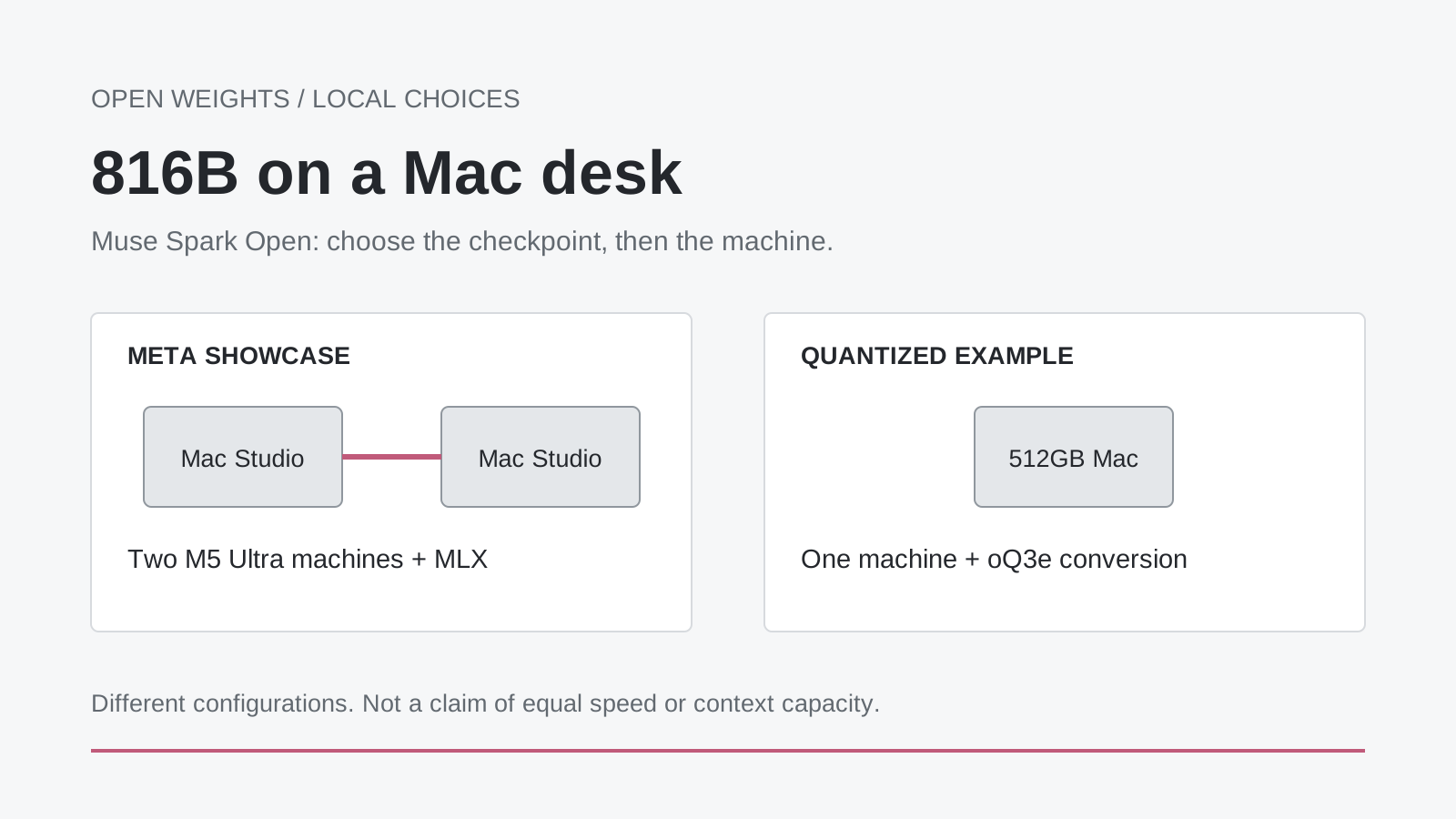
Original explanatory illustration. The two-machine showcase and the single-machine quantized example use different configurations; they are not interchangeable performance results.
An 816-billion-parameter model running on a desk sounds like a contradiction. The desk in Meta's October 15 announcement, however, holds two Mac Studios, each with a very large memory budget. That is a different proposition from putting the same model on the laptop you already own.
The more interesting development sits just below that headline. Muse Spark Open gives developers access to the model's weights, and the surrounding tools offer several ways to run them. Meta shows a two-machine configuration; Hugging Face also describes a more heavily quantized version on a single 512GB Mac. Local AI is becoming less about whether a model is theoretically downloadable and more about choosing the right representation and operating envelope.
This guide explains what the model can do, why the memory figures differ, which published demonstrations are worth watching, and how to take a useful first step without accidentally starting a several-hundred-gigabyte download. The goal is not to turn every reader into a workstation buyer. It is to make the choice between a local machine, a smaller model, and a hosted service a little clearer.
The breakthrough is access to the model, not a universal laptop upgrade
Meta released Muse Spark Open on October 15, 2026, describing an 816B-parameter mixture-of-experts model with roughly 42B parameters active per token and a context window of up to one million tokens. The release targets coding and extended tool-using work. Its weights can be deployed through multiple inference engines rather than one mandatory chat application.
That changes who can make deployment decisions. A developer can choose a checkpoint, run an appropriate serving stack, integrate tools, and decide where the application sends information. Those choices can matter when a project needs a reproducible model version or a particular data-handling arrangement. They also create responsibilities that a managed chat subscription normally hides: storage, upgrades, compatibility, monitoring, and recovery.
Our take is that this is a significant expansion of choice, not the disappearance of infrastructure. Owning the weights resembles owning an engine. It gives you room to build a different vehicle, but it does not supply the brakes, the workshop, or the road. The useful question is which parts of that vehicle you actually want to maintain.
For a hobby project, maintaining them can be the point. For a small business that needs an answer before a meeting starts, it may be an unnecessary distraction. Both are reasonable responses to the same release. An open-weight model makes the decision available; it does not settle it for you.
42B active parameters do not turn 816B into a small download
Mixture-of-experts models select only part of their expert capacity for each token. That helps explain why the active parameter count is much smaller than the total. It does not mean the unused experts can simply be omitted from a normal full-model deployment: another token can need a different route through the model.
It helps to separate three budgets. The first is storage for the checkpoint. The second is working memory for weights and the runtime. The third is the additional state that grows with the workload, including the attention cache and multimodal inputs. Passing the first test does not prove that the other two fit.
The official model card lists text, image, video, and audio inputs with text output. It also lists different checkpoint formats and substantial memory requirements. Those are specifications for the full model family, not a promise that every converted checkpoint contains every encoder or reaches the maximum context length on every machine.
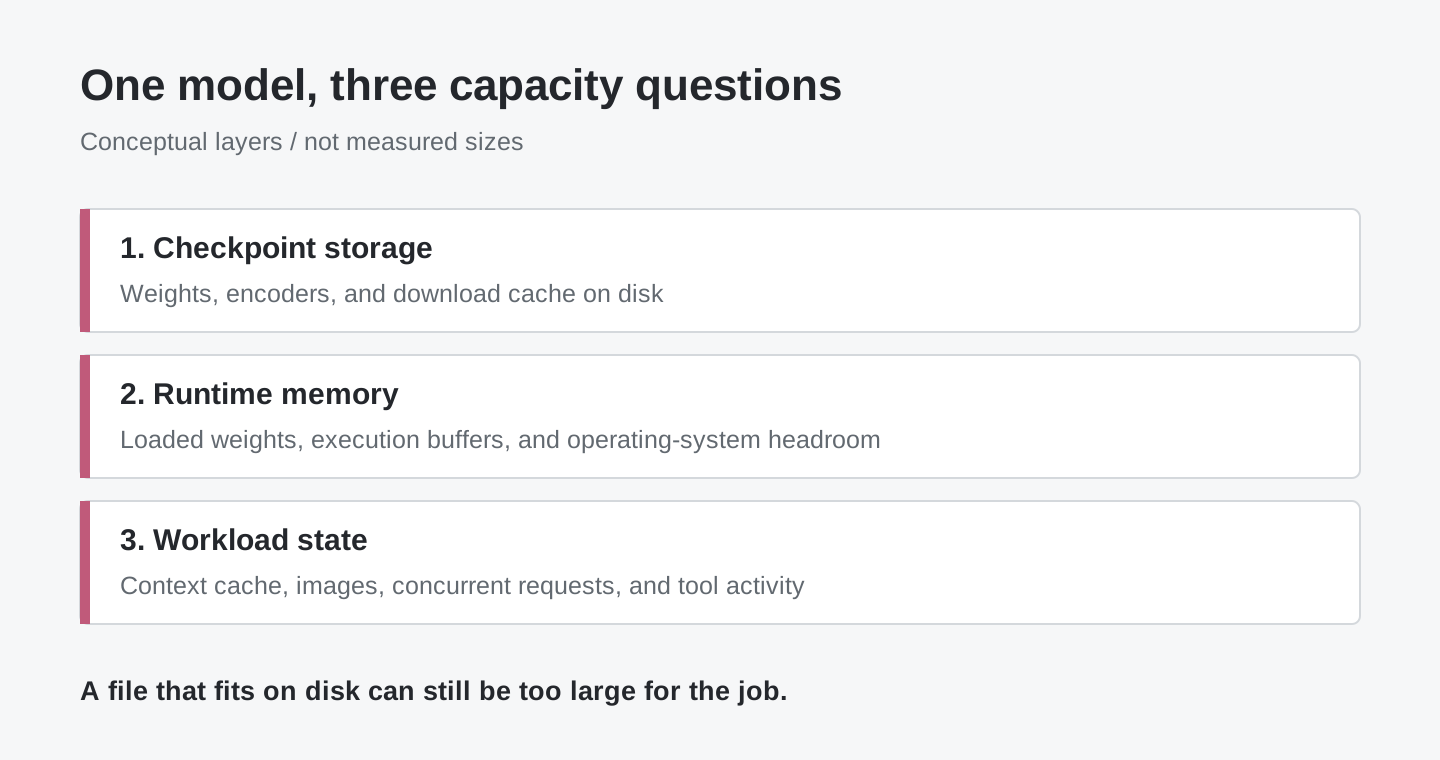
Original conceptual diagram. The bands identify kinds of memory use, not measured proportions. Checkpoint size alone is not a full-machine capacity estimate.
This distinction becomes especially important with video. A short question about an image and a long analysis of many frames are not the same request merely because both use a vision-capable model. A sensible first experiment keeps the input small, limits the response, and establishes a working baseline before adding a larger archive or a longer agent loop.
Two Mac Studios and one 512GB Mac tell different stories
Meta's showcase uses two M5 Ultra Mac Studios and MLX. Its announcement describes up to 512GB of unified memory per machine and reports local workflows involving changes to the Ice Cubes iOS application and editing in DaVinci Resolve. These are Meta's demonstrations, not measurements from our own desk. See the configurations and examples in Meta's launch post.
Hugging Face's launch article takes a different route. It describes testing an oQ3e quantized checkpoint on an M3 Ultra with 512GB of memory. For a 1,024-token prompt and 128 generated tokens, its authors report approximately 225 tokens per second during prefill and 21 during generation. These figures belong to that short test and that checkpoint, not every Mac or the two-machine showcase. Read the MLX section of the engineering article.
The oQ3e checkpoint card provides a useful unit correction: its tensor storage is about 344.152 GiB, or 369.531 GB. The card describes about 370GB in oMLX. Calling that simply a “344GB model” blurs binary and decimal units precisely where the remaining memory matters.
| Published route | What it illustrates | What a reader should not infer |
|---|---|---|
| Meta's two M5 Ultra Mac Studios | A high-memory local deployment and agent demonstrations | Every Muse configuration requires exactly two Macs |
| Hugging Face's 512GB M3 Ultra with oQ3e | A more heavily quantized single-machine example | An ordinary MacBook has enough memory |
| Hosted inference | Access without maintaining the full checkpoint locally | The work necessarily stays on your own computer |
There is another important boundary. The oQ3e conversion includes the language model and vision encoder, but not the audio encoder. A voice-and-browser demonstration using the full model therefore does not establish that the same audio workflow works with this particular download. A model's name is not a substitute for reading its variant's card.
The oQ4e card makes the capacity trade-off even more explicit. It lists roughly 475.886GB of tensor storage and warns that this is too much for reliable use on one 512GB Mac. More bits can preserve a different representation of the weights while leaving less space for the actual job. Filling memory is not the same thing as finishing work.
Watch the tool loop, not only the final answer
One attractive use case is a coding assistant that can inspect what its changes look like. Hugging Face's 3D asset example combines a quantized model, a coding agent, Three.js, rendered browser views, and visual feedback. The interesting part is the loop: generate an artifact, look at it, find a defect, and revise it.
Imagine using that pattern to prototype a product configurator. You would want the agent to notice an obscured control or an object outside the camera frame, not merely produce syntactically valid code. This is an illustrative application of the pattern, not a claim that the demo already supplies a production-ready configurator. The acceptance test still belongs to the project: the right controls, the right dimensions, and the right behavior on a small screen.
A second example is the “Call your Browser” demonstration, linked from Hugging Face's article. It combines spoken input with visual browser interaction to search for products matching a description. The source-hosted demonstration in the engineering article shows the interaction without implying that installing weights alone creates a browser agent. The linked Space may require access; do not assume that its launch-page link guarantees a runnable public service. Before trying a hosted version, review its setup and data handling and use non-sensitive examples.
A third use case is a review assistant for your own documents and screenshots. For example, you could ask it to compare a written requirement with an interface image and list discrepancies. That task benefits from image understanding without immediately giving the system permission to change files, send messages, or buy anything. Start with a job where a human can inspect both the input and the proposed answer.
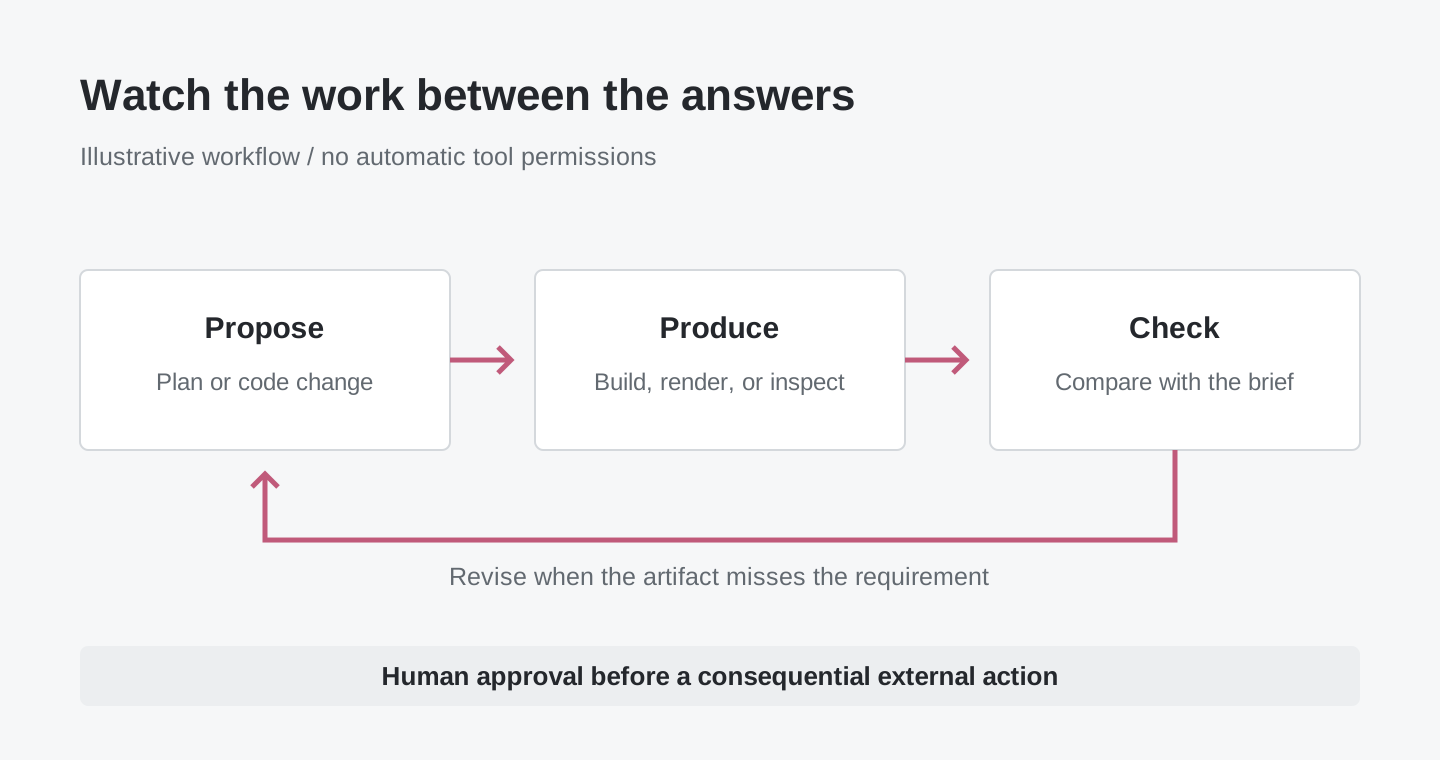
Original workflow illustration. An agent framework and its tools supply the action loop; downloading model weights does not itself grant browser or filesystem access.
For all three patterns, look for intermediate evidence. Did a code task compile? Does the rendered page match the requirement? Does a product choice meet the stated constraints? A polished final paragraph is a poor substitute for the artifact the task was meant to create.
Start on a Mac without treating “download” as the first step
The easiest mistake is to choose the largest model first and discover the capacity requirement halfway through. Reverse that order. Decide on a small job, identify a supported checkpoint, and check the machine before committing storage or time.
- Check the Mac's memory and free storage. In Terminal, the commands below display the macOS version, installed memory in bytes, and free space in your home volume. They do not install software or download weights.
sw_vers -productVersion
sysctl -n hw.memsize
df -h "$HOME"
-
Choose a supported application and checkpoint together. The oMLX project provides a macOS application and installation documentation. Its documented prerequisites include Apple Silicon and macOS 15 or later. At the time of writing, the latest release is v0.7.1rc1, a release candidate: keep experimental work separate from a workstation you depend on for deadlines.
-
Read the exact conversion's card before selecting it in the model-download interface. For the single-machine example above, the identifier is
mlx-community/Muse-Spark-Open-816B-A42B-oQ3e. Budget for the checkpoint, download cache, runtime, and the work you want to do. A 256GB Mac is below the published requirement for this variant; reducing a reply to one sentence does not remove the weight-storage requirement. -
Begin with a short, disposable task. Try a small text question or a non-sensitive screenshot with a short answer. Confirm that the model loads and that the result is useful before increasing context or adding tools. A successful load establishes compatibility, not factual accuracy.
-
Add actions only after the read-only workflow behaves. Work in a copy of a project. Restrict the files and tools the agent can reach, and require confirmation before an external action. Keep changes reviewable rather than allowing the first experiment to modify your only working copy.
Prefer the application's supported download and model-selection path over a generic command copied from another model's page. MLX LM also offers a command-line route, but model support and packaged releases can move at different speeds. Its Muse support pull request is a useful compatibility reference when choosing a version, not a reason to install an arbitrary development branch.
You do not need to buy hardware to understand the model's usefulness. A hosted endpoint can answer whether it handles your representative task before you investigate a local deployment. Review the provider's prices, data handling, and spending controls first. A public demonstration is a learning aid, not a free production backend.
Measure a finished job, not just a token counter
Tokens per second help describe an inference configuration. They cannot tell you whether the assistant saved an afternoon or created a subtle error. A faster wrong change can cost more than a slower correct one, particularly when a long-running agent repeats its own mistaken assumptions.
A practical comparison uses the same small collection of tasks across candidate setups. Include a code change with an existing test, a screenshot with a known issue, and a document question whose answer can be traced to a passage. Keep the prompt and acceptance conditions stable. Then record correctness, time to a reviewed result, intervention required, and peak resource use if your tools expose it.
Treat prefill and generation as different parts of the wait. A long input can make the first response slow even when subsequent tokens arrive quickly. An agent can also spend time compiling, browsing, or waiting for another tool. Count that time when comparing a local configuration with a hosted service; it belongs to the user's experience even when it is outside the model.
Repeat the comparison after a meaningful checkpoint or runtime update. You do not need a grand benchmark to discover that a change broke your normal workflow. A few representative jobs, checked consistently, are more useful than a screenshot of a single impressive answer.
Open weights give you choices, not automatic privacy or unlimited rights
A local model can keep inference on your machine. The complete application may still use web search, telemetry, external tools, remote storage, or hosted fallback models. Draw the data path for the actual workflow before describing it as private. An offline text experiment and a browser-shopping agent have different boundaries even if both start with the same checkpoint.
The Muse Model License also has conditions. It requires attribution and an accompanying usage policy, and it includes separate terms for certain model-as-a-service businesses. This is a custom open-weight release, not a blanket claim that every use is unrestricted. Check the current license for your intended distribution or service.
For a team, ownership should include an operational answer as well as a legal one. Who approves a new model version? Who can restore the previous configuration? Where do prompts and tool results go? Who reviews a change before it reaches a customer? Those questions are not arguments against local inference. They are what make local inference into a dependable service rather than a one-day demonstration.
The bottom line: local AI is becoming a configuration choice
The real milestone is not that every computer can now run an enormous model. It is that more of the deployment decision is visible and available to the user: which weights, which conversion, which machine, which runtime, and which tools.
Muse Spark Open makes that choice concrete. Two high-memory Macs demonstrate one route; a smaller conversion demonstrates another; hosted inference offers a different trade-off again. Choose the smallest arrangement that reliably completes the job you care about. The next useful question is not “Can I make it load?” but “Can I trust the work I get back?”
Sources and demonstrations
- Meta: Muse Spark Open launch, October 15, 2026.
- Meta's model card and checkpoint specifications.
- Hugging Face: runtime guide, MLX test conditions, and agent demonstrations, October 15, 2026.
- oQ3e conversion: storage units, included encoders, and usage.
- oQ4e conversion: storage and single-machine warning.
- oMLX installation documentation and v0.7.1rc1 release.
- MLX LM Muse support.
- Muse Model License.
Product and compatibility information checked October 16, 2026. Performance figures above are attributed publisher measurements with their stated test conditions.
Keep the decision, not just the model name
For readers collecting source links, configuration notes, and review decisions, Telli.sh is one optional workspace. Create a research note.