Can a robot feel a package start to slip before it falls?
Melexis's MLX90901 fingertip measures forces into and along the gripper pad. A proposed test with thin pouches could show whether those readings help reduce slips and damage.
A robot closes two pads around a thin pouch. The camera shows a good pickup, but as the arm turns, the pouch starts sliding between the fingers. Squeezing harder might save the pickup or leave a crease across the package. The decision depends on what happens at the contact surface during the brief interval when the object is still within reach.
On November 12, 2026, Belgian semiconductor maker Melexis introduced the MLX90901 tactile fingertip module for robotic hands and grippers. The module measures force into the fingertip surface and sideways force along two axes. Melexis says the DVK90901 evaluation kit is available. The module's product page lists engineering samples in limited quantities. That gives teams a way to evaluate feedback on a bench while the standalone module is still at the sampling stage. Melexis announcement · MLX90901 product specifications
For a gripper designer, the interesting experiment is whether adding these signals changes the outcome of an ordinary pickup. A thin pouch gives you something concrete to measure. Can the robot finish the move with less slipping or less damage, and how much does it slow down to do so?
Three force directions tell you something a camera can miss
The term normal force describes the part of a force perpendicular to the pad. In the pouch example, it changes when the two fingers close. Shear force acts along the surface. When the robot lifts or turns, the weight of the pouch and the change in motion can load the contact sideways. Resolving shear in two directions helps distinguish a pull along one edge of the pad from a pull across it. Those are the quantities the module reports in its local coordinate frame.
Melexis combines a magnetic sensor, magnet, elastomer, mechanical assembly and electronics in the MLX90901. Contact deforms the compliant surface and the module uses magnetic sensing to estimate the force components. The assembly arrives calibrated. The public specifications also list contact location on the sensing surface and signals for contact and over-force. For a robot hand, those outputs create separate questions. Did the pad touch anything? Where on the pad did it touch? How did the load change once the robot began to move? MLX90901 specifications and product demonstration
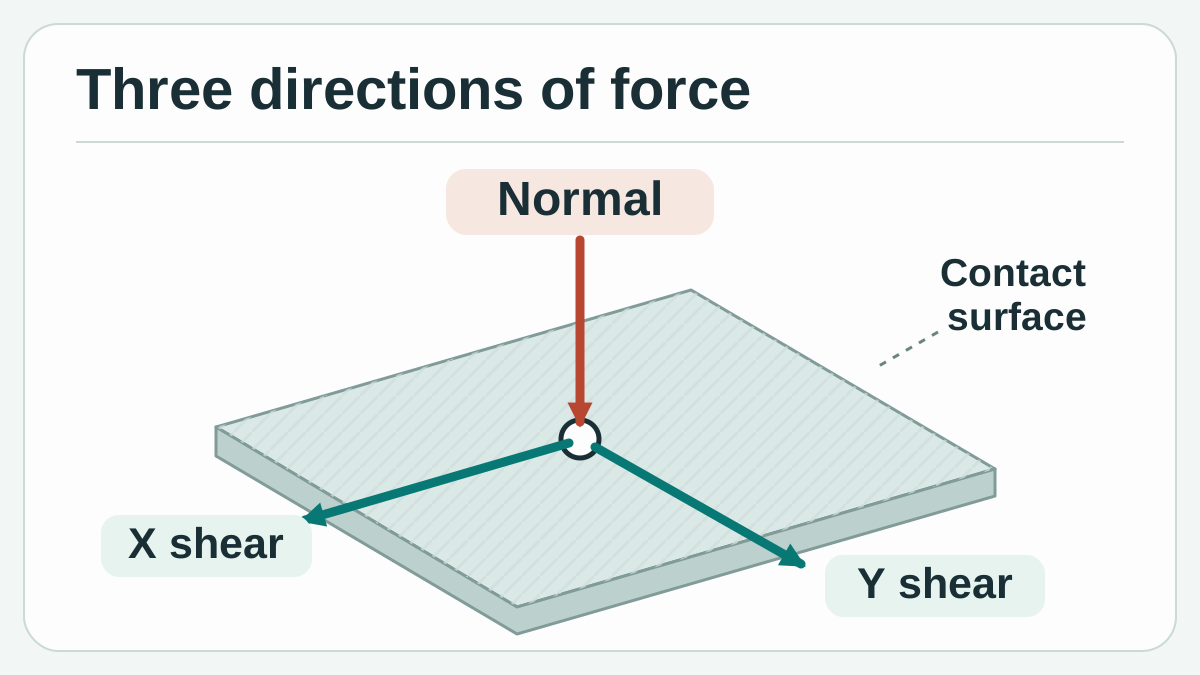
One normal direction and two directions along the pad describe the contact load. Original conceptual illustration by Telli.sh based on the Melexis specifications.
A camera is still useful. It can locate the pouch before the fingers close and show whether the object moved after the grip formed. A tactile reading adds evidence from a surface that may be partly hidden once the hand closes. Imagine two pickups that look the same to an overhead camera. One finger contacts the pouch well inside its edge in the first pickup. In the second, it contacts a corner that folds when the arm accelerates. The contact location and subsequent load can differ even when the camera's initial view is similar.
That distinction is also why a rise in sideways force needs interpretation. A stable package can exert more shear when the arm accelerates. An object can begin shifting at one contact while the other finger still holds. The useful signal is a pattern that corresponds to the start of motion under repeatable test conditions. A logged force change alone only shows that the load at the sensor changed.
Read the force range, detection limit and timing separately
Melexis lists a 15 N standard normal force range, an extended normal force range of 25 N, and a 4 N shear force range. It publishes accuracy as 10% of full scale. Its product page calls 200 mN the limit of detection, while the announcement describes 200 mN as typical resolution. If your packaging can take only a narrow range of force, request the datasheet and check the test conditions behind those figures. A detection figure does not tell you the error on every small reading. Melexis announcement · Melexis module specifications
The product page specifies digital force vectors at up to 400 Hz and I²C communication at up to 1 Mbps. At 400 samples per second, the nominal interval is 2.5 milliseconds. The interval to a physical correction is a different measurement. It includes reading and transporting the data, any filtering, the controller's decision, and the time until the motor changes the grip. A prototype with a fast sensor can still lose a pouch if the adjustment arrives after the useful interval.
| Published module detail | What it helps you plan | What to measure in the gripper |
|---|---|---|
| 15 N standard normal range and 4 N shear range | Whether expected contact forces warrant a bench evaluation | Contact loads at the actual grip points, including transient peaks |
| 200 mN detection figure and 10% full-scale accuracy | Which precision questions to take to the datasheet | Noise, repeatability and error on small forces in the working range |
| Up to 400 Hz output and I²C up to 1 Mbps | How to start planning acquisition | Timing from contact to controller response, including slow cycles |
| Contact location and over-force signals | What other events to capture | Whether events correspond to the relevant contact and a usable reaction |
The reported package dimensions are 18.5 × 23.6 × 9.4 mm. Start by checking the full finger geometry with the pad, mount and cable in place. A fixture can bend slightly or cover part of the sensing face. A replaceable surface layer can change the way a pouch contacts and slides on the pad. If those parts will be present on the actual hand, include them in the evaluation before drawing a conclusion from a bare module. Melexis mechanical and electrical specifications
Make the pickup prove that the sensor changed something
The thin pouch is one useful test because damage and slipping pull the design in different directions. For a first run, choose a harmless representative object, a fixed pickup point and a motion the team already knows how to repeat. Put a movable visual marker on the test object or use a camera view that shows displacement relative to the finger. An independent reference makes it possible to tell whether the package moved and when the movement began, without using the force signal to label its own answers.
A simple comparison keeps the same gripper, fingertip and motion. In the first condition, the controller runs the existing grip and the module only logs data. In the second, let an approved control action depend on the sensor. An initially useful response might be to pause a fixture or place the object down for another attempt. Adjusting grip force is also an option when the part's force limits and the equipment controls already allow it. Keep the conditions comparable so a different pad surface or trajectory does not become an unmeasured source of improvement.
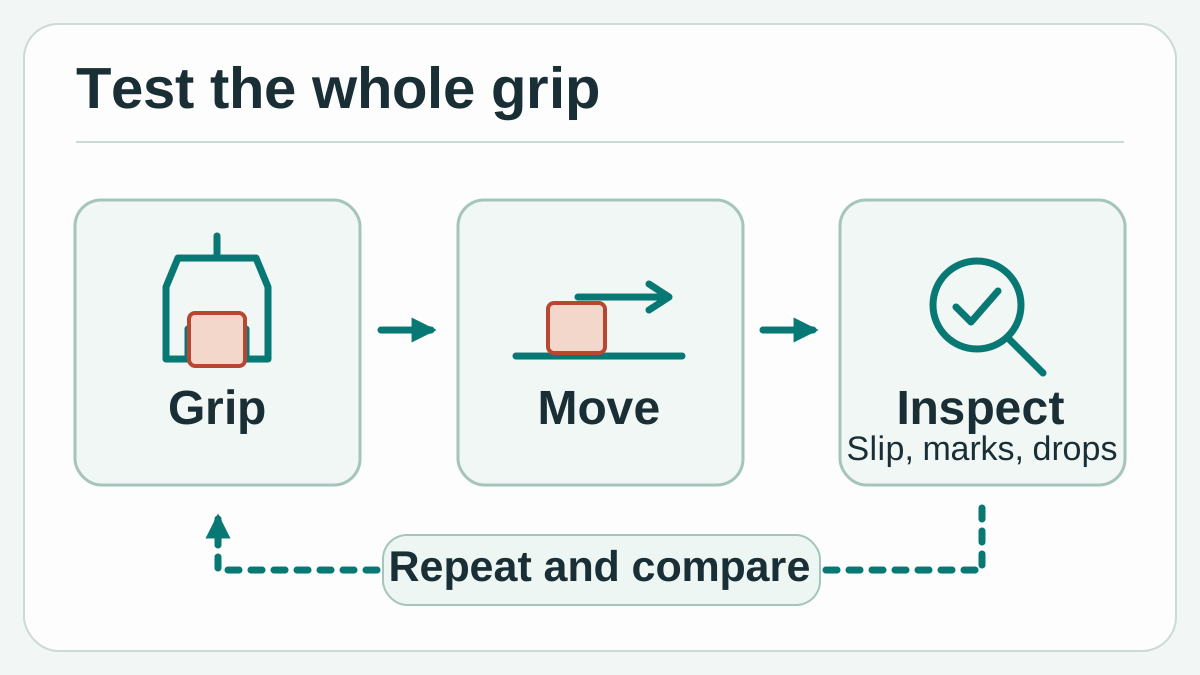
Compare logged-only feedback and active feedback on the same approved transfer. Judge both against independent motion evidence and the condition of the package. Original conceptual illustration by Telli.sh.
A second exercise uses a rigid test piece that moves toward a fixture. A position estimate can look right while a corner makes contact before the part is seated. The combination of contact location, normal force and sideways load gives the operator something to investigate. Begin by logging what happens in a few successful placements and a few deliberately misaligned placements under supervision. If both produce similar traces, use the existing position or inspection signal for the distinction and keep tactile sensing for the conditions where it contributes.
There is precedent for combining evidence. Li, Dong and Adelson's 2018 work tested slip detection with a gripper-mounted camera and an optical GelSight sensor, including 152 grasps across ten unseen objects. Griffa, Sferrazza and D'Andrea's 2021 work investigated incipient motion using distributed forces measured with a different optical setup. These studies offer evaluation ideas, including unseen objects and separate translational and rotational cases. Their results belong to their own hardware and methods. Li, Dong and Adelson, 2018 · Griffa, Sferrazza and D'Andrea, 2021
Use the kit to get a trace before closing the loop
The DVK90901 includes a fingertip module, a Melexis.IO USB interface, a translator board and cables. The bridge carries sensor data to a PC and Melexis provides a graphical interface for viewing, recording and exporting the readings. A companion Python library is available through registration. The bench workflow is a practical place to check signs, contact events and exported data before integrating directly with a controller. Melexis DVK90901 kit, data brief and software
- Capture a reference. Connect the kit according to Melexis's guide. Record the unloaded reading, then apply known loads along the pad normal and each shear axis in a fixture approved for the task. Compare direction, repeatability and timing to the reference before using the readings to make a decision.
- Set the acceptance rules for a pouch. Write down the motion, grip location, force bounds and what counts as movement or damage. Label the tests with a camera view or another independent displacement reference.
- Run logging first. During fixed-grip transfers, capture the three force components, contact events and the time of the arm movement. Save both clean runs and failures. Keep light and firmer packages in separate groups if their behavior differs.
- Compare the same transfer with feedback. Review the proposed response with the people responsible for the equipment. Change only the feedback policy for the comparison, and count drops, visible damage, unnecessary stops and recovery time under the same acceptance rules.
- Repeat with an ordinary change. Use a new batch of pouches or an approved change of pad finish. Keep the same rules and identify any retuning before moving on. A team gains useful evidence when it can explain what changed and why.
The first traces may reveal a problem in the measurement itself. One shear axis can appear to change when loading the normal axis because of how the object meets the pad, how the fixture flexes, or the sensor's response. Inspect the held load and reapply it at the same point. Then try a different part of the sensing surface. A trace that looks consistent in one place can conceal a mounting or contact issue that becomes obvious at the edge.
Time synchronization is worth an early check. A PC log may record when a sensor message arrived. A controller log may mark when it made a decision. A video frame shows a different observation and can be coarser than either log. Record a common event visible in the streams and note the timing uncertainty. Without that, a timing difference smaller than your measurement resolution can look like an early warning.
A gentle grip is a trade-off you can count
Start with the number of successful transfers out of all attempts and the number with damage. Include cases that only finished after a pause or another pickup. Report a typical cycle time and slower cases. If the feedback reduces slips but doubles the number of interruptions, a packaging line with a strict cycle may still need a different response. A supervised task with costly or delicate packages can reasonably weigh the same outcomes differently.
Give false alarms the same attention as missed events. A stable pouch can shift internally as its contents settle without sliding along the pad. A controller that interprets every force change as a slip may repeatedly stop or squeeze. Collect those cases deliberately. They tell the team whether a useful action is to pause, gather another observation, or leave a stable grip alone within the equipment's approved behavior.
One comparison worth keeping is between an alert and a useful intervention. Suppose a trace flags possible slip during a turn. In one trial, the controller stops the move in time and the pouch stays in place. In another, the same alert comes after the pouch has traveled past the recoverable point. Both traces contain an alert, yet only the first changes the outcome. Keep separate timestamps for first visible motion, alert, commanded response and completed response. Record intact delivery and any repeat pickup beside those timestamps so a team can decide whether to change the detection logic, the response, or the motion itself.
Melexis's evaluation kit makes the three force components accessible on a bench. The proof for a robot is the package that arrives intact, at the required pace, after a change you can name and reproduce. The useful outcome may be an earlier stop or a more confident hold. In either case, it is something you can see in the transfer as well as in the trace.
Sources
- Melexis launch announcement, November 12, 2026
- Melexis MLX90901 specifications, product photographs and demonstration videos
- Melexis DVK90901 kit photograph, software and ordering information
- Melexis DVK90901 data brief
- Melexis website terms, section 5, requiring express permission to copy or retransmit site images
- Li, Dong and Adelson, Slip Detection with Combined Tactile and Visual Information, 2018
- Griffa, Sferrazza and D'Andrea, Leveraging Distributed Contact Force Measurements for Slip Detection, 2021 preprint
To keep a searchable record of test runs, equipment observations and the decisions they support, create a Telli.sh account.