Stop writing the perfect prompt: show Loom what needs to change
Loom's Record for agent turns a short screen recording into an AI task brief. What the open beta changes for bug reports, design feedback and the review before an agent acts.
You can see the problem immediately. The button in the prototype is below the form; the button in the application is beside it, and the error message pushes both out of view on a phone. Explaining that clearly enough for an AI coding agent can take longer than showing another person.
On October 22, 2026, Atlassian introduced a group of Loom updates that includes Record for agent, a recording mode that turns a narrated screen walkthrough into instructions for an AI agent. Loom, the asynchronous video tool used to show colleagues how work looks, is extending that same habit to software that can carry out the next task. Its support documentation identifies the feature as an open beta for Business + AI and Enterprise plans, with a five-minute recording limit. Announcement; current requirements.
The interesting development is not that an agent can receive a video. It is that a familiar recording workflow now creates a brief you can inspect, edit and hand to an agent. That makes the quality of the handoff a practical question, rather than a competition to write the longest prompt.
 Official Loom logo, used to identify the product. This is a brand mark, not a screenshot of Record for agent. Logo: Loom / Atlassian; trademark use policy.
A recording can carry the parts your description leaves out
A useful bug report needs more than the sentence “the form is broken.” It needs the starting state, the action that causes the problem, the result you expected and the result you actually saw. When those details live in separate screenshots, copied URLs and chat messages, someone has to reconstruct their relationship before fixing anything.
Loom's documented workflow combines spoken instructions with screen keyframes, interaction events and visited links. In the Chrome extension, it can also collect console messages and network request or response metadata. The desktop version offers selection and drawing tools for directing attention to the relevant part of a screen. These are inputs to the generated brief, not proof that a proposed fix will work. Capture details.
Our view is that this changes the most useful unit of communication. A screenshot shows a state; a sentence describes an intention; a short walkthrough can explain how one state should become another. The generated brief is the bridge between that explanation and an executable task.
It helps to think of the recording as a parcel of context. The parcel should include everything needed for the requested change and little else. A five-minute limit can encourage that discipline: show one problem, explain its consequence and identify a clear finish line.
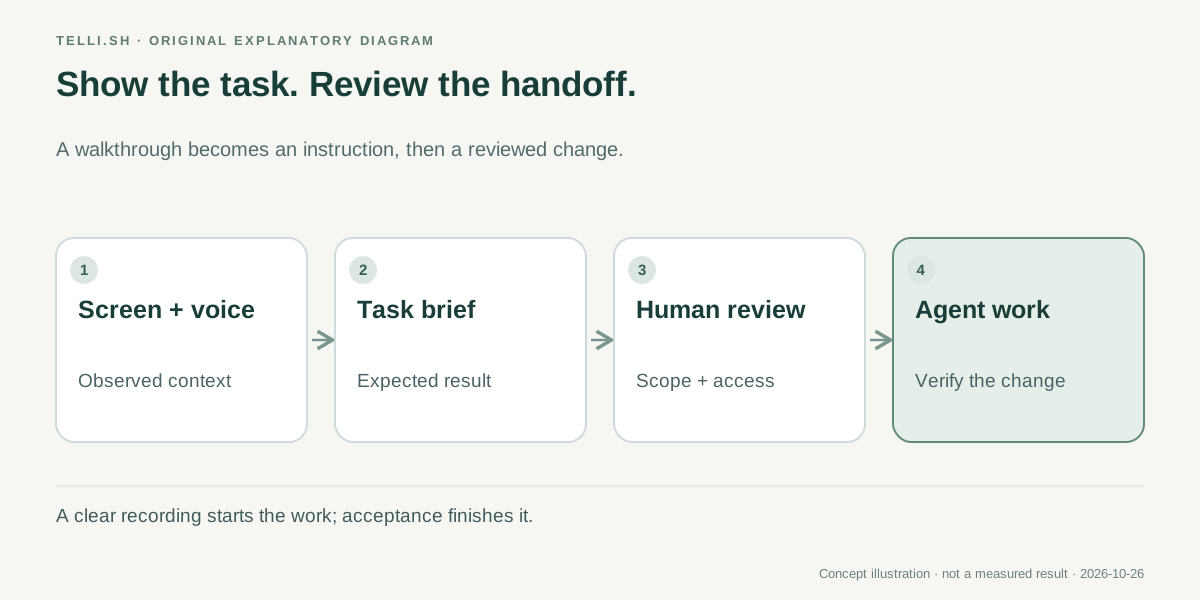 An original explanation of the handoff. Reviewing the brief is a separate step from the agent carrying out the work.
Design feedback becomes easier when the desired behavior is visible
Consider a team adjusting a checkout screen. In an illustrative walkthrough, the designer could open the approved layout, show the current application and point out three differences: the delivery option disappears below a narrow viewport, the total updates too late and the confirmation message uses the wrong emphasis. The value comes from the relationship between the two screens, not merely their appearance.
The person reviewing the generated prompt should turn each observation into a behavior. “Move this” is ambiguous once the agent is no longer watching the same moment. “Keep the order total visible after the delivery option changes at a narrow viewport” gives the implementer a result to verify.
This is particularly useful when a change spans a design file and a running page. Loom's own support example describes moving between Figma and a website while explaining a UI change. The feature can help capture the visible reference, but deciding which reference is authoritative remains the team's job. A polished prototype may still omit loading, error and permission states. Supported workflow.
You should therefore add one sentence that says what must stay true. In the checkout example, that might be that the total must match the selected delivery method, or that the keyboard focus must remain on the changed field. Those constraints are often absent from visual mockups and matter more than the position of a border.
The same approach works for product copy. Show the sentence in its actual setting, explain who reads it and state the decision it should help them make. A recording of an onboarding flow can communicate a confusing transition that a standalone text snippet would hide.
Bug reports need a reproducible beginning and an observable end
A second useful scenario is a recurring support issue. Imagine a customer can upload a document on a desktop but sees an empty progress indicator on a small screen. A short recording could show the file type, the selected action, the transition and the point where feedback disappears.
The generated task still needs a definition of completion. “Repair the upload” does not tell an agent whether the problem is a rejected file, a missing network response or a UI that failed to display a successful result. A more useful brief separates the observed symptom from a suspected cause.
We would keep the initial assignment narrow: reproduce the missing feedback, identify the layer responsible and propose a change with a regression check. If the agent subsequently discovers a server error, that finding can expand the investigation with evidence. It should not silently turn a layout complaint into a broad rewrite of the upload system.
There is a practical advantage here for people who are not comfortable reading logs. They can show the broken sequence without needing to diagnose it first. The engineer or agent can use the captured context to investigate, while the original observation remains available for comparison after a fix.
That does not make the recording a replacement for a test case. The two serve different purposes. The recording preserves what someone encountered; the test describes the behavior the software must keep satisfying. A successful workflow turns the first into an appropriate version of the second.
Copying a prompt and creating a Jira task are different entry points
Loom's open beta can be used from its Chrome extension or desktop app version 2.0 or later. The documentation also separates the basic prompt workflow from Jira work-item creation, which requires an Atlassian-managed account and an active Jira subscription. That distinction matters for a small team that wants to try the handoff without reorganizing its project management. Availability and setup.
The simplest trial is a single, low-impact task in a project you already understand:
- Open the relevant design, public test page or development environment and prepare a starting state you can explain.
- Select Record for agent in the supported Loom recorder and describe one change while showing the relevant interactions.
- Stop before the five-minute limit and read the generated action plan from beginning to end.
- Correct ambiguous references, remove unrelated material and add a concrete acceptance condition.
- Copy the prompt as Markdown into your chosen agent, or use the supported handoff or Jira flow for your account.
- Review the agent's result against the original scenario before accepting its change.
This sequence keeps the first experiment understandable. It also gives you a clean way to decide whether the feature helps: compare the time needed to prepare a clear assignment and the number of clarifying questions it generates.
An agent finishing quickly is not enough. If a teammate cannot explain what changed or why it addresses the original observation, the handoff still needs work. The most useful gain is less reconstruction, rather than less review.
Richer context also means a more deliberate sharing decision
The extra technical context is valuable because the screen alone may not explain what happened. A request that fails, an unexpected redirect or a console error can point to a different cause than the visible symptom suggests. That same detail may contain information you do not want to send into another tool.
Before recording, use a relevant test page and keep the task's scope visible. After recording, check the generated brief for account-specific URLs, customer identifiers and unnecessary log content. The documentation's list of captured data is a reason to make this check concrete rather than treating a recording as an ordinary image attachment.
The point is to preserve the information needed to resolve the issue. If a request identifier helps a teammate find an authorized server trace, it may be useful. A full list of unrelated URLs or a personal notification that happened to appear during the recording adds little value to a UI assignment.
| Input in the handoff | What it can explain | What the reviewer should decide |
|---|---|---|
| Spoken instruction | The intended change and why it matters | Whether the request is specific enough to implement |
| Keyframe or selected element | Which screen state or component is involved | Whether the image shows the relevant, authorized context |
| Clicks and visited links | The path through the workflow | Whether the path is reproducible outside the original session |
| Chrome technical metadata | A clue about what failed behind the interface | Whether the detail is needed and appropriate to share |
These are editorial review questions, not additional product permissions or a promise that every captured detail appears in every generated task. Their purpose is to help a team decide what belongs in the assignment it actually sends.
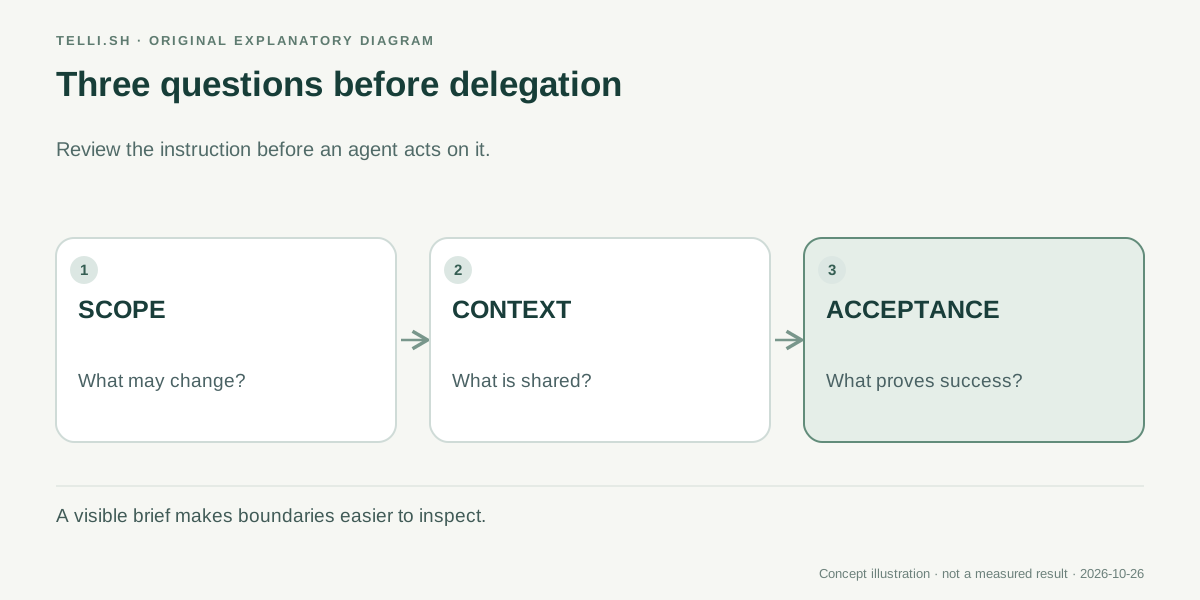 A useful review checks what the agent may change, what information it receives and how the result will be judged.
The first useful measurement is how much explanation survives
There are at least three ways this feature could save work. A designer can communicate a visual discrepancy without writing an elaborate description. A support specialist can preserve a sequence while it is fresh. A developer can give an agent a task with a clearer reference and a more specific expected result.
Each use has a different failure mode. Design feedback can omit behavior outside the happy path. A support walkthrough can depend on an account state no one else can reproduce. A developer's recording can contain so much detail that the actual request becomes hard to identify.
For an initial evaluation, pick several familiar tasks and keep the agent and repository unchanged. Record how much editing the generated brief needs, how often someone asks for clarification and whether the final change satisfies the stated condition. Those measurements tell you more about communication quality than an isolated demonstration of a moving cursor.
It is also worth distinguishing output quality from task difficulty. A simple copy change may succeed with almost any brief. A more revealing trial is a small task where context matters: a loading state, a narrow-screen layout or a transition between two tools. The assignment should still be reversible and easy for its owner to review.
Loom is well positioned to make this habit familiar because people already use recordings to explain work to other people. The opportunity is to carry that clarity into an agent workflow. The risk is assuming that a richer input removes the need to say what the agent is supposed to achieve.
The better brief is the one another person can still understand
Record for agent makes a sensible bet: showing can be a more efficient starting point than describing every pixel. Its strongest result would be a task that is easier for both an agent and a teammate to understand, with a visible connection between the original observation and the accepted change.
Before sending the next recording, ask one question: could someone who did not watch you make it still explain what success looks like? If the answer is yes, you have a useful brief. If not, the next improvement belongs in the instructions before it belongs in the code.
Sources
- Atlassian: Showing what you mean in the age of AI, October 22, 2026.
- Loom: Record for AI agents, availability, capture and workflow documentation checked October 26, 2026.
Keep the source and your reviewed notes together
For your own authorized recordings, Telli.sh offers a separate place to keep source material alongside reviewed notes. Start with an audio note.