Llama Windows: Your First Local AI Chat, Without a Terminal Setup
Install Llama Windows safely, choose a GGUF model that fits your PC, try three practical prompts, and connect to its local API without exposing your server.
Your first local AI task should be small: turn six fictional meeting notes into three action items. You should not need to compile an inference engine, guess a dozen launch flags, or upload a private document just to discover whether your computer can answer.
Llama Windows, announced by Hugging Face on October 13, 2026, puts the llama.cpp runtime behind a Windows system-tray app. It handles model discovery and downloads, then gives you a local chat interface and an API for other applications. The name describes the app, not a restriction to Meta's Llama models. Launch announcement
This guide takes you through a safe installation, a sensible first model, and a first conversation you can check. Then we will work through three useful tasks and an optional local API request. Start with public or invented text; introduce sensitive material only after you understand the whole workflow.
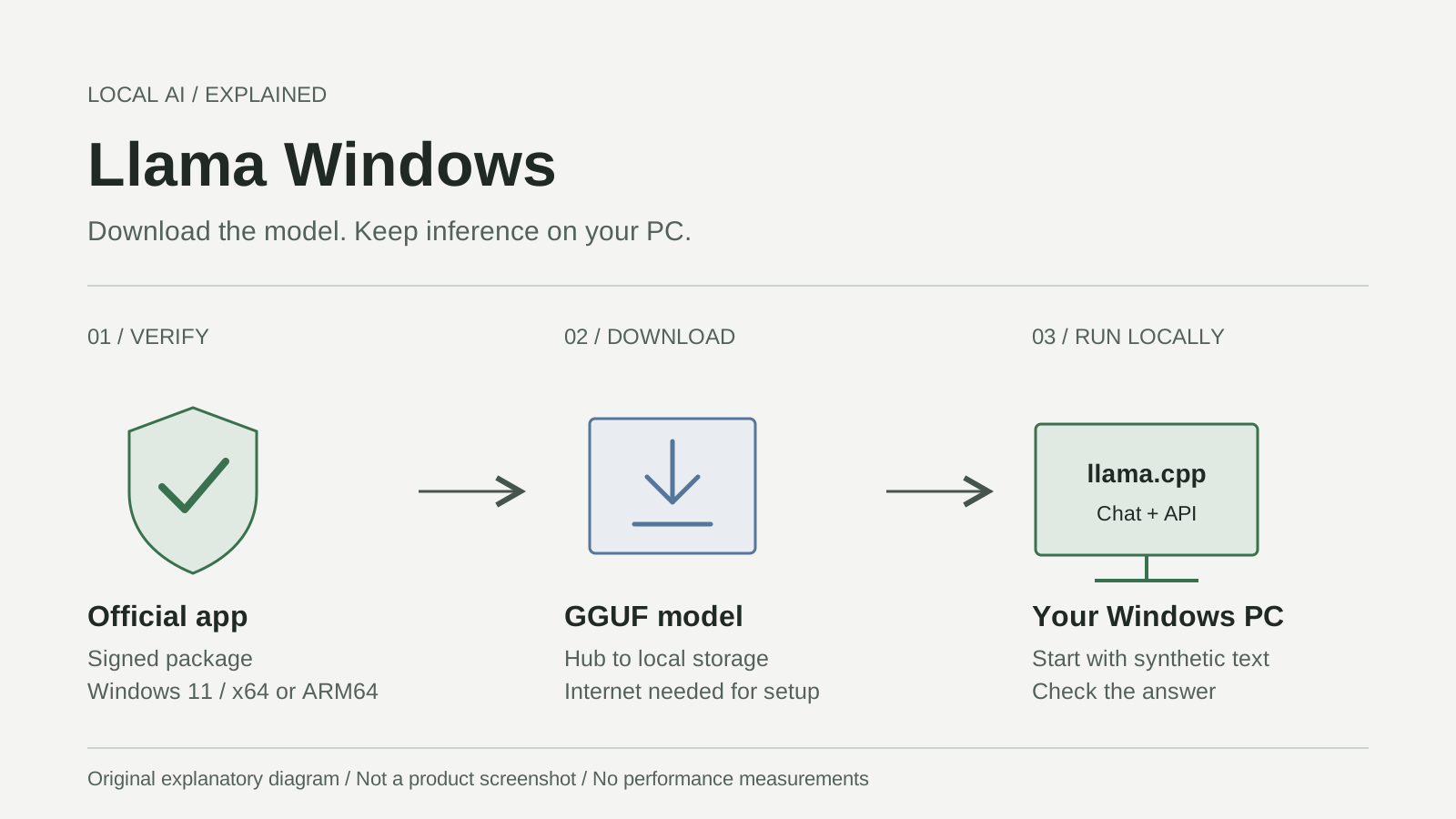
Original explanatory artwork, not a product screenshot. Setup downloads and local inference are different stages. Based on the official Windows installation guide.
Check the Windows build before choosing a model
As checked on October 20, the latest published Windows release is v0.12.0. Its package manifest requires Windows.Desktop 10.0.26100.0 or later. Build 26100 corresponds to Windows 11 version 24H2; use a currently serviced Windows release, not merely the oldest version that passes installation. Release, release manifest, Microsoft release information
Run winver from Windows search to check your build. In Windows Settings, open System > About to check the system type and installed RAM. The official .msixbundle contains x64 and ARM64 builds: x64 is the usual route for Intel/AMD Windows PCs; ARM64 is for Windows on Arm. The bundle selects the architecture. A 32-bit x86 release package is not among the current release assets. Windows repository, bundle packaging
The Windows installation documentation does not specify one universal RAM, VRAM, or dedicated-GPU minimum. Those needs depend on the model and context. llama.cpp supports CPU inference and several GPU backends, but that does not promise identical acceleration on every PC. You do not need RTX Spark specifically. llama.cpp capabilities
On a Mac, take the separate Download for Mac route at llama.app. Do not install the Windows bundle or borrow Windows driver instructions. The site's Mac app-size figures are not Windows installer requirements, either.
Install the signed app without weakening Windows security
The normal packaged route does not require compiling anything or installing the .NET SDK. Source-build prerequisites belong to developers, not this first-chat procedure. Official installation documentation
- Open llama.app and choose Download for Windows 11, or follow the repository's Releases link. Confirm that the release belongs to
ggml-org/Llama-Windows, not a similarly named download site. - Choose the current
.msixbundle, not GitHub's source-code archive. For the checked release, the asset isLlamaApp-v0.12.0.msixbundle. Keep its release page available while installing. - Open the bundle with Windows App Installer. Inspect its publisher and signature information before choosing Install. The v0.12.0 manifest's signing identity is Hugging Face, while its publisher display name is Morgan Funtowicz. A familiar display name alone is not signature verification; Windows must trust the package's signature. Package identity
- If Windows reports an unknown publisher, invalid signature, or an organizational restriction, stop. Recheck the official asset, update Windows/App Installer through Microsoft channels, or ask your administrator. Do not disable Defender or SmartScreen, bypass execution policy, or import an unfamiliar certificate to force installation. Microsoft's App Installer troubleshooting
- Launch Llama and find its notification-area icon beside the clock; check the hidden-icons arrow if needed. The app can install its managed llama.cpp runtime when one is missing, so first launch may need internet access. Windows download walkthrough, runtime setup
Leave network-sharing settings alone. In v0.12.0, Settings > Llama > Listen On controls the server address; localhost is the default. Your first chat does not need an inbound network exception or an address reachable from another computer. Release security notes
A model that fits on disk may not fit in memory
GGUF is a model-file format containing weights and metadata for inference engines such as llama.cpp. It is not a chatbot brand or a quality rating. An instruction-tuned or chat model is the appropriate starting point for conversation; a base model serves a different purpose. Read the model card rather than choosing by download count alone. Hugging Face GGUF documentation, model-card guidance
Parameter count describes the model's learned numerical values: 3B means roughly three billion parameters, not a 3GB download. Quantization stores those values more compactly. Names such as Q4_K_M and Q8_0 identify different quantization recipes, not app versions. Lower precision can reduce storage and memory needs, with quality and speed tradeoffs that depend on the model and hardware. It is not automatically the fastest or best choice. llama.cpp quantization guide
Keep four quantities separate:
| Quantity | What you are budgeting | Beginner's decision |
|---|---|---|
| Disk space | Downloaded model files, runtime, and temporary download space | Check the destination drive before downloading |
| System RAM | Windows, other applications, model data, and runtime work | Leave room for ordinary PC use |
| GPU VRAM | Work assigned to a dedicated GPU | Do not equate it with system RAM |
| Context | Tokens held for instructions, conversation, and generated output | Start short instead of selecting the maximum |
Context is the conversation's working desk. A larger desk holds more material, but it also occupies more memory. Tokens are text pieces, not a fixed number of words; different languages and code tokenize differently. The model weights are only part of the allocation: the key/value cache and runtime buffers matter too. llama.cpp server parameters
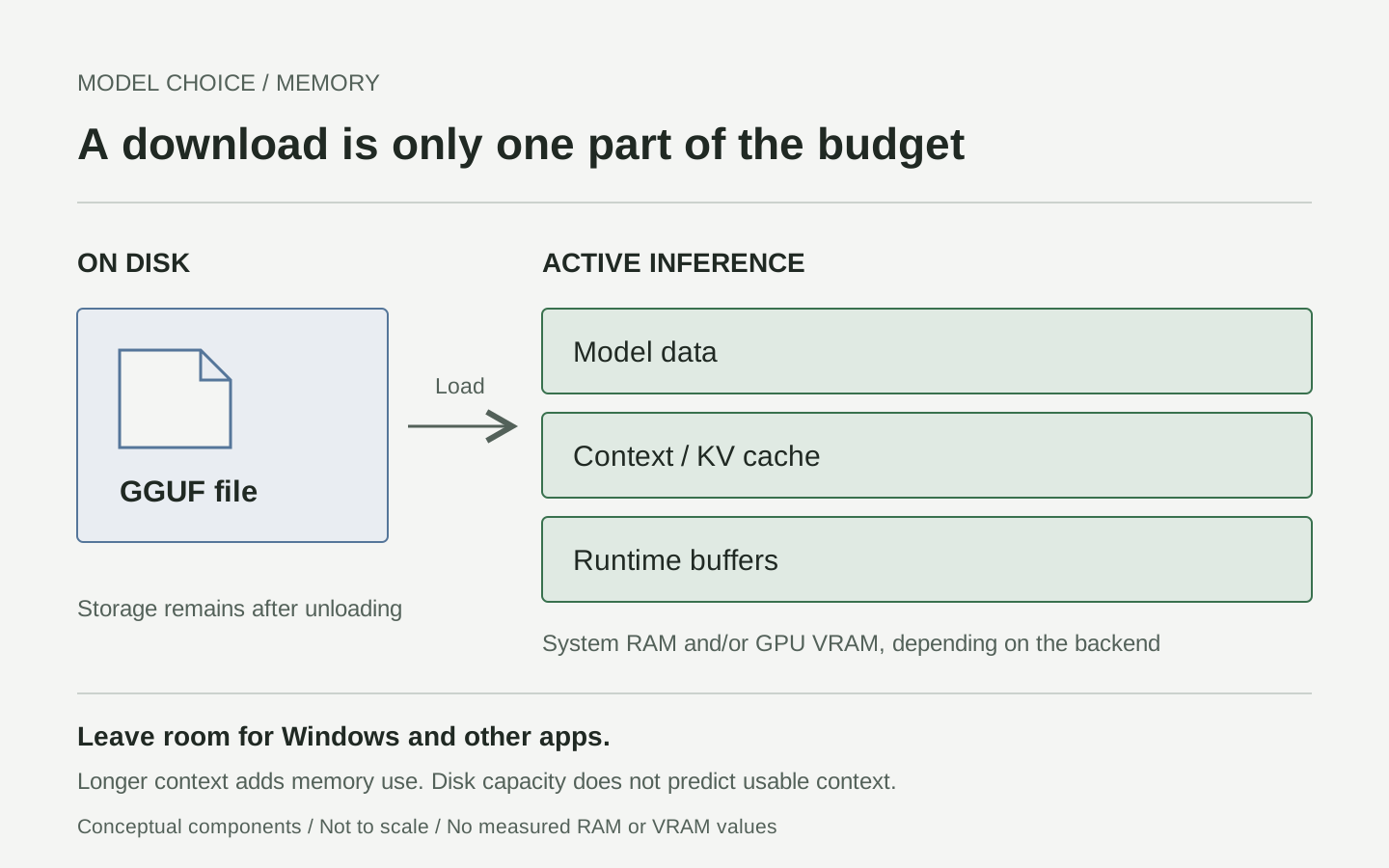
Original conceptual diagram, not a measured allocation. The model-details source estimates model-plus-context memory; total PC usage includes more.
Open a model's details and inspect its context-length memory estimates. Choose a small recommended chat model and a short context option that leaves headroom. A hypothetical 4GB file on a 16GB PC is not proof that a long conversation will fit. If you compare quantizations later, keep the model, prompt, and context constant so you can tell what changed. Check the model's own license before commercial use; the app's MIT license does not license every downloadable model.
Make the first conversation deliberately easy to verify
The launch article calls its panels Recommended Models and Available. The checked v0.12.0 source instead uses Models, a Browse more separator, and icon tooltips including Download model, Load model, Open WebUI, and Stop model. Follow the controls present in your release rather than searching forever for an old panel name. Versioned Windows UI source
- Open the tray flyout and inspect a recommended model's size and details. For this first run, choose a public model without a gated-access requirement.
- Use its download control and let the download finish. Download completion means the file arrived, not that inference is running.
- Select a short context in the model details, then use Load model. Once loaded, choose Open WebUI to reach the local chat. The official quickstart also describes choosing context before starting chat. Quickstart
- Paste the synthetic prompt below and send it. Compare the answer against the supplied facts; do not judge success only by whether text appears.
Use only these fictional notes. Return three bullets: owner, task, due date.
If a due date is missing, write "not specified".
Mira will send the draft on October 23.
Leo will check the links on October 24.
Sam will choose a cover image. No deadline was agreed.
A useful answer preserves both dates and leaves Sam's deadline unspecified. An invented deadline is an accuracy failure, even when the installation works perfectly. Save the prompt and model ID for comparison, then use Stop model when finished. The app also documents an Alt+Space chat overlay; it is optional, not a prerequisite. Windows README
Three small jobs show what a local model is good for
These are illustrative exercises with invented inputs, not recorded model outputs. Each gives you a task, a follow-up, and a concrete acceptance test.
Turn rough notes into a handoff without inventing decisions
Suppose a volunteer group is preparing a weekend event. Paste this request:
Make a handoff with Decisions, Actions, and Open questions.
Use only the notes. Quote the supporting phrase for every action.
Notes: We chose the library room. June will confirm capacity by Friday.
Omar offered to bring signs, but nobody accepted the offer yet.
The start time is still undecided.
The useful distinction is between a commitment and a suggestion. Ask a follow-up: "Which actions were explicitly assigned, and which are only proposals?" Accept the result only if June's task is assigned, Omar's offer remains tentative, and no start time appears. Keep the original notes alongside the handoff so another person can inspect the evidence.
Study a passage with questions that stay inside the source
Use a short public-domain passage or a synthetic explanation you wrote. Here is a self-contained exercise:
Passage: In this fictional greenhouse, a timer waters the plants at 07:00.
A moisture sensor can cancel watering when the soil is already wet.
The timer does not measure temperature.
Create three study questions with answers. Quote the sentence supporting
each answer. Then ask one question the passage cannot answer.
Check every quotation, not merely the answer's plausibility. A good unanswerable question might concern temperature thresholds, but the model must not invent a threshold. For a second pass, request simpler wording while preserving all facts. This turns a rewrite into something you can check sentence by sentence, rather than an invitation to add a general greenhouse tutorial.
Draft a service reply while keeping promises under control
Before using real customer text, rehearse on a fictional ticket:
Write a polite reply under 90 words using only this policy and ticket.
Policy: Refunds require staff review. No approval deadline is promised.
Ticket: My duplicate charge appeared yesterday. Can you refund it today?
Acknowledge the issue and ask for an order reference, not card details.
Do not promise approval, timing, or a completed action.
Reject a draft that says the refund has been processed or guarantees a same-day result. Ask the model to underline every promise it made, then inspect those promises yourself. Only a person with access to the actual support system can confirm an account action. Local execution changes where drafting happens; it does not give the model authority to issue refunds.
The local API can reuse the same model
You can stop at chat. For an editor, script, or prototype, the managed server is documented at http://localhost:9931, with OpenAI-compatible requests under /v1. This is local compatibility, not a request to OpenAI's cloud. Confirm any changed port in Settings. Llama API documentation
With the app running and your model already loaded, open PowerShell. First list the router's available models; /models includes load status, while /v1/models is the OpenAI-compatible metadata endpoint. Copy the exact ID of the model you intentionally loaded. Do not select an arbitrary first entry, which might cause another model to load.
$base = 'http://localhost:9931'
$headers = @{}
# Only needed if your local server is configured to require a key.
if ($env:LLAMA_LOCAL_API_KEY) {
    $headers.Authorization = "Bearer $env:LLAMA_LOCAL_API_KEY"
}
Invoke-RestMethod -Uri "$base/models" -Headers $headers |
    ConvertTo-Json -Depth 10
Replace the placeholder below with that exact ID before running this second block. It sends only synthetic text and requires no extra SDK:
$modelId = 'PASTE-THE-LOADED-MODEL-ID'
if ($modelId -eq 'PASTE-THE-LOADED-MODEL-ID') {
    throw 'Choose the already-loaded model ID from /models first.'
}
$body = @{
    model = $modelId
    messages = @(@{
        role = 'user'
        content = 'Rewrite clearly: Our fictional workshop begins at noon.'
    })
    max_tokens = 96
    stream = $false
} | ConvertTo-Json -Depth 5
$reply = Invoke-RestMethod -Method Post `
    -Uri "$base/v1/chat/completions" -Headers $headers `
    -ContentType 'application/json' -Body $body -TimeoutSec 180
$reply.choices[0].message.content
The request shape and output field follow the official llama.cpp server reference. Leave Listen On at localhost; never paste a cloud API key into this example. A 401 calls for checking local authentication, not removing protection. In v0.12.0, selecting a non-loopback address adds an app-generated key and requires confirmation. Windows security behavior
Local inference does not make every network operation disappear
The Windows README states that prompts and inference stay local and that the app sends no telemetry. It also documents network requests for model downloads and release-update checks, with a User-Agent containing app version, Windows build, and architecture. These are different activities, not contradictory meanings of "offline." Privacy statement
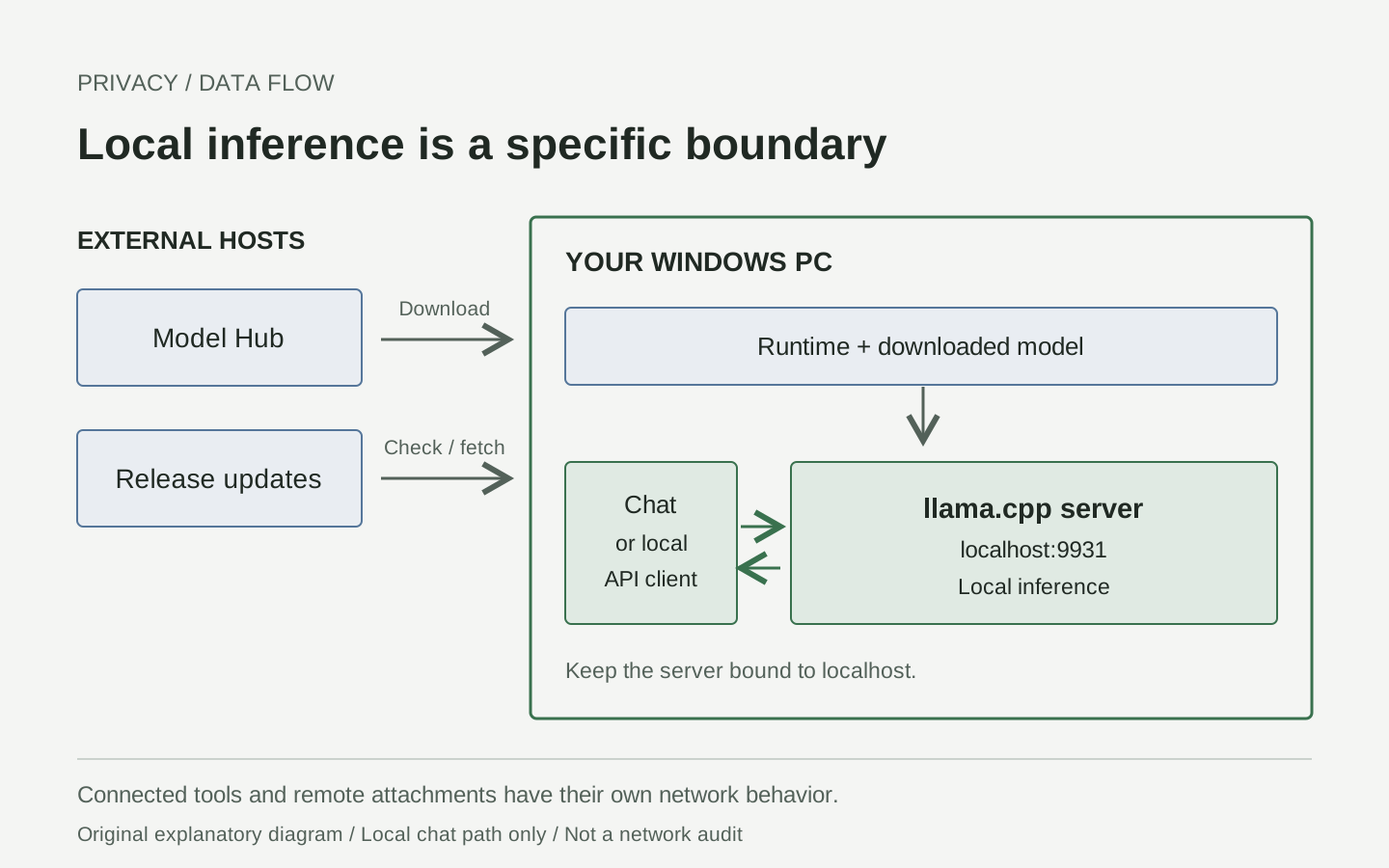
Original data-flow explanation. Download hosts are external; the illustrated chat path is local. Sources: Windows privacy documentation and API reference.
A downloaded, supported model can perform inference without an internet connection, but a new model still needs downloading. A connected editor, browser extension, remote attachment URL, or enabled external tool has its own network behavior. Do not assume it inherits the server's local-only boundary.
Before confidential work, check conversation storage, browser extensions, backup/sync locations, and your organization's rules. An offline synthetic chat is a useful functional check after setup, not proof that every component has been audited. Never include tokens or private prompts in public diagnostic logs.
Troubleshoot the failing stage, not the whole installation
| Symptom | Check first | Next useful move |
|---|---|---|
| Bundle will not install | Build 26100 minimum, architecture, signature, device policy | Keep the exact App Installer error; use official updates or administrator support |
| No visible app window | Notification area and hidden icons | Open the tray icon; a permanent taskbar window is not expected |
| Model download fails | Destination space, connectivity, gated access, displayed failure | Resolve that cause before retrying; begin with a public model |
| Download finishes but loading fails | Context estimate, free memory, runtime error | Stop other loaded models and reduce context or model size |
| Replies are slow | Model size, context length, CPU/GPU backend actually in use | Compare one short prompt; do not assume a catalog recommendation is a speed guarantee |
| API cannot connect | App running, configured port, local address | Inspect the server status before starting a second server |
| Fluent answer contains false details | Source text and model suitability | Shorten the task and require supporting quotations |
The current README locates settings and logs under %LOCALAPPDATA%\Llama; the launch post listed a different log path. Use the app's log-folder control rather than guessing. The documented /health endpoint helps distinguish a ready model server from one still loading, although a router being alive does not prove your chosen model loaded. Current storage documentation, server health behavior
Call the first setup successful only when these checks pass
- The official signed package installs without disabling security controls.
- One deliberately selected model finishes downloading and loads.
- The chat opens on a local address and answers the synthetic task.
- Dates, names, and missing information match the supplied text.
- You can stop the model and load it again.
- If using the API, the intended model answers and the server remains localhost-only.
The bottom line: local AI is a workflow you can inspect
Our take: the important improvement is not avoiding one terminal command. It is making model choice, memory use, source material, and the resulting answer understandable enough to repeat. Start with one small task whose answer you can verify. Expand only when you know what success looks like.
Sources and media
Checked October 20, 2026. This guide describes documented workflows; no installation trial, model run, paid request, or benchmark is claimed. All three SVGs are original explanatory artwork, not interface reproductions. See the publisher's official tray screenshot and overlay demonstration for the actual interface. Those assets are linked, not republished.
- Hugging Face announcement, October 13
- Windows release, package, and security changes
- Official installation and quickstart
- GGUF format and metadata
- Local API and endpoint documentation
- llama.cpp runtime and server reference
Keep your experiments reusable
Keep source links, prompts, model IDs, and review notes together rather than saving only the final answer. Telli.sh can help organize those research notes; it is not a Llama Windows integration or a claim that your notes stay offline. Create a Telli.sh account