Can 30 GPUs on one server shorten a lab’s AI queues?
LIQID UltraStack gives separate models their own AMD Instinct MI350P cards. Compare the vendor’s 20-GPU test with its 30-GPU projection and test the wait your researchers actually see.
At nine in the morning, a research team starts extracting text from yesterday’s scans. A second team submits notes for translation, and a third wants quick answers from an instrument manual. If those jobs share an inference queue, a short question can sit behind a large document batch. By the time the answer appears, the person who needed it may have gone back to the PDF.
On November 12, 2026, infrastructure vendor LIQID described an UltraStack configuration that attaches 4 to 30 AMD Instinct MI350P accelerators to one dual-socket AMD EPYC 9005 host. Its published serving design puts one model instance on each card, so an OCR job can keep running while separate GPUs handle translation or questions. LIQID announced a demonstration at SC26 in Chicago during the exhibition scheduled for November 17–19. LIQID’s November 12 announcement and official system images · SC26 dates
That design makes sense when a lab needs several jobs to finish on time and the models fit individually on a card. Start with the wait someone sees, then ask whether separate GPUs could remove the part caused by another job, what limit would appear next, and whether the improvement justifies the system’s power and cost. Most of that can be tested with a far smaller trial than the fully populated configuration.
Each GPU has its own 144 GB of memory
In LIQID’s published layout, the AMD EPYC host connects to the MI350P cards through a PCIe Gen 5 fabric. The cards may sit in separate GPU chassis attached to the host. AMD specifies 144 GB of dedicated HBM3E per MI350P and a PCIe 5.0 x16 card interface. In the one-model-per-card setup, an individual model uses the memory on its assigned GPU. Each model instance can handle several requests, subject to the limits of its serving software and its memory budget. LIQID UltraStack datasheet · AMD MI350P specifications
Twenty cards contain 2.88 TB of HBM3E in total, using decimal units. That figure is useful for counting how many separate model instances a system can host. For the job assigned to card number seven, the relevant starting point is still 144 GB. If your model fits only when its parameters and working state are split between several GPUs, evaluate a distribution strategy and benchmark it explicitly. LIQID’s reported scaling covers independent instances on separate cards. LIQID’s test setup and memory figures
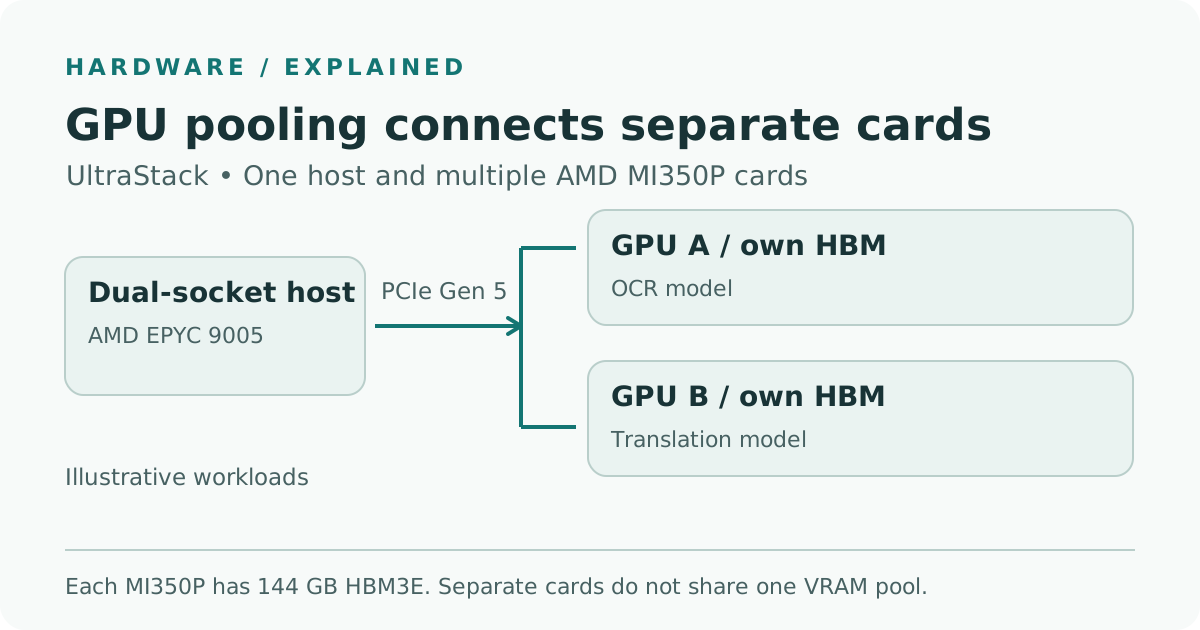
Telli.sh illustration based on LIQID’s hardware description and AMD’s card specifications. The diagram shows an example of independent serving and leaves out chassis and host peripherals.
A model’s parameter count helps narrow the options, but two models with the same count may have different memory requirements. Start with the exact weights and their precision. Then allow for the runtime and any cache the model uses to keep track of earlier tokens while it generates more. For a service that accepts several long requests at once, launch the proposed model and observe memory under that actual mix. A short test prompt on an otherwise idle card tells you whether the service starts. A sustained run with the longest accepted inputs tells you whether you can keep accepting work.
Independent queues help when the jobs arrive at different rates
Consider a university archive digitizing interviews alongside paper records. In a trial, one GPU can run a document model for OCR, another can transcribe interviews, and a third can handle short translations. A fourth card could take the busiest service as a second instance after a week of usage data. Give each service its own queue and define how much work it may admit at a time. A backlog of scanned pages should then have less opportunity to delay a short translation through contention for the same accelerator.
Suppose the archive receives a request to translate text after OCR. You can have stages overlap across different documents. The first document can enter translation as the second enters OCR. The translation of a particular document still needs that document’s OCR output. Measure the time for that document from upload to usable result along with the number of completed documents across the entire pipeline. A design that processes more documents in an hour may still leave an individual translator waiting for a page.
For a different mix, imagine an engineering lab using a document assistant during the day and processing old instrument logs at night. The daytime assistant needs a predictable first response after a researcher asks a question. The overnight job has a completion deadline and can often tolerate pauses. Measure the share of time each GPU spends on those services before allocating a permanent card to each. If the assistant is idle most of the day but gets a burst after a lab meeting, a permanently reserved second copy has a cost even when traffic stays low. A deployment that already handles the burst with scheduled jobs or separate queues is a useful comparison.
Model placement also affects recovery. One host simplifies some configuration work, and all the services on it still depend on that host. Write down which jobs can wait after maintenance, which must come back first, and which need a second serving location. For a document pipeline, save intermediate results so a restart can continue from completed extraction. For interactive work, agree on an outage allowance or provide another endpoint. The number of cards on the main host represents inference capacity during normal operation. Recovery time requires its own test.
LIQID measured 89,000 output tokens per second at 20 GPUs
LIQID’s throughput brief describes a 7B-class model at FP4 precision with a reported concurrency of 128. Each GPU served its own instance. Across cards, LIQID reported roughly 89,000 output tokens per second at 20 GPUs. Its 30-GPU estimate of roughly 133,000 output tokens per second extends the observed scaling from the 20-GPU test. Both numbers describe aggregate output across the tested or projected setup. A researcher making one request would experience that request’s own queue time, input processing, and generation speed. LIQID throughput brief and methods
| LIQID test | GPU count | Aggregate output tokens/s | Evidence |
|---|---|---|---|
| 7B class, FP4 | 1 | 4,653 | LIQID measurement |
| 7B class, FP4 | 10 | 44,383 | LIQID measurement |
| 7B class, FP4 | 20 | About 89,000 | LIQID measurement |
| 7B class, FP4 | 30 | About 133,000 | LIQID projection from 20 GPUs |
| 72B class, FP8, interactive latency limits | 8 | 1,256 | Separate LIQID measurement |
The separate 72B FP8 test used a target of at most two seconds to first token at the 99th percentile and at least 30 output tokens per second per user. LIQID reports measurements on 2, 4, and 8 cards for that experiment. The model size, precision, and serving conditions differ from the 7B throughput trial. Use the interactive result as a reference for that class of test, then apply your own latency targets to your expected prompts and concurrency. LIQID benchmark methods and interactive results
The 7B figures make a good case for repeating the same benchmark as you add identical model instances. They leave open a more interesting question for teams planning mixed workloads. What if requests spend part of their time reading many small files, assembling context from storage, or waiting for a CPU to prepare images? Run the same trace twice with identical models and GPU counts, first against each service individually and then with the full mix. If combined operation increases queue times while GPU utilization stays low, examine host CPU, filesystem activity, and request routing before adding accelerators.
Measure useful work under a latency limit
Start with a test your current deployment can run. For example, use a representative set of 200 approved documents with known languages and scanned page counts, then replay an anonymized log of interactive arrival times beside the batch. Preserve the input mix across both systems. If a hardware or software change forces you to switch precision, recheck result quality on the same sample. Count only results that complete and pass the checks your team normally applies.
- Pick what a good result looks like. For the assistant, set a first-response and end-to-end target, such as a first token within two seconds at the 95th percentile for your interactive sample. For batch extraction, choose a daily deadline and a minimum number of pages that pass validation. Those example targets belong to the proposed test. LIQID used the 99th percentile first-token limit in its separate 72B experiment.
- Record where each request spends time. Log when it arrives, starts on a worker, produces its first output, and finishes. Tag it by job type and capture retries. With those timestamps you can compare queue wait separately from active service time. A single end-to-end number can hide a long queue when a short inference step finishes quickly.
- Change one thing and replay the traffic. Compare a shared queue with separate queues while the same model instances stay on the same cards. Then test any proposed change in card assignment as a separate experiment. Keep prompt and output limits, input order, and quality checks fixed, and run each test after a consistent warm-up. Check the busy interval as well as average traffic. A single large job arriving at the wrong time is when separate queues should show their effect.
- Look at the host and meters beside the result. Record accelerator utilization and memory, host CPU and RAM, read and write activity, and system input power over the same window. Report the 95th percentile completion time per job, successful pages or requests per hour, and energy per successful result. Review drops and timeouts alongside the percentiles so rejected work remains visible.
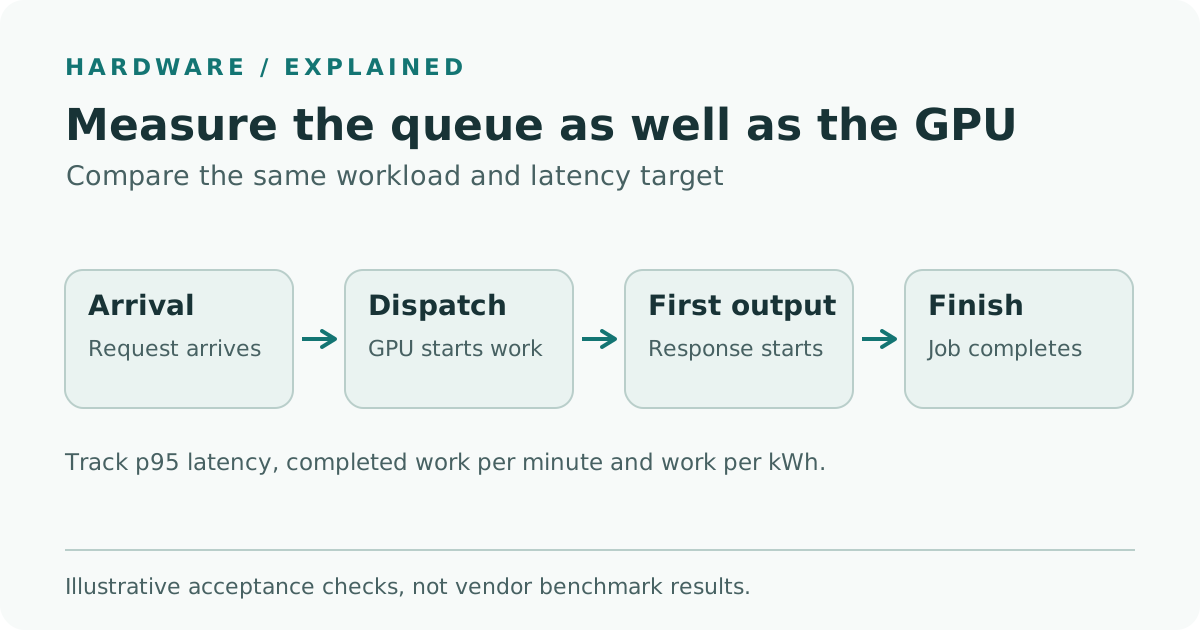
Telli.sh illustration of a proposed acceptance test. A shift in queue wait, first response, or completion time can point to a different constraint.
Plot a separate latency distribution for each service. P95 is the time within which 95 percent of the measured events complete. It can move even while the median stays flat, which matters if an analyst repeatedly arrives during the busy interval. Record counts for each distribution. A percentile based on five overnight jobs tells you something different from one based on hundreds of interactive requests. A sustained drop in queue time for the busy service, with comparable quality and fewer timeouts, gives a stronger reason to allocate a dedicated card than a peak throughput number.
Your comparison also needs the same measurement boundary. For power efficiency, count useful output over a fixed window and meter the same equipment in both configurations. If you only meter the server and GPU chassis, label the result as IT-system energy. If shared storage or cooling enters the comparison, count it consistently for both designs. Record idle power when evaluating a service that runs around the clock. A fast system has fewer minutes of active work per job, but an installation that waits all night at a higher idle draw may consume more over a day.
The 22 kW figure belongs in a site review
LIQID quotes about 22 kW for its full air-cooled 30-GPU system. AMD specifies a maximum typical board power of 600 W per MI350P and a configurable 450 W setting. Multiplying 30 by 600 W gives 18 kW for the cards at that board-power figure. The reported 22 kW applies to the broader system. Facility electricity, rack provisioning, and cooling capacity depend on the installation. Running at 450 W could also change useful throughput, so compare both power settings under the same workload and quality gates if the vendor supports them for your quoted configuration. LIQID system power guidance · AMD MI350P board specifications
Bring the facilities team in before choosing a larger configuration. Review the exact number of chassis, circuit capacity under normal and redundant operation, heat removal at your inlet conditions, and whether the installation can tolerate a sudden return to full load after a restart. Use the quote to identify where service, support, and power adjustments are handled. Track those items alongside the cost of a long document queue. Even if a single host reduces the number of servers you manage, its required power density may change which rooms can house the equipment.
LIQID advertises 4-to-30-GPU systems through its partner ordering process, with availability subject to stock. Its product page describes a 4–6 week delivery flow and ties the advertised four-week lead time to confirmation of the purchase order. Ask for a dated configuration quote and a delivery commitment for the installation site. LIQID listed its SC26 exhibition at McCormick Place starting November 17. LIQID partner ordering and delivery guidance · LIQID’s SC26 announcement
How much of the wait is worth paying to remove?
An accelerator dedicated to translation may be well spent if the next team depends on translated passages right away. The same card could sit idle for most of the week where every translation can wait until tomorrow. Start with the smallest configuration that can represent simultaneous jobs in your lab and repeat the busiest interval several times. Add capacity where shorter waits still produce better outcomes. For an archive, the acceptance result can be as concrete as a technician getting timely answers while the scanner’s full daily batch still finishes before handoff.
Sources
- LIQID SC26 announcement and official UltraStack images, November 12, 2026
- LIQID UltraStack with AMD Instinct MI350P product page, ordering and power guidance, checked November 15, 2026
- LIQID UltraStack datasheet, checked November 15, 2026
- LIQID Phase 3 benchmark methods and results, checked November 15, 2026
- AMD Instinct MI350P card specifications, checked November 15, 2026
- SC26 official dates for the 2026 event and exhibitions
To keep test notes, charts, and deployment decisions in one searchable place, create a Telli.sh account.