A supplier is late. What can Claude actually change in Infor?
Infor’s Claude connector can trace a delayed part through production and help a buyer make an approved order change. Here’s how to test the proposal, approval and audit trail.
A supplier pushes back a shipment of motor housings. The buyer can see the new delivery date, but three people now have different questions. The planner wants to know which assembly run will slip. Customer service wants a date it can give a customer. The buyer has to decide whether an expedited shipment is worth paying for.
On November 12, 2026, Infor and Anthropic announced Infor Industry AI for Claude. Infor makes industry-specific software for running operations such as purchasing, inventory and production. The new connector lets eligible customers query those records through Claude, consider possible responses and carry out authorized changes in Infor after review. Infor named three initial roles: production planner, buyer and customer service representative. Infor partnership, availability and official demo · Infor connector overview
A supplier delay is a good way to judge the feature. You can follow one part from its purchase order to the jobs and delivery dates it supports, compare responses with different costs, and see what happens when a buyer approves one specific change. Run that loop before asking whether the connector belongs in daily operations.
A late delivery matters when it leaves a job short
When Infor demonstrated the workflow in its November 12 product post, it used a supplier delay of 20 days to show how a buyer could trace affected orders and consider alternatives. A bill of materials gives the quantity of each part required to build one unit. A production schedule adds when and where each part is needed. The inventory record adds what is on hand, what has already been committed elsewhere, and what supply is due before the job begins. The same purchase order can have a different impact at two sites if one already has replacement stock. Infor manufacturing workflow examples, November 12, 2026
Take an illustrative case. A Tuesday run needs 80 housings and the warehouse shows 120. Forty are free to use, 60 are allocated to another run and 20 are on quality hold. The shortage is 40 for this run. A response that reads only the headline quantity would tell the buyer the wrong thing even though it copied a real number. The buyer should also confirm the figures are for the right site, revision and unit of measure. Eighty individual housings and 80 cartons are very different orders.
The connector uses the Model Context Protocol, or MCP, to let Claude interact with Infor. Infor supplies the manufacturing records and business logic available to the signed-in person. A planner can ask which jobs need the housing and whether an open receipt lands in time. A buyer can start with the same part and ask which approved source could cover the shortfall. Follow the response back to the relevant Infor records, especially when the figure changes what you intend to buy. Infor connector overview and role descriptions · Infor announcement and authorization FAQ
The approval has to describe the order change
The November 12 announcement says Infor's plugin is designed to request explicit approval before each change. Existing Infor permissions determine what the signed-in user can see and do, and connector actions are subject to authorization controls and recorded in Infor. That design gives the team a concrete question for a pilot: can a buyer understand the exact action on offer and later match the approved change to the resulting order record? Infor announcement and approval FAQ
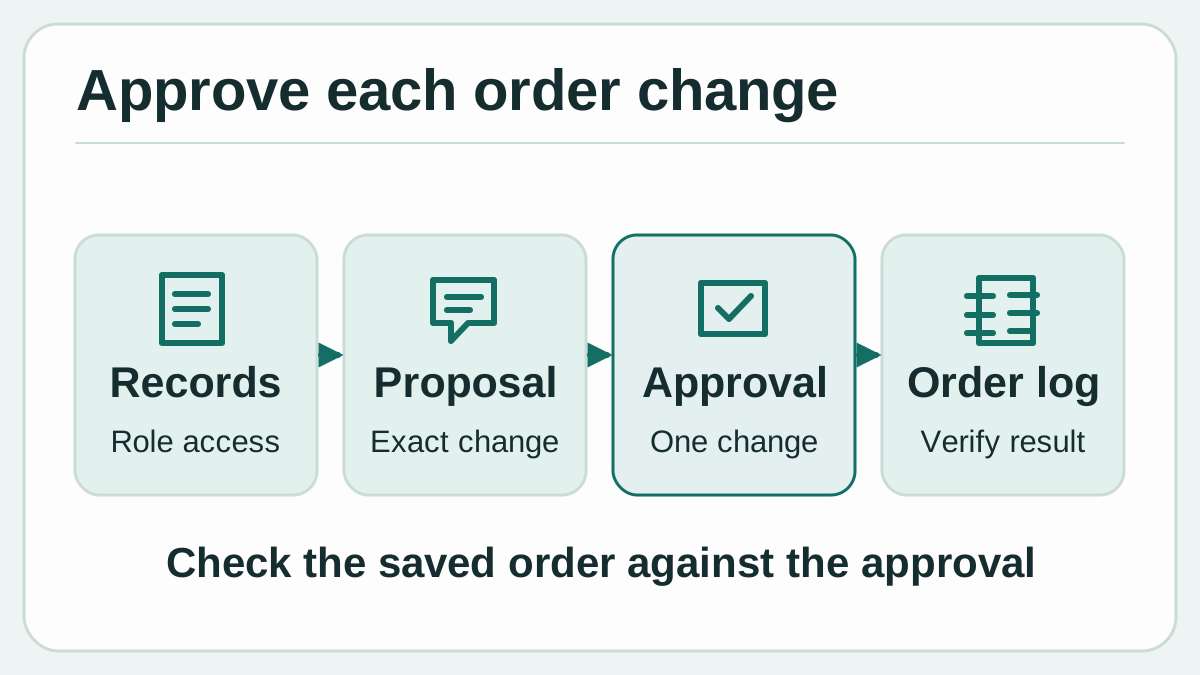
Original diagram of the approval sequence described in Infor's November 12 announcement. The final order record is where the buyer verifies the result.
A proposal to expedite 40 housings should make clear whether it creates a separate purchase order or alters an existing line. It should name the site, supplier, item and quantity. The requested date and price matter, and so does the status of the original order. The vendor's example includes keeping the original order open for remaining demand while expediting the immediate requirement. If the first order still covers the full quantity, someone needs to check how the newly purchased units affect the later plan. Infor supplier-delay scenario
The company purchasing policy still supplies the rules behind a signature. The buyer can review a recommendation at a desk or in an Infor workspace where the surrounding records are easier to see. If the difference between two options depends on a supplier callback or a carrier cutoff, keep the record of that confirmation with the decision. A useful approval request makes the action specific enough for someone who did not read the full conversation to understand it afterward.
There is also a sequencing question. A planner may discover that reallocating stock would keep the Tuesday job moving and delay a different order. Consider that change and any follow-on purchase as separate decisions. After the first approved transaction, revisit the available quantity before confirming a second. Another buyer or a warehouse receipt can change the starting point while a conversation is still open.
Three people can turn the same shortage into different decisions
A planner begins with the job and the schedule. If the late part is the constraint, the planner might prefer borrowing available stock at the same site if there is enough slack on the order giving it up. If a different line can start sooner, the crew and parts both need to be available for the new time. The value in the conversation is having the affected jobs and candidate adjustments in view while judging each trade-off.
A buyer begins with the supplier and the outstanding quantity. An alternative vendor might be listed but require a different minimum order or offer a date that is too close to the build. The useful follow-up is to narrow the question to the number needed this week, then check the supplier and date the saved order actually contains. The balance can remain linked to the normal supply plan, subject to what the purchasing team confirms.
A customer service representative starts with a customer commitment. Even if finished stock exists in another warehouse, it may already be allocated, require a transfer or miss the shipping cutoff. The representative needs a date the operation can still meet after those factors are considered. Infor's product material describes checks across inventory, existing allocations and production for rush requests. A pilot can compare the proposed date with what planning and shipping can independently commit to. Infor planner, buyer and customer-service examples
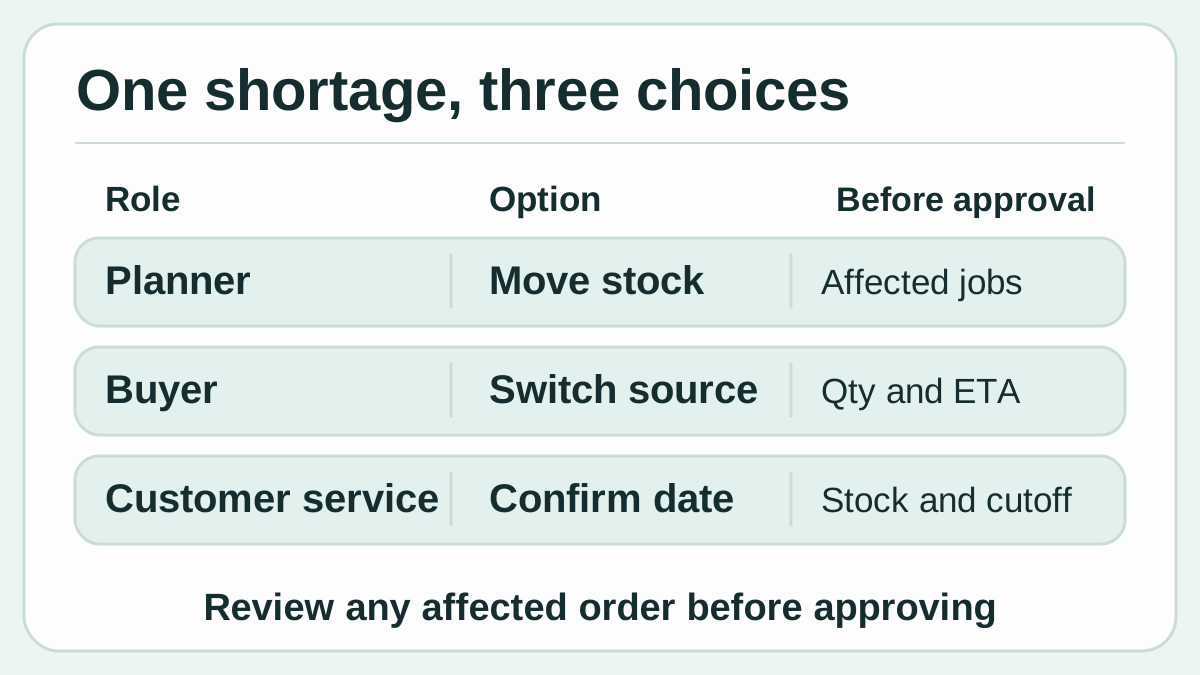
Original diagram showing how options for one shortage create different checks before a decision.
| Possible response | What makes it worth considering | What to check before approval |
|---|---|---|
| Use an expected receipt | The remaining lead time still fits the build | Confirm the date and quantity with the supplier or receiving team |
| Reallocate stock | An accessible site already has supply that can cover the shortage | Identify the current commitment and who bears the delay |
| Expedite a purchase | A qualified supplier can deliver the shortage quantity in time | Check freight, the quoted date, and the amount still due on the original order |
| Reschedule production | The available labor, materials and equipment can support another slot | Review customer commitments and downstream capacity |
These choices make the feature more interesting than a faster order lookup. A tool that assembles the relevant dependencies can save time even when a human rejects its first proposal. That benefit is measurable if a reviewer can see the order conditions that drove the recommendation and pick up the work from there.
A small pilot gives operations and purchasing something to compare
Infor's launch covers select Velocity Suite customers. The company says customers bring their own Claude license and need administrator activation. Infor's product post also specifies that an Owner on a Claude Team or Enterprise plan enables the connector first. Start by confirming eligibility for your tenant and which Infor applications and roles are available. Ask the site owner whether there is a suitable test company or training environment. Infor release availability and FAQ · Infor product guidance
- Select a realistic supplier exception. Use a known shortage with at least one affected production order and one downstream commitment. Establish the correct quantities and dates in Infor before asking Claude. Include a similar item at a second site if confusion between sites is common.
- Check the ordinary role assignments. Confirm that a planner and buyer each see the records needed for their work. Ask the administrator to verify that sensitive sites and actions outside the pilot assignments remain restricted. Use the same role assignments the people will carry in everyday work.
- Ask for the records behind a recommendation. Request the item, site, open quantity, relevant work orders and incoming receipt dates. Compare them with the workspace view. Where cases depend on informal supplier updates, record who checked the date and when.
- Approve a single ordinary change in the test environment. Choose a change the buyer can already make, such as a revised delivery date on one test purchase order. Compare the full proposal with the expected values before approving. Afterward, verify the saved order, audit entry and downstream effect on the schedule.
- Try rejection and changing data. Reject one proposal and verify the underlying record stayed as it was. Repeat the exercise after a simulated receipt or quantity change, and check that the operator can revisit the affected line before approving. Write down how the team will handle a failure or uncertain outcome before attempting a second transaction.
Record two clocks. The first runs from the initial query to a recommendation with enough evidence to act on. The second runs until an approved order change is visible and checked in Infor. A quick response with a ten-minute reconciliation still counts as a ten-minute reconciliation. Also log unexpected allocations, corrections and the time a second person spends checking a proposed change. These are suggested pilot measurements, with no customer time savings claimed here.
If you are comparing the connector with a normal Infor workflow, try cases that look alike at the start and differ in one important detail: an inbound shipment due a day too late, stock committed to another customer, or a quantity below a supplier minimum. An assistant that surfaces the difference can be useful across shifts. If it misses it, you have a concrete exception to examine with the vendor and the buying team.
The return comes from the cases your team can handle consistently
The promising part is making scheduling, procurement and customer service work from the same chain of facts. In the shortage example, one buyer might find a lower-cost option by showing that only 40 units need to move early. A planner might recognize that a small reschedule costs less than rush freight. Each person can make a better decision if the relevant orders, quantities and trade-offs are visible together.
The part to watch is how much a short conversation can hide. A clear-looking proposal can leave out a second customer, an allocation status or a quantity that changed while someone was on the phone. Review the audit trail and the purchase order itself as part of the job. Expand to other change types only once the small group can reliably predict which operations are permitted and verify the results.
A good first win is specific. The buyer works through a shortage and can tell another shift which job was protected, which purchase order changed, and why the order quantity made sense. When the person who inherits the case can follow that decision from the Infor record, the connector has improved more than the speed of the conversation.
Sources
- Infor and Anthropic announcement, approval FAQ and official demo, November 12, 2026
- Infor product team's manufacturing scenarios, November 12, 2026
- Infor connector capabilities and official product video
To keep supplier calls and purchasing decisions searchable alongside your notes, create a Telli.sh account.