Granite Switch 4.1: turn English speech into a useful next decision
Try Granite Switch 4.1, then build a practical chat, English transcription and decision workflow with realistic setup, memory, privacy and cost guidance.
A spoken request usually needs three different kinds of work: hear the words, explain what they mean, and decide what should happen next. Granite Switch 4.1 puts those capabilities behind one endpoint, rather than asking you to assemble three independent model servers.
IBM's October 15, 2026 announcement introduced the ready-composed 8B and 30B releases with chat, a general decision adapter, Guardian safety screening and speech recognition. The practical attraction is a shorter path from an English voice note to a reviewable action. IBM launch article, October 15, 2026.
This guide starts with a small browser exercise, then shows a local setup and three realistic workflows. You will also learn where the boundaries matter: English audio is not multilingual audio, a decision score is not proof, and model weights are not your entire GPU memory budget.
Hero: original editorial schematic of English audio becoming a transcript, then branching into a chat response, decision options and safety screening. The final action passes through human review; this is not an official screenshot or a performance claim.
Get your first useful result before installing anything
Start with the official Speech to Decisions demo. IBM links it from the October 15 announcement; the demo's own documentation describes live microphone input, a short topic description, safety checks and yes/no judgments. Official demo documentation, checked October 18, 2026.
-
Open the demo and use only invented, non-sensitive material. This is a hosted service, not local processing.
-
If the app is available, allow microphone access and say the following in English, the supported ASR language:
Plain textThe replacement keyboard arrived damaged. Please send a new one. I can share a photo tomorrow. -
Stop recording and compare the displayed transcript with what you said. Inspect the topic description and available judgment flags separately.
-
Check whether the request, the damaged item and the promised follow-up survived. Do not count a plausible topic label as success if the transcript lost a negation or changed the item.
That is a useful first checkpoint: one understandable input and outputs you can inspect. It is not a promise of exact wording, latency or uninterrupted demo availability. If the Space is unavailable or your organization prohibits external audio uploads, move to the local route below rather than submitting private material elsewhere.
What does the switch actually switch?
The base language model handles ordinary chat. An adapter is a smaller set of trained adjustments that specializes the model for a particular task. The decision adapter selects among labeled options; guardian-core screens text for particular safety risks. Your application chooses the adapter through the chat template instead of loading a complete second language model. Granite Switch repository, checked October 18, 2026.
Speech follows a different path. Automatic speech recognition, or ASR, converts the waveform into text before the language model reads it. The bundled recognizer is IBM's 470M-parameter English Granite Speech TurboCTC model, checked October 18, 2026. Think of that transcript as the handoff receipt: everything downstream depends on the words recorded there. Keep it alongside any cleaned-up summary so a reader can trace a questionable decision back to its input.
| Checkpoint | Status and intended starting point | Audio expectation |
|---|---|---|
granite-switch-4.1-8b | Released; the smaller ready-composed option | English ASR included |
granite-switch-4.1-30b | Released; a larger base with the same capability bundle | English ASR included |
granite-switch-4.1-3b-preview | Preview with a different adapter bundle | Not the released speech-enabled bundle |
The 8B model card, released October 14, 2026, distinguishes the audio-enabled releases from the no-audio preview family. The 30B card and 3B preview card, checked October 18, describe their respective compositions. A smaller preview is not a drop-in speech substitute.
The 8B card lists 12 chat languages: English, German, Spanish, French, Japanese, Portuguese, Arabic, Czech, Italian, Korean, Dutch and Chinese. That list does not extend the default speech recognizer beyond English.
Choose the operating system before copying commands
For the CUDA/vLLM setup here, choose Linux with a compatible NVIDIA GPU and driver. On Windows, use a properly configured WSL environment with GPU access; these Bash commands are not native PowerShell commands. On macOS, start with the hosted exercise or a Linux GPU host rather than assuming this CUDA recipe transfers to Apple Silicon. vLLM GPU installation guidance, checked October 18, 2026.
vLLM-Metal and other runtimes have their own compatibility paths. A runtime supporting your operating system does not establish that this exact Switch checkpoint, its adapters and its speech cascade all work there. Require a matching example before choosing that route.
Start locally with chat, then add audio and decisions
Use a new working folder in a Linux or WSL Bash terminal. Install Git and Python 3.12 first, and confirm that nvidia-smi sees the GPU. The repository snapshot used here requires Python >=3.11,<3.14, PyTorch >=2.11.0, Transformers >=5.16,<=5.17.0 and vLLM >=0.26.0,<0.31.0. Package declarations at revision 7e72456, checked October 18, 2026.
- Install the Switch package and audio dependencies together. This pins the source recipe rather than depending on an older published wheel.
git clone https://github.com/generative-computing/granite-switch.git
cd granite-switch
git checkout 7e724560f9a9449bba2f08e16e8678c4dd6a06e7
python3.12 -m venv .venv
source .venv/bin/activate
python -m pip install --upgrade pip
python -m pip install -e '.[vllm,audio]' openai
python -m pip check
The extras are task-specific: [hf] adds Hugging Face inference support, [compose] adds composition tools, and [audio] pulls vLLM's audio decoding dependencies. Installing only vllm does not install the Switch plugin. Keep the resolved PyTorch/CUDA combination compatible with your driver; do not fix a resolver error by removing dependency checks. Initial use downloads model weights, so allow provisioning time and disk space for checkpoints before starting a recording.
- Start one loopback-only server. The context and concurrency limits below are conservative starting settings, not a hardware-fit guarantee.
VLLM_PLUGINS=register_granite_switch \
python -m vllm.entrypoints.openai.api_server \
  --model ibm-granite/granite-switch-4.1-8b \
  --host 127.0.0.1 --port 8000 \
  --max-model-len 4096 --max-num-seqs 1 \
  --gpu-memory-utilization 0.80 --enable-prefix-caching
The package registers register_granite_switch in vllm.general_plugins. vLLM discovers installed entry points; the environment variable explicitly selects this plugin. No copied registration script or --trust-remote-code workaround is needed for this recipe. Switch registration source and vLLM plugin system, checked October 18, 2026.
- Check a plain chat response. In a second Bash terminal, wait for server readiness, then run:
curl --fail http://127.0.0.1:8000/v1/chat/completions \
  -H 'Content-Type: application/json' \
  -d '{"model":"ibm-granite/granite-switch-4.1-8b","messages":[{"role":"user","content":"Rewrite this request clearly without adding facts: The replacement keyboard arrived damaged. Please send a new one."}],"max_tokens":120,"temperature":0}'
Read the assistant message inside the JSON response. Success means preserving the request without inventing an order number, deadline or refund approval. An HTTP response alone is not a useful-answer check.
- Send a short English WAV. Place a consented, non-sensitive recording named
request.wavin the repository folder. Activate the same virtual environment in your second terminal, save the following astry_audio.py, and runpython try_audio.py.
import base64
from pathlib import Path
from openai import OpenAI

audio_bytes = Path("request.wav").read_bytes()
message_parts = [
    {"type": "text", "text": "List the requests in this recording. Do not add facts."},
    {"type": "input_audio", "input_audio": {
        "format": "wav",
        "data": base64.b64encode(audio_bytes).decode("ascii"),
    }},
]
local = OpenAI(api_key="unused", base_url="http://127.0.0.1:8000/v1")
reply = local.chat.completions.create(
    model="ibm-granite/granite-switch-4.1-8b",
    messages=[{"role": "user", "content": message_parts}],
    max_tokens=160,
    temperature=0,
)
print(reply.choices[0].message.content)
This returns a language-model response over the internally inserted transcript, not an untouched ASR export. The audio guide documents the cascade and input format; use a transcript-exposing application when you need to inspect both stages independently. Audio documentation, checked October 18, 2026.
- Try one bounded decision using reviewed text. Keep the server running and send:
curl --fail http://127.0.0.1:8000/v1/chat/completions \
  -H 'Content-Type: application/json' \
  -d '{"model":"ibm-granite/granite-switch-4.1-8b","messages":[{"role":"user","content":"State:\nThe replacement keyboard arrived damaged. Please send a new one."},{"role":"user","content":"### DECISION\nQuestion:\nWhich queue should review this request?\n\nOptions:\nA: Damaged-item replacements\nB: Account access\nC: Human triage because neither category fits\n\nReply with exactly one option label."}],"chat_template_kwargs":{"adapter_name":"decision"},"max_tokens":1,"temperature":0}'
This exercises adapter selection and asks for one label, not a probability report. For probabilities, follow the model card's decision example, checked October 18, 2026: verify single-token labels, request their logprob_token_ids, and normalize over the candidate labels. The decision adapter's readout documentation, checked October 18, explains the option-level softmax. Do not substitute a chat-generated sentence saying "I am 95% confident."
Make three workflows reviewable rather than merely automatic
These are illustrative uses, not reported trials. Begin with outputs that help someone review work; add consequential actions only after evaluating representative cases.
Route a customer voice message. Use ASR to capture the request, chat to draft a neutral summary, and a decision question to choose among replacement, account support and human triage. Keep the original audio linked to the reviewed transcript. A request saying "do not cancel my order" should become a deliberate test case, not an afterthought once cancellation automation exists.
The acceptance check is concrete: does the selected queue fit the actual words, and can a support agent correct it before anything is sent? A safety flag can request additional review, but it should not silently discard a frustrated customer's complaint.
Turn a project update into a draft task. In an English recording, a colleague says, "I can review the draft Friday, but I cannot approve the budget." Ask chat to separate commitments from exclusions, then ask the decision adapter whether budget approval is present, absent or unclear. Keep "unclear" available when the recording or context is insufficient. A person checks the date and responsibility before the task enters a shared tracker.
Prepare an interview follow-up list. With the speaker's permission, transcribe a short English interview excerpt and draft questions about missing details. Use bounded decisions such as "Does this passage explicitly name a delivery date?" rather than "Is this person trustworthy?" Retain the excerpt supporting each flag. This makes disagreement resolvable without treating a model's interpretation as a judgment about the speaker.
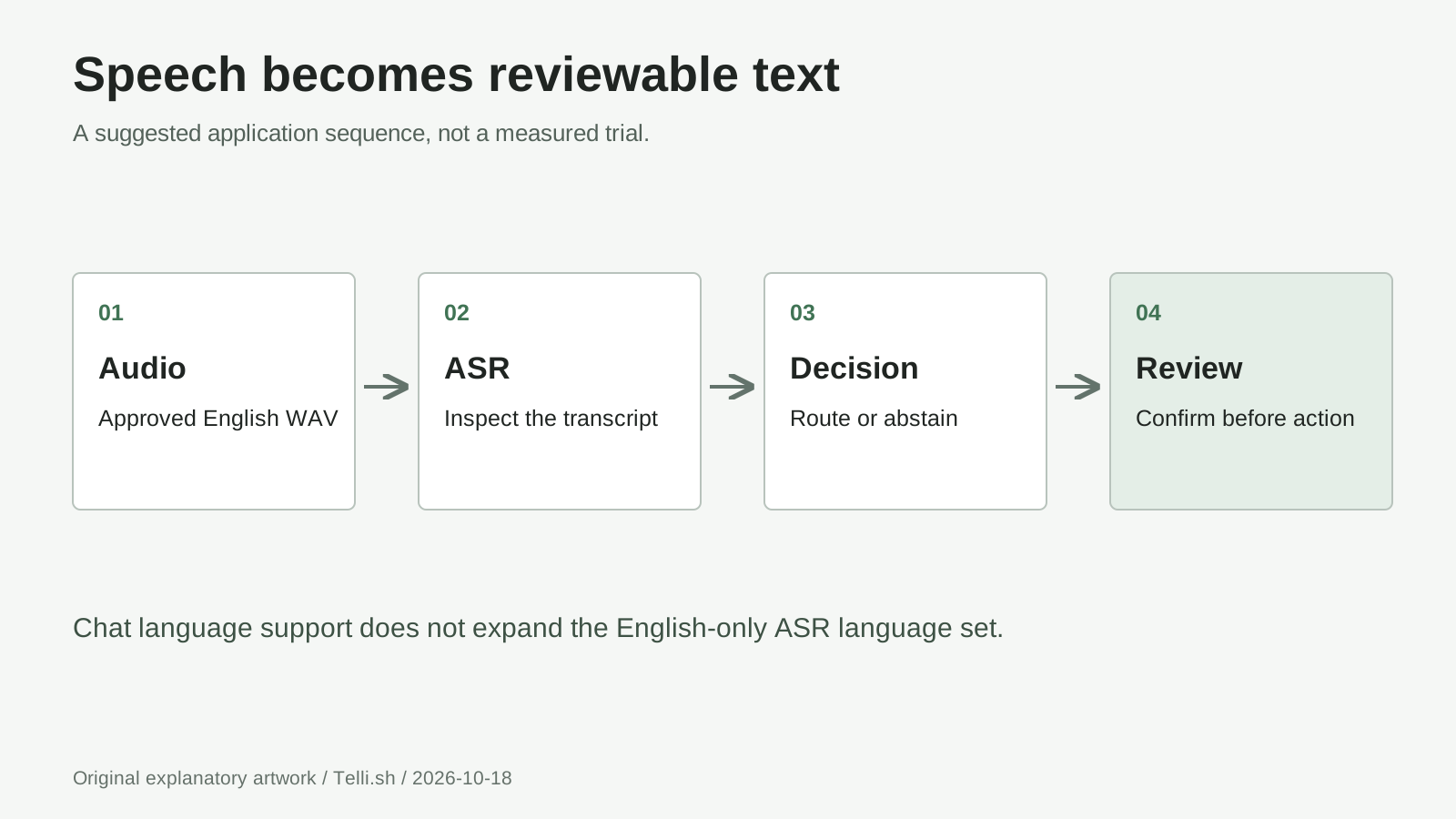
Original workflow schematic: preserve audio and transcript, produce separate derived outputs, then review before action. It illustrates the applications above, not an official interface; the underlying cascade is described in the audio guide, checked October 18, 2026.
Why can several capabilities share the same context?
A key/value cache stores attention information computed from earlier tokens. Activated LoRA, or aLoRA, lets a specialist activate after a shared context rather than requiring ordinary adapter-specific reprocessing of the entire prefix. IBM introduced the underlying approach in its April 17, 2025 research explanation. IBM Research on aLoRA.
Switch uses normalized base-model cache state so specialists do not consume one another's private adapted state. In application terms, keep the evidence prefix identical and append the task-specific question. Rewriting the transcript differently for every check undermines prefix reuse. Switch mechanism documentation, checked October 18, 2026.
Shared cache is an efficiency mechanism, not free inference. Prefix caching saves repeated prompt processing; it does not eliminate generating responses or recognizing audio. vLLM prefix-caching documentation, checked October 18, 2026. Our take: compare complete reviewed workflows, not isolated headline speeds.
Budget for the whole workload, not just 8B weights
As a planning calculation, 8 billion parameters at two bytes each occupy about 16GB, or 14.9GiB; 30 billion occupy about 60GB, or 55.9GiB. These are base-weight arithmetic examples, not checkpoint sizes or minimum VRAM specifications. They exclude adapters, the speech encoder, cache, temporary buffers and runtime overhead.
Longer context and more concurrent sequences increase memory pressure. The model's advertised context ceiling is not a recommendation to reserve it for a first experiment. vLLM documents reducing max_model_len and max_num_seqs as memory controls. vLLM memory guidance, checked October 18, 2026.
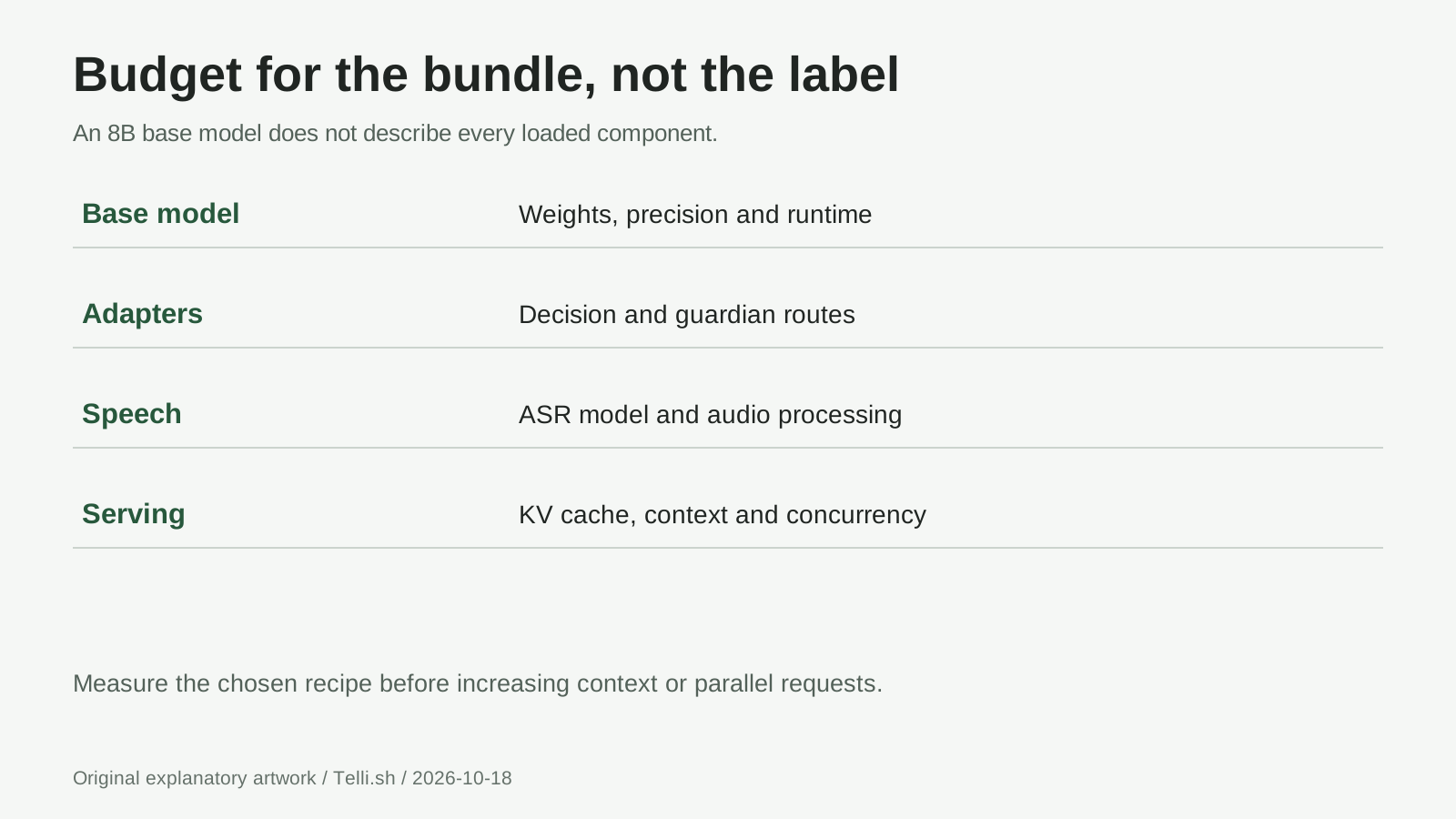
Original memory checklist, not proportional allocations: base weights + adapters + ASR weights and activations + KV cache + runtime/display headroom. The audio guide warns that cache preallocation can leave insufficient room for ASR; checked October 18, 2026.
Test a short chat, a short clip and your longest normal input separately. Record peak memory observations, completion time and mistakes. Lowering cache allocation can leave more room for speech, but cannot make oversized weights fit. A quantized alternative needs its own compatibility check for Switch adapters and audio, not just a smaller download.
Keep cost and privacy attached to the deployment choice
Apache-2.0 model licensing does not make operation costless. Local use consumes hardware, electricity, storage and maintenance time; a hosted endpoint adds provider billing and data-handling terms. Do not assume a universal Granite Switch per-minute price. For a pilot, divide total compute and review cost by successfully completed items, including failed requests and corrections.
A simple hypothetical budget makes that tangible: 10 hours at a provider rate of $1 per hour is $10 in compute before storage, transfer and human review. Those are illustrative inputs, not a quoted service price. Idle endpoint hours matter too.
For sensitive work, choose where audio, transcripts, caches, logs and backups live before recording. Loopback binding limits network access but does not set retention rules or disable every library's telemetry. Keep the server off public interfaces, review dependencies and logging, obtain speaker permission, and define deletion for source audio and derived records separately. A hosted demo is useful for learning, not a default destination for confidential meetings.
Fix the failed stage before changing the whole stack
The architecture is unknown. Check that the virtual environment contains granite-switch, that vLLM uses that environment, and that VLLM_PLUGINS includes register_granite_switch. Read the first plugin import error before replacing packages.
Chat works but audio fails. Confirm the audio-enabled release ID, [audio] dependencies and a real WAV rather than a renamed file. Check the Transformers version and available memory. Installing decoding libraries cannot turn a text-only preview into an audio checkpoint.
Names or punctuation are wrong. The default English CTC recognizer produces lowercase, unpunctuated text and has no decode-time language steering. Preserve that raw text; any punctuation restoration is a derived edit. The cascade can propagate transcription errors into later decisions. Audio limitations, checked October 18, 2026.
A long clip exceeds context. Shorten the input or divide it into meaningful sections, retaining source references. The transcript consumes text context; enough room must remain for the question and answer. Increasing the context limit also changes the memory budget.
What should you know before relying on it?
Can it speak its answers aloud? This bundled speech path is ASR, not text-to-speech. A voice-output application needs a separate TTS component.
Can it transcribe all 12 chat languages? Not with the default English recognizer. The audio guide describes replacing the ASR backend for multilingual input; that is a different configuration requiring evaluation.
Does a 0.95 option probability mean 95% real-world correctness? No. It expresses the model's distribution over the supplied choices, not a verified success rate for your domain. Missing options, bad transcripts and ambiguous questions can still produce a strong preference. Evaluate labeled examples and define abstention rules before automating actions. Decision adapter documentation, checked October 18, 2026.
Does Guardian prove an answer is true? No. Safety screening is distinct from factual verification. The ready-composed release does not include every specialist in the broader Granite Libraries collection; inspect the adapter inventory before designing a factuality workflow.
The bottom line: one endpoint still needs an evidence trail
Granite Switch 4.1 is most useful when chat explains, speech supplies reviewable words, and bounded decisions organize what happens next. Its modular serving design reduces infrastructure duplication; your workflow still owns consent, evidence and authority to act.
Start with one short recording and one reversible decision. Expand only when the transcript, interpretation and action remain understandable to the person responsible for the result.
Sources
Release dates: IBM's launch article is dated October 15, 2026; the 8B model card lists October 14, 2026. Linked documentation was checked October 18, 2026. Setup instructions are adapted from primary documentation, not hands-on performance results. Diagrams are original editorial schematics; vendor images are not reproduced.
- IBM launch article, 8B model card, 30B model card and 3B preview card: release scope and checkpoint differences.
- Granite Switch repository, pinned package requirements and audio guide: installation, architecture and speech limits.
- Official speech demo, demo documentation and official aLoRA race notebook: demonstrations to explore, not this guide's measured results.
- IBM's April 17, 2025 aLoRA explanation and vLLM documentation: the mechanisms and operating requirements discussed above.
Optional Telli.sh recommendation: keep the sources behind the decision
Keep original recordings, your notes and reviewed results together so later decisions have context. Create a Telli.sh account to organize that reference material as your workflow develops.