Copilot can open your self-hosted GitHub PR. What happens after sign-in?
GitHub Copilot app 1.2.0 adds general access to Enterprise Server repositories, issues and pull requests. Here is what to check before using it on an internal review.
An internal pull request changes the time a daily report is sent. The issue says the schedule should follow the customer's time zone, and the reviewer wants to see how the change handles the first day of a month. The issue and the diff live on the company's GitHub server. If you already use Copilot's desktop app for other repositories, you can now bring that review into the same app.
On November 13, 2026, GitHub made GitHub Enterprise Server support generally available in its Copilot app, starting with version 1.2.0. The integration had been an opt-in preview. GitHub says the expansion covers remote repositories, issues and pull requests on a connected Enterprise Server account. You first sign in with GitHub.com or GHE.com and then add the company server account. The release explicitly excludes cloud sessions for Enterprise Server. GitHub release and official changelog visual, November 13, 2026
That account setup is only the first thing a team should check. A pilot on one ordinary PR can show whether the integration saves navigation, what information the model needs, and how the reviewer can still trace each suggestion back to the diff and test results. It also gives the administrator a concrete workflow to evaluate before widening access.
The app sign-in and the repository sign-in do different jobs
GitHub Enterprise Server, or GHES, is GitHub's self-hosted platform. A company operates a GitHub instance and its developers use the instance for repositories, issues and pull requests. The GitHub Copilot app is a desktop client for working with GitHub and directing coding sessions. When you add the server account, that client can work with repository objects on the company instance. The initial app sign-in still uses GitHub.com or GHE.com. GitHub's 3.22 documentation describes the server authorization as a separate browser step. GitHub Enterprise Server 3.22 sign-in documentation · Copilot app overview
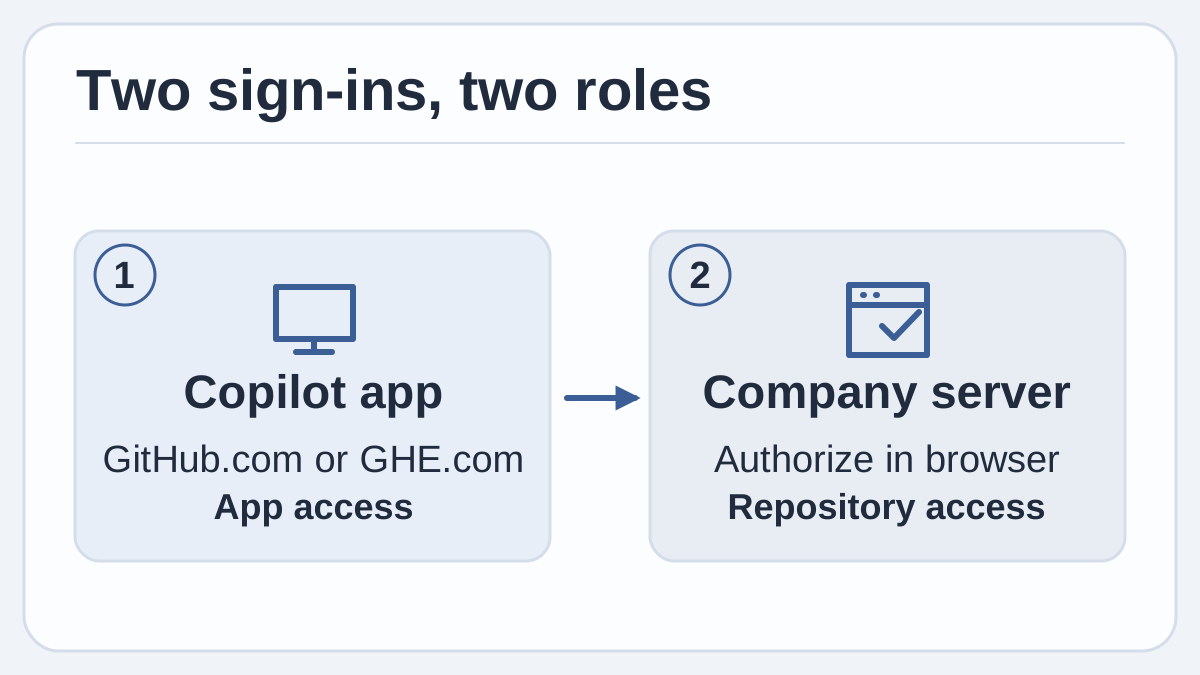
Original diagram based on GitHub's November 13 release and the Enterprise Server 3.22 sign-in guide. The hosted account signs you into the app, and authorization for the company server gives the app its repository access.
For developers with more than one account, the distinction is visible in a familiar way. A training repository and an internal repository might have the same short name on different hosts. Before opening a supplied link or submitting a review, check the host, repository owner and name, and PR number against the original request. Those checks take a moment and prevent a review note about one company's code from landing in the wrong place.
The two account steps also help identify setup problems. If the app opens but the expected repository is absent, check the server authorization and confirm that the same GHES account can see the repository in the ordinary server interface. If the repository opens but the app cannot make a model request, look at the model setup and the app policy. The GHES sign-in guide says ordinary Copilot requests require a signed-in cloud account with a Copilot license. It separately points to configuring your own model provider. For Business and Enterprise users, the app's general documentation describes an app policy separate from the Copilot CLI policy. GHES sign-in and model requirements · Copilot app availability and policy
Local work, model requests and session history are three different settings
The November 13 release gives the desktop app access to GHES repository workflows while excluding the app's cloud sessions for GHES. For a developer accustomed to starting a GitHub-hosted coding session and picking it up later from another client, this is a workflow limit. A team can start by browsing a PR or, where approved, work with a local checkout. A local session describes where the execution runs. Check model processing and any session syncing as separate questions. GHES release scope · GitHub session data documentation
| What you are checking | What the release and documentation say | What to confirm for your team |
|---|---|---|
| Repository access | The GHES connection covers remote repositories, issues and pull requests | Which company host and repositories the authorized account can access |
| Session execution | Cloud sessions are unavailable for GHES | Where approved local review or testing may run |
| Model requests | The GHES guide calls for a cloud account with a Copilot license for ordinary requests and links to model-provider configuration | Which provider is approved to process the relevant code or prompt |
| Session history | GitHub documents local storage and policy-dependent syncing for locally run Copilot app sessions | Whether history may sync, who can access it, and whether the normal retention rules cover it |
The distinction matters even for a small change. A reviewer can have an approved local copy of a file and still need permission to send selected context to a model. GitHub also explains that a session record can include prompts, responses and file changes. Its general documentation says Business and Enterprise local-session data can sync only when the applicable policy permits it. Confirm the effective setup for the intended account and provider before using it with nonpublic code. GitHub session data and syncing policy · GitHub model-provider setup
A team can keep the initial exercise simple by choosing an approved sample repository and a benign feature change. Save decisions in the internal PR or issue, where maintainers already look. If the team's data agreement excludes external processing, keep the exercise inside the approved boundary and have the IT owner confirm what the configured client and provider support before including private material.
A useful assistant review gives the human something to verify
Suppose a small PR changes a daily dispatch report from midnight UTC to 8 a.m. in each customer's configured time zone. A new reader first needs to understand which scheduler runs the job, how an unset preference is handled and whether the tests cover the relevant dates. These are good questions for a bounded review. The reviewer can ask for pointers to changed files and tests, then read the cited lines before treating an observation as a review finding.
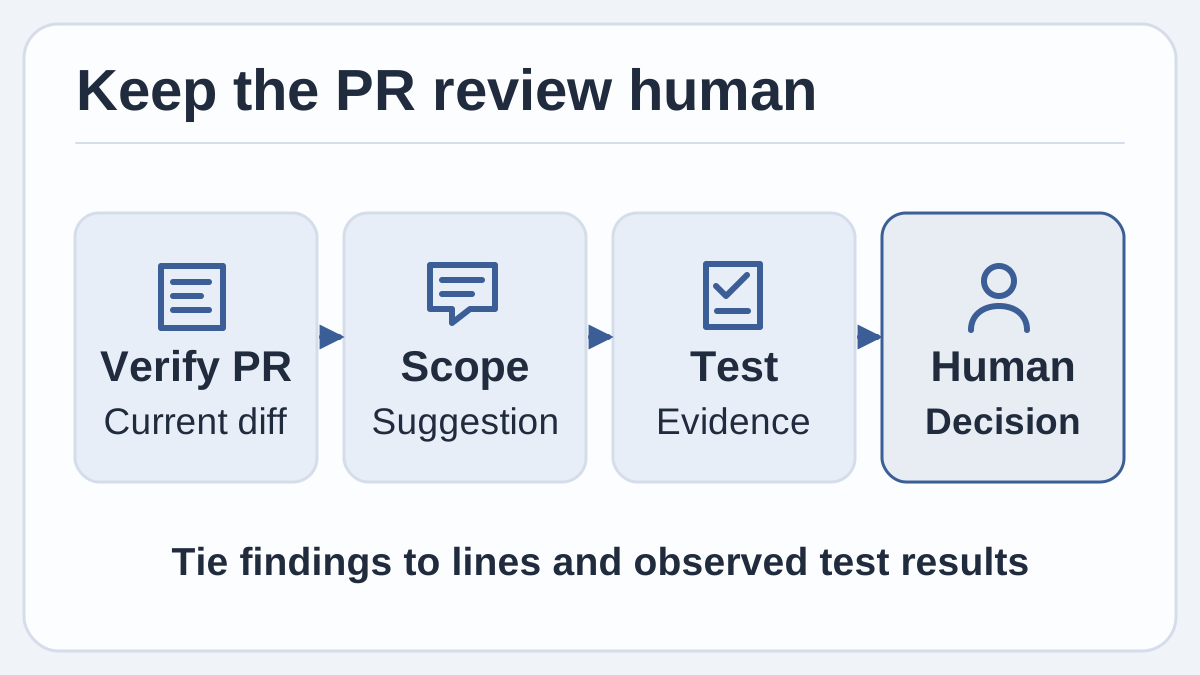
Original example of a pull-request review. Suggestions become useful when a reviewer can tie them to the current diff and observable test results.
Give the assistant just enough context to make the task answerable. Ask it to explain whether the default-time-zone path changed, point to the relevant test and suggest one missing case if the coverage is incomplete. Set the expectation that the surrounding code and changed lines are the evidence. Start by asking for findings without edits or published comments. If the proposed missing case already exists under a different test name, the reviewer can discard the suggestion immediately.
An issue and a PR answer different parts of the same question. The issue can establish that a per-customer time is intended. The PR gives the implementation and test evidence on which to approve the change. The app can make it easier to keep both in view, especially for small reviews that span several files. For the same illustrative PR, the result worth keeping might be one comment asking the author to add a case for a customer with no time zone set, with a link to the actual test file.
A second use is review handoff. A maintainer who starts later in the day can ask for a short recap of what changed, then reopen the discussion in the same PR and see the outstanding question. A recap is convenient, but the PR head may advance between shifts. Review the latest diff and check whether its CI results are for the same revision before relying on an earlier summary or an older passing test run.
The report example has a good test whether you use an assistant or review it manually. Set two sample customers to different time zones, leave one unset, and compare their expected run times with the behavior asserted in the tests. Look for the rule the application uses when a customer's local date differs from the server's date. An assistant can help locate the rule, but the final comment is more useful if it states the behavior you observed and explains why it matches or conflicts with the issue.
The same approach works for a copy change. You can ask where a new label appears and whether the PR updates the translations used on that screen. If the change is intended for all languages, look at the actual message keys and an example in a narrower layout before commenting. A review like this is small enough to run twice and concrete enough to evaluate against a second reader's observations.
An initial pilot can cover setup and review in one sitting
GitHub's November 13 release and 3.22 sign-in guide give a short setup sequence. The following adds a practical review exercise for a team that already has permission to use the app, server account and approved model. Plan to work on a single repository with a test PR the team can inspect fully. GitHub GA announcement · Official GHES connection steps
- Verify the app version and approved account. Use Copilot app 1.2.0 or later and sign in to the intended GitHub.com or GHE.com account. If the team manages Copilot seats, ask the owner to confirm that the app policy and the model configuration apply to this user.
- Add the company server. Choose Settings → Accounts → Add account → GitHub Enterprise Server, then complete the browser authorization for the known company host. Open one expected repository and compare the visible issue or pull request with the native GHES view.
- Choose one ordinary change and write down success before prompting. Use an approved sample such as a report schedule change or a documented UI label update. Start with the issue and the current PR head. Decide which expected behaviors and tests a review should cover.
- Keep the first request small. Ask for an explanation grounded in the changed lines and for any gaps in the named tests. Verify the model settings before supplying code. If the pilot needs an approved local execution environment, use a separate worktree where available and inspect the configured tool permissions for that session.
- Compare the result with the actual review. Read the changed lines, verify any requested test results and check that findings still apply to the current revision. Write the final comment in the team's normal PR workflow. Record which suggestions survived, which were wrong and how much review time they took to validate.
An organization that runs several internal repositories can repeat this with the same reviewer on a second repository with a different issue template or test layout. That gives an early indication of how much convenience comes from the app and how much comes from prior familiarity. One useful measurement is elapsed time from opening the issue to writing a substantiated first comment. Another is the number of suggestions the reviewer can verify without extra investigation. Record the time spent on context recovery and ignored suggestions as part of the exercise.
Give a developer and an administrator different questions when you review the pilot. The developer can judge whether the tool kept the issue, diff and tests together and whether its suggestions were clear. The administrator can confirm that the approved account, provider and sync policy were in effect. If the developer found a useful result using a configuration the rest of the team cannot use, record the result and repeat the exercise under the configuration that is available to everyone in the intended group.
The thing to keep is the trace from requirement to decision
The most immediate benefit of the GHES release is having internal issues and pull requests available in a desktop client that already supports guided development work. For a team alternating between hosted and self-hosted repositories, that can make an afternoon of ordinary reviews easier to navigate. The improvement is strongest when two people reading the same result can agree which host, revision and test support it.
A release labeled generally available gives teams a reason to evaluate the connection. It still leaves the model configuration, review evidence and repository policy to the people responsible for the work. Use the example of a tiny schedule change as a practical threshold. If the reviewer can follow the requirement to the new behavior, then leave a clear note on the right repository without extra cleanup, the app has earned a place in that workflow.
Sources
- GitHub changelog and official visual, November 13, 2026
- GitHub Enterprise Server 3.22 setup and model prerequisites
- GitHub Copilot app overview and policy
- GitHub Copilot app session environments and permissions
- GitHub Copilot session storage and syncing policy
To keep review notes and engineering decisions searchable across handoffs, create a Telli.sh account.