GitHub Agentic Workflows moves repository chores out of the chat window
GitHub's October 28 GA brings reasoning-based jobs to Actions. How Markdown workflows, safe outputs, model costs, and human review fit together.
Every morning, someone opens the same tabs: yesterday's issues, failed builds, stale documentation, and pull requests waiting for attention. Much of the work needs judgment. Very little of it needs to begin with a fresh conversation in an AI chat window.
GitHub made Agentic Workflows generally available on October 28, 2026. The open-source GitHub Next project turns Markdown instructions into standard GitHub Actions workflows, allowing coding agents to run repository tasks on configured events or schedules. That moves the unit of automation from a personal prompt to a versioned repository job. GitHub's GA announcement establishes the release date.
The useful question is which chores deserve that treatment. This guide follows issue triage, CI diagnosis, and documentation maintenance, then explains a first deployment that leaves maintainers with inspectable evidence and manageable review work.
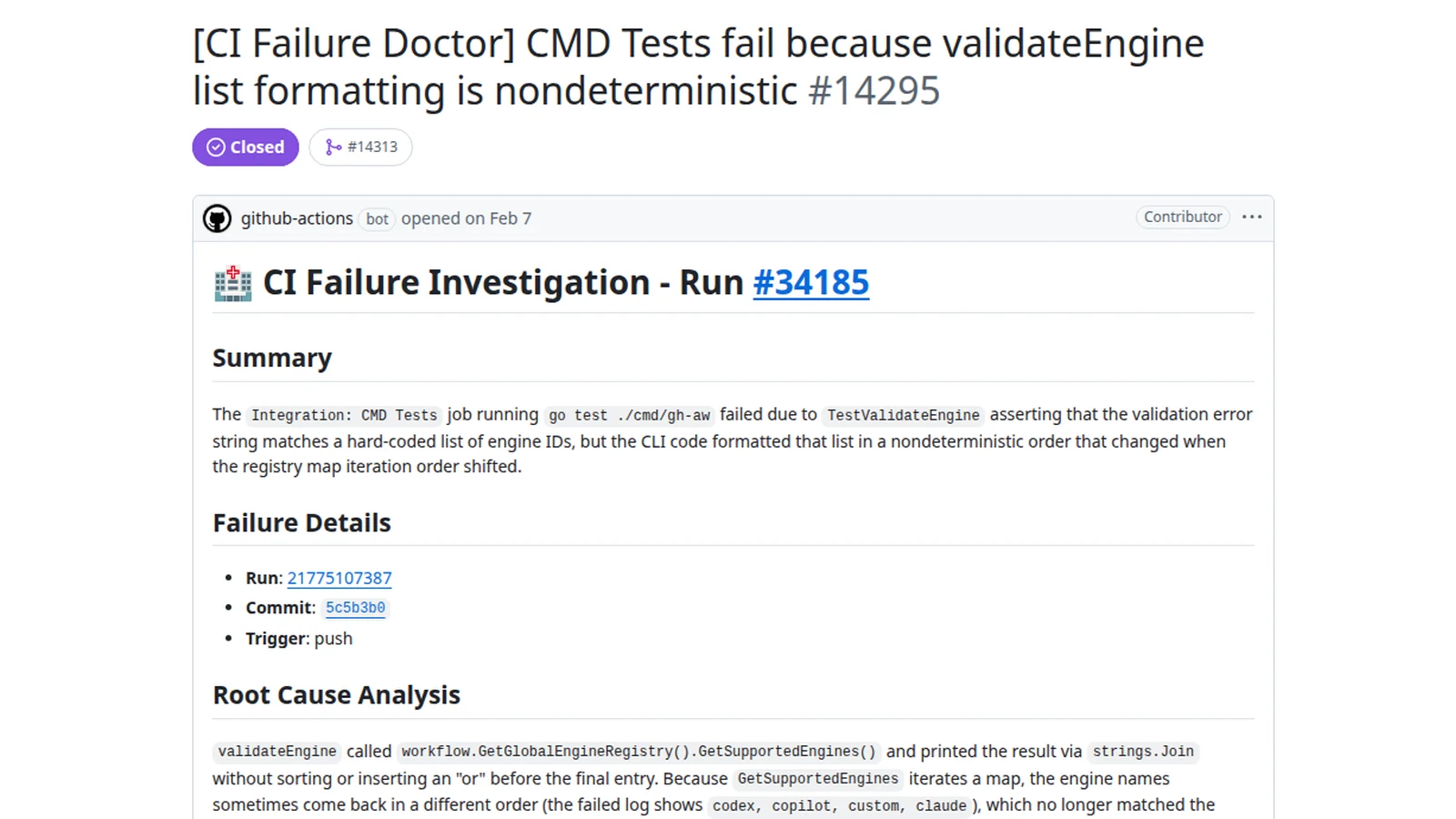 GitHub’s official CI Doctor documentation example shows a workflow reporting a CI failure. Historical example, MIT license; resized with margins. Image source · License and image notes.

A repository job needs more than a recurring prompt
A person using a coding assistant supplies context continuously. They notice an irrelevant suggestion, narrow the task, and decide when enough has been done. A scheduled workflow has to make those boundaries explicit before the run begins.
That changes the shape of a good instruction. “Improve this repository” leaves the agent to invent priorities. “Review issues opened since the last daily report, group related reports, and propose which need a maintainer reply” gives it a bounded input and an identifiable output.
The distinction is operational. A useful job needs a trigger, a scope, tool permissions, an output destination, and a stopping condition. It also needs a person who will read the result. Automating the production of reports without defining their reader can replace a neglected issue queue with a neglected report queue.
GitHub's documentation homepage, checked November 2, describes configured schedules and events, with generated changes reviewed before merging. Agentic Workflows complements conventional CI and CD: it can investigate and propose, while deterministic checks still establish the contracts they already test.
Our take is that this is a maintenance queue with an engine attached. The engine can make progress between human sessions, but the queue still needs priorities, ownership, and an acceptable volume of work.
Markdown records intent; Actions provides the execution machinery
Agentic Workflows uses Markdown with configuration frontmatter. The compiler produces Actions YAML, placing the reasoning task inside familiar repository automation rather than creating a separate orchestration service for every team.
That is helpful for review. Maintainers can see the intended task in prose and inspect the execution configuration alongside it. Changes to the task can follow the same pull-request process as changes to a build workflow. The generated artifact matters because it expresses what the runner will actually execute.
An instruction and its execution configuration can still diverge in meaning. A prompt that asks for a summary may have tools capable of broader changes. A tool permission that sounds harmless may expose material the task does not need. Review both the stated purpose and the capabilities granted to achieve it.
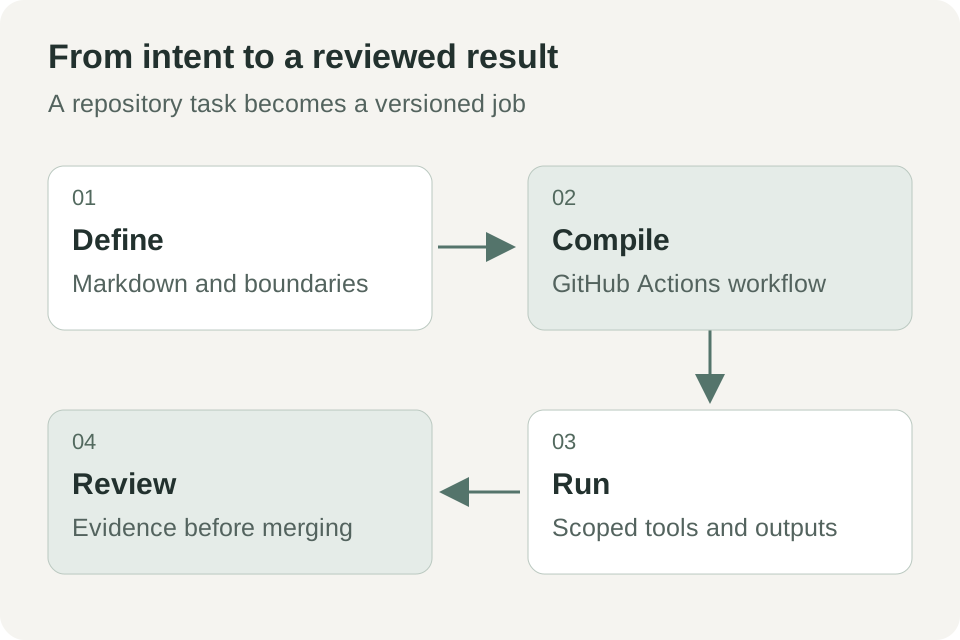 Original explanatory diagram based on GitHub's GA announcement and safe-output documentation. It shows a conceptual workflow rather than a specific repository configuration.
GitHub's October 28 announcement says these workflows reuse existing runner groups and policy constraints. That is a meaningful integration advantage for teams that already govern Actions. It also means repository owners should involve the people responsible for runner access, secrets, and organization policy when the workflow reaches sensitive projects.
Daily issue triage is a sensible place to learn the system
Consider an illustrative open-source repository receiving a mixture of bug reports, feature requests, and support questions. A daily workflow groups new issues, identifies missing reproduction details, and creates one summary for the maintainer. Initially, it does not close issues or change their status.
This is a good first job because the output can save context-gathering time while remaining straightforward to review. Each claim should link to its source issue. A suggested duplicate should explain the shared behavior rather than relying only on similar titles.
Define how far the agent may infer. A report that says “these two issues appear related because both fail after token refresh” is useful. A report that announces the root cause without inspecting relevant code or logs creates false certainty. The workflow should distinguish observation, hypothesis, and a proposed next step.
Also define what it should omit. An empty day can produce a short no-change result rather than an elaborate report. Repeated unresolved issues can stay linked in the same place rather than generating a new demand for attention every morning. Review burden is a product metric for internal automation too.
GitHub's workflow examples, checked November 2, include repository status and issue-triage patterns. Treat a template as a starting point: your labels, response expectations, and community norms still determine what good triage means.
CI diagnosis should return a testable explanation
A second illustrative job starts when a build fails. Instead of asking a maintainer to open every log, the agent reads the failed run and relevant change, identifies the first meaningful failure, and proposes a focused investigation. It can link the evidence in an issue or another configured output.
The key word is meaningful. A failed dependency download, an assertion failure, and an exhausted runner need different responses. A log may contain dozens of secondary errors after the real problem. A useful diagnosis points to the earliest relevant signal and explains why it matters.
Require the output to separate what happened from why it may have happened. “The integration test timed out while waiting for the database” is an observation. “A shared fixture may be leaking state across parallel workers” is a hypothesis until further evidence supports it. A proposed test or reproduction command makes that hypothesis actionable.
Do not immediately grant permission to rewrite the application. Start with diagnosis and deduplication. If several runs fail for the same reason, update the existing tracking item. Otherwise the automation can multiply the noise generated by a flaky check.
GitHub describes CI-failure investigation among the GA use cases and provides a CI Doctor example in its official gallery. The value to evaluate is how often the resulting explanation helps a maintainer make the next decision, not how many paragraphs the agent writes.
Documentation maintenance works best against a named source of truth
For a third scenario, a repository adds a command-line flag but the guide still shows the old syntax. An agentic job can inspect the relevant changes, compare them with the documentation, and propose a small update in a pull request.
This task needs an explicit authority order. Is the command's --help output authoritative? Is a schema generated from code? Does the public guide intentionally describe only stable options? Without those rules, an agent may copy an internal detail into user documentation or preserve a stale example because it appears in several files.
Keep the initial output small. One flag, one example, and one explanation are easier to review than a sweeping rewrite of every page. Ask for links to the code or generated output that supports the change and a description of any validation performed.
Documentation can contain instructions as well as information. The agent should treat material it reads as task data unless it comes from the authorized workflow configuration. A malicious issue comment or modified example can try to redirect the job. Good scope and limited permissions reduce the consequences of that confusion; they do not make it impossible.
The October 28 GA announcement lists documentation updates and test writing among supported applications. Whether those applications are useful in your repository depends on how clearly you define acceptable changes and the evidence required to merge them.
Read-only defaults constrain power, not the truth of the answer
GitHub describes layered safeguards: default read-only access, sandboxed execution, a firewall, validated safe outputs, and threat detection. Those controls address different parts of the execution path. They should not be translated into a claim that an agent's reasoning is guaranteed safe or correct. GitHub, October 28, 2026.
The safe-output reference, checked November 2, documents controlled output types such as creating issues and pull requests. The important design idea is to separate an agent's proposed result from the privileged step that applies a permitted operation.
A validated operation can still carry a poor conclusion. An issue may be well formed yet diagnose the wrong cause. A permitted pull request may introduce a regression. Runtime boundaries and engineering review answer different questions, so both belong in the workflow.
| Control or review | Question it addresses | What still needs judgment |
|---|---|---|
| Read permissions | Which information can the job access? | Is that information necessary and appropriate for the task? |
| Sandbox and network policy | Which execution and network capabilities exist? | Are the allowed capabilities too broad? |
| Safe outputs | Which changes may be applied through defined paths? | Is the proposed content accurate and useful? |
| Tests and maintainer review | Does the change meet the repository contract? | Are the tests and acceptance criteria sufficient? |
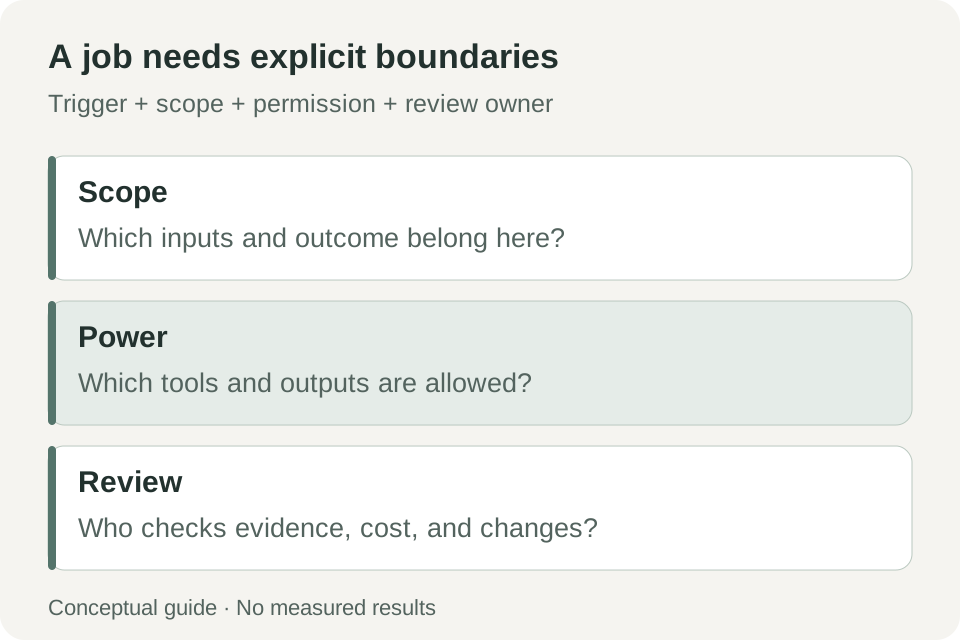 Original adoption checklist. These four questions help evaluate a repository job; they do not certify an agent run as safe.
A first workflow should have a visible stop button and a modest budget
The official quickstart, checked November 2, begins with the GitHub CLI, a repository where you have write access, enabled Actions, and an AI account. It documents Linux, macOS, or Windows with WSL. The sample job is a daily repository status report.
- Choose a repository and an owner. Start where the team can inspect every output and disable the job easily. Define who responds if it produces noise or unexpected content.
- Confirm account and Actions access. Check
gh --versionandgh auth status, then verify the chosen engine's requirements in the official setup documentation. - Install the CLI extension. The documented command is
gh extension install github/gh-aw. - Add the guided sample. From the repository root, use
gh aw add-wizard githubnext/agentics/repo-status. Review the wizard's engine, authentication, and initial-run choices. - Review both source and generated workflow. Inspect the Markdown, generated Actions file, permissions, output types, schedule, and access to logs or artifacts before accepting the change.
- Run once and read the complete result. Compare source links and claims with the repository. Record useful findings, incorrect statements, cost, and review time.
- Set a bounded operating policy. Establish when it runs, how much it may spend, what it may change, and when a maintainer disables or revises it.
Use the provider's supported credential mechanism and repository secret controls. A workflow does not need a token pasted into its Markdown body. Its access should match the task and the organization's existing policies.
The GA announcement makes the product available on github.com for Free, Team, and Enterprise plans, while requiring a Copilot license for the default Copilot CLI engine. Plan availability is not a promise of unlimited free model calls or runner time. Alternative engines have their own setup and billing requirements. Source: GitHub.
More automation can mean more review unless you measure the right result
GitHub's GA release includes improved budget forecasting through gh aw forecast, refreshed engine choices, and model routing. These features make cost planning more practical, but a forecast is still a planning aid rather than a cap or a final bill. GA release details.
For a pilot, measure accepted useful outputs, time spent reviewing them, duplicate noise, and incorrect claims. Track total runs as context, not as the success metric. Ten helpful reports can be more valuable than a hundred autonomous attempts that require cleanup.
A workflow also needs maintenance when the repository changes. Labels are renamed, build commands move, and release processes evolve. Because the job is versioned, those changes can be reviewed deliberately. Assigning ownership prevents a once-useful automation from becoming a permanent source of stale advice.
Treat a changed workflow like a changed teammate's remit
A useful adoption rule is to review changes in responsibility explicitly. Turning a daily summary into automatic labeling expands the workflow's effect on the repository. Turning a diagnosis into a proposed code change expands it again. Each step should have a concrete reason, a review owner, and evidence from the previous scope.
Test these changes against a few known repository situations. Include an uneventful day, an issue with incomplete information, a repeated CI failure, and a task the agent cannot complete. The expected output for the last case should name the missing evidence or access and stop at the appropriate boundary. A confident invention is worse than a clear incomplete result.
Plan recovery as well. If a workflow opens incorrect issues or proposes an unsuitable change, the team should know how to stop future runs and identify the outputs from the affected configuration. Version history and execution records are valuable because they connect behavior to a particular instruction and permission set.
This is also a reason to avoid enabling many templates at once. With one job, maintainers can identify the benefit and the burden. With several overlapping jobs, the same issue may be summarized, relabeled, diagnosed, and rewritten before anyone has decided which intervention is useful. Expand from demonstrated value rather than available automation slots.
Repository automation earns trust by leaving the next decision clearer
Agentic Workflows makes a recurring reasoning task a repository asset: something with configuration, history, execution records, and an owner. That is a useful step beyond repeatedly asking an assistant to inspect the same queue.
The best first workflow is one whose output you can judge tomorrow morning. If it points to the right evidence, respects its scope, and leaves a small, concrete decision for a maintainer, it has done useful work. Broader permissions can wait until that pattern is dependable.
Sources
- GitHub: Agentic Workflows generally available, October 28, 2026.
- GitHub Agentic Workflows documentation and examples, checked November 2, 2026.
- Official quickstart, checked November 2, 2026.
- Safe outputs reference, checked November 2, 2026.
- Project releases, for version-specific changes; the October 28 GA date is distinct from individual package-release dates.
Keep your review connected to its source
Telli.sh is one option for retaining authorized source material and the notes behind a technical decision. Create a note workspace.