GitHub Agentic Autofix Is GA: Turn a Security Alert into a Reviewed Fix
A practical guide to GitHub Agentic Autofix: eligibility, CodeQL setup, access policies, AI-credit costs, draft pull requests, and the human checks before merging.
A security alert tells you something needs attention. It does not necessarily tell you how to change the application without breaking it. For a newcomer maintaining a small app, that gap can stop a fix before it starts; for a developer, it can leave a growing backlog of familiar warnings.
GitHub announced general availability of Agentic Autofix for code scanning alerts on October 15, 2026. Assign an alert to Copilot, and an agent investigates the code, proposes changes, attempts validation, and opens a draft pull request. The useful change is the starting point: a proposed repair you can inspect rather than an empty editor. GitHub GA announcement, October 15, 2026
This guide takes you from an eligible repository to your first reviewed fix, then shows how to handle related alerts, custom scanners, costs, and unsuccessful attempts. Our recommendation: treat the agent as a patch author, not a release approver. You still need to understand the change before it becomes part of your application.
The opening diagram separates the agent's proposed repair from the human decision to merge.
Start with one alert, not the whole backlog
Your first success should be a small change you can explain, test, and review. A pull request is a proposal to combine changes into a project's main code; a draft signals that the proposal is not ready yet. CodeQL is GitHub's code-analysis engine, which produces alerts about potentially vulnerable code.
Use this sequence before attempting a large cleanup:
- Choose a repository you administer. Confirm eligibility below, access approval, and a billing owner before starting an agent session.
- Confirm CodeQL analysis first. If your repository already has working analysis, keep that configuration and check its latest successful run. For a new setup, in repository Settings > Advanced Security > Code Security, find CodeQL analysis, choose Set up > Default, review the configuration, and select Enable CodeQL. Wait for successful analysis. GitHub setup instructions, checked October 18, 2026
- Enable Agentic Autofix through the applicable policies. A repository switch cannot override an organization or enterprise prohibition.
- Choose one existing alert on the default branch. Open Security and quality > Code scanning, open the alert, then select Assign to Copilot under Assignees. GitHub alert procedure, checked October 18, 2026
- Inspect the draft pull request and session log. Read the diff, run relevant tests, and rescan with the configuration that reported the problem.
- Merge only after human review and required checks. Then verify the alert's state after analysis of the updated default branch.
For the interface, see GitHub's official UI demonstration in the GA announcement. Use that reference alongside your repository rather than assuming an illustrated diagram reproduces every current screen.
Can your public or private repository use it?
The launch announcement emphasizes enterprise customers. GitHub's current access documentation is broader: it includes public repositories on GitHub.com and organization-owned repositories with GitHub Code Security or GitHub Advanced Security. A Copilot license is not required. GitHub access documentation, checked October 18, 2026
| Repository situation | Agentic Autofix eligibility | Who controls access? |
|---|---|---|
| Public, ordinary personal account, GitHub.com | Eligible | Repository administrator |
| Public, organization-owned, GitHub.com | Eligible; policies apply | Organization, repository, enterprise if applicable |
| Private or internal, organization-owned | Requires Code Security or Advanced Security | Same policy chain |
| Private, ordinary personal account | Not included in documented eligibility | Do not assume access |
| Personal namespace of an Enterprise Managed User | Excluded | Buying credits does not remove exclusion |
Public access does not mean agent sessions are free. Separate repository eligibility from usage charges before inviting contributors to try the feature.
Enable access from the highest applicable policy downward
For an enterprise-owned organization, an enterprise owner or security manager must first allow the feature at Policies > Advanced Security > Agentic Autofix. That permission alone does not enable it. An organization owner or security manager then enables it in Settings > Advanced Security > Global settings; eligible repositories inherit enablement. Repository administrators can opt out or re-enable only when higher policies permit. Standalone organizations skip the enterprise step; eligible personal public repositories use their repository setting directly. Preview users must enable it again. GitHub policy procedure, checked October 18, 2026
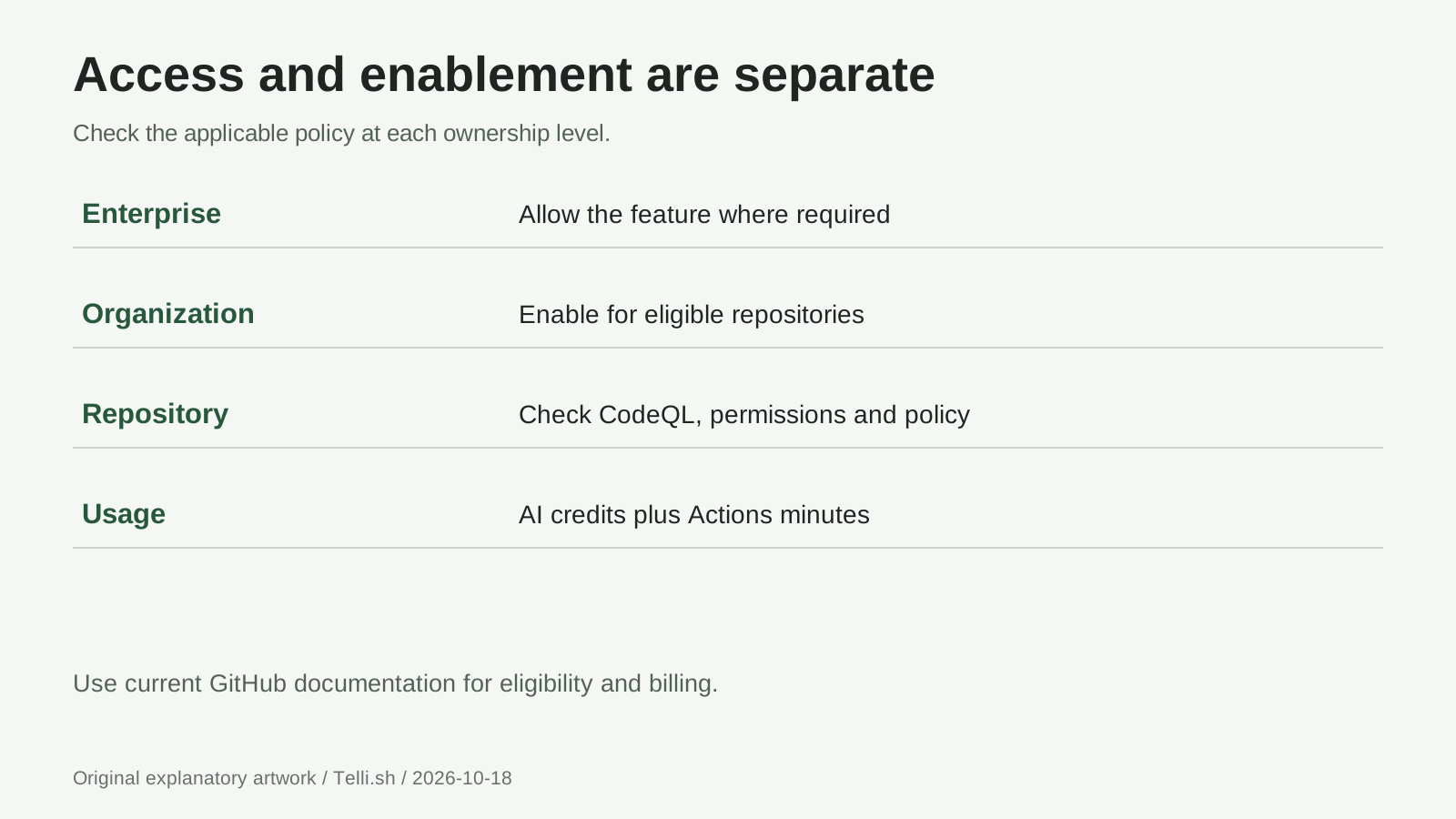 Access diagram: permission, enablement, and repository choice are separate decisions. Source: GitHub's access documentation, checked October 18, 2026.
Before an organization-wide rollout, name the repositories that should remain opted out and agree who reviews generated patches. A sensible pilot pairs one repository maintainer with one security reviewer. Record the alert, expected behavior, reviewer, and budget owner so an unattended draft does not become someone else's unexplained responsibility.
Make sure CodeQL actually analyzed the code
Default setup requires GitHub Actions and either public visibility or Code Security. Review the selected languages and query suite, not just the enabled toggle. If an existing advanced setup is working, do not switch casually: default setup overrides existing configurations, disables the existing workflow, and blocks CodeQL analysis API uploads. GitHub default setup documentation, checked October 18, 2026
Check the latest analysis result before selecting an alert. Ask whether the affected service was included and whether its build or dependencies caused an analysis failure. A setting marked enabled is not evidence that the relevant files were analyzed successfully. Fix that setup problem before asking an agent to repair findings from an unreliable baseline.
For a first attempt, choose a localized problem with a clear expected behavior, such as a database lookup or a specific output-rendering path. Avoid starting with a sweeping authorization redesign. If no relevant alert exists, do not deliberately introduce a vulnerability into a live repository to create a demonstration.
What happens between assignment and the draft pull request?
GitHub describes an agent that explores relevant files, generates a fix, reruns CodeQL, and iterates before opening a draft pull request. The proposal includes a repair summary and validation details. This is the Agentic Autofix workflow, not an automatic merge into your default branch. GitHub GA workflow, October 15, 2026
After assigning the alert, use this review sequence:
- Read the original finding again. Identify the untrusted input, sensitive operation, and expected protection. Note the alert identifier and reporting configuration.
- Read every changed file. Look for unrelated changes, removed checks, disabled tests, new dependencies, and changed error behavior.
- Inspect the session evidence. Distinguish a completed scan from a failed command or a statement that validation was unavailable. You can request iteration through the session or a Copilot mention in a pull request comment. GitHub session guidance, checked October 18, 2026
- Run application tests and the relevant scanner. Use the project's documented test commands in an appropriate development environment. Inspect setup scripts and workflow changes before running unfamiliar code.
- Request human approval. Keep the draft blocked while behavior, scan coverage, or ownership remains unresolved. Mark it ready only when the evidence is reviewable.
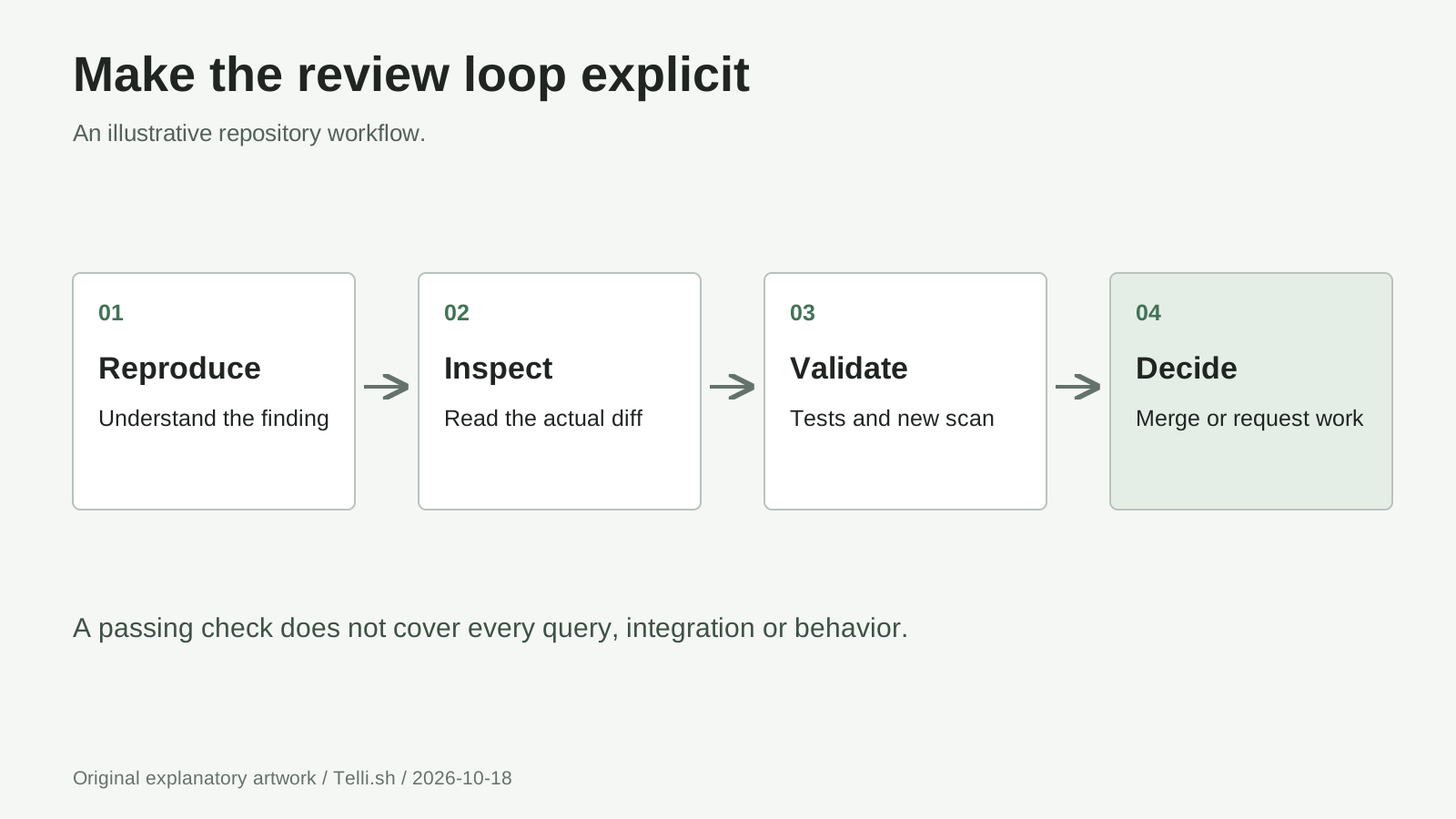 Review loop: an agent-produced draft is an intermediate artifact, not proof that the application is safe. Source: GitHub's announcement and alert-resolution documentation.
GitHub pull requests expose the diff in Files changed and automated results in Checks. Use both: a green summary cannot explain whether a changed permission check still enforces your application's rules. GitHub pull request concepts, checked October 18, 2026
Workflow 1: repair a small database lookup without changing its meaning
Consider a fictional Python service that finds an inventory item by its label. Its existing implementation inserts the supplied label into SQL using string formatting, and a code-scanning alert identifies that query construction. A useful repair separates the SQL statement from the value rather than trying to remove individual punctuation characters.
An illustrative safer implementation with Python's sqlite3 interface is:
def find_item(connection, label):
    return connection.execute(
        "SELECT id, label FROM inventory WHERE label = ?",
        (label,),
    ).fetchone()
The placeholder binds the value separately from the SQL text, following Python's official parameter-binding guidance, checked October 18, 2026. This is a fictional repair pattern, not an Agentic Autofix output or a reported trial. The exact query, schema, and authorization rules in a real service require their own review.
For this example, ask for tests covering an ordinary label, a label containing an apostrophe such as Maker's Kit, and an unknown label. Check that the function preserves its expected row-or-None return behavior. Then test the calling endpoint's existing access rules; a parameterized query does not decide who is allowed to read inventory.
A useful review comment would be: "Keep the lookup behavior unchanged, bind the label as data, and add regression coverage for apostrophes and unknown items." It describes the contract instead of telling the agent merely to make the warning disappear. Rescan the actual patch before accepting it.
Workflow 2: group related alerts, not arbitrary warnings
Suppose a fictional web service has three alerts associated with the same response-rendering helper. Review them together to decide whether one shared correction is appropriate. GitHub permits selection of up to 25 backlog alerts from the alert list or a security campaign; one assignment produces one session and one pull request. GitHub bulk-assignment instructions, checked October 18, 2026
The limit is a capacity ceiling, not a recommended batch size. Three related findings with one owner can be easier to review than twenty unrelated findings spanning authentication, file handling, and database access. Before assigning, list each affected endpoint and the ordinary behavior it must preserve.
In this illustrative workflow, review the shared helper and test every caller. If the proposed fix changes output escaping, check the intended output contexts rather than approving it because one example now looks correct. Split the work when different findings need different reviewers or release schedules. Do not let a single unresolved alert obscure which repairs actually have evidence.
Workflow 3: a custom scanner needs its own confirmation
Agentic Autofix is backlog-only on the default branch. Alerts appearing only on a pull request or another branch are outside that assignment workflow. If a new pull request introduces a finding, fix it there rather than merging vulnerable code simply to make it assignable. GitHub scope statement, October 15, 2026
There is another boundary: GitHub says agent validation cannot confirm fixes for custom CodeQL queries, the security-extended CodeQL query suite, or third-party code-scanning alerts. Its built-in validation reruns the code-scanning query suite on a best-effort basis. GitHub validation limits, checked October 18, 2026
Imagine a fictional organization with a custom query enforcing an internal data-handling rule. Even if an agent proposes a plausible patch, the reviewer must run that custom analysis and inspect its result. Write down the query version, configuration, analyzed revision, and outcome. A successful default-suite run cannot stand in for the query that reported the problem.
Keep the stronger scanner enabled. Reducing coverage to obtain a green status changes the measurement, not the security of the application. If you cannot reproduce the required analysis, leave the proposal awaiting validation and name the person who can run it.
No Copilot license does not mean no bill
Agentic Autofix consumes Code Security AI Credits and GitHub Actions minutes. GitHub's billing documentation explicitly says AI credits are consumed even for public repositories that do not require active-committer licenses. Included AI credits, when the billed account has an applicable entitlement, are used first; further usage is metered, and accounts without included credits have metered usage from the start. GitHub AI-credit billing, checked October 18, 2026
For organization repositories, charges belong to the paying organization or enterprise account. Review that account's allowance and Code Security AI Credits budget before broad enablement. The announcement also requires a configured Copilot billing method; that is distinct from requiring every user to hold a Copilot license. GitHub launch billing requirements, October 15, 2026
For a pilot, record session usage, Actions usage, reviewer time, and whether the patch was accepted. Do not promise a fixed price per repaired alert: a batch, iteration, or unsuccessful proposal still needs cost review. Compare the cost of accepted repairs with your existing workflow rather than counting generated pull requests as completed remediation.
Classic Copilot Autofix is different: it offers a one-step suggested change rather than the agent's investigation-and-draft workflow, and its suggestions do not consume AI credits. Where supported, it remains an option when Agentic Autofix is not enabled. GitHub comparison, checked October 18, 2026
Before merging, answer these seven questions
Our review checklist focuses on preserving behavior as well as removing the reported weakness:
- Root cause: Does the patch address the unsafe operation rather than suppressing the warning?
- Scope: Are unrelated refactors, new dependencies, and configuration changes justified?
- Behavior: Do valid input, invalid input, errors, and permissions still behave correctly?
- Tests: Is there a regression test that would catch the original problem?
- Analysis: Did the reporting scanner analyze the proposed revision with the required configuration?
- Approval: Has a responsible human reviewed the diff and any unresolved agent notes?
- After merge: Has default-branch analysis confirmed the expected alert state without new findings?
Treat "validation unavailable" as unfinished work, not an approval. GitHub says an agent can report inability to validate or a suspected false positive in its pull request. Neither statement substitutes for a maintainer's assessment. GitHub best-effort behavior, checked October 18, 2026
What if the button is missing or the result is wrong?
Why can I see an alert but not assign it? Check default-branch backlog status, repository eligibility, feature enablement, and your permissions. Assignment requires write access. Ask the appropriate administrator about a locked setting instead of repeatedly toggling the repository control. GitHub assignment prerequisites, checked October 18, 2026
Does a clean scan prove the app is secure? No. It answers questions covered by that analysis and configuration. Business rules, authorization, runtime behavior, and unsupported findings still require appropriate testing and review.
Should I keep retrying a failed session? First inspect its log and proposed diff. Identify whether the missing piece is analysis setup, test execution, project context, or the proposed repair itself. Supply a precise correction or fix the underlying setup before another attempt; repeated assignments without new information are not a remediation strategy.
Can I accept a suspected false positive? Investigate the finding independently and document the reasoning. Do not confuse dismissing an alert with fixing vulnerable code, or let an agent's confidence decide a risk exception.
The bottom line: a proposed fix is the beginning of review
Agentic Autofix moves useful work earlier: investigation, a candidate patch, and available validation arrive together. The practical win is a smaller gap between recognizing a vulnerability and reviewing a concrete repair. Keep the first attempt narrow, preserve your scanners, and make acceptance depend on evidence rather than authorship.
Sources
Primary references checked October 18, 2026.
The links throughout this guide point to GitHub's October 15 GA announcement, current access policies, Autofix concepts and limits, alert-resolution procedures, CodeQL setup, and billing documentation. Documentation is a dated access snapshot, not a guarantee about every account's configuration. The three workflows are illustrative, not hands-on results.
A place for your review notes: Keep source links, alert references, test outcomes, and decisions together in Telli.sh. It can organize your notes; it does not scan repositories or approve fixes. Create a Telli.sh account.