Change the background, keep the label. A 15-second test for Gemini Omni 1.2 Flash
Google's video model edits clips through conversation. A product-video workflow shows how to check packaging fidelity and calculate the cost of an approved clip.
The product video is almost ready. The first shot shows the front of the carton, the second follows it through a slow turn, and the last gives viewers time to read the size. The background is wrong for the campaign. Changing it takes one sentence. The harder part is confirming that the model has left the rest of the shot alone.
Google made Gemini Omni 1.2 Flash generally available on the Gemini API and Google Cloud on November 5, 2026. The model can create and edit up to 15 seconds of video, compared with 10 seconds for Omni 1.1 Flash. Google's release highlights reference following and conversational editing. It lists 720p video at $0.07 per second at launch. A production team can use those capabilities to audition a shot and revise it through another turn. The best first test is a change narrow enough that the reviewer knows which parts should survive it. Google launch · Google Cloud availability
Start with the words on a real box. Most people reviewing a video can tell whether the setting looks right in a few seconds. Catching a misspelled name, changed volume, or missing warning at the far end of a turn takes a different kind of review. A reference-led test can make the creative change and the product check part of the same workflow.
Google's original Mountain View headquarters. Context photograph by Steven Arnold, cropped and resized, CC BY 3.0. Image source · License.

A longer shot gives small changes time to show up
An extra five seconds can make a short clip easier to plan. A product can enter a scene, turn enough to show a second face, and settle into a readable closing shot without cutting away. That also increases the number of frames over which a detail has to remain consistent. A logo might look perfect when the carton is stationary, then acquire an extra stroke during the turn. A label might shift slightly between frames even if the individual frames look plausible at a glance.
Google's November 5 announcement describes conditioning from product or style images, short motion references, and audio cues. It includes a virtual try-on sequence made from a model photo and front-and-back references for three garments. That demonstration offers a useful way to think about reference coverage. A front-facing product photo gives the system a visible target for the front. For an orbit, supply the side or back if it matters to the audience. If a side is missing, choose a framing that does not ask the model to invent what customers will later see as a real feature. Google launch demos · Google DeepMind model card
For an illustrative 15-second carton video, set aside an opening view, a short turn, and a final hold. Write down two classes of detail. The change request might move the carton from a kitchen counter to a cool studio backdrop. The details to preserve can include its dimensions, the product name, the volume printed on the front, the background-independent brand colors, and the camera's path. This short list becomes a review rubric the editor can use on both the first shot and the edit.
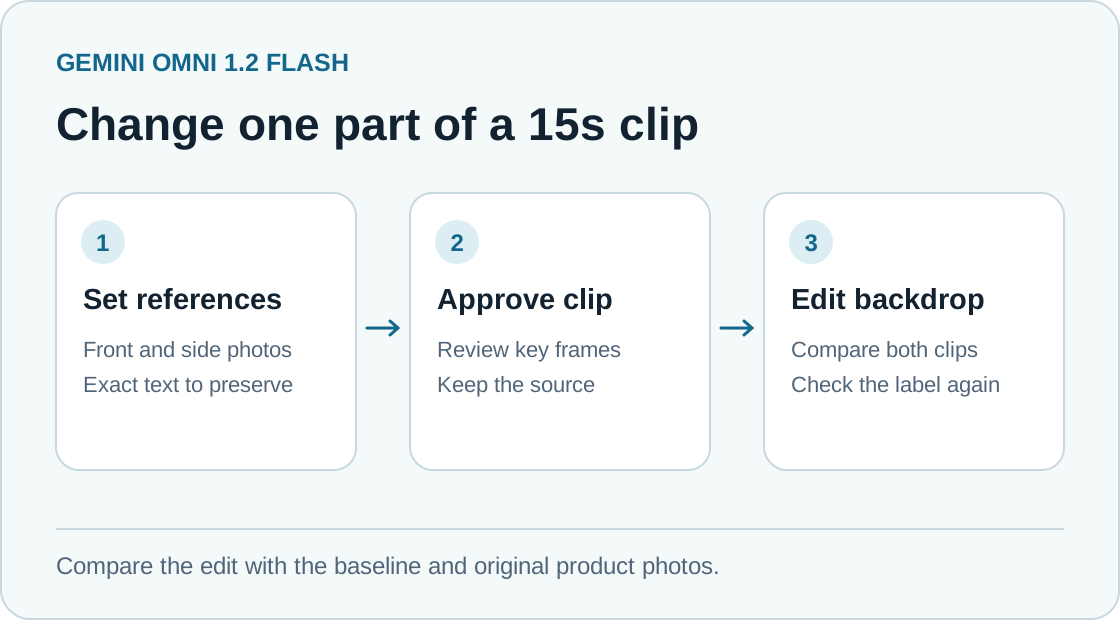
A proposed review sequence for one variable at a time. Source reference photos stay in the workflow through the second pass. Original illustration by Telli.sh.
Before the first request, decide which text the camera needs to resolve. An unreadable serial number at the back of the box may be fine if the composition never shows it. A size claim in the final frame is different. A blur or a one-digit change can make a video unsuitable for a product page even when the rest of it is convincing. For a fixed end card or critical legal copy, keep the verified artwork as a separate editing layer. The generated clip can provide the environment and movement while the team keeps exact words under its own control.
Make the second turn earn its place
Google describes conversation-based edits that can swap a background, change lighting, or adapt aspect ratio in a subsequent turn. One release demo replaces the setting around two characters while attempting to preserve their performance and framing. In a product workflow, start by changing the background alone. If you also change the aspect ratio and lighting, a new highlight on the carton or a lost corner may be harder to attribute to a particular request. Google conversational editing examples
A useful edit brief can be direct. “Put the carton on a matte slate-blue studio sweep. Keep the carton, print, scale, hand movement, and camera timing from the approved clip. Preserve the readable final hold.” Then compare the result with both the approved clip and the original product photography. The approved clip shows what movement and composition the team wanted. The original photography establishes whether the label and shape are faithful. Reviewing only against the previous generation can carry an early mistake through every later version.
Test the opening, the midpoint, and the last moment, then watch the whole clip at its intended speed. The three stills are a starting point, because the transitions are where a replacement background may briefly cover an edge or a printed mark may distort. In a sequence with a hand, check the frames where fingers pass in front of the label. If the clip carries sound, play it without watching the picture once. That can reveal a changed cue, distracting artifact, or unsupported spoken claim that the picture previously masked.
| Check | Approve when | Repair path |
|---|---|---|
| Product identity | The same name, size, shape, and marks are visible where the shot calls for them | Restore original product footage, restrict the angle, or use verified artwork in the final composition |
| Scene change | The desired environment changes while the product and timing remain usable | Return to the approved source and ask for only one change |
| Closing frame | A viewer can read the intended product detail on the target screen | Extend or reconstruct the hold in a conventional editor |
| Audio | The cue, speech, and mix support the approved message | Replace with approved audio in the final edit |
The repair path matters because the cost of a mistake varies with where it lands. A shadow on the studio wall is a creative choice. Incorrect package copy creates rework and may make the clip unusable for the intended placement. If the same problem returns after two narrowly scoped attempts, an editor may save time by compositing the original footage into the new setting.
Catalog videos and campaign variants need different checks
A catalog team might use references to give several products consistent angles and timing. The value is a coherent shopping experience, especially when someone compares similar sizes. The hard cases are near-identical variants. A shade name, an extra connector, or a slightly different lid can be the only difference that matters. Check each generated clip against the exact SKU and keep the identifier outside the prompt as part of the review record.
The launch examples include a retail try-on, where a person turns to show different sides of a garment. That makes it natural to ask whether a catalog version preserves the hem, closure, pockets, and fit cues visible in the supplied references. For shopping, the bar is tied to what a viewer could reasonably infer about the product. A generated clip can be a useful presentation asset when it supports the source photography, and a bad fit for a shot whose job is to prove a detail that the inputs do not show. Google launch examples
A campaign team has another problem. It may want the same product in two environments or a clip adapted for a vertical placement after a landscape version is approved. Changing framing can change which evidence remains in view. For a vertical cut, check whether an edge, a partner logo, or the closing text has been cropped from the important moments. Check the result in the destination preview as well, where a platform's interface may sit over the bottom or sides of the video. A file can pass a full-screen review and still be awkward in the actual placement.
Google's launch says the model's output carries an imperceptible SynthID watermark. That provenance feature can help identify generated output. It does not establish that a label is accurate, that a product claim was approved, or that the material can be used in a particular campaign. Keep the sources for reference images and approved claims with the version history. That gives the editor and reviewer the same record when someone asks what changed. Google launch and SynthID note · Google DeepMind model card
Price the clip that survives review
The $0.07 launch rate for one second of 720p video yields $1.05 for a 15-second output. Three billed 15-second outputs under the same rate yield $3.15 in that line item. Those figures are arithmetic examples, using Google's announced rate and an assumed number of successful billable outputs. Review, final editing, higher-resolution delivery, or any other billed operation may add cost. Verify the rate and billing units for the interface you use before applying the example to a campaign. Google release pricing · Google Cloud generation options
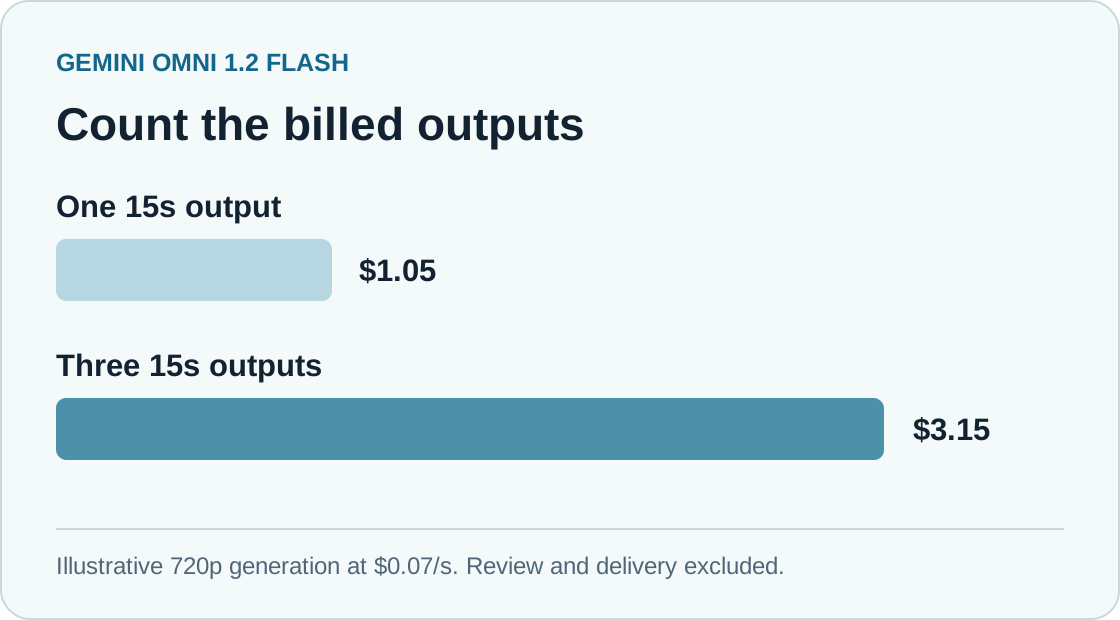
Illustrative 720p generation costs at Google's announced November 5 rate. Figures exclude review and final delivery costs. Original illustration by Telli.sh.
Track both paid outputs and accepted outputs. If four billed versions at the example rate yield one approved 15-second clip, the generation line item for that clip is $4.20. If the same four versions yield two approved clips, the average falls to $2.10. The model's rate has stayed constant. Your rate of acceptance has changed, which is why a quality check can have a larger budget effect than shaving a second from the shot.
A short low-resolution experiment can answer whether the lighting and motion suit the idea. Save the more expensive pass for an edit that has met the creative and identity checks. Google Cloud documents 360p, 720p, 1080p, and 4K options and describes an upscale path. Inspect the final delivery separately. A larger frame can make a packaging error easier to see, and the opportunity to detect it is useful only if someone is checking. Google Cloud launch and workflow · Google Cloud model settings
Run one controlled edit before requesting ten variations
- Choose one actual product you have permission to use. Prepare a front and any visible side or back photographs. Copy the approved product name, size, and other must-keep details into a short review sheet.
- Pick the destination format and a duration from the documented range. Build a baseline clip using the references, and keep its settings and the accepted file. Make sure the end frame gives reviewers a readable view of the detail that matters.
- Ask for one visual change in a follow-up turn. Preserve the approved source and use a separate output for the edit. Track whether it was an attempt, an approved variant, or a version rejected for a specific reason.
- Compare the edit with the baseline and the reference images at several points in the clip. Review the complete video in its target placement. Bring in a teammate who can verify product details if the clip represents a real item.
- Record billed outputs, review time, and the number accepted. If an error repeats, restrict the scene or keep the relevant element as a conventional editing layer. Only expand the test to more products when the first one meets the same checks you would apply to the finished campaign.
The useful test is simple. If the background changed and the carton still tells the same true story, the second turn has done a real piece of production work. If the product changed too, the editor has a concrete reason to keep the source and take another route.
Sources
- Google launch and official demonstrations, November 5, 2026
- Google Cloud general availability, November 5, 2026
- Google Cloud Gemini Omni 1.2 Flash model reference
- Google DeepMind model card and watermark details
- Context photograph by Steven Arnold, CC BY 3.0
For a searchable record of the creative briefs, feedback, and approvals behind each version, Create a Telli.sh account.