Gemini 4 Argon in Practice: A Beginner's Guide to Tasks, Connected Apps and Mac Coding
Start with one safe Gemini task, then build research, calendar, shopping and coding workflows. Learn account requirements, Windows and Mac setup, review checkpoints, schedules and troubleshooting.
You ask an AI to plan a workshop. It writes an attractive agenda, but someone still has to check the venue, compare supplies, make a calendar entry and turn the plan into a usable file. The difficult part is often not the answer. It is the work surrounding it.
Google brought Gemini 4 Argon to the Gemini app on October 13, 2026, with access for Google AI Pro and Ultra subscribers. The update also puts more emphasis on switching from conversation to tasks and brings Antigravity's coding interface into the Mac app. Argon itself was introduced on September 30; October 13 is the app-availability milestone. App announcement · Model announcement
This guide starts with a small research assignment and builds toward practical workflows for study, scheduling, shopping research and coding. You will learn which setup you need, what to ask for, and how to decide whether the result is finished. You do not need an API key or a software project to begin.
Three pieces of Gemini do different jobs
Think of the model, task mode and connected services as a workbench, not a single magic switch. Argon is a model: it supplies reasoning and responses. Task mode is a workflow: it lets Gemini carry out a goal. Connected Apps are integrations: they provide particular information or actions when your account and permissions allow them.
| What you want | Where to begin | What counts as a useful result |
|---|---|---|
| Understand a topic or revise a paragraph | An ordinary chat | A clear answer you can check |
| Research several sources and prepare a deliverable | Task mode | A sourced file that meets your brief |
| Read or act on information in another service | That service in Connected Apps | The correct source or a verified change |
| Build a small application on a Mac | Antigravity in the Gemini Mac app | Working behavior in the chosen project folder |
Google's October 13 announcement says Gemini connects with more than 40 apps. That is a catalog-wide figure, not a promise that your account can use every integration. App availability depends on location, device, language and account type. Your own Connected Apps page is the useful starting point. Connected Apps guide
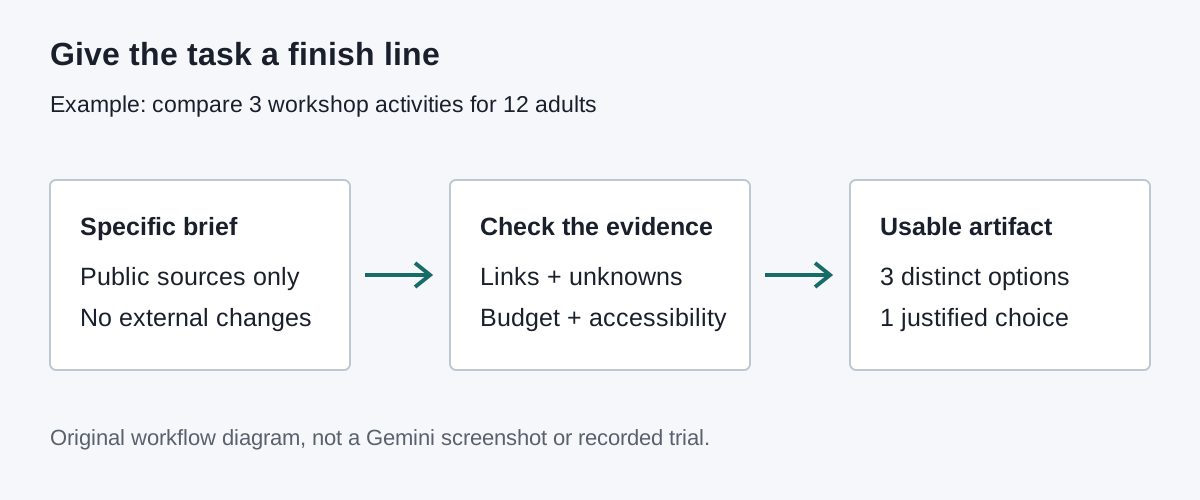
Original explanatory diagram: connect a goal to a deliverable and a review checkpoint. This is not a Gemini interface screenshot. See Google's official app announcement for its integration illustration.
Check access before paying for a workflow
For Task mode, Google's current requirements include a personal Google Account, age 18 or over, Google AI Pro or Ultra, Keep Activity enabled and an opt-in to Personal Intelligence. Work and school accounts are not currently eligible for this Task feature. The documented region exclusions are the European Economic Area, Nigeria, Switzerland and the United Kingdom. Check the live requirements before subscribing. Task requirements
That does not mean all Gemini features disappear on a work account. Eligible Workspace accounts have their own Connected Apps rules and administrator controls. Access to a document integration does not establish access to personal-account Task mode. Keep those two questions separate when troubleshooting a company laptop. Work and school account integrations
Start on Windows in the Gemini web app: eligible users can use its Task mode for the research and connected-service workflows below. This is the browser route, not a claim that the Mac coding interface exists on Windows. On a Mac, the web route is also useful; the dedicated Mac app adds the Antigravity route discussed below. Consult the model availability table for your plan rather than assuming a model shown in somebody else's screenshot is included in yours.
Before connecting personal data, read the activity and personalization choices. Gemini's Privacy Hub explains data handling, human review and activity controls. Personal Intelligence has additional connection and eligibility settings. If those settings do not suit your data, an ordinary chat using public material is a better first exercise.
Give your first task a small finish line
Use public information, one deliverable and no external changes. Here is a practice assignment for someone organizing a fictional community workshop:
Research three beginner-friendly ways to run a 90-minute community
workshop about reducing household waste.
Use public sources only. Do not access my email or personal files.
Create a Markdown comparison with: activity, materials, estimated
preparation effort, accessibility concerns, and source links.
Label cost estimates and unavailable facts. Recommend one option
for 12 adults with a materials budget of USD 60.
Do not book, buy, contact anyone, or create calendar events.
The numbers are constraints for an illustrative exercise, not measured costs. They make the response easier to evaluate. A generic request for “a great workshop” gives the agent little reason to distinguish a simple paper exercise from an activity requiring equipment and a trained instructor.
- Open Gemini and select Task below the text box.
- Enter the assignment. Choose an available model from the model menu if needed.
- Submit and review requests for additional access before granting them.
- Open the task's progress chip to inspect the work panel.
- Open the resulting file and check its sources and constraints.
Those entry points are documented in Google's task workflow guide. The useful milestone is not a “completed” message. It is a file containing three genuinely different activities, accessible sources, explicit unknowns and a recommendation that respects the budget.
Read at least two linked sources yourself. Check that materials and accessibility details came from those pages rather than being plausible additions. If a source does not contain a price, the table should say so. Ask for a correction to that row, not a wholesale regeneration that changes everything you already checked.
Use a brief that separates preparation from action
A good brief has five parts: goal, inputs, boundaries, deliverable and acceptance criteria. You can reuse this structure across products. The important distinction is between preparing an option and changing something outside the conversation.
Goal: [one concrete outcome]
Inputs: [specific public links or files I authorize]
Boundaries: [what you must not read, change, send or purchase]
Deliverable: [file type, sections and required source links]
Acceptance: [checks that determine whether the job is finished]
If a required input is missing, ask rather than inventing it.
Our recommendation is to treat a task as a bounded handoff. The agent receives a small job with visible limits, not ownership of your whole day. As results become predictable, expand one dimension at a time: more sources, a connected service, or a recurring schedule. Changing all three together makes failures harder to diagnose.
Turn calendar logistics into a two-pass workflow
Suppose you need to prepare a study session. First ask for a proposed time and agenda using information you supply. Then, after checking the details, ask for one specific calendar action. That separation makes it easier to catch a mistaken date before an event is created.
Google documents creating, finding and editing Google Calendar events through the Workspace connection. You can select the calendar explicitly; otherwise the default calendar is used. Supported actions differ by calendar provider: restrictions listed for other calendars should not be assumed to apply to Google Calendar. Check the current action list and use the calendar app itself for unsupported changes. Calendar instructions and limits
Prepare, but do not create, a 45-minute study-session event for
November 4, 2026 at 18:00 Asia/Seoul.
Show the date, weekday, time zone, end time and a three-part agenda.
Do not invite anyone or change existing events.
After checking the proposal, a separate request can name @Google Calendar, the event and the destination calendar. Open that calendar afterward. Confirm the time zone, duration and duplicate status; a natural-language assurance is not the same as seeing the correct event.
For a team, use a shared written proposal before any write operation. If the account cannot perform the required action, copy the approved details into Calendar manually. That is a valid workflow, not a reason to grant broader access or switch accounts without understanding where the data will go.
Compare purchases without delegating the purchase
Price research is a good example of why an agent needs explicit stopping points. Ask it to compare a few available options, normalize units and include delivery costs. Keep checkout outside the first exercise.
Compare three publicly listed USB-C chargers suitable for my
65 W laptop. I will supply the laptop's required charging profile.
Use official product pages where possible. List output profiles,
ports, plug region, warranty, listed price and shipping exclusions.
Use live public pages and include a source URL and checked date for
each price. If browsing or price evidence is unavailable, say so;
do not substitute a remembered price. Do not sign in, add items to
a cart, purchase, or claim compatibility when the profile is missing.
This brief does not establish electrical compatibility on its own. Open the manufacturer's specifications and match the laptop's required profile, cable rating and local plug type. A low price is not useful if the selected port cannot provide the required power when another device is attached.
For travel and restaurants, the same distinction applies. Google documents an OpenTable integration, but its eligibility and booking conditions matter. A beginner's first task should produce a shortlist with cancellation terms and times, not a reservation that silently commits other people.
Make a learning pack that points back to its sources
Students and career changers can use a task to turn a small reading list into a study sequence. Supply three public articles rather than asking the agent to find everything on a broad subject. Request an explanation, a glossary and questions that require understanding rather than copied definitions.
Using only these three public links, prepare a beginner study pack
about [topic]. Explain five essential terms in plain language.
Create a 30-minute lesson, six practice questions and an answer key.
For factual answers, include the supporting URL and section title.
Mark disagreements between sources. Do not invent missing citations.
Output Markdown. Do not access my account data.
Test the pack yourself. Can you explain one term without reading the answer? Does the answer key actually follow from the linked source? A polished document that hides disagreements can teach the wrong lesson more efficiently.
Use your own notes as a second input only after removing private information. For school work, follow the institution's AI rules and keep an honest distinction between your reasoning and generated assistance. The useful outcome is a study aid, not a substitute author for work you must produce yourself.
Build one small app on a Mac, then inspect it
Antigravity inside the Gemini Mac app is a separate route for coding. Google documents the latest Mac app, an eligible personal or work account, and age over 18; the interface is available in English in supported Antigravity regions. Agents work inside selected folders and request permission for sensitive changes. Mac Antigravity guide
- Create an empty folder for a disposable practice project.
- Open the Gemini Mac app and select Antigravity at the top.
- Start a project or conversation and select only that practice folder.
- Request a plan before implementation; review the proposed files and dependencies.
- Allow the agreed implementation, then inspect the walkthrough and run the result.
Try a reading-list page rather than a production website:
Plan a local reading-list page with title, URL and read/unread status.
Use invented sample entries. Keep all work in the selected folder.
No accounts, payments, analytics, external APIs or deployment.
Explain whether a dependency is necessary before installing it.
After approval, build it and provide checks for adding an entry,
filtering read items, narrow-screen layout and reload behavior.
Decide what reload should do before approving the plan. A temporary demo can reset its data; a reusable tool may need local persistence. Those are different requirements. Check blank inputs, long titles, keyboard focus and a narrow window, not only the happy-path screenshot.
Do not point this first exercise at a folder containing credentials or an existing project. Google warns that using the same Antigravity conversation from both its standalone app and the Gemini app can cause conflicts. Choose one interface for the exercise. The Mac integration does not establish equivalent Antigravity controls in the Windows Gemini web interface.
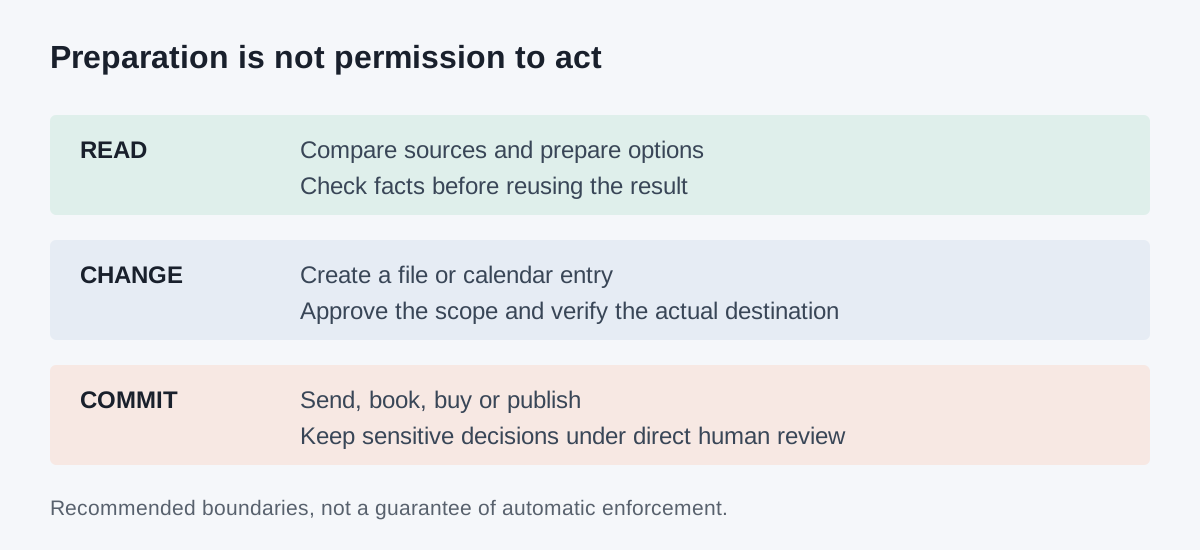
Original checklist diagram: each increase in authority needs a new review boundary. It describes a recommended practice, not a guarantee that an agent will enforce every instruction.
Schedule only after the manual version is useful
A recurring task multiplies both good results and mistakes. Run the workshop research or study digest manually first. Check that its format, source quality and notification frequency are useful before adding a trigger.
Google's task schedules support time-based runs, Gmail monitors and topic monitors. Time-based schedules retain their original time zone when you travel. The documentation warns that monitors are not ideal for time-critical events such as buying tickets the instant sales open. Schedule guide
For a first schedule, use a read-only digest: “Every Monday at 09:00 Asia/Seoul, compare updates from these three public sources and report only meaningful changes.” Ask Gemini to repeat the schedule, time zone, inputs and output destination before accepting it. Review the first occurrence and pause the schedule if it produces repetitive or unsupported claims.
Cloud execution and local computer actions are not interchangeable. Google's Chrome auto-browse documentation lists separate eligibility, including US availability, English device language, eligible personal Pro or Ultra access and gradual rollout. General Task access does not guarantee this local-browser feature. Local browsing needs the device and Chrome awake; a remote browser can continue independently and may require you to take over for sign-in. Do not assume a local Mac file or an authenticated local tab remains accessible just because a cloud task is running.
Diagnose the missing piece before changing permissions
| Symptom | Check first | A useful next step |
|---|---|---|
| Argon or Task is missing | Plan, account type, region and model menu | Recheck the specific feature's current eligibility |
| An app is unavailable | Connected Apps for this device and account | Read its supported actions; avoid assuming another platform's feature exists here |
| A task waits instead of finishing | Its work panel and requests for input | Complete only the necessary sign-in or approval step |
| A calendar change looks wrong | Destination calendar, time zone and duplicates | Correct it in Calendar and narrow the next request |
| A scheduled digest is noisy | Trigger, sources and definition of “new” | Pause it and repair the manual version |
| A coding result looks finished but fails | Actual behavior and the agreed checks | Report one reproducible failure with expected and observed results |
An app connection and an action are not the same permission. Google's Connected Apps guide explains how to connect or disconnect services, while the Privacy Hub describes broader data handling. Do not paste passwords, payment details or sensitive documents into a task to get past a stalled sign-in. Use the product's requested takeover flow and review the destination yourself.
What does this cost, and is a better model always necessary?
The consumer-app route uses eligible subscription access and feature-specific limits. It is not an API tutorial, and a subscription should not be treated as unlimited execution. Check the current Google AI plans and model availability before buying for a particular workflow.
Start by improving the brief. Missing dates, an undefined output format and conflicting constraints waste effort regardless of model. Reserve longer or more complex work for cases where the result has a clear value, then count the time spent checking it as part of the cost. One accurate, reusable comparison can be worth more than ten loosely specified tasks.
The useful agent is the one whose work you can inspect
Our view is that the important shift is from collecting answers to organizing completed work. Gemini's model, integrations and task interface can shorten the distance between a request and a usable artifact. They do not remove the need to define what a good result looks like.
Begin with a public source, one small deliverable and a visible stopping point. Expand only when you can explain what the agent read, what it changed and how you checked the result. That is how a promising demonstration becomes a practical habit.
Sources and media
Checked October 20, 2026. The prompts and scenarios above are illustrative practice assignments, not accounts of completed product trials. No paid task, local coding run or comparative benchmark is claimed. The artwork is original explanatory material; official product imagery remains linked at its source rather than rehosted without verified permission.
- Google: Gemini 4 Argon model announcement, September 30
- Google: Gemini app update, October 13
- Tasks: eligibility, creation and review
- Connected Apps and supported account rules
- Calendar setup and limitations
- Antigravity in the Mac app
- Schedules and time zones
- Chrome browsing, takeover and supervision
- Privacy Hub
Keep the brief and the result together
Save the source links, prompt, approved result and follow-up notes as one reusable reference. Telli.sh can organize those research notes; it does not operate your Gemini tasks. Create a Telli.sh account