Figma puts code and Specs on the canvas: can the design intent survive?
Figma's October release connects running prototypes, written requirements and agents. Here is where code layers and Specs help, and where a team still needs deliberate review.
Official lockup from Figma's brand resources, used unchanged with neutral padding under its informational-use guidelines. This mark identifies the company; it does not show the code layers or Specs interface.
A signup screen can look finished while the important decisions remain invisible. What happens if the invitation has expired? Can someone retry after a network error? Which text is approved? A working prototype can answer some of those questions, but it can also conceal them behind a convincing happy path.
Figma's October 15 release brings code layers and Specs into open beta. Code layers put running prototypes directly on the design canvas. Specs give written intent a shared home beside the designs, diagrams and code it describes. Figma, the collaborative design platform familiar to many product teams, is extending the place where a screen is discussed into a place where behavior and requirements can be explored together. Figma's release notes.
Our take: the interesting feature is the relationship between those materials. Generating another screen is easy to appreciate in a demo; keeping its behavior aligned with the team's decisions is the more useful test. This article looks at three practical workflows, the release's uneven availability and the review work that a shared canvas can improve without automatically completing.
A prototype can now run beside the design that explains it
A code layer is an interactive prototype backed by running code inside a Figma Design file. It lets people explore a behavior in the same space where they compare visual alternatives. That changes the discussion from “imagine this interaction” to “try these two versions,” while keeping the surrounding design work visible.
The code layers help guide, checked October 23, describes starting from a design frame, a prompt, a captured webpage, a connected repository or local files. A team can duplicate a code layer to compare alternatives side by side. Access to a particular route still depends on its rollout and repository compatibility.
Consider an illustrative product team reviewing a signup flow. One version places the invitation check before account creation; another lets the user enter details first. A static frame makes both versions look plausible. A running prototype exposes the sequence, the interruption and the amount of work a person loses when the invitation fails.
The gain is a more concrete conversation. The team can decide which behavior fits the product before asking engineering to generalize it across the application. The prototype is a testable expression of an idea, not a substitute for the eventual authentication implementation. Its value comes from revealing a disagreement while changing direction remains inexpensive.
Specs gives the explanation a place to stay
Figma's October 15 Specs announcement describes bringing Markdown onto the canvas and embedding references to frames, diagrams and other Figma content. The document can carry the reasons behind a decision beside the visual work. That relationship is what distinguishes it from dropping a screenshot into an otherwise disconnected document.
In the signup example, a spec could say that an expired invitation must preserve entered information, explain who owns the copy and identify the approved error state. Those details are easy to omit from a prompt such as “build this screen.” When the design changes, the team has a nearby place to ask whether the rule changed too.
There is a useful difference between shared context and correct context. A document that every teammate and agent can read can spread an outdated decision very efficiently. Someone still needs to decide which statements are current, resolve conflicting comments and mark questions that remain open. Bringing materials together reduces the distance between them; it does not resolve contradictions by itself.
The risk is a new form of apparent completeness. A polished spec with embedded visuals can look authoritative even when a critical requirement is unapproved. Use a small, explicit distinction between decisions, assumptions and open questions. That helps a collaborator know which sentences can guide implementation and which ones invite further discussion.
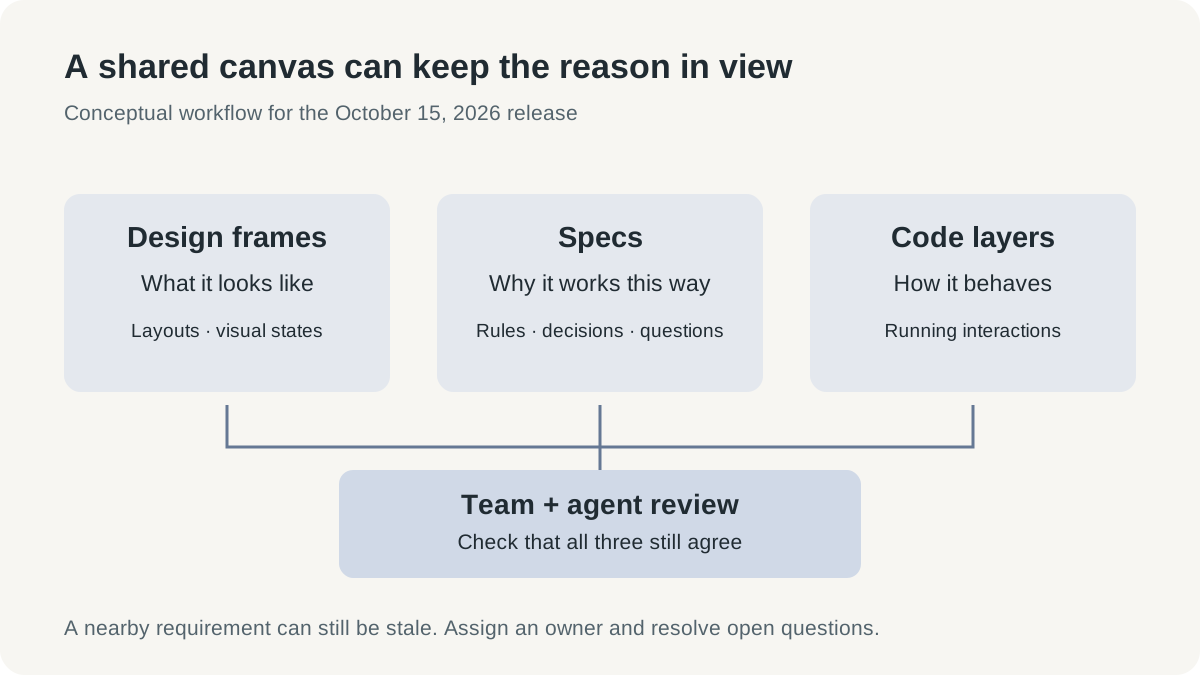
Original conceptual infographic. Designs, Specs and code layers carry different kinds of information; agreement between them still requires review.
The October announcement contains several different release states
Figma's release bundles capabilities that are easy to collapse into one promise. The October 15 launch recap distinguishes open betas, a closed beta and a preview. A team can begin evaluating the available pieces while keeping the more ambitious system vision separate from the tools it can use today.
The commercial timing matters too. Release notes say creating and editing within a code layer is free on paid plans through November 4, 2026. That is a time-limited offer, not a permanent pricing statement. Code layers are described as available across plans, while Specs is rolling out on paid plans. Check the relevant seat, credits and current plan conditions before building a team budget around the beta.
| Capability | Announced state on October 15 | Practical implication |
|---|---|---|
| Code layers | Open beta, rolling out | Try running prototypes on the canvas; confirm access in the file |
| Specs | Open beta on paid plans | Establish who owns and edits the shared requirements |
| Code sources | Closed beta | Do not assume every team can import reusable production components through this feature |
| Guidelines | Open beta | Give the agent explicit design-system rules and examples |
| Centralized design systems | Preview | Treat the broader management experience as a future direction |
| Expanded Figma MCP | Available | Check the client, permissions and tools needed for the intended action |
This table is also a useful adoption sequence. A team can test whether the shared prototype-and-spec workflow improves a real review before making access to an unreleased management experience a dependency. The release becomes easier to evaluate when each piece has its own job and status.
Try the signup flow with the error states included
The first practical use case is a behavior review before implementation. Use a flow that has an actual decision to make, rather than a decorative screen whose only question is whether it looks attractive. Signup is a useful example because validation, loading, failure and recovery all affect the experience.
The following is a suggested evaluation procedure using Figma's documented entry points, not a report of our hands-on results:
- Choose one existing frame and write the user goal beside it. List the expected success, empty, loading and error states before asking for a running version.
- Select the frame and choose Code from the toolbar, or press B, then use Build selection. These are the documented steps for starting from a static design.
- Ask for a narrow behavior: for example, preserve entered values when invitation validation fails and provide a clear retry action. Keep the prompt tied to the chosen flow.
- Duplicate the code layer to explore a genuinely different interaction. Compare both running versions with the same scenario instead of judging two unrelated happy paths.
- Record the chosen behavior and its rationale in a spec. Include the rejected alternative when it explains a constraint that a future editor might otherwise remove.
- Send the reviewed design and requirements into the normal implementation process. Verify the actual authentication and data handling in the application environment.
The important deliverable is a decision supported by something the team could try. If the prototype exposes an uncertainty, leaving it unresolved in the spec is better than inventing a rule merely to complete the document. A useful tool makes the open question easier to see.
A design system needs instructions as well as components
The second scenario is maintaining a shared component system while exploring a new screen. A team may already have approved buttons, spacing rules, content patterns and accessibility expectations. An agent can produce a visually plausible alternative that quietly bypasses those investments, creating maintenance work behind an attractive preview.
Figma's October release adds guidelines to published libraries and introduces code sources in closed beta. The launch recap positions these as ways to give agents patterns and existing components to follow. The preview of centralized design systems extends the idea to bringing libraries, code and guidelines together, but that preview should not be treated as universal access today.
An illustrative trial could ask the agent to create a settings form using an established field component. The spec should say which component is required, what validation messages should communicate and which interaction rules are essential. The reviewer then checks whether the implementation actually reuses that component or merely imitates its appearance.
That last distinction has consequences. Two screens can look the same while one inherits the maintained component's behavior and the other carries a new, unrelated implementation. Visual consistency is valuable, but implementation consistency determines which future fixes propagate. The canvas is a helpful place to compare the result; the code still needs a reviewer who understands the system.
Guidelines also have a maintenance cost. A rule copied from an old library can disagree with a newer component, and a long instruction document can hide the one exception that matters. Prefer concrete approved examples and a clear owner over a large collection of undated preferences. Ask the agent to explain the components it used so the reviewer has a starting point for inspection.
MCP moves context into the editor and can bring changes back
Figma's MCP documentation, checked October 23, describes agents reading design context and writing native content back to the canvas. It identifies the remote server as the route with the broadest feature support. Spec writing requires the remote server and edit access to the file; other actions have their own seat and client requirements.
This gives the workflow a return path. A coding agent can receive requirements, discover a constraint during implementation and help update the shared spec. The benefit is continuity between the decision and the code. It is less useful if every discovery remains in an editor chat that the rest of the team never sees.
The connection also changes the permissions question. A tool that can read a frame and a tool that can edit a spec are different capabilities. Before enabling a workflow, identify the file, the intended action and the people allowed to approve changes. A convenient connection should not make every project document writable by default.
For a trial, use one file and a narrow request. Have the agent read the reviewed spec, propose the implementation change and capture any unresolved question in a visible place. Inspect what it wrote back. The purpose is to evaluate whether the round trip preserves meaning, not merely whether an API call succeeds.
Payload brings real data closer, and real responsibilities with it
The third scenario is a small content-backed application: an event directory, an internal catalogue or a campaign page that staff must update. A static prototype can communicate layout while leaving every operational question unanswered. Once content changes daily, the editing workflow becomes part of the product.
Figma's October 15 release notes say Make can scaffold a Payload backend, including a CMS, database, media, APIs, authentication and an administration panel, with Figma hosting the resulting setup. Payload is an open-source content framework. Its inclusion makes the release broader than a new way to draw or prompt a frontend. Payload in Figma announcement context.
For the event-directory example, the visible benefit is that a content editor could update an entry through an administration interface rather than asking someone to change a hard-coded card. The design conversation can include actual field lengths, missing images and draft entries. Those are ordinary conditions that polished mock data often conceals.
Production responsibility grows with that convenience. Decide who can publish an entry, which fields are public, how an accidental deletion is recovered and what happens when access changes. A generated backend gives those decisions a place to be implemented; it does not make the decisions for the organization. Review the actual hosting and data conditions for the intended application before accepting real submissions.
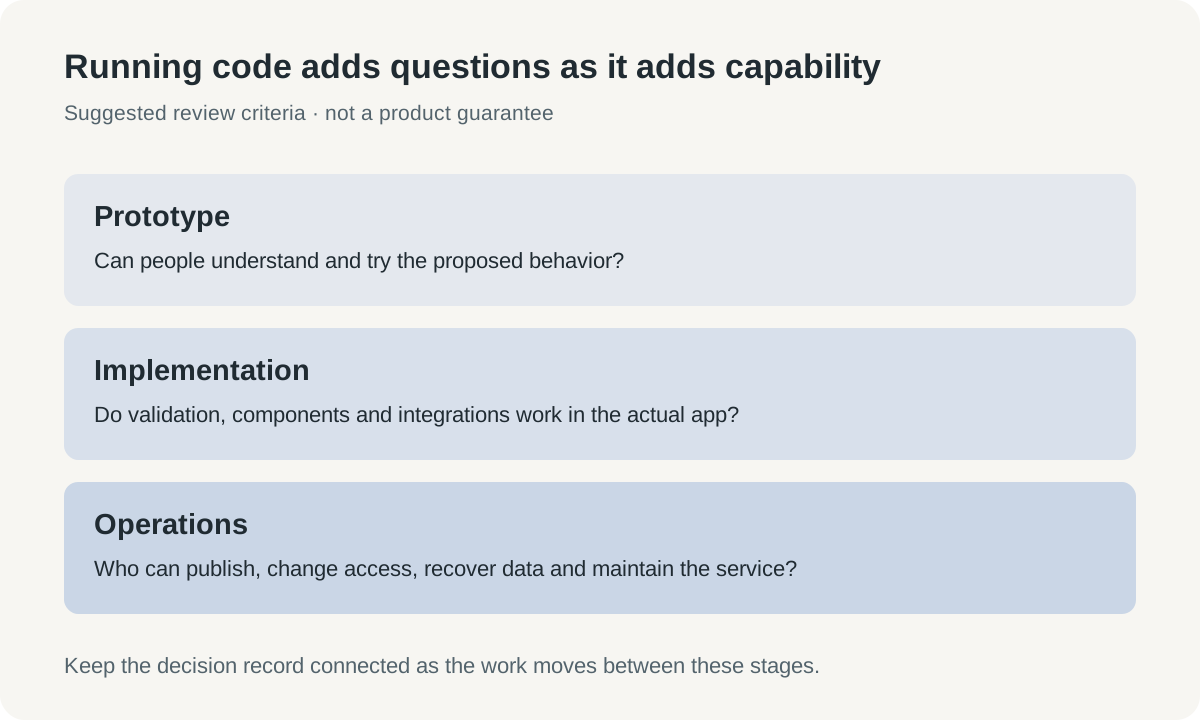
Original infographic. Moving from prototype to production adds implementation and operating decisions; the stages are evaluation criteria, not a measured product guarantee.
Faster exploration can create a queue of unmade decisions
The main benefit of the release is that more people can discuss behavior using a concrete artifact. A designer can compare working alternatives, a product manager can attach intent, and an engineer can point out a constraint before it becomes a release surprise. The same speed can also create many variations whose status nobody remembers.
Treat each variation as an experiment with a question. “Does preserving entered information reduce confusion after this error?” gives reviewers something to examine. “Generate five more versions” may be useful for exploration, but it needs a later decision about what was learned. Otherwise, the canvas becomes a waiting room for choices that were never made.
A useful team measure is the number of unresolved decisions that reach implementation. Track a few ordinary changes and ask whether the developer received clearer behavior, fewer contradictory references and a reliable route back to the decision owner. Also notice the time spent maintaining the spec. Shared context earns its place when it reduces ambiguity across the whole workflow.
The expectation worth holding is modest and powerful: designs, written reasoning and running behavior should become easier to keep in agreement. Beta quality, repository limits and plan conditions will influence how well that works for a particular team. The product direction is promising because it addresses the missing conversation between generation and production, where so much avoidable rework begins.
The canvas can become a place where decisions remain visible
Code layers make an idea easier to try. Specs make its intended meaning easier to carry forward. Together, they offer a way to keep the reasons for a design beside the thing being built, so a later collaborator has more to work with than a persuasive screenshot.
The useful finish line is agreement that survives implementation. Start with one flow, make the uncertain behavior visible and keep the resulting decision attached to the work. If the team reaches production with fewer unanswered questions, the new canvas is doing something more valuable than generating another prototype.
Sources
- Figma product release notes, Config India announcements, October 15, 2026; checked October 23.
- Build by design: New workflows for new ways of building, October 15, 2026.
- Code layers in Figma Design, checked October 23, 2026.
- Introducing Specs: Markdown as a medium, October 15, 2026.
- Figma MCP server documentation, checked October 23, 2026.
- Figma trademark and brand resources, checked October 23, 2026.
Keep the reasoning behind a technical decision
If you want a separate workspace for source links and your reviewed technical notes, Telli.sh is one option. Open your notes workspace.