Every Translator 1.30.0: translate the paragraph, not the entire page
Paragraph translation, Spotlight, eight tested blog platforms, YouTube descriptions and comments, and verified Clip connections: what changed in Telli.sh: Every Translator 1.30.0, and how to use it.
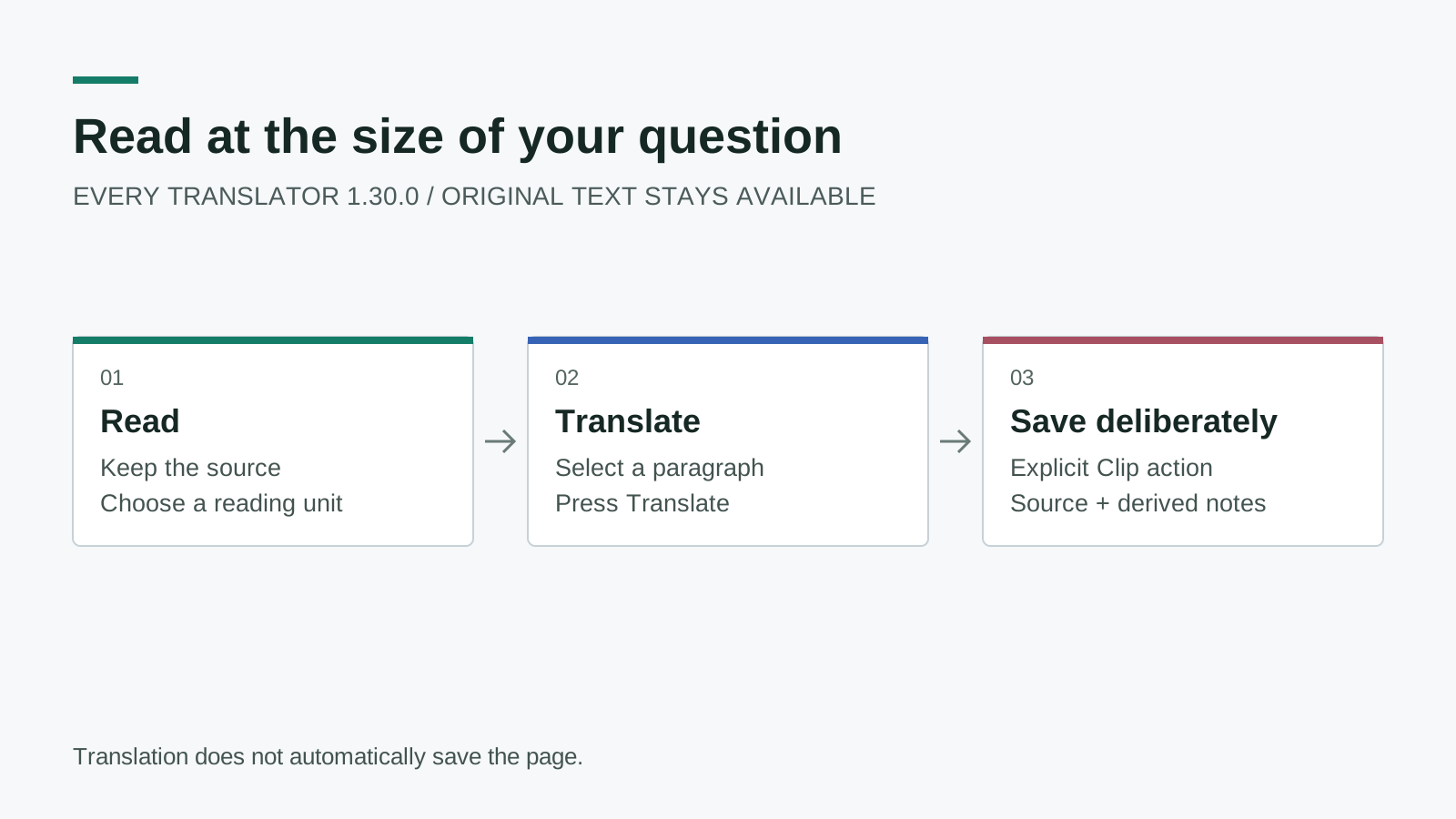
Original release diagram. Reading, translation, and saving are separate actions; translating a paragraph does not automatically save the page.
You open a long technical article because one section looks useful. The first paragraph is easy, the second contains unfamiliar terminology, and the code sample needs no translation at all. Replacing the entire article with translated text is a blunt response to a very specific reading problem.
Telli.sh: Every Translator 1.30.0 makes that choice smaller. You can translate semantic paragraphs, select them through a new Spotlight display mode, and fold results when you want the original page back. The same update expands blog coverage, tightens Clip connection feedback, and gives unsupported-site requests a route to the administrator.
This is a product update and a practical reading guide. Web and API changes are deployed; the extension package was submitted to Chrome Web Store review on September 30, 2026, Korean time. Submission is not approval: at the release check, the public store version was still 1.29.6. Check the installed extension version before looking for the new controls. The 1.30.0 publisher verification and Public feature guide are the dated sources for the behavior described here.
TL;DR:
- Choose paragraph or whole-block translation independently from the display mode.
- Spotlight highlights a paragraph, but translation starts only when you press its Translate action.
- Eight blog platforms were exercised on real pages; YouTube coverage means descriptions and loaded comments, not subtitles or dubbing.
- Clip remains an explicit save action, with a connection test that checks the server without creating a note.
A reading unit and a display mode answer different questions
The most important settings distinction is easy to miss. A translation unit determines how much source text belongs to one translation request. A display mode determines how you reveal and read the result. Changing one should not require giving up control of the other.
Paragraph mode follows meaningful text elements such as paragraphs, headings, and list items when the supported site's adapter exposes them. Whole-block mode keeps a detected article or message together. Neither mode means indiscriminately translating every visible character in the browser, including navigation, editors, or code. The source remains available for comparison.
For a tutorial, paragraph mode lets you compare a translated explanation with the exact heading or list item above it. For a short message, whole-block mode can preserve context that would be awkward if separated. A message that uses line breaks instead of semantic paragraphs can still remain one unit; the extension does not pretend that every visual line is a standalone paragraph. Whole-article handling also retains a 20,000-character limit rather than sending unbounded page content.
| Reading situation | Translation unit | Display approach | What to expect |
|---|---|---|---|
| A long blog with one difficult section | Paragraph | Spotlight | Select the section, then explicitly translate it |
| A technical explanation you want to compare closely | Paragraph | Bilingual or an inline result | Keep the source near the derived translation |
| A short, coherent message | Whole block | Your existing preferred mode | Translate the detected message as one unit |
| A page you are rereading | Either | Fold and reopen | Hide a result without throwing it away |
Think of paragraph mode as a reading lens, not a page replacement. You decide where to focus, and the surrounding original stays useful. This matters especially when an author uses a term consistently across a long article: you can inspect a difficult passage without losing the earlier wording that defines it.
Spotlight waits for an explicit translation action
Spotlight adds a fifth display mode alongside the existing comment, bilingual, click-expand, and click-toggle options. Hovering highlights an eligible section. Selecting that section reveals its translation action. Hovering or selecting alone does not send the text for translation.
That separation gives you room to explore a page without turning every pointer movement into a request. It also makes the cost boundary easier to understand when you use a provider that bills for translation. The page can acknowledge your interest visually while waiting for a deliberate command before involving the translation engine.
The interaction has a keyboard path as well as a pointer path. It is not meant to take over ordinary links: following a link should remain navigation, not an accidental instruction to translate its parent paragraph. Code blocks, hidden content, and editable controls are not reading targets simply because they contain text. These details are part of the reading experience, not optional polish around it.
- Update or load version 1.30.0, then reopen the page you want to read.
- Open the extension settings and choose the paragraph translation unit.
- Set the display mode to Spotlight and select your desired target language and provider.
- Move to an eligible paragraph and select it; with a keyboard, use the section's supported focus and activation path.
- Press Translate to request the result. Compare it with the original before relying on technical terminology.
- Fold the result when it is no longer needed, or reopen it to continue comparing.
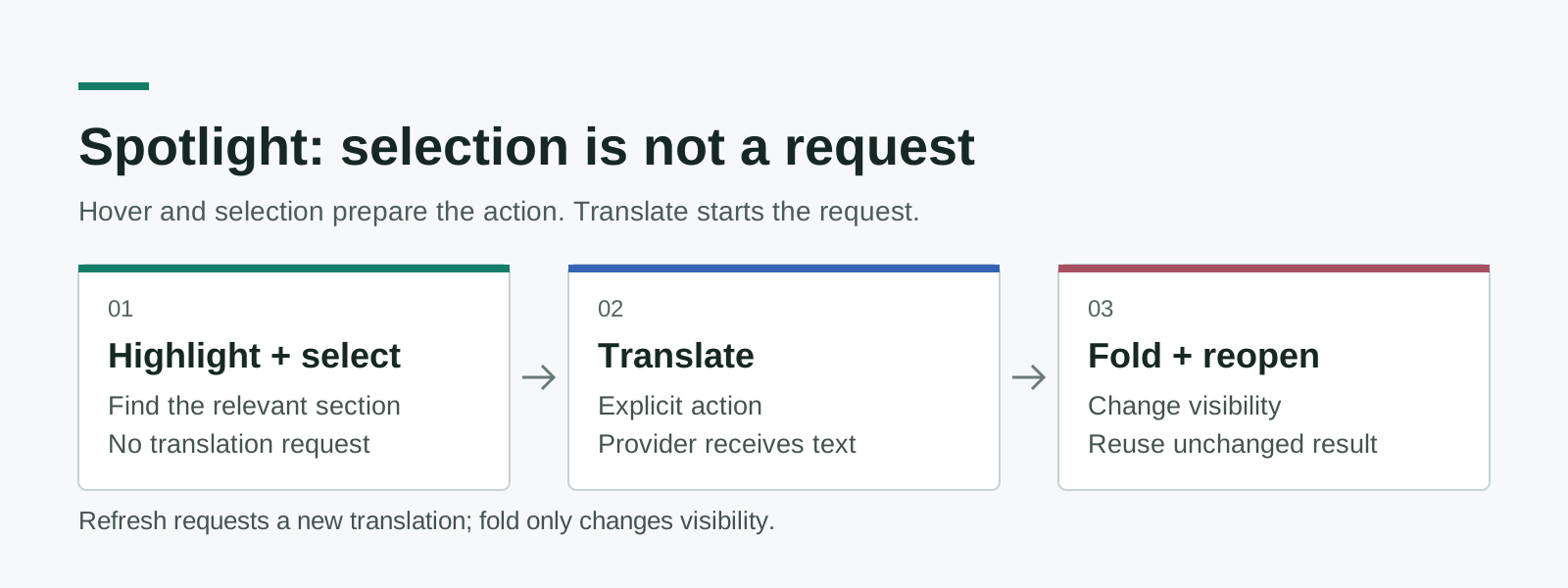
Original interaction diagram based on the 1.30.0 implementation. The request boundary is the Translate action, not hover or selection.
Fold and refresh also serve different purposes. Folding changes visibility; reopening an unchanged result reuses it instead of making a new request. Refresh is the intentional request to run translation again. If you are simply moving between the author's wording and the translation, folding is the relevant control.
This distinction is useful during careful reading. You might translate an unfamiliar argument, hide it while examining a diagram, and reopen it after reading the conclusion. A visibility change should not quietly become repeated provider work. When you actually need a new result, refresh stays available and communicates that different intent.
Blog coverage now includes eight real-page checks
Version 1.30.0 adds adapters for Medium, Cnblogs, SegmentFault, and 51CTO, restores or improves handling for Juejin and CSDN, and improves heading and nesting behavior on Substack and DEV. These eight platforms were included in real-site Korean translation checks during release verification. CSDN required its normal user-completed security challenge before that check could continue; the extension did not bypass it.
The platform names matter because a blog is not just a rectangle of text. Article bodies, embedded widgets, comment streams, and subscription prompts have different structures. A site-specific adapter identifies the intended reading surface and reduces the chance of translating a navigation label twice or missing an article nested inside another element. It cannot guarantee that a publisher will never change its markup.
The supported-site catalog now reflects 36 implemented adapters. Eight placeholder entries were removed instead of being presented as working integrations: WeChat, Zhihu, LinkedIn, Weibo, Douban, Hugging Face, V2EX, and Bilibili. A name in a settings list should describe implemented support, not an aspiration. Their removal is a correction to the catalog, not a claim that those services are unimportant.
For independent domains, the useful question is more specific than whether they look like a blog. A publication may use a familiar engine but expose a different article container, hydration pattern, or login boundary. We are not claiming universal compatibility with every custom domain, every newsletter, or every page on a supported host. The new request workflow makes those missing cases visible without overstating coverage.
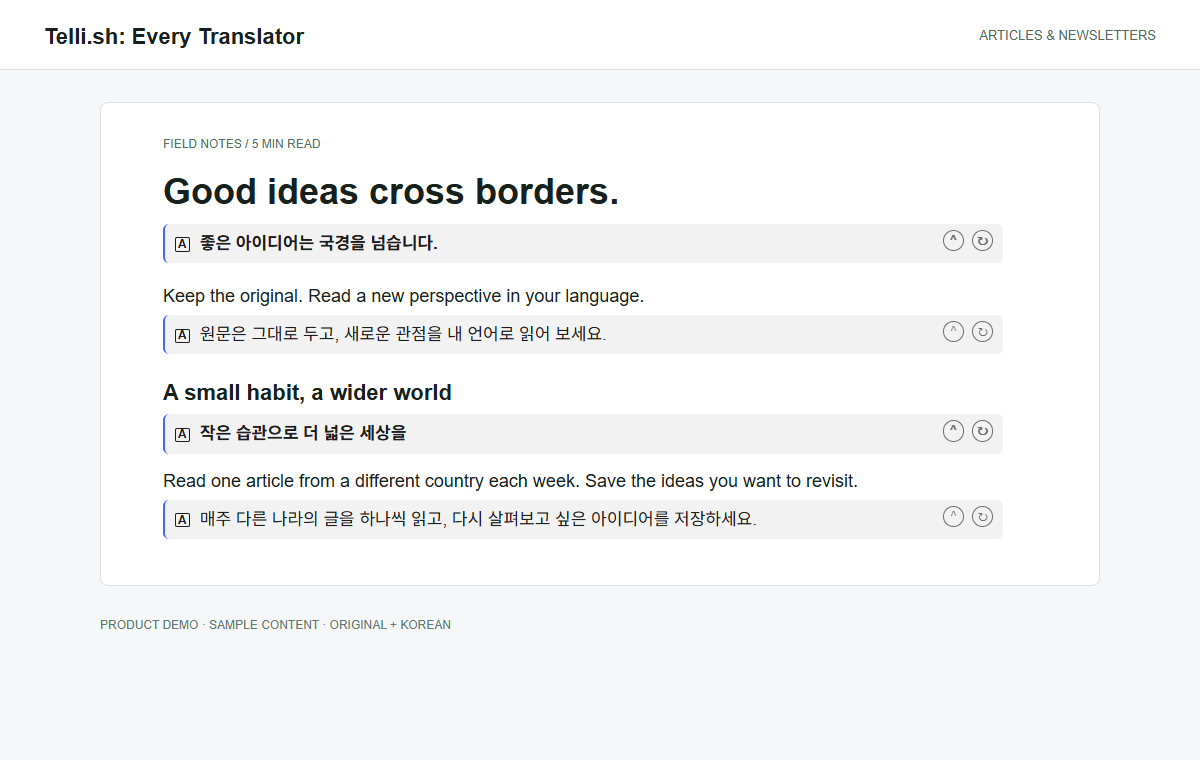
Product illustration captured with the real extension UI, authored sample content, and fixed translation responses. It demonstrates layout, not provider speed or an independently measured translation-quality score.
YouTube translation is about the discussion around the video
YouTube support covers the video description and comments that the page has loaded. It is useful when the description contains references, a project explanation, or instructions, and when the surrounding conversation adds context that the title does not provide. This is text translation on the page, not audio processing.
The boundary is important: 1.30.0 does not add subtitle translation, live interpretation, or translated dubbing. Comments that YouTube has not loaded are not silently fetched as a complete archive. Expand the description or load the comments you want to read, then use the extension on the material actually present in the page.
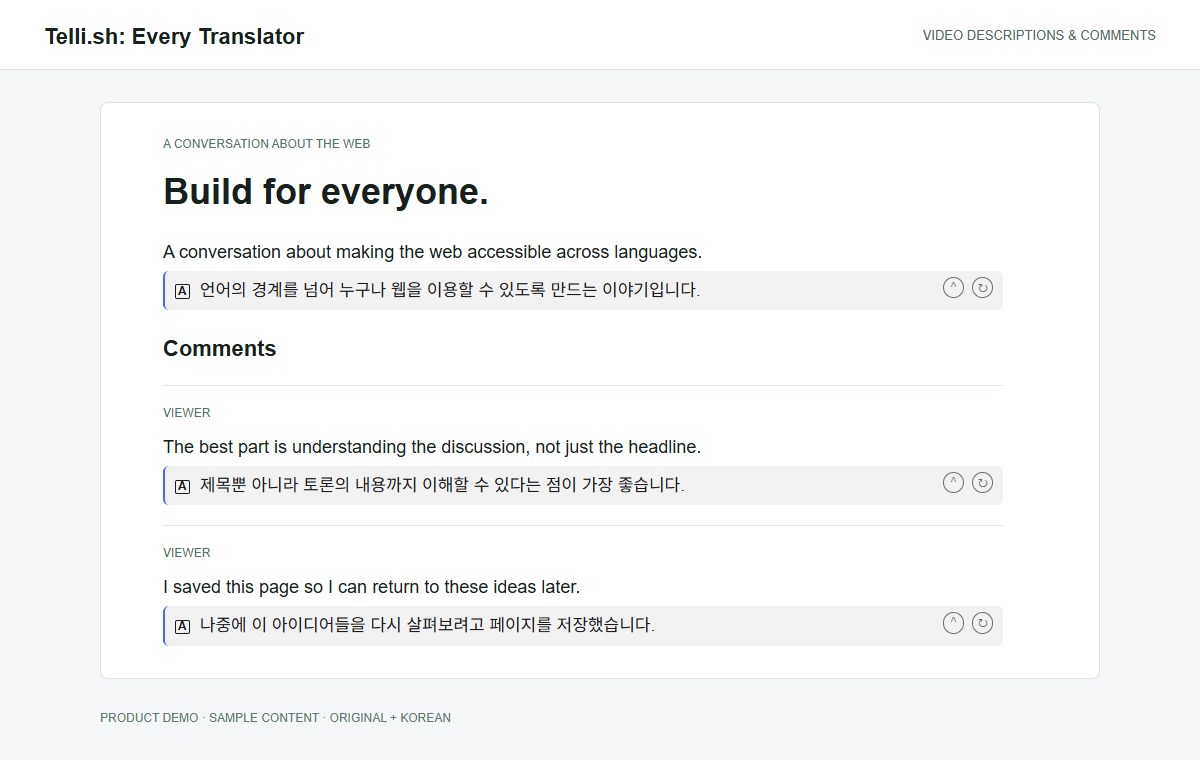
Authored YouTube-style sample rendered through the real extension interface. The example concerns descriptions and comments; it does not depict subtitle or audio translation.
This is a better fit for research than a vague promise to translate a video. You can inspect the author's linked resources, read objections in the discussion, and decide whether the source deserves closer attention. A translated comment remains another person's claim, so keep the original and its context in view when it affects a decision.
Clip connection now means more than a stored token
Previously, a token could appear connected without a clear round trip to the server, and the Connect button could remain actionable even when nothing had changed. The updated flow tests a candidate connection before saving it. Empty or unchanged input does not invite a redundant connection attempt, and a failed replacement attempt preserves the previously saved token.
A separate connection-test action checks whether the configured Clip endpoint accepts the token. That check does not create a note or consume note quota. The operational distinction matters: a successful connection test proves a narrow authentication and connectivity contract, while a successful Clip save proves the separate creation flow. Neither should be represented by a cosmetic change to a button alone.
During rollout, an early connection test failed because the new endpoint had not yet reached the production API. After deployment, the endpoint returned successfully and the same user confirmed a successful connection test without reentering the token. The 1.30.0 publisher verification documents that sequence; it is not evidence that every possible network or credential failure has disappeared.
Clip still requires an explicit save action from the extension's context menu. It is not a background crawler, and translating a paragraph does not implicitly upload that page into your account. A live Medium save check confirmed source URL, title, selected material, and derived summary output. That check was not a claim that every entire article, image, and embedded attachment had been archived.
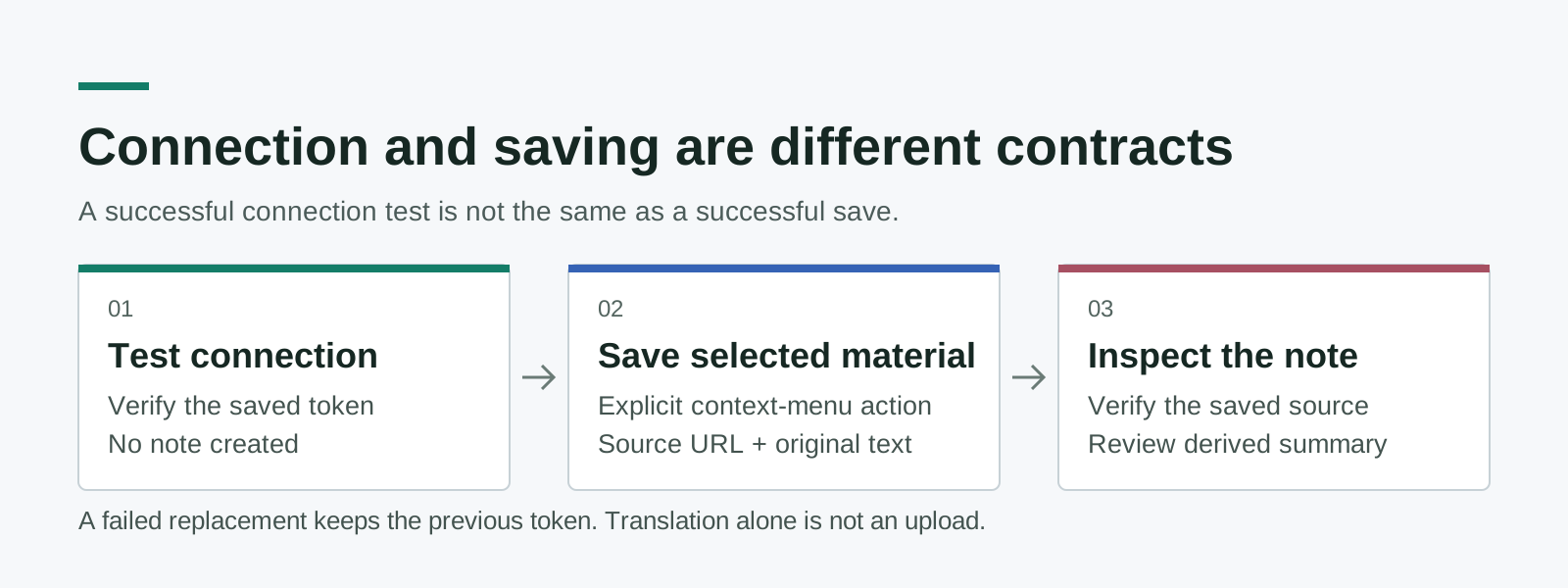
Original contract diagram. Testing a connection and creating a note have different side effects; only the explicit save flow should produce the note.
For your first save after an update, use a page you can legally access and a small passage you can recognize. Verify the destination note's source URL and saved text before judging its summary. The original material and the generated explanation serve different purposes: one preserves evidence, while the other helps you navigate it.
An unsupported-site request is now a trackable request
The settings screen now offers a site-request entry point. It opens an authenticated web form, and submitted requests appear in the administrator's request list with a status. This closes the gap between encountering an unsupported article and having a specific, reviewable example for future adapter work.
The form accepts a page URL and a short explanation. It does not fetch that URL on submission and does not start an AI job, so a request is not an invitation for the server to retrieve arbitrary network resources. Account verification, duplicate handling, and input limits are applied before the request is stored.
The release includes a limit of three new domains per rolling 24 hours, a five-per-minute account rate limit, and bounded request fields. The durable domain quota uses database coordination; the short-interval limiter is process-local. Those are concrete abuse controls, not a claim of complete DDoS immunity or a replacement for infrastructure-level protection.
To make a useful request, provide one accessible article URL, name the reading surface that fails, and describe what you expected. For example, say that the article body is missing while comments translate correctly, rather than reporting only that a site is broken. Do not put passwords, access tokens, or private article contents in the request. An administrator can assess an adapter without collecting your credentials.
Verification is a scope statement, not a compatibility guarantee
The release combined automated tests with real-site checks. The extension suite passed 236 tests, while the frontend release run passed 126 suites and 1,176 tests; targeted release E2E checks also passed. The validation record covers reading modes, narrow and desktop layouts, localized controls, Clip connectivity, and the site-request workflow. These figures describe the tested revision, not a permanent success rate on the open web.
Real sites continue to change after a release. Login requirements, anti-bot challenges, browser extensions, provider limits, and publisher markup can all change what a reader sees. Reporting the exact page and installed version helps distinguish an adapter regression from a provider failure or a page that has not loaded its content. A catalog entry alone cannot make that distinction.
If the new options are absent, first verify that 1.30.0 is actually installed; a pending store review can leave an older version active. If translation fails but the controls appear, check the selected provider and a short, accessible passage before trying a full article. If Clip fails, use the connection test and keep that result separate from the result of an actual save. These checks narrow the problem without treating unrelated features as interchangeable evidence.
The bottom line: translate at the size of your question
A better reading tool does not need to translate more text on every visit. It needs to let you inspect the right passage, retain the original, and keep a useful source only when you choose to save it. Version 1.30.0 moves those decisions closer to the paragraph you are actually reading.
Release sources
- 1.30.0 publisher verification, release check September 30, 2026 KST.
- Public feature guide, checked September 30, 2026.
- Chrome Web Store listing, checked September 30, 2026.
Try the source-to-note workflow
For a source you want to revisit, explore Every Translator and create a Telli.sh account. Keep the source, check the translation, and save only the material you deliberately choose.