DeepSeek V4.1 Flash 1017: Build Your First Project, Then Connect the API
Start with a working browser project, connect DeepSeek Flash on Windows, Mac or Linux, and understand the October 17 update, thinking, vision, costs and limits.
A coding model becomes useful when the thing it writes actually works. Start there: a small application you can open, inspect and improve, rather than a giant prompt asking for an entire business.
DeepSeek released V4.1 Flash on September 10, 2026; October 17 brought the 1017 update, not the first V4.1 release. The update is live on DeepSeek's website, app and API, and the API model ID remains deepseek-flash. DeepSeek's dated update log
This guide takes you from a first browser project to a repeatable development workflow, then through API setup on Windows, macOS and Linux. After that, we will unpack the architecture, vendor benchmarks, token costs and practical boundaries that matter before you give an agent a larger job.
Hero: original explanatory artwork showing specification, building, inspection and revision. It illustrates a workflow, not a DeepSeek product screenshot.
Get a first success before installing anything
Open DeepSeek's web chat or its official app and begin a new conversation. Use invented information for this first exercise. A public AI service is not the place to discover that your sample file contains a customer list or an access token.
Our first project is a reading queue: a tiny page containing articles you want to read. It needs no account, cloud database or API key. The following is an illustrative exercise, not a report of a completed model run.
-
Ask for the smallest complete artifact with this prompt:
Plain textBuild a reading queue as one self-contained index.html file. Use plain HTML, CSS and JavaScript, with no libraries or network calls. Include three fictional example articles, a title filter, and a read/unread toggle. Keep state in memory; reloading should reset it. Use accessible labels and make the layout work at 360px wide. Return the complete file, followed by five manual acceptance checks. Do not add login, analytics, remote fonts or a backend. -
Put the generated file in a new, otherwise empty folder and open
index.htmlin a browser. Before opening unfamiliar generated code, inspect it for unexpected network requests or scripts. This exercise should not require a terminal command, downloaded dependency or permission prompt. -
Check behavior yourself: filter by a title fragment, toggle an article, remove the filter, narrow the window and reload. The toggle should survive filtering but reset on reload, because that was the requested scope.
-
Send one concrete failure back: "Filtering hides all rows when the query has trailing spaces. Trim the query, preserve the other behavior, and return the revised file." Run the same checks again.
That is a first success you can recognize. "Looks good" is subjective; "the toggle still works after filtering" is an acceptance condition. Keeping the first project deliberately small also makes it easier to tell whether a revision fixed the problem or merely changed the appearance.
The October update is about finishing projects, not just writing snippets
DeepSeek says 1017 uses reinforcement learning with self-feedback to improve end-to-end project development. Its announcement shows four examples: Forbidden City 3D modeling, a web racing game, a Godot recreation inspired by Portal 2, and Valley of Ages, a 3D scene spanning historical eras. Follow the official project demonstrations to inspect those examples; they are vendor demonstrations, not promised outcomes for any prompt.
Here is the important distinction: training with self-feedback is a model-development claim, while your project's feedback comes from running the software. A chat response does not execute your browser, inspect your repository or verify a game build simply because the model learned from feedback during training. Those actions need an environment and tools.
Think of the process as a project loop: specify, implement, check, revise. Our take is that this loop matters more than the size of the first generated answer. A compact change with a passing acceptance check is more useful than an impressive repository that nobody has launched.
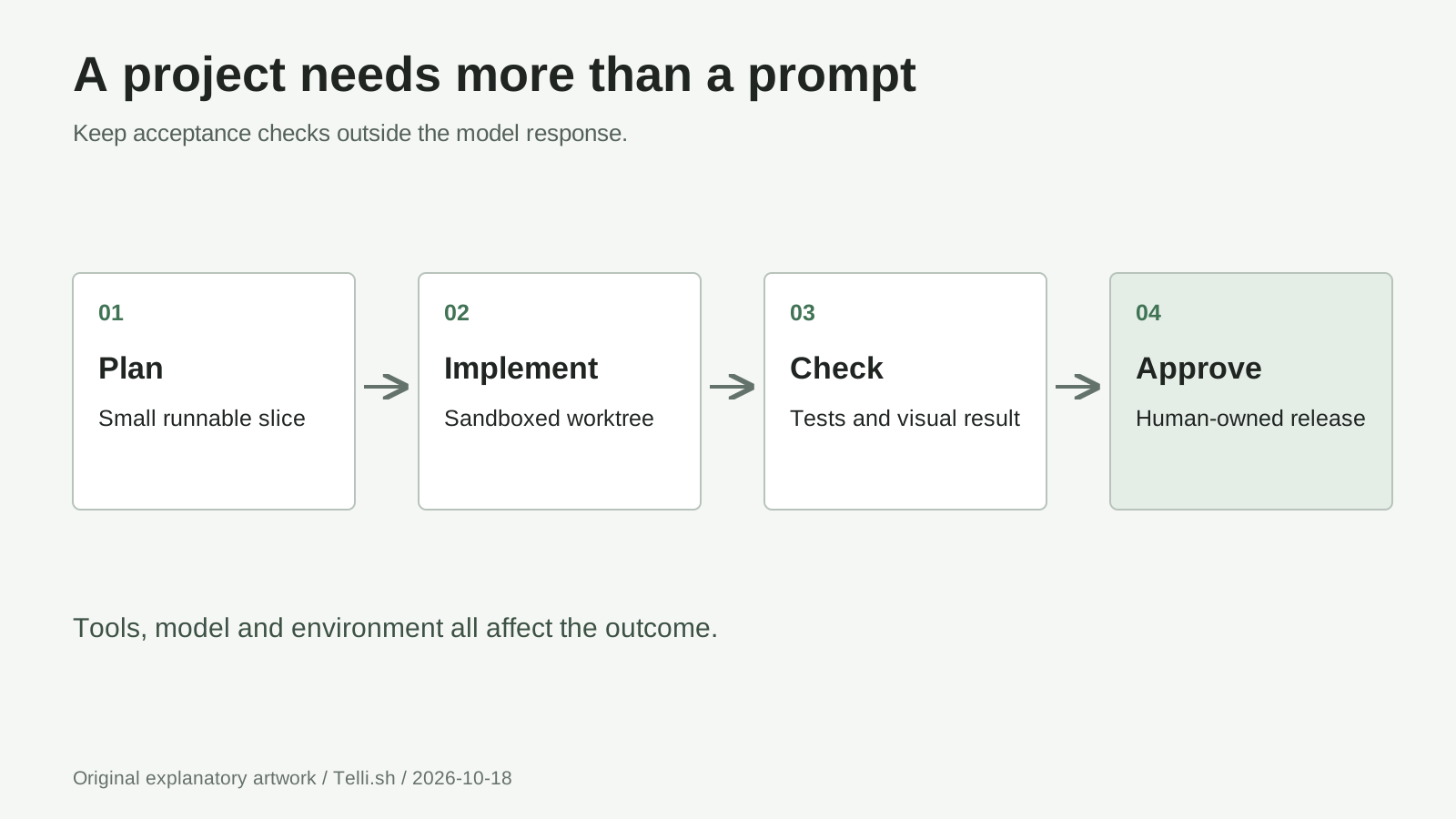
Original diagram: acceptance checks and release approval remain outside the model's answer. Tools and the execution environment determine what can actually be verified.
Turn the reading queue into a project with a finish line
For a second iteration, imagine a reading queue for a small study group. Members need to add links, mark articles as read and export the queue. Keep this version single-user and browser-only; collaboration and synchronization are separate projects.
-
Write the contract. Require title, URL and read status; reject invalid links; preserve entries after reload; export a JSON file. Specify what should happen when there are no entries, when a title is long and when an imported file is malformed. Leave authentication and server storage out.
-
Ask for a plan before edits. Have the model identify the files it needs, the storage approach and the tests it proposes. Give it a clean folder or isolated worktree. Do not start by handing it your home directory, production credentials or permission to install arbitrary software.
-
Implement one vertical slice. Add one article, persist it and reload. Then add filtering, followed by export and import. Each increment should remain runnable, so a broken export function does not become entangled with a storage migration and an unrelated redesign.
-
Feed back evidence. Provide the exact error, input and expected behavior. For a layout problem, attach a cropped screenshot with private information removed. Ask for a narrow fix and repeat the same checks rather than accepting a fresh rewrite every time.
-
Approve a release candidate. Test keyboard navigation, an empty queue, duplicate links and a long title. Export, clear the test queue, import and confirm that fields survive the round trip. Keep a known-good copy before accepting another revision.
The model can also help write a test plan before implementation. For example, ask it to describe the expected JSON structure and identify which fields an importer must validate. Then compare the implementation against that plan. This separates the promise from the code and makes disagreements visible.
A project harness supplies file editing, command execution and other tools around the model. DeepSeek recommends Harness v0.2.1-rc.1 or later for 1017 in its release announcement. Follow the official Harness guide for installation rather than assuming that making a chat API request creates a coding agent.
Connect the API without putting a secret in your webpage
Use the API when your own program needs model responses. The reading queue can stay a local browser application; the following script is a separate terminal-side development helper. Never embed your DeepSeek key in index.html, browser JavaScript or a public repository.
1. Create an API key and choose a small task
Create a key in the DeepSeek API platform and check your account balance. DeepSeek's first-call guide documents the OpenAI-compatible base URL https://api.deepseek.com and model deepseek-flash. A web-chat account does not make paid API usage unlimited.
For the first request, ask for acceptance checks rather than a whole repository. That keeps the output easy to inspect and limits the amount generated if something is misconfigured.
2. Prepare Python on your operating system
Install Python 3 if it is not already available. In a new project folder, create an isolated environment and install the SDK. These commands invoke its interpreter directly, so no activation script or PowerShell execution-policy change is needed. This follows Python's virtual-environment documentation.
Windows, PowerShell:
py -m venv .venv
.\.venv\Scripts\python.exe -m pip install --upgrade openai
If py is unavailable but python --version identifies your Python 3 installation, use python -m venv .venv for the first command.
macOS, Terminal:
python3 -m venv .venv
./.venv/bin/python -m pip install --upgrade openai
Linux, terminal:
python3 -m venv .venv
./.venv/bin/python -m pip install --upgrade openai
Some Linux distributions package venv separately. If environment creation reports that it is missing, install the Python virtual-environment package documented by your distribution, then repeat creation. Do not solve an isolated-environment problem with a system-wide sudo pip install.
3. Create a terminal-side helper
Create first_request.py beside .venv with the following example. It uses a hidden key prompt through Python's getpass module, rather than putting the secret in source code or a shell-history command. Run it in a normal terminal that supports hidden input.
from getpass import getpass

from openai import OpenAI

client = OpenAI(
    api_key=getpass("DeepSeek API key: "),
    base_url="https://api.deepseek.com",
    timeout=120.0,
    max_retries=0,
)

reply = client.chat.completions.create(
    model="deepseek-flash",
    messages=[{
        "role": "user",
        "content": (
            "Propose five manual acceptance checks for a browser-only "
            "reading queue with filtering, read status and JSON export. "
            "Return checks only; do not claim to have executed them."
        ),
    }],
    max_tokens=2048,
    stream=False,
    extra_body={"thinking": {"type": "disabled"}},
)

print(reply.choices[0].message.content)
print("Finish reason:", reply.choices[0].finish_reason)
print("Usage:", reply.usage)
4. Run it and inspect the response
On Windows, run .\.venv\Scripts\python.exe first_request.py. On macOS or Linux, run ./.venv/bin/python first_request.py. Paste your key when prompted; the intended result is a list of checks, a finish reason and usage information, not newly created project files.
If the request fails, inspect the status before retrying. A 401 concerns authentication, 402 insufficient balance and 429 a limit; DeepSeek documents these in its error-code guide. A length finish reason means the answer reached a limit, so it is not evidence of a complete answer. Keep retries deliberate while learning the API.
Thinking, vision and web tools do different jobs
Thinking is enabled by default, with high effort. For a harder debugging question, replace the example's extra_body with {"thinking": {"type": "enabled"}} and add reasoning_effort="high". The documented effort choices are low, high and max; thinking mode ignores temperature, so lowering it is not a shortcut to more reliable reasoning. Thinking-mode guide, checked October 18
Thinking consumes the generation budget too. Raise a small output cap deliberately when moving from short non-thinking answers to complex reasoning. If you implement thinking-mode tool calls, preserve the assistant's reasoning_content in subsequent requests carrying tools, as the guide requires. Do not build the tool conversation by retaining only the visible final answer.
Vision accepts images alongside text; it is not an image-generation endpoint. In Chat Completions, put image content in a user message using an image_url block, a base64 data URL or the documented Files API format. JPEG, PNG, GIF and WebP are supported. The inline request-body limit is 48 MiB, and an inline or externally linked individual image is limited to 32 MiB. Vision guide
For the reading queue, send a redacted screenshot and ask which labels overlap at a narrow width. Treat that as a diagnosis to check in the browser, not proof that the layout is fixed. Image understanding also does not give the API permission to move your mouse or modify files.
Search finds pages; Fetch retrieves a page as Markdown. Their standalone endpoints are POST /v1/tools/search and POST /v1/tools/fetch, authenticated with the same bearer key. A Search request can use {"query":"browser storage documentation","count":3}; Fetch uses {"url":"https://developer.mozilla.org/en-US/docs/Web/API/Storage"}. Your application must explicitly call these endpoints or use an integration that supplies them. Merely mentioning a URL in a basic chat request is not the same workflow. Search and Fetch guide
Keep fetched content separate from instructions. A retrieved page is evidence, not authority to run a command, disclose a key or change a project requirement. Fetch also remains subject to the target site's access policies; it does not grant access to private or paywalled material.
A large backbone can activate fewer parameters without fitting on a laptop
The September V4.1 model card describes a 552-billion-parameter MoE backbone, activating approximately 8 billion parameters per input token during prefill and 16 billion per output token during decoding. Its Causal Encoder-Decoder separates a 20-layer causal encoder from a 20-layer decoder. These architecture details belong to the base V4.1 release, not a newly announced October 17 architecture. Base-model architecture and technical-report link
In plain language, prefill processes your existing prompt; decoding produces the answer. Mixture-of-Experts routing uses selected experts rather than activating every backbone parameter for every token. The model's compressed attention and shared cache design address the memory cost of long prompts. Fewer active parameters describe computation, however, not the full storage and memory required to host the checkpoint.
The advertised context is one million tokens. That is capacity, not a requirement to paste an entire repository into every request or a guarantee of perfect recall. Start with the task, relevant files and concrete errors; expand context when a missing dependency or contract warrants it.
For self-hosting, use the official 1017 inference instructions, which describe checkpoint conversion and tensor-parallel execution. The Hugging Face page's generic vLLM launcher is not a model-specific deployment recipe. Check hardware, supported kernels and serving compatibility before downloading weights. deepseek-recipe handles prompt/protocol conversion; it does not supply inference or execute tools. Ordinary laptop users should start with hosted access.
Estimate a whole task, not the cheapest token
As of October 18, 2026, DeepSeek lists these Flash prices in US dollars per one million tokens. Official pricing
| Token category | Peak | Off-peak |
|---|---|---|
| Input, cache miss | $0.30 | $0.15 |
| Input, cache hit | $0.006 | $0.003 |
| Output | $1.20 | $0.60 |
Peak periods are 01:00-04:00 and 06:00-10:00 UTC, Monday-Friday, excluding Chinese public holidays; all other periods are off-peak. Weekends are entirely off-peak under that schedule. Use UTC when scheduling rather than assuming your local daytime is expensive.
For an illustrative task with 100,000 cache-miss input tokens, 200,000 cache-hit input tokens and 20,000 output tokens, the peak calculation is:
(0.1 x $0.30) + (0.2 x $0.006) + (0.02 x $1.20)
= $0.0300 + $0.0012 + $0.0240
= $0.0552
At off-peak rates, those assumed quantities cost $0.0276. This is arithmetic, not a measured project bill. Use actual cache-hit and cache-miss usage rather than assuming that repeated context always receives the cheaper rate.
Search and Fetch each cost $0.75 per 1,000 successful, result-producing requests. Thus, 40 billable searches plus 60 billable fetches add $0.075, excluding model tokens used to read their results. The temporary free period applies to server-side calls through the named DeepSeek API integrations; their billing begins October 31, 2026, at 16:00 UTC. It is not a blanket free period for direct endpoint use. Tool billing rules
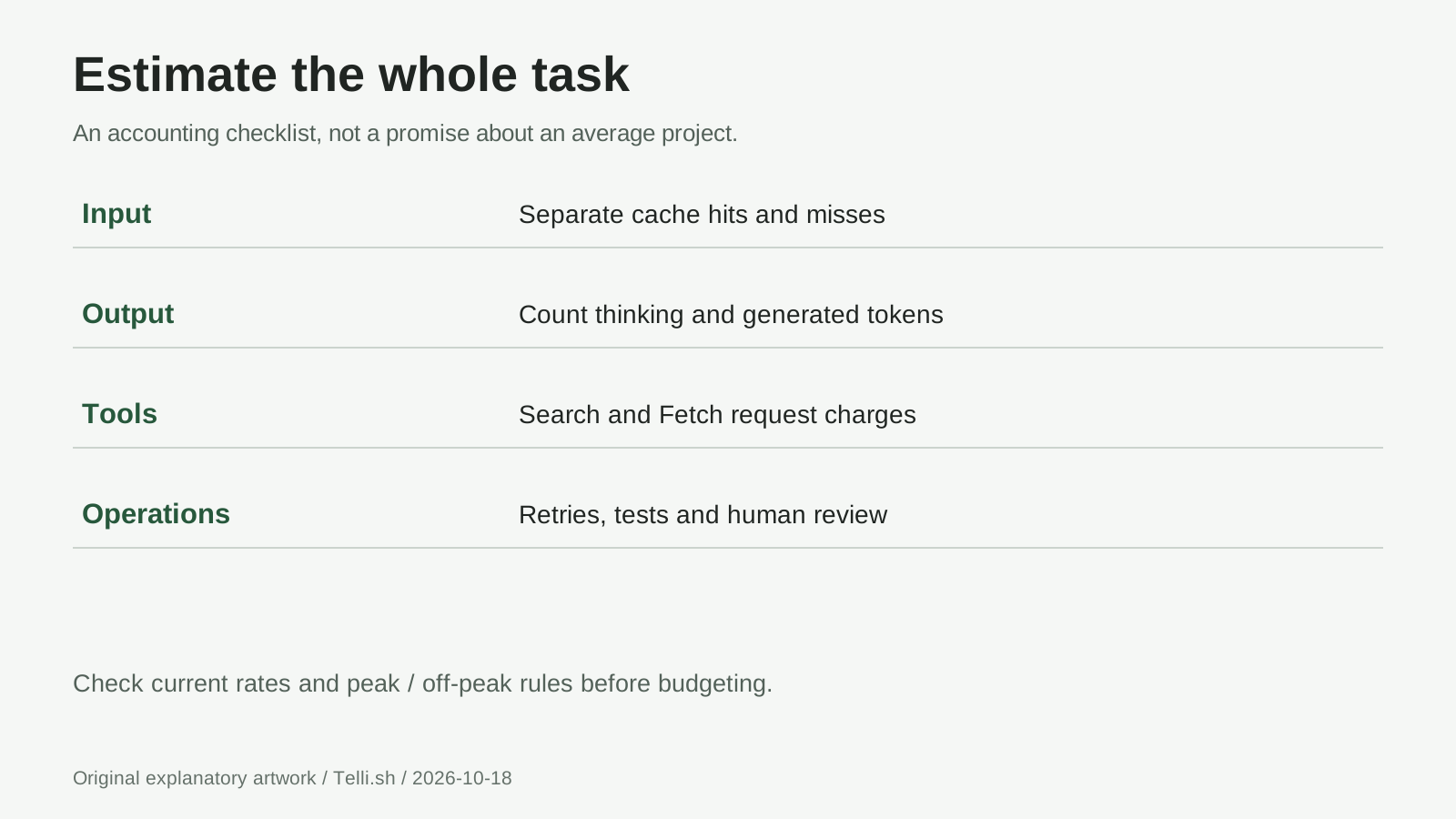
Original accounting diagram: include thinking output, retries, tool calls and review work when budgeting. No average project cost is implied.
Read the benchmark gains with the harness attached
DeepSeek reports the following changes from base V4.1 Flash to 1017. These are vendor-reported scores, not independent results from this guide. 1017 model-card comparison
| Benchmark | V4.1 Flash | 1017 | Change |
|---|---|---|---|
| DeepSWE v1.1 | 74.2 | 77.0 | +2.8 points |
| Terminal-Bench 4.0 | 31.2 | 42.3 | +11.1 points |
| ProgramBench | 20.3 | 29.1 | +8.8 points |
The 1017 card specifies Claude Code for Terminal-Bench 4.0 and Mini-SWE-V2 for DeepSWE v1.1. A harness supplies tools, context management and execution policy; changing it changes the experiment. Do not treat a score difference across different setups as a pure measurement of model capability.
For your own comparison, keep the repository, acceptance checks, permissions and budget fixed. Record whether the project works, how many corrections it needed, total usage and elapsed time. A higher public score helps select a candidate; a repeatable task in your environment decides whether it earns the job.
Questions to settle before giving it a bigger job
Is 1017 a separate API model name?
No. Use deepseek-flash. The dated checkpoint name identifies the update, while DeepSeek's hosted API keeps the existing identifier. Record the date and returned model information when reproducibility matters. First-call documentation
Do MIT weights make the API free?
No. The 1017 model card licenses the repository and weights under MIT. Hosted usage has separate charges. The weights' license also does not grant rights to private inputs, third-party assets or the media in a demonstration.
Can it build a complete game from one prompt?
Use the official demos as examples of the publisher's results, not delivery guarantees. Define movement, collision, restart behavior and a finish condition before asking for visual polish. A game you can inspect and replay is a better milestone than a large generated codebase.
Should I always use maximum thinking and the full context?
No. Begin with a bounded request and increase effort or context when a specific failure calls for it. More generated reasoning and larger prompts consume resources; neither replaces acceptance checks or careful tool permissions.
Can I publish generated work immediately?
Review functionality, security, dependency licenses and asset provenance first. Remove sample credentials and inspect any remote requests. Keep deployment approval separate from permission to edit a local project.
The bottom line: finish means someone checked the result
The useful promise of 1017 is stronger project completion, not a reason to stop reviewing projects. Give the model a small goal, a bounded environment and observable checks. Then expand the project only after its current behavior earns your approval.
Sources
Product documentation and prices checked October 18, 2026. Benchmark and training claims are attributed to DeepSeek; the exercises are teaching examples, not claimed hands-on results. All three diagrams are original explanatory artwork. Vendor demo media is linked rather than reproduced.
- October 17 update and project demonstrations
- September 10 base release
- Dated update log
- 1017 model card, benchmarks and MIT license
- Base V4.1 architecture and technical report
- First API call, thinking, vision, Search and Fetch, and pricing
- Official inference reference and deepseek-recipe
Keep the next project easier to resume
Telli.sh recommendation: keep your source links, project brief, prompts and review notes together so the next session starts with decisions, not guesswork. Telli.sh can organize that project knowledge; it is not a DeepSeek coding-agent integration. Create a Telli.sh account