Cursor can turn a sales spreadsheet into a live app. Who owns the link?
Cursor Live Apps handles hosting, authentication, and optional Postgres. A sales dashboard and an onboarding portal show where the team's operational work starts.
On Monday morning a sales lead wants one page with the accounts that need attention. The numbers live in a spreadsheet, a second tab contains assignment rules, and everyone has a slightly different copy. A developer can build a useful dashboard in an afternoon. The first awkward question comes when the sales lead asks for a link.
Anysphere, the maker of the Cursor coding environment, released Live Apps on November 5, 2026. You ask a Cursor cloud agent for a web app and Cursor can set up hosting, authentication, and a Postgres database if the app needs one. After a security review and an explicit publish action, the app gets a live URL. The release is available on paid plans with cloud agents enabled. A new or existing Cursor Origin or GitHub repository can supply the code. Cursor release announcement
That makes an internal app a practical option for workflows previously served by spreadsheet copies and weekly messages. It also makes it easy to go from a prototype to something a teammate will depend on. A sales dashboard and an onboarding portal show how to decide when a prototype is ready for that step and how to tell who can see, change, or turn off what it exposes.
The deploy button ends one job and starts another
Cursor asks you to say explicitly that you want an app and use a cloud agent. A local coding session can still help with the source, but the Apps workflow described by Cursor runs through the cloud agent. Starting from scratch can create a repository on Cursor Origin. If the team already has an app in a supported repository, you can use that source instead. Cursor provisions the app resources, while the person publishing chooses the URL and decides when to share it. Apps setup and deployment
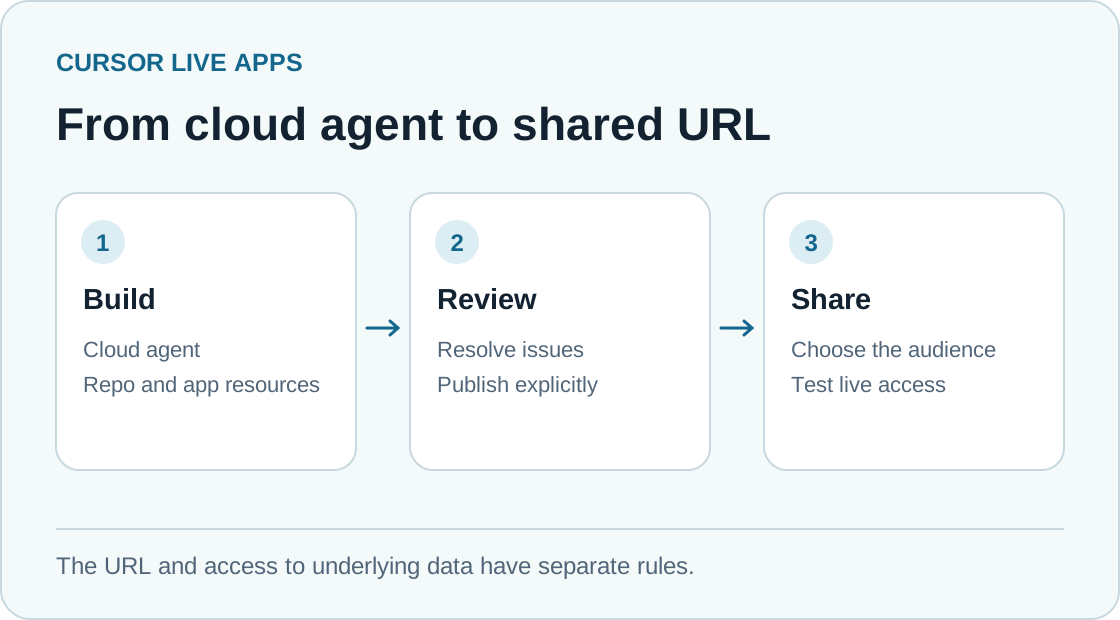
The path from source to a live URL, with the audience and data source shown separately. Original illustration by Telli.sh.
Cursor describes two kinds of review before publication. Deterministic checks catch known conditions such as a secret written into a file. An AI security review examines the app source for serious issues. Cursor says team admins can add their own rules, see the team's apps and secrets, and unpublish apps. They can also approve some publications blocked by the AI review. Cursor keeps its blocks in place for malicious code, hardcoded secrets, or exposed credentials. The app owner still decides which credentials the app needs in the first place. Cursor release announcement · Apps security and administration
Imagine an app whose homepage shows sales totals and whose detail endpoint returns every account. The page may look appropriately limited when a sales manager signs in. A teammate might still be able to open a guessed detail URL or ask the backend for a territory they cannot see in the table. The deployment review can find flaws in the implementation. The source of truth for the territory rule remains the team's access policy, and the release test needs to exercise it with the relevant roles.
The live URL is the point at which those choices become consequential. Once colleagues bookmark it, a broken report can hold up a morning call. If an app becomes the only place where a decision or approval is recorded, its database becomes part of a business workflow. Even a tiny app needs an owner who can explain what happened when the numbers look wrong.
Start with a dashboard that can only read
Suppose a sales operations team wants a pipeline view for two territories. A sensible first app displays opportunity counts by stage, the date of the last refresh, and a link to the CRM record for detail. It works with fake accounts first. Once the view is correct, its credential can read a narrow report or database view with only the fields that belong on the dashboard. The CRM stays responsible for assignments and notes. That keeps changes to business records outside the first release and gives you an independent place to reconcile the totals.
Cursor's Apps documentation says secrets for a warehouse or another external resource can be entered through the app setup or Apps dashboard. Cursor says the agent does not see the values. Credentials still matter when the published app makes a request. Keep the connection in server-side code, keep the permitted query scope small, and check the built page and its network responses for fields that should have stayed behind the server. Giving an app a read-only secret helps only if the underlying account actually has read-only access to the intended data. Cursor Apps secrets
| First release decision | Sales pipeline dashboard | New-hire onboarding portal |
|---|---|---|
| Intended audience | Named sales operations group | Invited employees and onboarding coordinators |
| Authoritative data | CRM or a restricted reporting view | Approved internal guide and onboarding checklist |
| Useful app state | Filters and display preferences | Completion marks for the signed-in employee |
| Check before sharing | Compare two territories and try an unauthorized detail URL | Verify employees cannot read or change another person's checklist |
| Operational owner | Sales operations with a backup contact | People operations with a named content owner |
Run the dashboard from three points of view. The intended user should see a correct total and the update time. A colleague with a different territory should see only the rows the application policy permits, even if the link or request is edited. Someone outside the sharing audience should be denied before any dashboard data arrives. The second check is especially useful because the failure is easy to miss when the builder is the only tester.
Do the reconciliation using a fixed snapshot from the authoritative system. Record the date range, timezone, inclusion rules, and the exact expected total for each territory. A chart that appears to be missing Monday's opportunities may simply be interpreting the reporting window differently. Include an empty result, an upstream timeout, and a stale refresh in the first test set. Showing the last successful update and an explicit error gives people a way to distinguish an outage from a real drop in the pipeline.
An onboarding portal earns its database one field at a time
A portal that only links to existing policy pages may need no new database. An interactive checklist adds state. Cursor can provision Postgres when an app requires it, which makes the second version easy to build. Before using that capability, write down which values actually need to persist. A checklist step identifier, completion timestamp, and the authenticated user's stable identifier may be enough. A copy of a manager's notes, a government ID, or an employee's home address adds risk without improving the checklist. Cursor Apps resources
Separate the data that helps employees navigate the process from the data a coordinator needs to manage it. An employee can mark their own required reading as complete. A coordinator might need to see overdue steps across a cohort. Give the coordinator view a different permission rule and audit its query on its own. A single login screen makes both views look consistent while the underlying access needs are different.
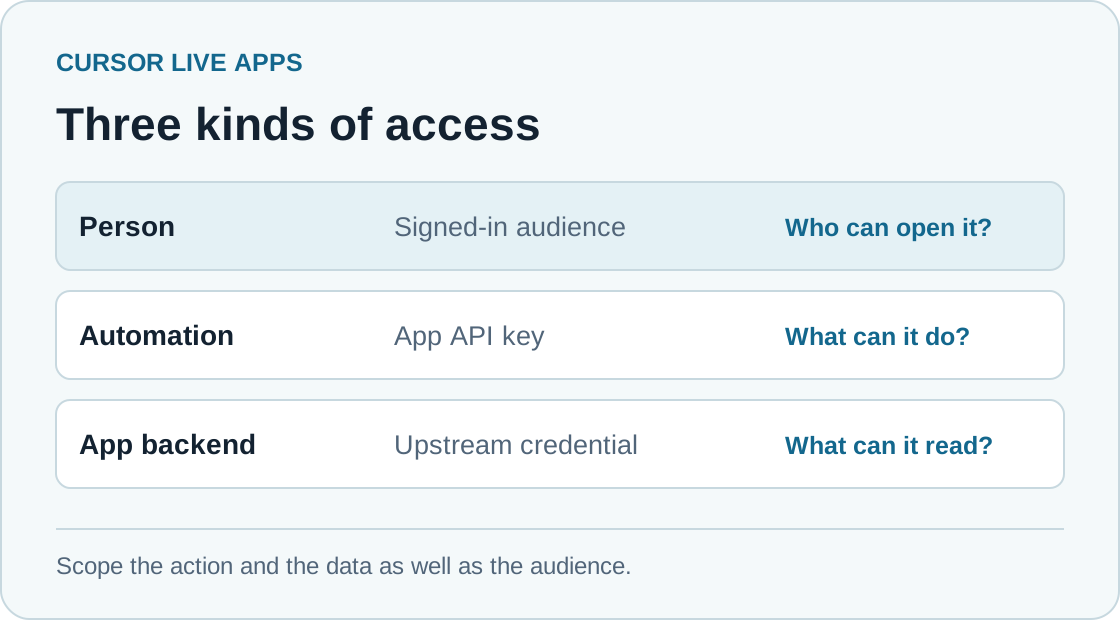
Three distinct access checks for one internal app. Original illustration by Telli.sh.
A small pilot can use one dummy employee and a test coordinator before it stores real onboarding information. Use a clear failed test as the release signal. An employee must be unable to overwrite someone else's completion status even after changing an ID in the browser request. Then check that a second attempt on the same step results in the same state instead of creating duplicate progress. The point of the pilot is to make the behavior verifiable without asking a colleague to expose real information.
This kind of app benefits from a handoff checklist. Write down how a new coordinator obtains access, where the guide content is edited, who can remove a departed employee's access, and what happens to existing completion records. Decide how you will recover the relevant state if a change fails. Cursor can provision a database. The team still needs to decide what recovery and retention mean for this particular checklist.
An invitation and an integration key have different jobs
Cursor's current Apps docs distinguish three sharing options. An invite-only app can open to the owner and specific signed-in people or groups. Team sharing can open it to the whole signed-in Cursor team. A public app can open to anyone with the URL, and public sharing is off by default for Teams and Enterprise unless an admin enables it. The launch announcement highlights public sharing on individual plans. Those settings are why a working URL tells you little about the effective audience until you open the Apps dashboard and check the actual visibility. Cursor Apps sharing
The same docs describe API keys for automated requests. The key is passed in an HTTP header, and the request is identified as automated rather than attached to a person. That's handy if a script needs to call an app. It changes how you investigate an unexpected request. If the app supports both human sessions and an API key, check that automation has only the app actions it requires and record where that key is used and who will rotate it. Keep the initial pilot human-only if every meaningful action begins with a teammate opening the link. Cursor Apps API keys
There are three boundaries to test when an app reads a warehouse. Cursor controls the audience for the link. The app decides which actions and rows that audience may reach. The upstream system decides what the app's service credential can read. A mistaken choice at one layer can be limited by the others. If an internal dashboard needs only aggregated pipeline counts, granting it a credential that can query every CRM record makes a small application bug expensive.
The tests can be simple. Open the live link in a fresh browser session as an invited person, as a signed-in teammate without access, and with no sign-in. In the allowed session, request one record that should be visible and one from a different territory. If a script uses a key, make sure a request without its header fails and confirm that a revoked key is rejected. These are separate checks because each reveals a different type of mistake.
A narrow first release makes review faster
- Choose one job and one named audience. For the dashboard, ask for weekly pipeline totals by stage with fake records, a visible refresh time, and a link back to the CRM. For a portal, ask for a small checklist using synthetic employee accounts.
- Start a cloud agent and explicitly ask it to build an app. Use a repository the eventual owner can access. Keep the first code change small enough that the person responsible for the app can explain the routes, data model, and error handling.
- Specify what can persist and which requests can write. Connect a narrowly scoped secret through the app settings only when the fake-data flow works. Have the agent show where the secret is used and where audience checks take effect.
- Use the publication review and inspect what it reports. Choose the URL, publish explicitly, and share with the smallest suitable group. Test allowed and denied requests on the deployed link before asking anyone to rely on it.
- Record who owns the app, which upstream service it calls, and who can take it offline. Repeat a small verification after changing visibility, a connector, or credentials. Keep a fallback link or process that a colleague can use if the new app is temporarily unavailable.
The first release can be narrower than the code the agent is capable of producing. A dashboard that displays one reliable number each morning may be more useful than a workspace with six views whose calculations people dispute. An onboarding portal with a well-maintained checklist can remove repeated messages even if its coordinator view is deferred. A smaller first release also gives the person responsible for the tool a chance to observe what changes, access requests, and support questions actually arrive.
It helps to judge the result over an ordinary week. Watch how often someone opens the app without prompting, whether they can locate the source when they question a value, and how long it takes the owner to correct an issue. A live app that saves a few minutes a day can justify its existence. If people still rely on the spreadsheet for confirmation, find out which result the new app has yet to make trustworthy.
Cursor's changes make this kind of trial easier to start. In the November 5 announcement, the build, database, authentication, hosting, and share link are part of one workflow. Before, the same experiment could die while the builder looked for a hosting owner or tried to arrange a sign-in screen. With those pieces available, the bottleneck moves to explaining the audience, data, and release conditions clearly. The useful artifact at the end is a link that someone can use and someone else knows how to look after. Cursor release announcement
Sources
- Cursor Live Apps release, November 5, 2026
- Cursor Apps documentation, including setup, sharing, and administrative controls
For a searchable record of the conversations and decisions behind an internal tool, Create a Telli.sh account.