The transcript looked fine: Confident AI brings the sound of a conversation into evaluation
Confident AI's October 23 update adds direct audio classification, human review and issue timestamps. How teams can evaluate interruptions, silence and delivery while preserving the evidence behind each finding.
Original editorial diagram by Ken Jo, based on the sources listed below.
A customer asks a question, the agent gives the right answer, and the transcript reads perfectly. Listen to the recording, though, and a different interaction appears: the agent starts too early, talks across a correction, and leaves a long silence before acknowledging the person again.
Confident AI's October 23, 2026 update brings more of that audible experience into its evaluation workflow. The company announced direct audio classifiers, a human review step, issue timestamps in its Observatory player, and Pipecat audio tracing. Those features connect a suspected problem with a moment someone can actually hear. Official changelog.
Confident AI provides evaluation and observability tools for AI applications. This release is useful to understand through a practical question: how can a team turn an uncomfortable conversation into a reproducible issue? We will separate the evidence a transcript provides from the evidence in audio, then build a small review process for three common voice-agent scenarios.
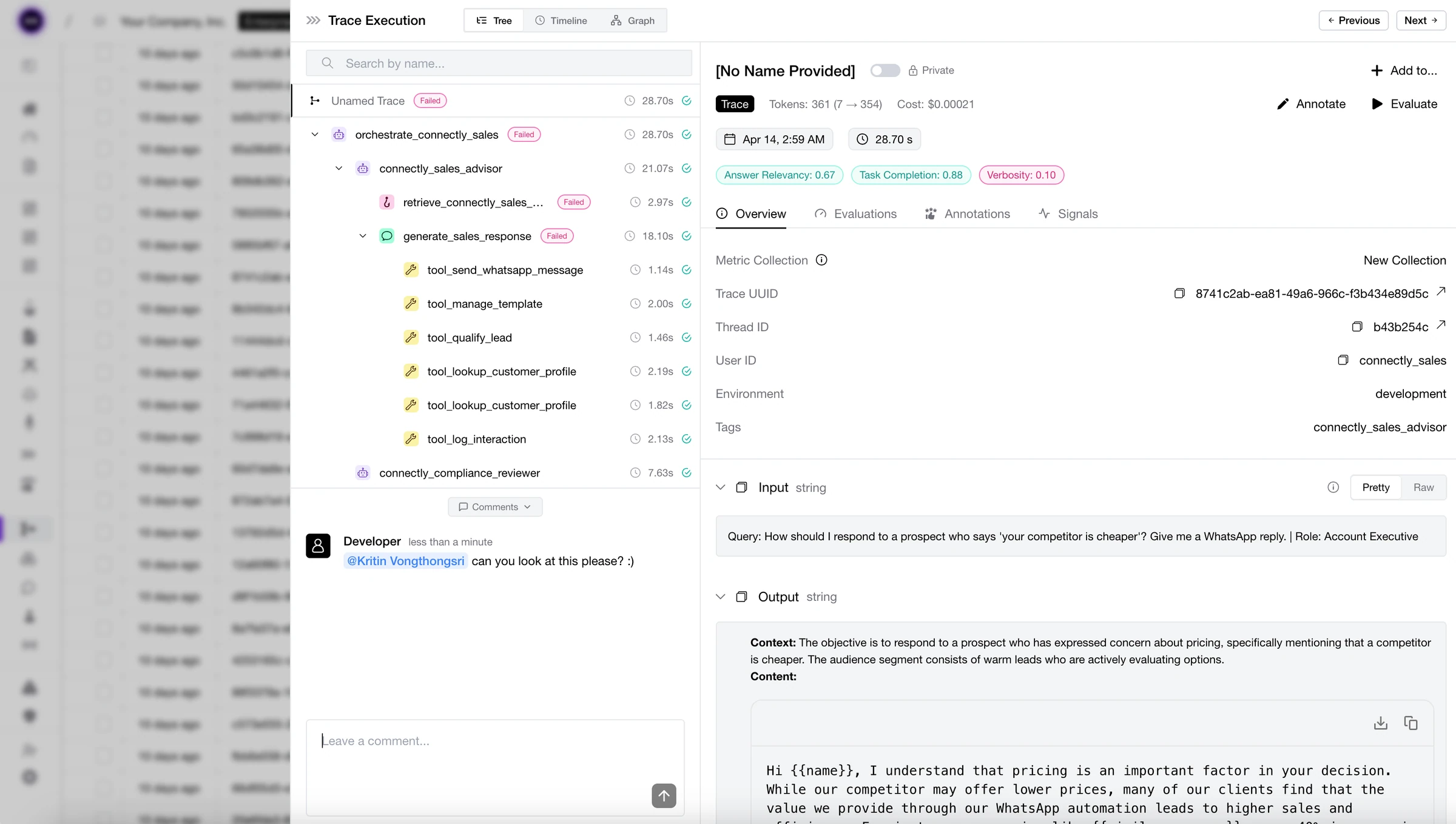
Official Confident AI documentation image, © 2024 Confident AI Inc., Apache 2.0. This general trace interface shows how execution evidence is organized; it does not depict the new audio classifier or measurements from this article.

A transcript preserves words while audio preserves the interaction
A transcript is a compact way to inspect whether an answer contained the expected information. It can expose a wrong date, a missing instruction, or a contradiction. It is also easy to search and compare across many conversations.
Audio answers a different set of questions. Did the person finish speaking? Was an apparent pause actually someone thinking? Did the agent's delivery make a correct sentence difficult to understand? A reader looking only at cleaned-up text can miss the very event that made the call frustrating.
The distinction becomes especially useful when the two forms of evidence disagree. A transcript may show a complete question even though the agent began answering halfway through it. Conversely, an awkward-looking text fragment may sound natural when it is a brief acknowledgment in a flowing conversation. Keep both forms available so reviewers can judge the interaction in context.
Confident AI's audio guide describes attaching a recording to a message alongside its role and text, with playback available in the trace. That arrangement lets a reviewer move between what was represented as text and what was heard. Audio documentation, checked October 27, 2026.
Our view is that voice evaluation needs this second track. The spoken exchange is part of the product, so its quality cannot be represented fully by the final text alone. Keeping the recording connected to the application event makes that quality easier to discuss precisely.
A useful finding includes a moment and a reason
The October 23 release adds audio classifiers intended to detect issues such as interruptions, awkward silence, and delivery problems. It also adds a step where a person listens before confirming the label. The player marks issue timestamps so a reviewer can return to the relevant part of the recording. New audio workflow.
That is a more actionable shape for a finding than a general complaint that the agent sounded wrong. A developer needs a location, a description of the observed behavior, and enough surrounding context to understand what should have happened. The classification helps prioritize where to look; the clip supplies inspectable evidence.
The reviewer should preserve the difference between a suspected issue and a confirmed one. A pause may be appropriate while a caller checks a reference. An overlapping utterance may be a helpful acknowledgment rather than an interruption. The label becomes useful when it reflects the team's actual conversational expectations.
Write those expectations in ordinary language. For example, an interruption issue might require the agent to begin a substantive answer while the caller is still supplying information, causing information to be lost or repeated. This is an illustrative criterion for a team's review process, not a definition imposed by the product.
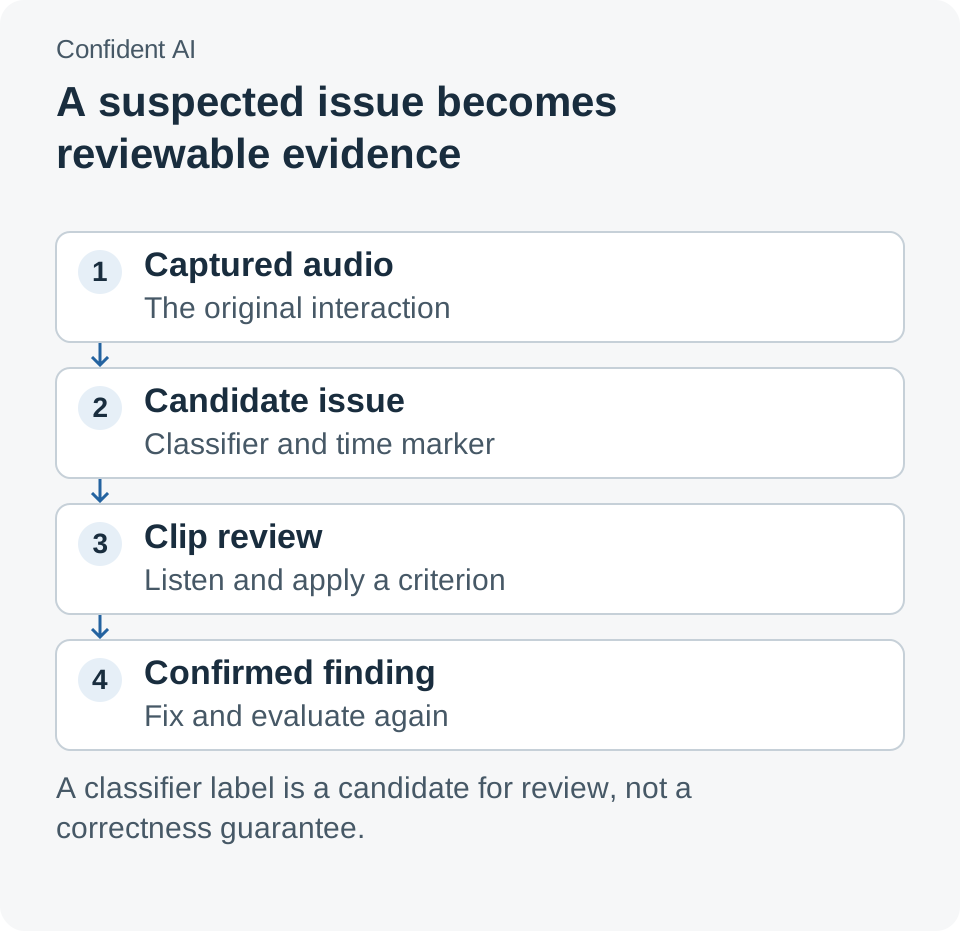
Classification locates a candidate problem. Listening and applying a clear criterion turn that candidate into a finding a team can act on.
Three conversations show why timing needs context
Consider an appointment assistant first. A caller says they want to move a booking, pauses to check a calendar, and then supplies the day. If the agent starts offering times during that pause, the answer can be semantically relevant and still disrupt the task.
In this illustrative scenario, the reviewer should listen before and after the interruption. Did the agent merely acknowledge the request, or did it commit to an interpretation before the person finished? Did the caller recover naturally, or have to restart? Those observations help distinguish an acceptable conversational habit from a defect worth fixing.
A second scenario is customer support for an unfamiliar product. The agent answers correctly but leaves the caller uncertain about whether it has heard them. A long unacknowledged interval can cause the person to repeat the question, which may then be interpreted as a new request. Inspecting the recording alongside the execution trace can help identify where the visible delay began.
Avoid choosing a universal silence threshold from a single example. Different tasks contain different expectations: looking up an account and confirming a simple instruction do not feel the same. Establish the intended interaction for the task, then compare observed pauses with that expectation. The useful question is what the person reasonably understood was happening.
A third scenario is a multilingual assistant handling an address or product code. The written transcript may contain a plausible phrase while the original pronunciation points to a different term. Replaying the caller's audio and the agent's response helps the team identify whether the problem began in recognition, interpretation, or delivery.
This does not make every error an audio-classifier problem. The application may need a confirmation step, better vocabulary support, or a more explicit way to ask the user to repeat a critical detail. Evaluation becomes valuable when it leads to an appropriate change in the interaction rather than a generic attempt to make the agent sound friendlier.
| Evidence to inspect | What it helps establish | What still needs context |
|---|---|---|
| Transcript | The words recorded and the content of the answer | Whether turn-taking and pronunciation were understandable |
| Audio clip | Timing, overlap, silence, and delivery | Whether the observed behavior harmed the intended task |
| Application trace | Which steps and tool operations occurred | Whether the final interaction met the user's need |
| Human review note | A confirmed interpretation with a reason | Whether a later change actually fixes the same case |
Capturing a trace does not guarantee a playable recording
Before evaluating audio, verify that the evidence exists. Confident AI's multimodal documentation distinguishes inline media, links to media, and files omitted from a trace. General model-call capture retains supported inline images and PDFs, while audio needs an appropriate attachment or supported voice-integration path. Multimodal tracing documentation, updated October 9, 2026.
That distinction affects day-to-day debugging. A URL in a trace is a reference to a file, not necessarily a retained copy. If the underlying location expires or the reviewer cannot access it, the trace can remain visible while its audible evidence is unavailable. Include playback in the initial integration check.
The same documentation gives a 5 MiB default limit per media item and a 16 MiB default total per span in the TypeScript SDK. Oversize media is omitted instead of truncated. A large recording should therefore be handled deliberately rather than assumed to fit because a text trace arrived successfully. Media limits.
The audio-specific guide places audio on a message with its role and content. For an evaluation pipeline, that association is useful: preserve which speaker produced the recording and which text belongs with it. A clip with the wrong message association can send the reviewer toward the wrong conclusion even when the file plays correctly.
Begin with twelve clips that explain the task
A practical pilot can start with 12 deliberately selected clips. Choose four ordinary successful interactions, four obvious failures, and four ambiguous cases that require discussion. This is a suggested starting set for review calibration, not a statistically representative sample or a vendor benchmark.
The ambiguous cases are especially valuable. They reveal whether reviewers share a definition of interruption, acceptable waiting, and clear delivery. If people disagree, record why before asking an automated classifier to reproduce a supposedly settled label.
Use a repeatable procedure so the first evaluation produces more than a collection of impressions:
- Create a project for one voice-agent use case. Keep the initial scope narrow enough that the same conversational expectations apply to the clips.
- Connect the recording and transcript to the same interaction. Use the documented audio attachment path or the relevant voice integration. Confirm that a reviewer can play both sides of a representative exchange.
- Check the evidence at the default media limits. Look for omission markers, unavailable links, and incorrectly associated messages. Fix capture problems before interpreting missing audio as an uneventful call.
- Define a small set of review labels. Write a concrete description of each behavior, including an example of a similar case that should remain acceptable.
- Run classification and listen to the flagged moments. Preserve the candidate label, the confirmed decision, and the reviewer's explanation. Include unflagged clips in the listening pass to discover missed problems.
- Change one relevant part of the interaction and repeat. Compare the same cases after the change, then add fresh examples from the task before expanding the process.
Confident AI's classifier guide explains that label descriptions influence classification and that results become filterable signals. Its older general guide and the newer October 23 release describe different stages of the product; use the current workspace controls for the new audio workflow. The durable principle is to make the desired behavior specific enough that another reviewer can apply it. Classifier guidance.
Measure the review process as well as the agent
A growing number of detected issues can mean several things. The agent may have become worse, the classifier may have become more sensitive, or the traffic may contain harder conversations. Keep the evaluation configuration and the set of reviewed calls visible so the team can tell those possibilities apart.
For the pilot, record how many flagged clips reviewers confirm and how many problems they find among unflagged clips. Also record the time needed to locate the relevant moment. These are simple observations about the team's process; they do not require claiming a universal accuracy score for the classifier.
When a change improves a clip, state what improved. The caller finished the question before the agent answered. The person heard an acknowledgment while a lookup continued. The assistant asked for confirmation before acting on an uncertain code. Concrete outcomes make a quality discussion more useful than a broad claim that a model sounds natural.
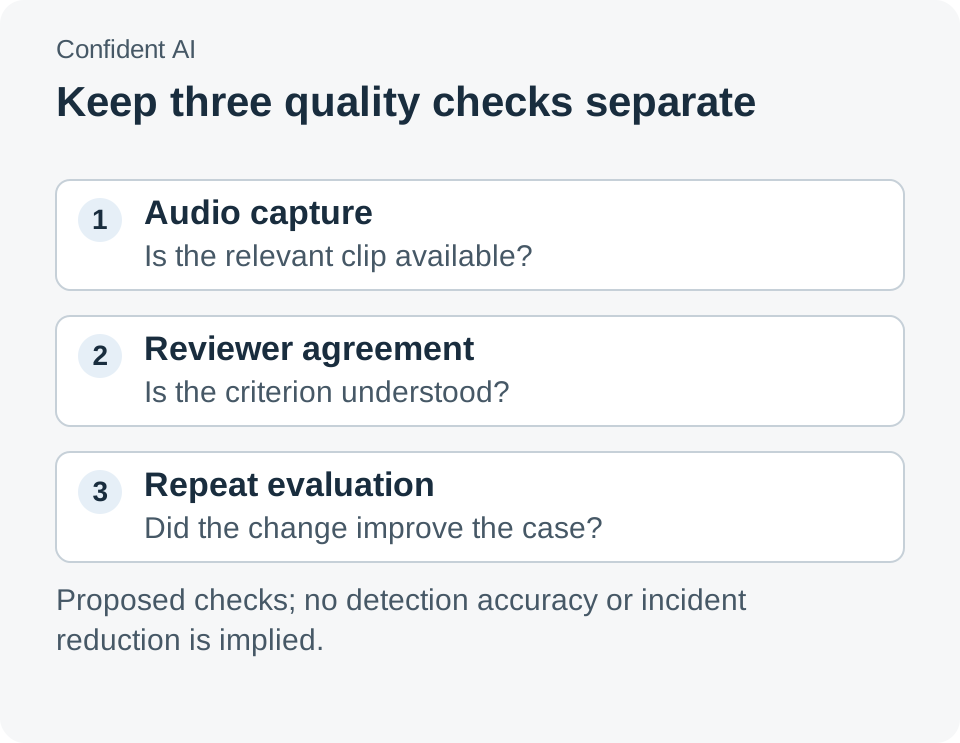
A reliable review process checks the evidence, the interpretation, and the effect of a change separately.
Recording access and storage belong in the design
Voice recordings can contain information that a team does not need for every review. Decide which conversations are appropriate to retain, who may listen, and how long the evidence is useful. Use the smallest meaningful set for a pilot rather than collecting broadly without an evaluation purpose.
Confident AI's data-handling guide describes projects as separate workspaces with their own data and access permissions. That supports a practical organizational boundary: a reviewer working on one use case does not automatically need the recordings for another. Data handling, updated October 14, 2026.
The October 23 changelog also introduces credit accounting and trace storage measured in GB-months. Teams evaluating audio should check the current plan and actual usage before widening collection. A technically successful ingestion path is only one part of an affordable, maintainable review process. Usage changes.
Conversation quality becomes useful when someone can replay it
The interesting direction in this release is the connection between a quality judgment and the underlying experience. A timestamp, a playable clip, and a review decision give developers something concrete to improve. They also give the team a record it can return to after changing a model or interaction rule.
A natural-sounding agent earns trust through the whole exchange: hearing the person, responding at an appropriate moment, and completing the task clearly. Evaluate those parts together, and the recording becomes evidence for a better conversation rather than another file in a monitoring system.
Sources
- Confident AI product changelog, October 23, 2026.
- Audio in traces, checked October 27, 2026.
- Multimodal tracing and media limits, updated October 9, 2026; checked October 27.
- Classifier tasks, updated October 6, 2026; the October 23 changelog is the source for newly announced audio and span features.
- Data handling, updated October 14, 2026.
- Official documentation image and repository, Apache 2.0 license. Scenarios and the 12-clip pilot are illustrative; no detector-accuracy benchmark was performed.
A recommendation from Telli.sh
Keep the review notes, example transcripts, and decisions behind a conversation change easy to find later. Create a Telli.sh account to organize your recordings and reference notes.