Dot, Muse, and Grok Bot: agents are moving beyond the open laptop
What ChatGPT dots, Meta Muse, and Grok Bot can do, how to set them up, and why cloud agents are moving from executing requests to noticing what needs attention.
OpenClaw helped turn a compelling idea into something people could run: a personal agent that stays connected to their conversations and tools. Its self-hosted Gateway can live on a laptop, a home server, or a VPS, with a heartbeat that periodically brings the agent back to its work. The next step is becoming visible: the computer that keeps the agent working increasingly belongs to a cloud service rather than to the person chatting with it. OpenClaw documentation.
That change makes a different kind of request practical. Instead of asking for a list of venues, imagine asking an assistant to keep an event plan moving: collect replies, compare dates, notice a missing decision, and return with a proposed next step. OpenAI's ChatGPT dots, Meta's Muse, and xAI's Grok Bot approach this ongoing work from different directions. A dot coordinates across work tools, Muse organizes personal goals, and Grok Bot brings role-based specialists into a shared working environment.
The interesting question is no longer just whether an AI can finish a task. It is whether it can recognize which task deserves attention next, while leaving consequential decisions with its user. This guide looks at the three products' capabilities, practical ways to begin, and the smaller Codex tools that help turn ongoing work into something manageable.
Hero: an original illustration of the workflow generations discussed below.
The fourth generation starts by noticing what needs attention
One useful way to read this transition is to divide AI workflows into four generations. This is a lens for this article, not an industry standard. The distinction is about responsibility: who asks, who executes, and who notices the next useful step?
| Generation | The change in responsibility | A familiar workflow |
|---|---|---|
| 1: conversational assistants | Answer a question | Explain a concept or draft a paragraph |
| 2: tool-using assistants | Perform a requested action | Search the web or retrieve a document |
| 3: task-executing agents | Carry an assigned goal through several steps | Claude Code or Codex edits a project and runs checks |
| 4: context-aware personal agents | Notice something worth doing and propose the next step | A dot, Muse, or Grok Bot follows ongoing work and raises a useful suggestion |
Claude Code and Codex make the third generation tangible. They can read a project, edit several files, run development tools, and work toward a result rather than hand over a suggestion for a developer to implement. For software teams, that moves AI from helping with a line of code to taking responsibility for a bounded piece of work. Claude Code overview, Codex CLI.
The fourth generation changes the starting point. OpenAI describes a dot researching relevant context and bringing up suggestions; Meta describes Muse proposing helpful actions based on what it knows about a person; xAI describes Bots becoming more proactive over time. The opportunity is to spend less effort remembering what to ask for. A calendar conflict can become a proposed adjustment, or an approaching deadline can become a prepared decision brief. Dots tasks and memory, Muse announcement, Grok Bot announcement.
Noticing and acting remain different responsibilities. An assistant can prepare a reply without sending it, compare flights without buying one, or propose a code change without releasing it. That separation is what makes initiative useful: the agent absorbs the monitoring and preparation, while the user retains the decisions that carry consequences.
A dot connects the conversation to the work behind it
ChatGPT dots have their own cloud computer and browser, and can coordinate work with ChatGPT Work and Codex. Their appeal is continuity across activities that would otherwise live in separate conversations. A research thread, an event plan, and a coding task can become parts of one ongoing responsibility rather than three requests the user must keep synchronizing. Meet dots.
Consider an event organizer. A useful first assignment would be to follow a planning document and connected correspondence, maintain the unresolved decisions, and draft responses when a venue changes its offer. For a small development team, the equivalent is following an issue, gathering the reproduction details, and handing a clearly scoped fix to Codex. These are starting scenarios, not promises that every connected service or task is supported automatically.
A dot's memory helps preserve preferences and ongoing context between conversations. Its Activity view exposes delegated work, while Scheduled lets users inspect recurring tasks. That matters for a responsibility that lasts longer than an afternoon: the assistant should remember the objective, but the person still needs an accessible place to see what is running. Getting started.
Begin with one responsibility, not every account
- Open dots in the ChatGPT mobile app, desktop app, or a desktop browser. Mobile web is not supported.
- Create and name your dot, then choose its appearance or keep the defaults.
- Connect the plugin needed for the first task. For an event plan, that could be the service containing the planning material.
- Describe the result and its boundary: keep an updated decision list and draft replies, but ask before sending anything.
- Inspect delegated work in Activity and recurring tasks in Scheduled. Adjust the assignment after reading its first results.
The setup is deliberately small. A messaging channel, an application connection, and access to a local computer serve different purposes. Adding a contact method makes the assistant easier to reach; it does not supply the documents required for its work. Likewise, connecting a laptop is optional for cloud-only tasks, but a task using that laptop needs it online with the ChatGPT app open. Computers and apps.
For cloud coding, set up the Codex cloud environment and repository before handing over the task. Define action boundaries in Settings > Personalization > Custom rules, under Permissions. When stopping work, inspect delegated tasks and recurring schedules separately; pausing the main dot conversation does not cancel them all. Task setup, Dot controls.
Access is rolling out rather than available to every ChatGPT account. As of October 12, 2026, OpenAI lists Pro 100, Pro 200, and Pro 500 users over 18 outside the EEA, UK, and Switzerland, alongside worldwide Business Premium and Enterprise rollout. Enterprise access requires an administrator to enable it. Check that dots is available in your account before planning connected workflows. Dots access.
Muse turns personal goals into work that keeps moving
Meta introduced Muse on September 8, 2026, as a personal agent that can continue working after its app closes. Its dedicated cloud computer gives it a browser for tasks that reach beyond answering questions. The useful unit is often a goal rather than a single prompt: prepare a family trip, organize a school week, or turn a dietary preference into a usable meal plan. Meta's introduction to Muse.
Muse's Goals view makes those ongoing responsibilities visible. The official example below groups a child's sports schedule, weekly meals, and a family trip rather than treating them as unrelated chats. Persistent memory, side conversations, and adjustable proactive suggestions help it return to the relevant context without asking the person to restate everything. How Meta designed Muse.
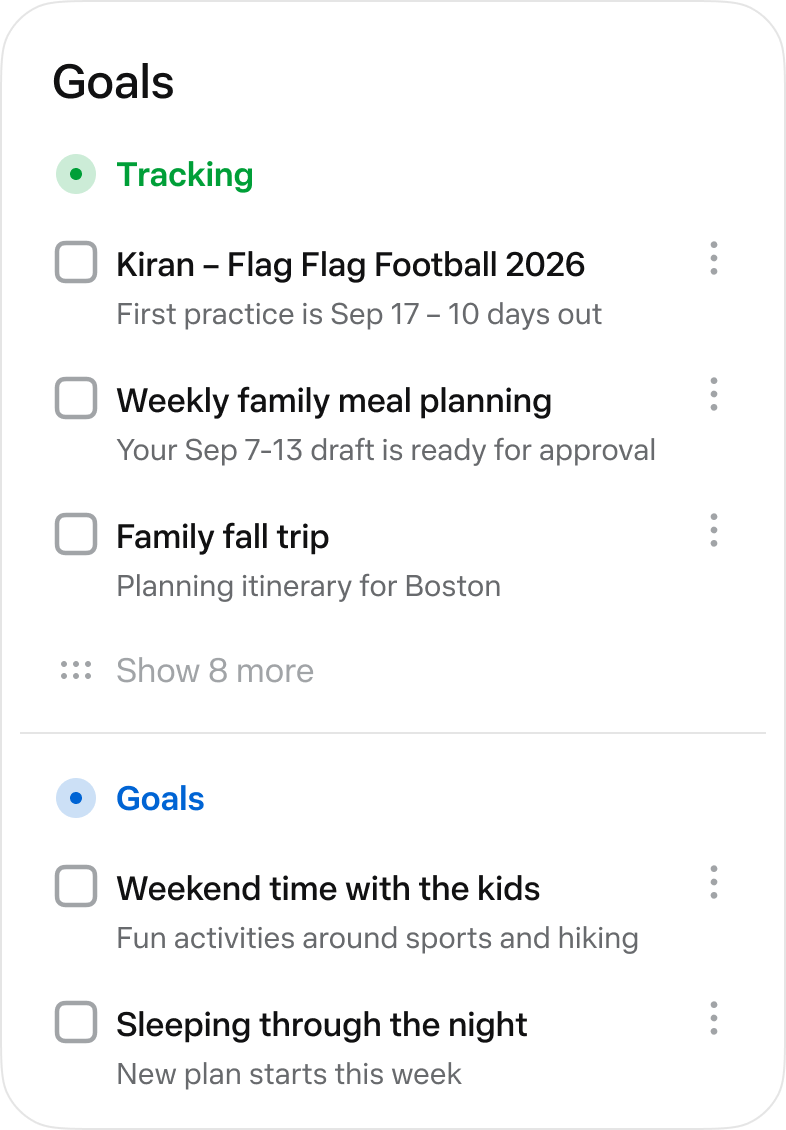
Official Muse interface excerpt from Meta's product design article. Source: How We Designed Muse.
Two practical starting points are meal planning and travel preparation. A meal-planning assignment can combine dietary constraints with recipes and a grocery list; a trip assignment can collect options and build a proposed itinerary. Muse can also produce artifacts such as documents and interactive pages, giving a plan a form that is easier to use outside a chat. A study guide or a spending tracker is more useful when it remains a working artifact rather than disappearing into a long conversation.
Connect the service needed for the first goal
- Open the official Muse app or website and complete the account flow available in your region.
- Open Settings > Connectors.
- Select Connect beside the required service and review the connection information.
- Select Continue, then sign in and authorize the requested access.
- Start with a goal that produces a reviewable plan or draft. Check activity and permissions before adding purchases or outgoing messages.
Meta's connector help provides this connection flow. Sensitive connector writes require approval each time, rather than an Always allow rule. Shopping deserves particular attention: Muse's launch describes one-time cards through Link by Stripe, while Shop Pay and 1Password support were announced as upcoming additions. Start with the capabilities currently offered in the app, not a future integration mentioned in a launch story. Connector help, Connector guidelines.
The initial rollout covers the United States on iOS, Android, and muse.ai. For a new user, the practical decision is straightforward: choose one recurring personal responsibility, give Muse enough context to help, and tune how often it should make suggestions. The value comes from a goal moving forward with less repeated coordination, not from connecting the largest possible number of accounts.
Grok Bot gives recurring work a specialist and a cloud computer
Grok Bot approaches the same shift through roles. A Bot has a name, a job description, persistent context, and routines; several Bots can cooperate. That makes it a natural fit for work that repeatedly crosses the same sources, such as researching sales leads, following product feedback, or preparing a daily brief. xAI introduced it on August 11, 2026. Introducing Grok Bot.
The official guide shows a cloud computer with browser access, account connections, and routines. A research Bot could prepare a source-linked comparison each morning. A sales Bot could collect candidate accounts and draft outreach for review. A software-oriented Bot could gather a reported bug's context before work moves into Cursor. The role description is useful because it narrows what the Bot should pay attention to, not because a title makes it an independent employee. Grok Bot 101.
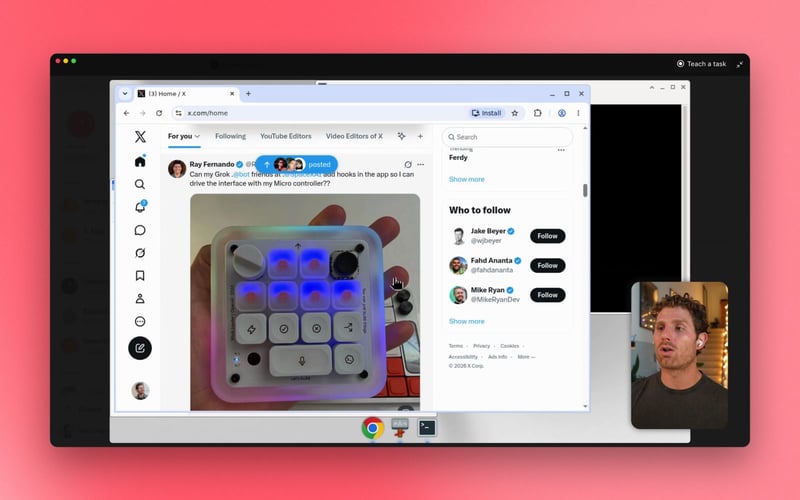
Official Grok Bot guide image from xAI, showing the cloud-computer interface. Source: Grok Bot 101.
Give one Bot a concrete job before adding colleagues
- Use the official Grok Bot entry point and sign in with an eligible account.
- Create a Bot and set its name, title, and description around one responsibility.
- Connect the account or cloud-browser session needed for that responsibility.
- Review allowed and blocked actions in Settings > General > Agent.
- Run a draft-only assignment, inspect the result, and then add a routine if the task is genuinely recurring.
The shared-computer model is important. A user's Bots share one persistent cloud computer, including its files, browser, and logins. A researcher Bot and a sales Bot are therefore not separate credential compartments. Keep that in mind before combining personal accounts and company accounts in the same working environment. Grok Bot FAQ.
Current access includes eligible Cursor and SuperGrok plans, alongside Enterprise, with desktop macOS, Windows, and iOS conversation surfaces. Weekly usage is included under the relevant plan, and additional usage can incur token-based charges. A sensible first routine has a defined frequency and a small output: one reviewed daily brief is easier to evaluate than several always-running specialists. Availability and usage.
Choose the ongoing responsibility before choosing the agent
The three products overlap, but their starting points differ. A dot is particularly interesting when ChatGPT, connected work material, and Codex belong in the same flow. Muse foregrounds personal goals and useful artifacts. Grok Bot foregrounds role-based work and routines. None of those starting points removes the need to define the desired result.
| Product | A useful first responsibility | What to inspect |
|---|---|---|
| ChatGPT dots | Maintain a planning brief and coordinate a scoped Codex task | Activity, Scheduled, connected sources, and permission rules |
| Meta Muse | Prepare a meal plan, study artifact, or trip itinerary | Goals, activity, memory, and approvals for sensitive actions |
| Grok Bot | Prepare a recurring research or lead brief | The role description, routine, review controls, and shared logins |
A good first assignment should leave an artifact another person can judge. Ask for sources alongside a research brief, unresolved decisions alongside a plan, and checks alongside a proposed code change. This makes the comparison about useful outcomes rather than the number of messages an agent sends. It also reveals whether the ongoing responsibility is worth keeping.
The cloud keeps work available; the task still needs a trigger
OpenClaw separates the heartbeat that wakes an agent from the machine running its Gateway. A persistent VPS or home server provides an always-available runtime; a heartbeat supplies periodic attention. The same distinction helps explain cloud agents: keeping a computer available and deciding when to revisit a task are separate pieces of the experience. OpenClaw heartbeat, Remote Gateway setups.
For someone managing research or development, this affects what happens after closing the laptop. Hosted work can continue in its cloud environment. Local Codex work that needs a checkout on your computer still needs that computer powered on and the app running. The assistant's friendly surface does not change where the files and tools live. Codex scheduled tasks.
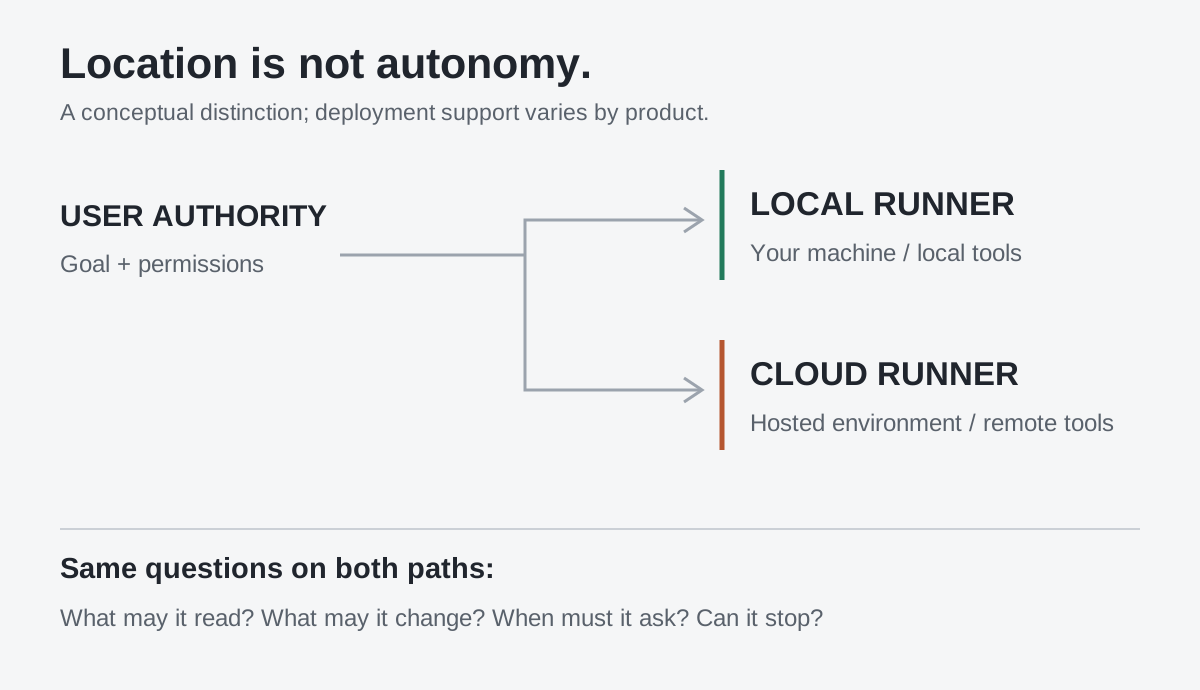
Original diagram: a local task depends on the connected computer; hosted work uses the service's execution environment.
For a recurring assignment, specify the source, frequency, time zone, useful output, and an end date. Also say when nothing should happen. A release monitor that stays quiet on unchanged days is more valuable than one that turns every check into another notification. Review the first few results before treating the schedule as dependable.
Skills, plugins, and worktrees make Codex easier to delegate to
Several smaller Codex features matter even without a personal cloud agent. They reduce repeated setup, keep work separated, and make requests easier to carry through. Their usefulness is practical: a reusable procedure, a supported connection, or a separate checkout can improve today's workflow without waiting for the next agent generation.
Skills capture a procedure worth repeating. Use the Skills view or /skills in the CLI; $skill-creator can help build one. A useful skill for release notes would define the inputs, the comparison steps, the output format, and the checks before publishing. It saves the user from explaining the same method in every task. Codex skills.
Plugins supply capabilities and service connections. Browse the Plugins directory, inspect what the plugin needs, install it, and complete the service connection. The CLI also offers /plugins; installed tools require a new session there. Support varies by surface, so use the directory and connection flow offered by the app you are actually using. Codex plugins.
Worktrees keep independent changes apart. In a Git project, choose Worktree in the new-chat composer, select a starting branch, and submit the task. One agent can investigate a bug while another prepares documentation without both writing into the same checkout. This is particularly useful when the main working directory already contains unfinished changes. Codex worktrees.
Schedules bring back a task at the right time. Test the prompt manually, then request its recurrence, destination, and time zone. A daily check of a public release page is a manageable starting point. Review the saved schedule, its early outputs, and the local or cloud requirements before relying on it. Voice input, where available, makes giving the assignment easier; it does not change those execution requirements.
These pieces fit together without needing an unlimited mandate. A skill describes how to prepare a release brief, a plugin supplies an authorized source, a worktree contains the code change, and a schedule asks for a follow-up. The personal agent can coordinate the arrangement, but each part still has an understandable job.
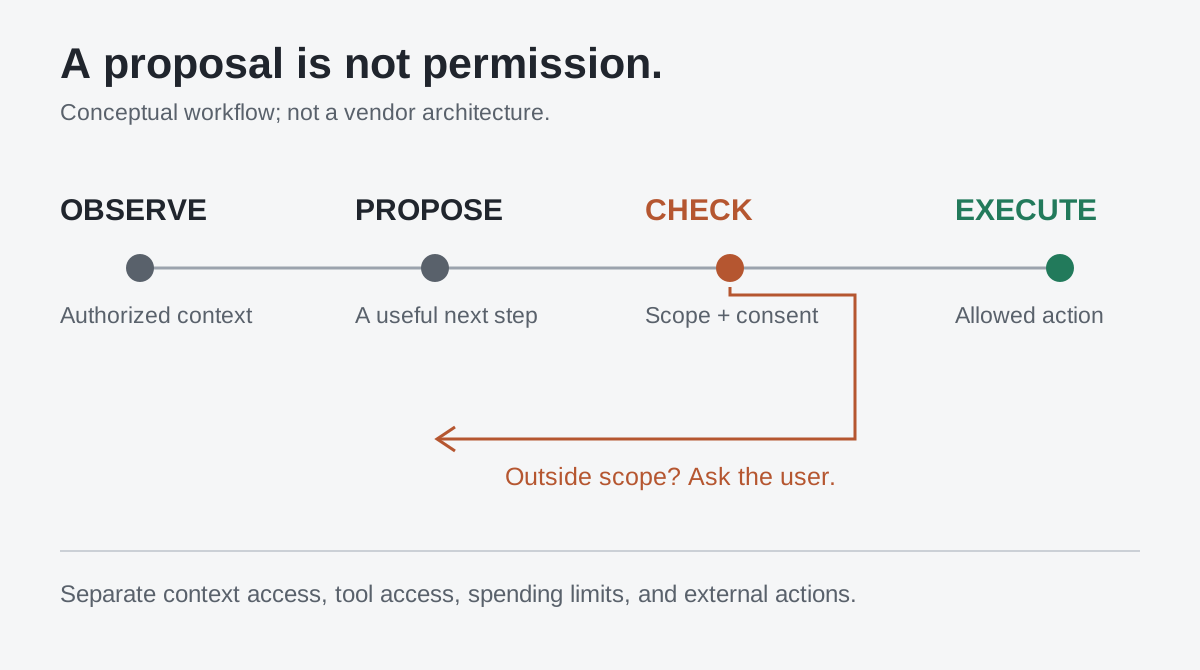
Original diagram: noticing a useful action and authorizing it are separate steps.
The bottom line: what will the fifth generation take responsibility for?
The fourth generation is exciting because an assistant can start recognizing what matters before a person writes the next prompt. The fifth generation's challenge may be coordination: understanding which specialist should handle a problem, what context each needs, and when the user should decide. More initiative is only useful when it reduces the user's coordination work rather than creating another team to supervise.
Imagine a personal system that notices a work trip, prepares the schedule, asks a coding agent to finish the necessary change, and brings back the decisions that require attention. It would need visible costs and clear boundaries between personal and professional material. After agents learn to execute, and then learn to notice, can they learn to coordinate reliably around a person's life? What should a fifth-generation agent take responsibility for, and what should always remain ours?
Product information and linked documentation checked October 12, 2026. The workflow examples are suggested starting scenarios; the product images come from the named vendors.
Keep the sources behind your decisions
Comparing agents is easier when the original sources, your notes, and the results of your own trials stay together. Create a Telli.sh account to organize that material into a reference you can return to as products change.