Can one sentence build a contract approval workflow in Box?
Box Architect starts from a business outcome. A contract intake example shows what it can draft and what a process owner still needs to decide.
A sales team receives a vendor's contract with an attachment called “final.” The purchase amount is in a schedule on page 13. The jurisdiction field is missing, and the assigned reviewer is away. Anyone who has handled that request knows how much work hides inside the instruction “send the contract for approval.” The steps live in policy documents, team habits and the judgment of whoever opens the file first.
Box, the enterprise content management platform, introduced Box Architect at BoxWorks on November 5, 2026. The announced product starts from an outcome described in ordinary language and uses procedures and content already held in Box to propose a workflow. Box says Architect will assemble supporting components such as forms, metadata templates, agents and apps, and later surface bottlenecks for owners to consider. The company said it would begin rolling out Architect in beta to Enterprise Advanced customers in the fourth quarter of 2026. BoxWorks announcement and availability
The first draft of a workflow could get easier to produce. The valuable work is deciding how to handle the cases that make the process fail. Contract intake gives us a small enough example to see exactly which decisions belong in the draft, what the team should check before a rollout, and what a useful pilot would measure.
Box headquarters in Redwood City, photographed in March 2017 by Jeanjung212. Context photograph, cropped and resized, CC BY-SA 4.0. Image source · License.

A business outcome becomes a draft that people can inspect
Box's November 5 walkthrough describes a design, build and improvement sequence. It starts with the desired outcome and the organization's existing procedures. Architect proposes stages, decisions and handoffs, then can assemble the related Box components. The company names Box Forms, Extract, Automate, Apps, Doc Gen and Sign among the capabilities that may be used. The process owner can revise the draft, try edge cases, and add review and approval stages before deployment. Box also says the product will suggest improvements after finding issues such as recurring missing information. Box Architect product announcement
The workflow is easier to reason about if each step has a specific verb. Intake receives a file. Extraction finds fields. Routing identifies the reviewer. Approval records a decision. Distribution shares the approved result with an authorized recipient. These steps can use the same documents and still have quite different consequences. Someone may be able to extract a purchase amount from a contract even though only procurement can approve it. A person who approves a purchase may still have no reason to grant an external party access to a whole folder.
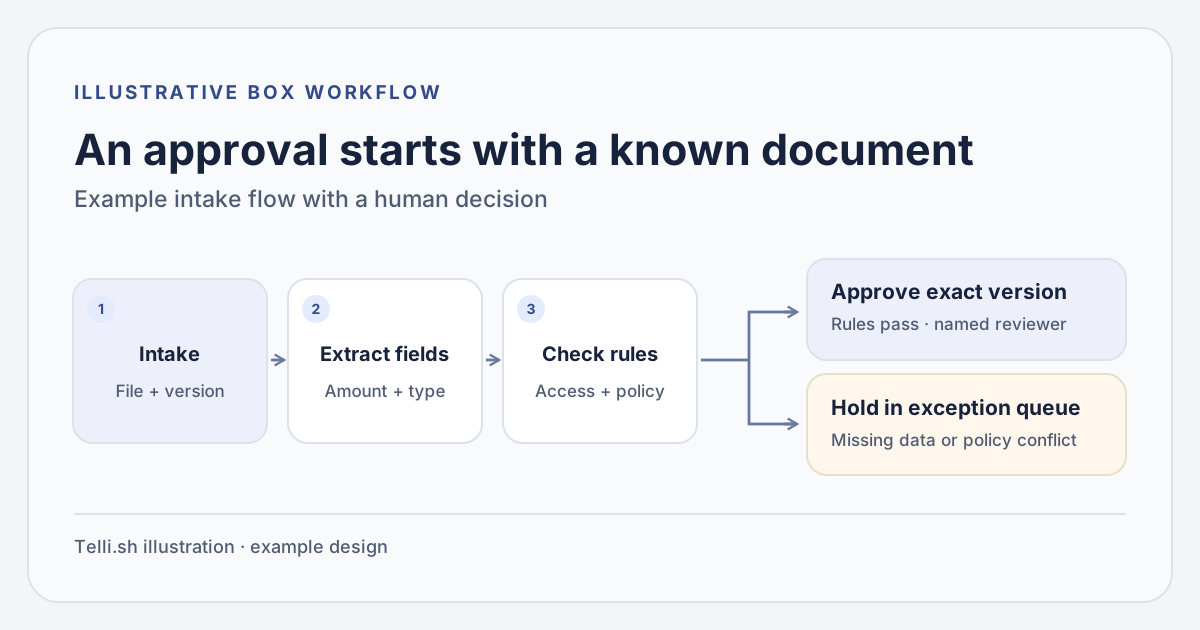
A contract approval example separates intake, extraction, routing and the decision. Original illustration by Telli.sh.
A well-scoped starting instruction could look like this:
Receive incoming vendor agreements and identify the request owner, contract type, amount and jurisdiction. Route complete requests to the owner named in the approved routing table. Send missing fields, conflicting amounts and unfamiliar jurisdictions to a named reviewer. Hold external sharing until an authorized person approves the exact version and recipient.
That instruction is more useful when it points to an actual policy. Add the controlled version of the routing table and define what happens if two rules apply. Clarify which amount to use, including whether the currency and contract term affect the threshold. If Legal and Procurement both have a role, specify whether they review in parallel or whether one must wait for the other. A workflow proposal gives people something concrete to inspect while they settle those choices.
Box says the content remains in Box subject to its permissions and policies. A team designing the process should still test it with accounts representing the submitting employee, the reviewer and a user with no access to the agreement. The important artifact is the approved workflow graph with its inputs, handoffs, exception paths and decision owners. When that graph exists, a new team member can understand what happens to a file without reverse engineering a conversation with the assistant. Box Architect product announcement
The exception queue is where the design proves itself
Consider two copies of an agreement. The uploaded file says that the total is $49,500, while its signed amendment raises the amount to $52,000. The numbers are easy to extract. Deciding which file controls the approval is a different task. In this illustrative case, both values should appear in the exception report with their source pages and filenames, and the automated route should stop. If the workflow picks a number without preserving the disagreement, a reviewer may never learn that a second amount existed.
Or consider a record with the right content and the wrong access. Someone has permission to request a review but attaches a file outside the workflow's permitted folders. The person should see that the request is blocked or incomplete without getting a preview of the restricted document. If a document owner moves the file, an old link or approval task should behave according to the organization's access rules. That behavior belongs in the pilot because an enterprise rollout will rarely have a single folder with identical access for every employee.
A third case tests replacement. An approver selects version 4, but version 5 arrives just before the signature request. Decide whether the review should reopen, how version 4 remains visible in the audit record, and which person can resume the request. This is an example of an approval decision that must attach to a specific version. A clause-level summary can still be useful, but the workflow should show exactly which agreement the human decision covered.
| Test case | Evidence the reviewer needs | Expected action in the pilot |
|---|---|---|
| Standard agreement | Document version, required fields, routing rule | Assign the designated reviewer |
| Amounts conflict | Both figures with page or file references | Pause and request clarification |
| Required file is restricted | Access result and permitted corrective action | Hold the workflow without exposing the document |
| New revision arrives after approval | Approved version and new version | Reopen review or follow the team's documented revision rule |
| Duplicate request enters twice | Existing request ID and intake timestamp | Link or flag it without creating a second approval |
The requests in this table are illustrative. Build the pilot with sample documents carrying known answers and the same mix of layouts your team sees. A clean one-page agreement is useful for establishing the happy path. A rotated PDF scan, a multilingual attachment or a missing signature field will show whether the process remains legible when extraction confidence drops.
A second workflow can test whether the approach travels across teams. An accounts payable group could extract invoice identifiers and compare amounts with purchase orders before sending mismatches for review. The job shares an intake pattern with contract approval, yet the evidence changes. The person reviewing an invoice needs the order number, line items and tolerance rule rather than contract terms. Keep the first pilot focused on one of the two flows. When the second team tries the same design method, look at whether it can reuse the intake and exception structure while substituting its own controlled sources and approvals. That is a more useful sign of reuse than a visually similar diagram.
Architect beta and the controls available today have separate dates
In its November 5 announcement, Box grouped several products under agentic workflow automation and protection. Architect was slated for a beta rollout to Enterprise Advanced customers. Box said the new threat protection capabilities would be available to eligible plans in early 2027. It also said agent security controls were already generally available for Shield and Enterprise Advanced customers. The agent controls include classification-based policies, restrictions on actions through Box's Model Context Protocol server and threshold-based alerts. Verify plan and tenant access before using a demonstration of one capability to set expectations for another. Box launch announcement and availability
The distinctions matter in a workflow that may create records or share files. For example, Box documents administrative MCP rules for write actions called by an external AI agent. An administrator can use those controls to constrain supported operations on that path. A Box-native approval flow still needs to be tested through the exact components it uses. Map each write to its component and policy, then check the actual outcome from the role that performs it. Box Support documentation for MCP guardrails
Designing a workflow and controlling its runtime are separate costs. A reviewer might spend less time connecting forms and metadata, yet more time curating the rules and preparing test documents. If policy is spread across old versions, shared drives and email, the first improvement may be a single current routing table. A repeatable workflow makes drift visible because each exception has somewhere to go. An approved process can also be revised faster when an ownership change is confined to a small rule instead of a dozen individual handoffs.
Give the workflow owner a concrete policy change to rehearse. Suppose a revised purchasing rule lowers the threshold for Legal review on December 1. A case already under review may belong to the old rule, while a new submission should follow the new one. Write down which timestamp controls that decision and who can approve the change. Keep one test contract on either side of the effective date. When a draft revision also changes an extraction instruction, repeat the amount and currency checks separately so the team can tell whether a new route came from policy or from a different reading of the document.
Compare two drafts before sending a live contract
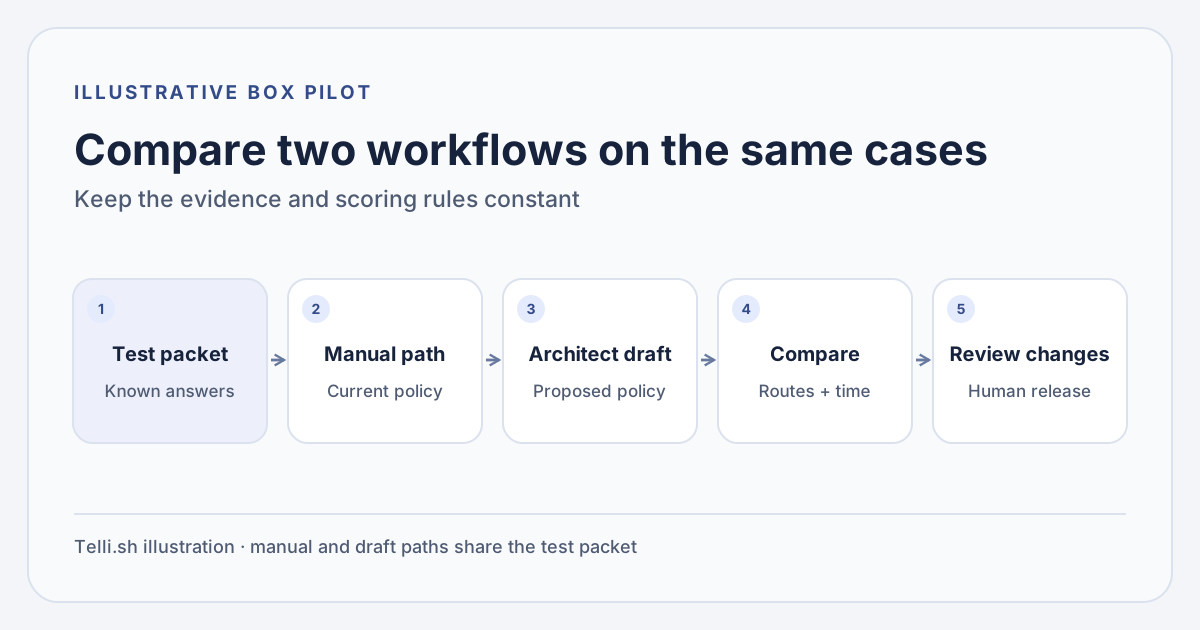
Use the same test packet and scoring rules for a manual process and an Architect draft. Original illustration by Telli.sh.
- Choose one narrow workflow. Start with a single business unit and one agreement type. Write down the current process and select a process owner who can answer routing and escalation questions.
- Collect approved source material. Record the policy versions and authorizations the workflow can use. Prepare fictitious or properly de-identified documents, including known exceptions and an access-denied test account.
- Draft the flow in the eligible tenant. Give Architect the goal and the relevant procedures once beta access is available. Review the proposed forms, metadata, routing and decisions with the owner. Make the exception queue explicit.
- Replay the same cases manually and through the draft. Score whether each required value came from the right version, whether each route reached the right role and whether restricted information stayed restricted.
- Review changes before activation. Record the initial draft, manual changes, named approvers and rollback route. Put live sharing or signature behind the required approval. Confirm what happens when a run is repeated or a rule is changed.
Separate build time from operating time. Track the minutes to create the first usable draft and the minutes to fix it after the first review. During replay, track the share of complete cases routed correctly, the share of exception cases caught, and the number of decisions a human had to reverse. Include unauthorized test cases even if they are rare. A workflow that processes 20 easy samples and exposes one restricted agreement has demonstrated a release problem.
For the first live batch, retain a manual way to handle a submission and define who can pause new runs. Compare the record the team sees with the one the submitter sees. Both should be able to tell whether a request is waiting for information, awaiting approval, or has been returned, with detail limited to each role's access. If a process becomes easier to create but leaves employees guessing where their contracts went, the work has moved from setup to support.
The useful workflow is the one you can explain when it stops
The most compelling piece of Architect's proposal is the editable design between a business goal and a working process. It gives an owner something to discuss with Legal, Procurement and IT before a real contract moves. A successful pilot should answer a question that outlasts the demo. When a document stalls, can the person who owns the process tell which rule stopped it, which version it saw and who can act next?
Sources
- Box Architect announcement and walkthrough
- Box Architect product page and public vendor demo
- BoxWorks release, plan eligibility and timing, November 5, 2026
- Box Support documentation on MCP guardrails
- Box headquarters context photograph by Jeanjung212
For a searchable record of the conversations and decisions behind your work, Create a Telli.sh account.