Can a 0.9-inch ring screen make an AI approval clear?
The Aina Ring proposes actions from your calendar, apps and agents. A meeting reminder, a ride and a message show where a flick helps and where you need more room.
You are carrying coffee and a laptop when your next meeting starts. A small screen on your finger offers to join it. There is a second possibility. Your calendar says you are still in another meeting, and the ring offers to email the next group that you are running late. A thumb flick could resolve either prompt, but the two actions deserve different amounts of attention.
On November 5, 2026, consumer hardware company Aina opened preorders for a ring with a 0.9-inch OLED display and a thumb-operated controller. It pairs with an iPhone and is designed to work with a Mac. Aina's pitch is that the ring can surface an action just as it becomes useful, using context drawn from connected devices, apps and agents. The company listed a limited preorder price starting at US$399 and said it planned to begin shipping in January 2027.
The ring gives us a concrete question about proactive assistants. How much of a decision can fit on your finger? A meeting control, a ride reservation and a message to a colleague show where a quick gesture saves time and where the full app earns its place.
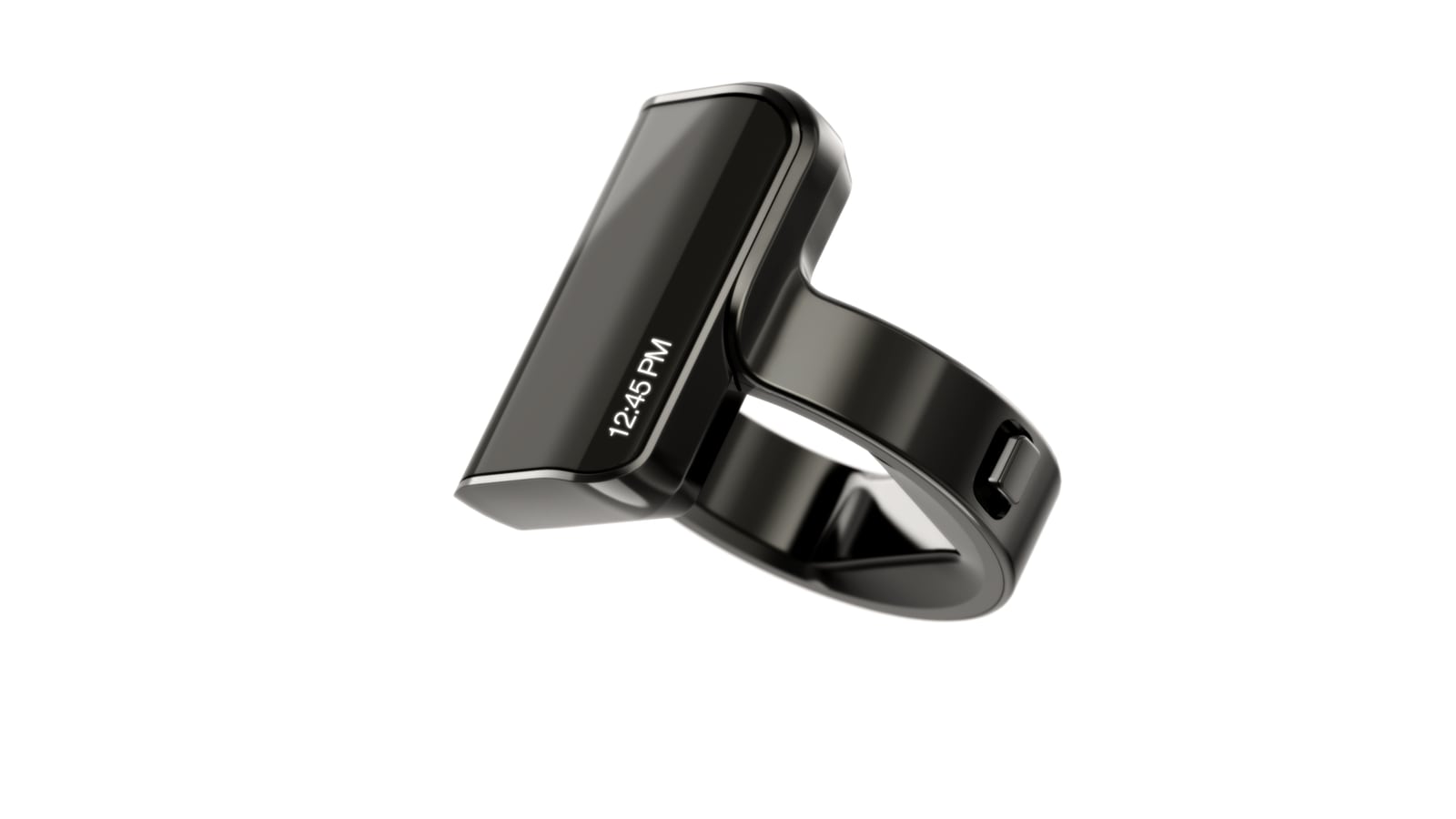
Aina provided this product image to the press. Telli.sh cropped and resized it for the web. Aina press kit · Original image
A flick is the last step in a longer decision
Aina calls its context-based suggestions Cues. The company describes a system that considers information such as calendar entries, location and app habits to anticipate useful actions. Its Shifter controller can move among actions and approve or reject a suggestion. Holding the center button opens the voice interaction. A separate Remote mode surfaces controls for the current activity, such as media playback or a meeting on the Mac. Aina product overview
That gives the ring three ways into a task. Cues present a suggested action, Voice lets you state what you want, and Remote gives you a control for something already in progress. Treat those as different decisions. You can usually tell whether a podcast paused by listening. An agent that proposes sending a message needs to tell you who will receive it, what it says and what happens when you approve it.
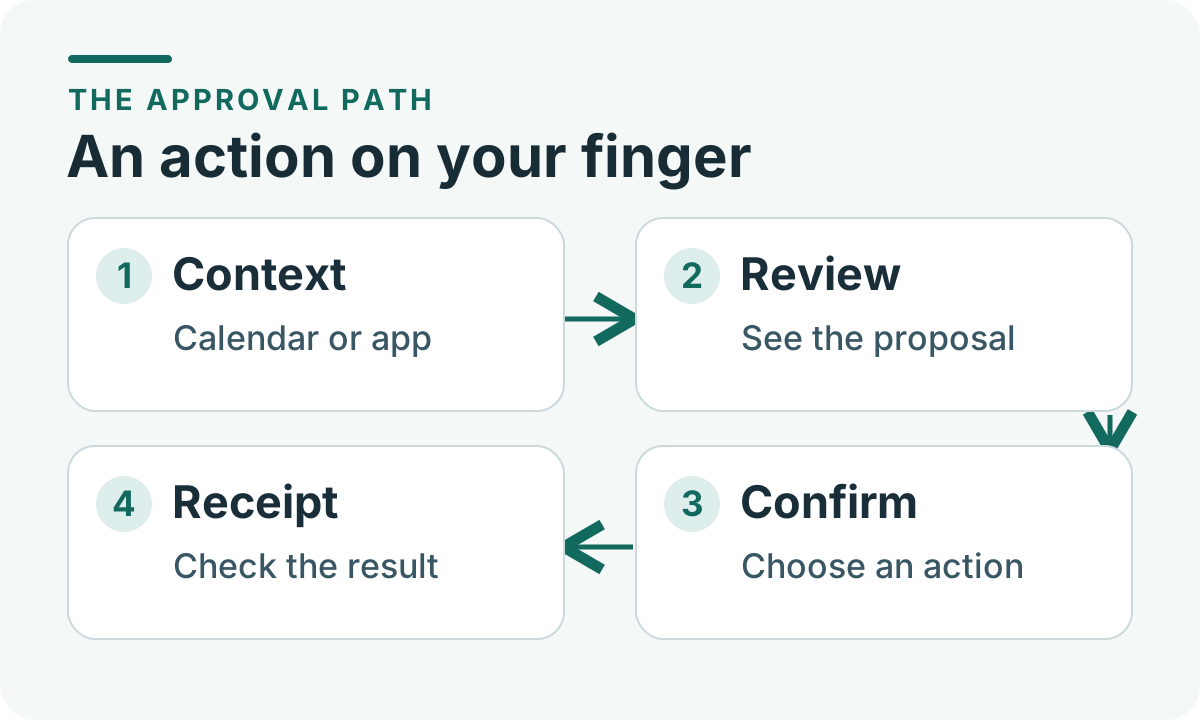
An approval sequence for a small screen. Original illustration by Telli.sh.
The design opportunity is a shorter path from intention to action. Every time an assistant prepares a repetitive step, the ring can save the time you would otherwise spend finding the right control. The design risk is that the gesture gets easier even as the thing you are authorizing gets harder to inspect. Think of the display as a narrow window. Its job is to show exactly the part of the action that changes your answer.
The specifications tell you what the company is building around. Aina lists a 180 ppi display, seven ring sizes with the same screen size and an advertised battery life of up to 18 hours. The company rates it IP65 and advises against submersion. Battery life across a day of calls and repeated prompts, outdoor readability and the range of hands that can comfortably work the Shifter will matter as much as the headline specifications once units reach buyers.
A meeting control is an easy place to see the benefit
Picture a call where you keep your notes open on a second screen. You want to mute the microphone while a delivery arrives at the door. A dedicated gesture could remove the need to locate the call window, bring it to the front and click the right button. The action is short and reversible. A clear muted indicator on the ring or in the meeting app would tell you that it worked.
Aina's product page lists microphone, camera and notetaker controls in its meeting Remote mode. Those controls have different consequences. Muting a microphone changes what a room can hear immediately. Turning on a camera can expose something you did not intend to show. Starting a notetaker can create a record that persists long after you leave the call. Even if each appears as a small toggle, users should be able to identify the active meeting and the new state before moving on.
Try this thought experiment on a pair of overlapping meetings. Suppose a rehearsal is open in one app while a client call starts in another. A simple label like “Mic” can be ambiguous. The ring could show a recognizable meeting name or the app it is about to control. When the calendar and the currently active app disagree, that small bit of context becomes the difference between a shortcut and an interruption.
The same principle applies when a call starts late. Your calendar gives the assistant a good reason to show a join action. The join confirmation should still make the target recognizable, especially for repeated meetings with similar names. A quick action starts to feel useful when you can answer “which one?” immediately.
A ride changes the amount of information you need
Aina illustrates Cues with an Uber shortcut before a regular commute and a ride suggestion after arriving at an airport. The attraction is obvious if you travel the same route each morning. The assistant can bring a familiar task into view while your hands are occupied. Once the trip differs from the usual pattern, the same shortcut needs more detail to remain useful. Aina's Cue examples
An airport pickup makes the difference tangible. An assistant may infer the destination from a hotel booking while the pickup app chooses a terminal or rideshare zone. The passenger may be at another door or traveling with someone who needs a different pickup point. Reviewing the correct place, vehicle type and displayed cost matters more than saving a few seconds of navigation. The full phone app gives you space to make those comparisons.
For a recurring route, a short preview might be enough if it names the destination, shows the pickup and tells you whether the gesture opens a quote or commits to a booking. Those are two useful versions of the shortcut. A glance can move you to the right screen with details already filled in. A genuine one-step booking would need a dependable confirmation and a clear path to change or cancel the result. Aina describes rides as a use case. The launch materials do not establish which details every ride confirmation will show.
This is where a wearable can reduce a routine interaction without taking away a useful checkpoint. Keep the convenient part, which is making the likely trip easy to find. Give the person a quick route to the phone when the location, price or passenger changes. If the device earns trust in the familiar case, users can tell more easily when a suggestion deserves a longer look.
A message needs a recipient you recognize
Aina's November 5 announcement describes an assistant cue that offers to send a late-arrival email. Picture a recurring team check-in and a quick note to the organizer. The action might fit a concise preview if the organizer is identified and the message is a short sentence. An email to every invitee, a message sent from a work account or a note with a revised arrival time warrants more room.
| Situation | What should be visible at approval | Where the action can go next |
|---|---|---|
| Mute a meeting microphone | Active meeting and the resulting mic state | Verify the meeting indicator |
| Send a running-late note | Recipient, sending account and the actual text | Review and edit a longer message on the phone |
| Book a ride | Pickup, destination, price when available and whether the booking is final | Open the full itinerary or cancellation view |
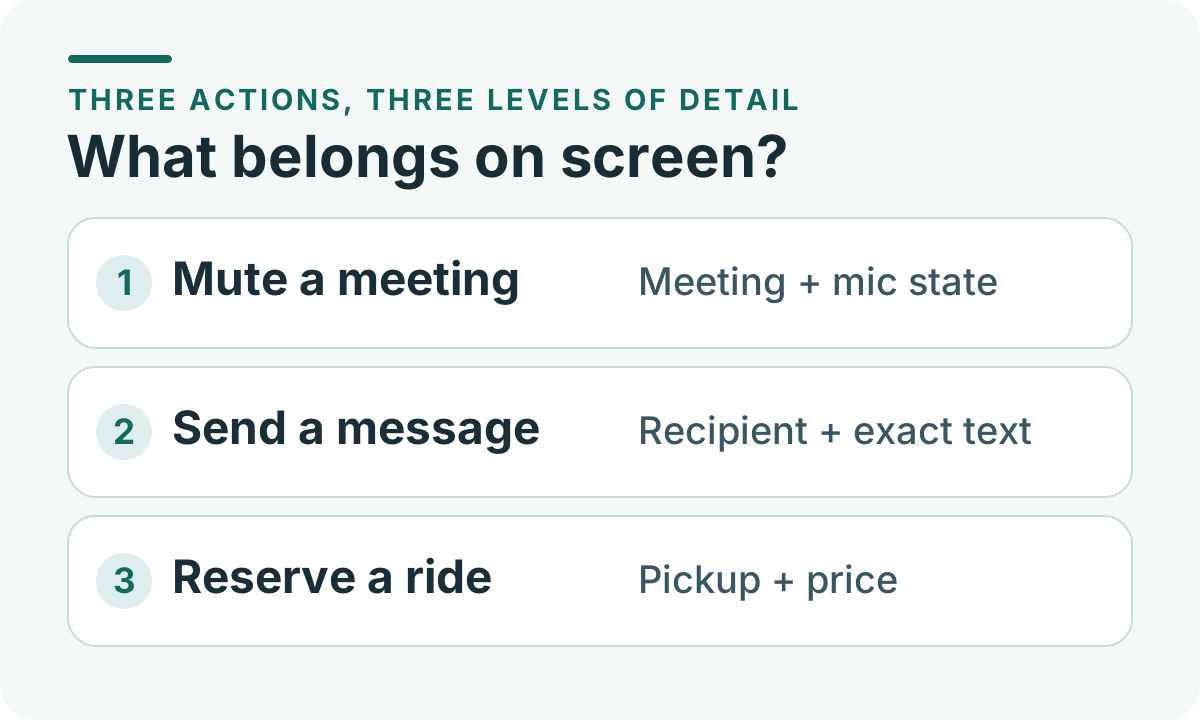
The approval screen should grow with the consequence. Original illustration by Telli.sh.
An assistant may have enough information to predict lateness while still being wrong about what to send. You might be early for the next appointment, the event might be canceled, or a meeting organizer might prefer a group chat. A useful flow lets you decline, changes little when you ignore it and can show the details of the action you actually took. That keeps the shortcut helpful even when the prediction misses.
For a team that uses personal and work accounts on the same devices, identity is part of the decision. A reminder attached to the work calendar could still trigger a compose action that defaults to a personal account. The reliable version shows the sending identity before committing and leaves a matching record afterward. A short gesture saves time when you already know whose behalf you are acting on.
The permissions behind the suggestion matter as much as the gesture
Aina's November 6 privacy policy says users can opt to connect calendar and email accounts. The policy describes what the service may access, including calendar event details and information needed for enabled email features. It also describes product analytics such as gesture and button interactions, device performance and workflows triggered. Those are separate categories from the screen in front of you. Reviewing the gesture does not automatically reveal the information that led the service to offer it. Aina privacy policy
Start with an example that has a clearly bounded purpose. A meeting mute control needs the current meeting and an interface that can change microphone state. An automatic suggestion about a delayed arrival asks for a broader set of signals. The difference matters when you decide whether to connect a calendar with client names and links, or a personal calendar with family appointments. The conveniences are easiest to judge one integration at a time.
Consider the end of the permission lifecycle as well. If you remove a calendar or disconnect an agent, do its suggestions disappear, and what happens to an action that was already prepared? Revocation, suggestion history and the downstream app's own records are different questions. Checking each separately is more practical than treating the ring and the services it connects to as a single account.
This becomes even more visible when Aina's voice mode passes a request to an agent. Aina describes press-and-hold voice input and connection through its app. Once a connected service receives a request, its capabilities and account permissions shape the outcome. A voice reminder can be harmless when a permission is scoped narrowly. A connected assistant that can send messages or control devices deserves the same review you would give that agent from a computer.
Three exercises can tell you whether the interface saves effort
Aina announced iOS and Mac support and said it would provide additional integration details. Before ordering, check the specific device, operating system and service you expect to use. The announcement's US$399 entry price was tied to limited early units, and the proposed shipping date is a company plan. Treat the controls listed on the product page as capabilities to verify once you have the ring in your own setup. Aina launch announcement
- Begin with a reversible control. Use a test call or media playback. Compare how long it takes to select and verify the result on the ring and the host app. Check whether you can identify the active app and reverse the command without searching.
- Add a calendar event with a familiar name and create a second event nearby. Move one, then see which action the ring offers. For a message scenario, use a recipient you control and check the sending account and full text before accepting. Repeat with a stale or irrelevant suggestion and observe how easy it is to dismiss.
- Test a decision that should expand to the phone. Prepare a ride request without placing it, or preview a draft that has several recipients. See whether the phone opens to the exact action with the expected details intact. Check the result in the host app when you choose to execute a harmless version.
Keep track of prompts you dismiss as well as the ones you accept. A system that offers seven unnecessary decisions and saves time on the eighth can demand more attention than a single manual step. You can compare the time to understand a suggestion, the number of unwanted suggestions and the rate at which you need to reach for the phone anyway. These measures say more about your day than a clean demonstration of one ideal interaction.
Consider when you normally wear rings, which hand feels comfortable and whether you can read the display in your usual lighting. The product page lists an advertised charge time of under two hours and up to 18 hours per charge. If you want the ring for two commute windows and a late call, check whether your routine includes a reliable charging break. A confirmation surface is only useful when you can reach it at the moment the decision arrives.
The ring should make the decision easier to see
The best use of a tiny screen may be the moment when you already know what you want and need a fast way to make it happen. A clear meeting control fits that shape. A longer message or an unfamiliar trip can still start on the ring, then move to a surface that gives the decision room. The test for Aina is whether it makes that handoff feel as deliberate as the flick.
Sources
- Aina Ring product overview and specifications
- Aina's launch announcement, November 5, 2026
- Aina privacy policy, updated November 6, 2026
- Aina's official launch film and press assets
To keep decisions and their context together in a searchable record, create a Telli.sh account.