The Photoshop contest is becoming a workflow contest
Adobe and NVIDIA are accelerating editing and media discovery. The useful comparison is how a project reaches review, approval and a reusable archive.
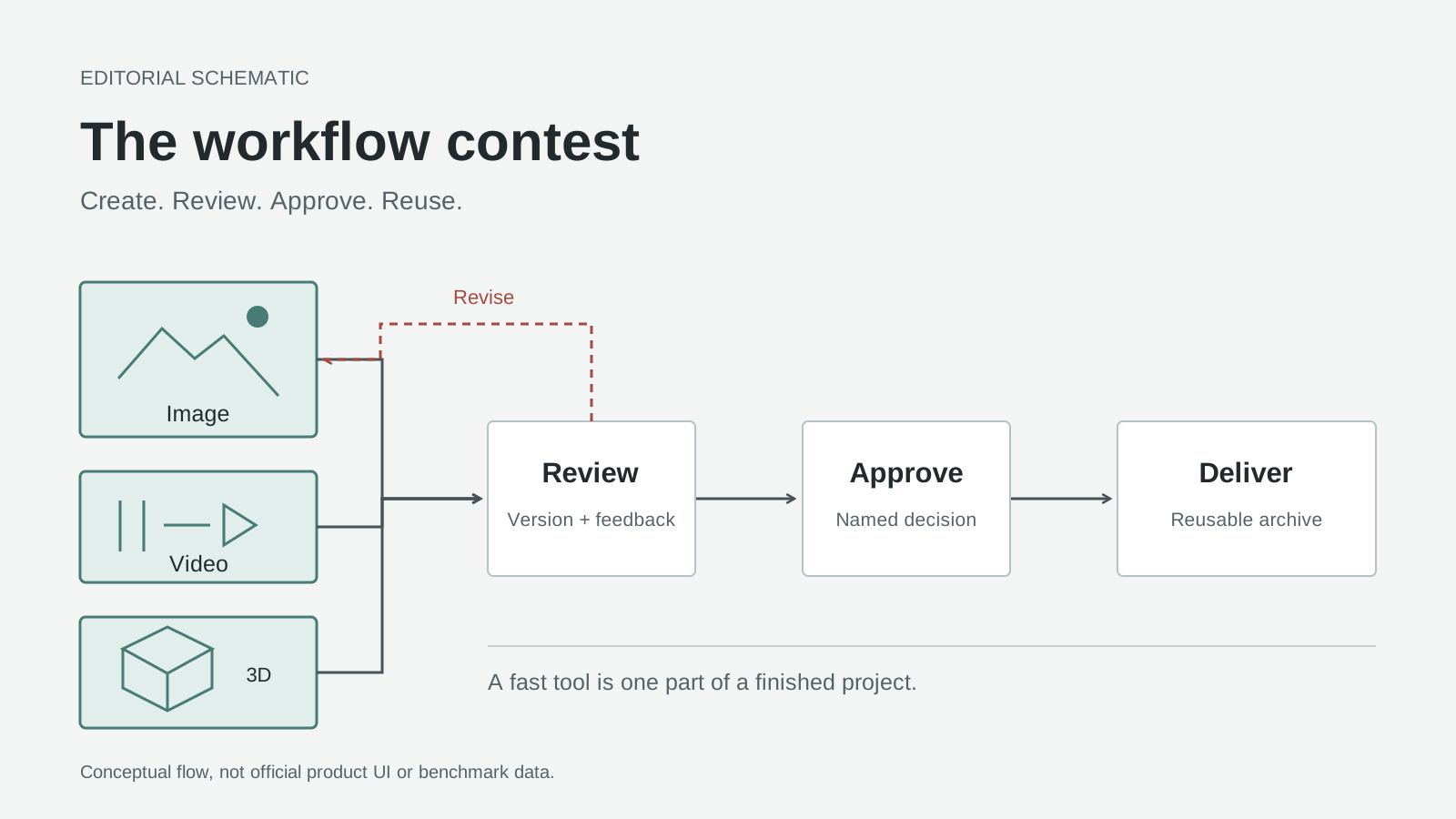
Original editorial explanation: the competition extends from creating an asset to getting the right version approved. This is a schematic, not official product UI or a performance chart.
A designer removes a distracting cable from a product photograph. An editor cleans up the interview audio. The client then asks which cut includes the approved image, and someone starts searching through folders. The first two tasks can be fast while the project remains slow.
Adobe and NVIDIA expanded their collaboration on October 15, 2026. Adobe reports up to 2x faster performance in affected RTX Spark-optimized workflows, not every editing operation. All performance figures here are vendor measurements, not independent benchmarks.
Our PhotoCraft analysis considered what inexpensive, AI-assisted software changes about familiar editing tools. This follow-up asks a narrower question: which parts of a creative project actually deserve your money, hardware or maintenance time? The answer requires following the asset beyond the canvas.
Faster editing matters when it keeps decisions moving
Photoshop's optimizations address GPU-accelerated compositing, Remove Tool, Gaussian Blur and Light Leaks; Premiere's include Enhance Speech and Object Mask. Substance 3D Painter targets heavy texturing. These speed existing tasks, not autonomous production.
Consider a small product launch: a still photograph, an interview cut and a material variant for a rendered product. These three deliverables expose different kinds of delay, and each needs a different acceptance test.
For the photograph, removing a cable is only useful if the replacement surface remains believable. A sharp edge, a repeated texture or a reflection can reveal a bad repair. Compositing responsiveness matters because the designer needs to compare alternatives, not simply obtain the first filled region. Blur is similarly contextual: a background treatment that works in isolation can weaken the product silhouette once the image enters the finished layout.
Adobe's Remove Tool guide, updated June 17, 2025, documents brushing or looping around an unwanted area and sampling visible layers. Those capabilities provide a reproducible starting point. They do not decide whether a retouch preserves the truthful appearance of a product; that remains a review question.
For the interview, intelligibility matters more than a dramatic noise-removal demonstration. Adobe's Enhance Speech instructions, updated January 7, 2026, place the operation in the Essential Sound panel and provide a Mix Amount control for balancing processed and original audio. Listen to quiet words, breaths and transitions back into untreated material. A voice that sounds impressive alone can sound inconsistent inside the complete scene.
Object Mask solves a different problem: isolating a moving subject for a selective effect or correction. Adobe's September 9, 2026 masking guide and embedded demonstration describe selecting a subject in the Program Monitor and tracking it. A product can receive a local correction without forcing the same change onto its surroundings. Check crossings, motion blur and the moment a subject leaves the frame; a convincing starting frame is not a finished mask.
Watch Adobe Care's “How to Use AI Object Masking in Adobe Premiere” demonstration to see subject selection and tracking in the editing interface. It illustrates the workflow, not the partnership's claimed acceleration or a benchmark on your hardware.
Painter's handoff is less visible but just as consequential. A material can look right in its authoring viewport and still arrive in the next application with the wrong channel arrangement. Adobe's October 8, 2026 export documentation explains that output templates control texture naming, channel packing, format and bit depth. Faster material iteration helps only if the exported maps match the receiving renderer's expectations.
Here's the point: editing speed has value when it creates more opportunities to make a correct decision. Counting generated alternatives without counting rejected results misses that value.
Frame.io changes when media becomes usable
The desktop and cloud stories address different waits. On your workstation, the question is whether an adjustment responds quickly enough to judge. In a shared media library, the question is whether uploaded material has been processed into something colleagues can find and review.
For selected early Frame.io transcode and search workloads, Adobe reports approximately 5x faster embedding generation, P95 processing-latency improvement of 4-5x and an approximately 80% smaller search proxy. Its pipeline uses NVDEC decoding and TensorRT with CUDA for preprocessing and embeddings. These aren't blanket editor gains. Adobe, October 15, 2026.
Decoding turns compressed video into frames that subsequent processing can use. Embeddings represent aspects of content numerically so a search system can match related material. A search proxy is a derivative used in that search workflow, not a replacement for the camera original. Reducing that derivative says nothing by itself about the size or quality of a delivery master.
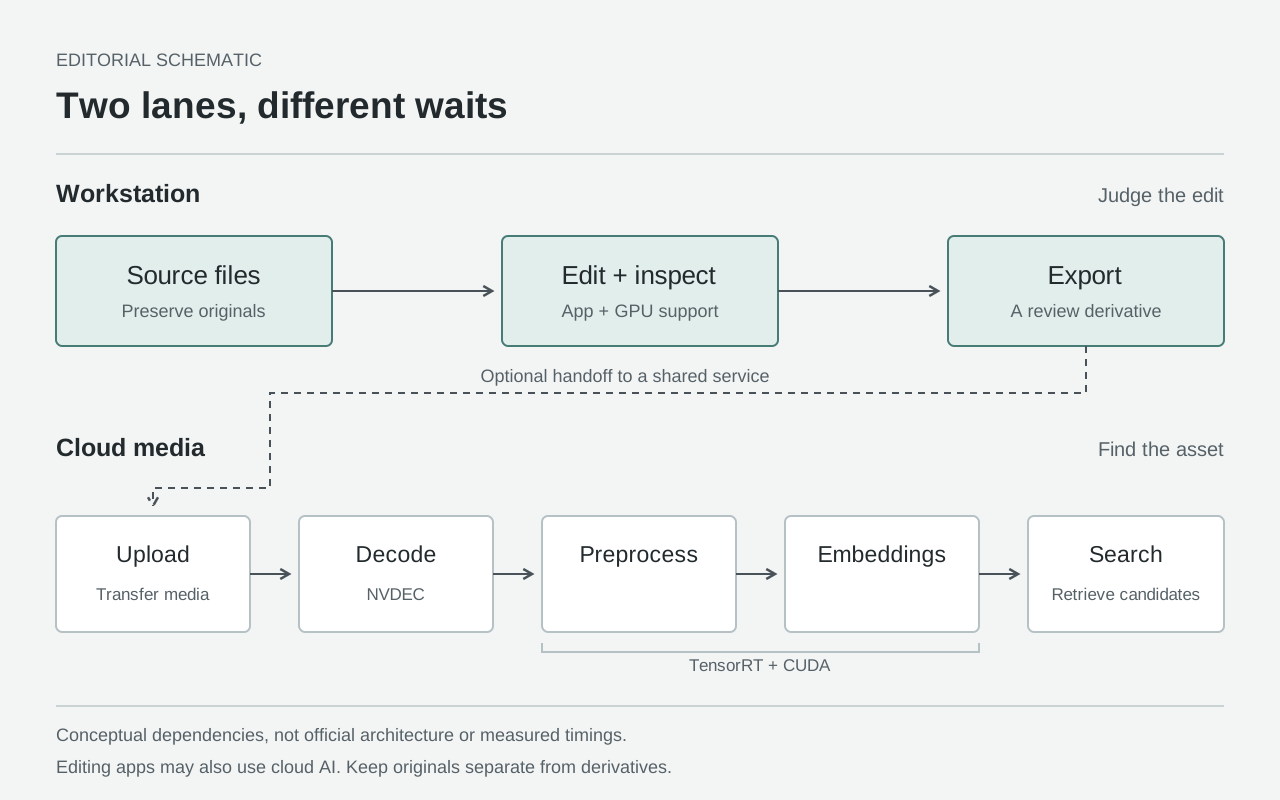
Original editorial explanation: the lanes separate editing feedback from media discovery. Arrows show conceptual dependencies, not official architecture or measured timings. Individual AI tools can also use cloud processing.
P95 describes the processing time at the 95th percentile: a way to examine slower jobs rather than only an average. For a producer waiting for the last interview file before assembling a review set, a slow job can matter disproportionately. But faster backend processing cannot remove a slow upload, a missing permission or a reviewer who has not opened the link.
This distinction suggests a useful measurement: record when a file finishes uploading, when it can be reviewed and when a relevant search can retrieve it. Do not merge those events into a single impression that the platform feels faster. They answer different operational questions.
A documentary team looking for a previously filmed location has a discovery problem. A designer moving one approved still into a folder may not. Media intelligence earns its place when finding and reusing material is part of the job, rather than an attractive feature that nobody needs.
Compare a delivery system, not two toolbars
Free tools remain serious options. GIMP identifies itself as a free, open-source image editor, while the Kdenlive 26.08 manual documents an open-source video editor with editing, effects and export workflows. Both references were consulted on October 16, 2026. Neither choice requires treating professional delivery as somebody else's problem.
The comparison below is a decision framework, not a benchmark or a claim of feature parity.
| Route | A useful reason to choose it | What to verify before committing |
|---|---|---|
| GIMP + Kdenlive with your own delivery process | Local editing, adaptable tools and control over how files move | Required formats, client handoff, backup restoration and who maintains collaboration services |
| Photoshop + Premiere, with Painter where needed | A workflow built around those applications and their project formats | Actual device support, editable project handoff and whether the optimized operations dominate your work |
| Adobe editing applications + Frame.io | Review, version comparison and media discovery are repeated team tasks | Processing readiness, reviewer access, version discipline and the route to an independent archive |
An open-source editor does not prevent you from adding dependable hosting, permissions or review. A team can operate those services itself or pay someone to operate them. Conversely, a subscription does not automatically establish a good approval process. Reliability is an operational outcome, not a property that follows from a license label.
Hosting, collaboration and maintenance recur because files keep arriving, people change roles and software needs updating. The right comparison includes that work without pretending it must always be bought from one supplier. A technically capable studio may prefer its own infrastructure; a small agency may value having fewer systems to administer.
There is also a practical middle ground: use a preferred editor locally and standardize the exported review asset. That arrangement can reduce dependence on a single editing application. Its limitation appears when a collaborator needs the editable layers, timeline or material setup, rather than a flattened image or rendered movie. Test the handoff your client actually requests.
That creates a different purchasing test from the one a standalone editor poses: how much work surrounds the individual editing command, and who is responsible for getting that work done?
Run one real handoff before changing your stack
Use a representative job with permission to share its media. A product still, a dialogue clip and an optional textured asset make a useful exercise, but substitute the files your team genuinely delivers. Keep the original project available so the exercise remains reversible.
-
Write the acceptance conditions first. Specify the deliverable, who may review it and who can approve it. Preserve camera originals, source photographs and the editable project separately from exports. Decide what must remain editable at handoff. This prevents an apparently successful export from becoming a failed delivery when the next person asks for changes.
-
Check the workstation before judging Photoshop. Follow Adobe's October 4, 2026 performance-preferences guide: open Edit > Preferences > Performance on Windows, or the corresponding Photoshop Performance preferences on macOS; confirm the detected GPU and Use Graphics Processor. Do not copy somebody else's memory allocation as a universal setting. On a working copy, select Remove Tool, enable Sample All Layers when sampling a layered composition, and repair one relevant distraction. Compare the result at delivery size and close inspection.
-
Treat audio and masks as separate checks in Premiere. Select the dialogue clip, open Essential Sound, choose Enhance, then adjust Mix Amount while comparing with the original. For Object Mask, let the required first-use model download finish, choose the tool, and select the subject in the Program Monitor. Start from a frame where the subject is clearly visible and inspect the resulting tracked shot. Adobe's regular desktop release notes, consulted October 16, 2026, include Object Mask among released features; a separate beta application is not a prerequisite for the basic workflow. Check your installed version before relying on newer refinements.
-
Verify the material outside Painter. If the job includes 3D, open File > Export Textures and select an output template appropriate to the destination application. Check the resulting channel maps in that application before producing the review render. Use an agreed material reference rather than assuming two viewports should look identical. Keep the Painter project so a request to change roughness does not require rebuilding the asset from exported bitmaps.
-
Send a named version to the correct review destination. Frame.io's Premiere V4 panel guide, consulted October 16, 2026, documents Window > Frame.io > Frame.io V4 Panel in Premiere 25.6 and later, with a V4 account. Sign in, select the sequence, choose Export under Current Sequence, and set the name, preset and destination. Export directly or send to Media Encoder. Keep the name unambiguous, and wait for the upload to complete before circulating the review link.
-
Set access before inviting reviewers. In Frame.io, choose the intended assets and configure the Share. Its September 9, 2026 Shares guide and tutorial cover passphrases, expiration and comment/download permissions. Apply the controls available to your account, inspect what the recipient can access and avoid sharing a parent folder containing unrelated work. Define approval explicitly: a comment saying that a shot looks better is not necessarily authorization to deliver it.
-
Close the revision loop, then test the archive. The Premiere panel can bring review comments back into the edit and stack a new upload with earlier versions. For browser-managed uploads, Frame.io's versioning guide, consulted October 16, 2026, explains waiting for the new file to upload before dragging it onto the prior version. Confirm that reviewers approved the current cut. Deliver that version, retain the approval record, and reopen the archived project with its media before calling the job complete.
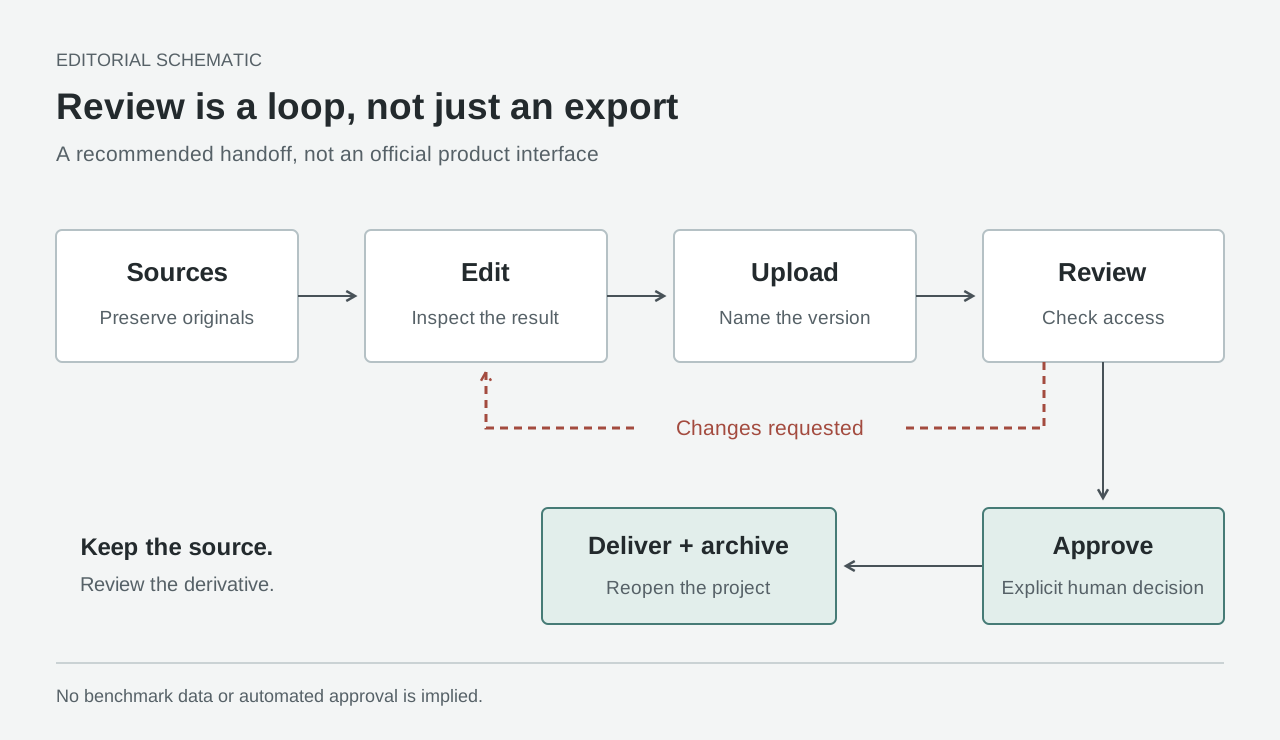
Original editorial explanation of the recommended handoff. The revision path returns to the edit; delivery follows an explicit approval decision. This is a process schematic, not official Frame.io UI or an automated approval feature.
During this exercise, keep a short log of waits and corrections. Separate computer time from human time: processing a clip, locating the right take, repairing a mask and waiting for feedback are different costs. Record whether a revision forced someone to download another file or ask which version was current. Those observations are more useful than borrowing a benchmark from a different machine and production.
Agentic creation still needs a named approver
There are three distinct availability categories here: documented shipping application features, newly announced optimizations whose value depends on the relevant hardware and build, and future enterprise software. A partnership announcement should not collapse them into one package that everyone can use immediately.
Adobe says its Nemotron-optimized Brand Concierge will become available to enterprise customers later in 2026. As of October 16, that version is a future release, not generally available. Source: Adobe, October 15, 2026.
That enterprise conversational product should not be confused with the editing procedure above. Nor should the word agentic make approval disappear from a creative pipeline. An assistant can help prepare alternatives or organize work; the authority to share a confidential asset, accept a retouch or send a final master still needs an owner.
For a team evaluating automation, write down which actions can run unattended and which require approval. Keep the approved version distinguishable from a promising candidate. The more quickly software produces alternatives, the more important that distinction becomes.
The bottom line: the deliverable is an approved, reusable asset
The Photoshop contest is no longer exhausted by asking who can reproduce a selection tool. For work that crosses photography, audio, video and 3D, the stronger question is whether the whole process preserves quality, source files and responsibility as an asset changes hands.
Choose a local open-source workflow when it meets those requirements with a delivery process you can maintain. Choose integrated services when their review and discovery capabilities remove a recurring, demonstrated problem. Upgrade hardware when the operation it accelerates is actually limiting your work. None of those decisions follows automatically from an impressive multiplier.
An image that is finished on one person's screen is not necessarily finished for the team. The useful finish line is the right version, reviewed by the right person, delivered in the right form and still usable when the next revision arrives.
Sources
- Adobe, October 15, 2026: collaboration announcement and scoped performance claims.
- Adobe Photoshop: Remove Tool, June 17, 2025; performance preferences, October 4, 2026.
- Adobe Premiere: Enhance Speech, January 7, 2026; Object Mask guide and demo, September 9, 2026; release notes.
- Adobe Substance 3D Painter, October 8, 2026: texture export and output templates.
- Frame.io: Premiere V4 panel; Shares guide and tutorial, September 9, 2026; versioning.
- Open-source project documentation: GIMP; Kdenlive 26.08 manual.
Documentation without a stated publication date was consulted on October 16, 2026. All diagrams are original editorial schematics; none depicts a measured result.
Keep a reviewable record of your AI research
For readers collecting their own research notes, Telli.sh is one optional place to organize material and derived summaries. Create a note workspace.